
1. Introduction
The Fitkit FT100 Series DC-Motorized Treadmill is designed to provide an effective and convenient fitness solution for home use. This manual contains essential information for the safe assembly, operation, maintenance, and troubleshooting of your treadmill. Please read this manual thoroughly before using the product and retain it for future reference.

Image 1.1: The Fitkit FT100 Series DC-Motorized Treadmill, showcasing its overall design and structure.
2. Safety Information
To ensure safe operation and prevent injury, adhere to the following safety guidelines:
- Always consult a physician before beginning any new exercise program.
- Keep children and pets away from the treadmill during operation and when unattended.
- Ensure the safety key is properly attached to your clothing before starting the treadmill. In an emergency, pulling the safety key will immediately stop the machine.
- Place the treadmill on a flat, stable surface with adequate clearance around it. Maintain at least 2 meters (6.5 feet) of clear space behind the treadmill and 0.6 meters (2 feet) on each side.
- The maximum user weight capacity for this treadmill is 110 kg. For optimal safety and product longevity, it is recommended to choose a treadmill with a user weight capacity at least 20 kg greater than your current weight, as impact weight increases during running.
- Wear appropriate athletic footwear and clothing. Avoid loose clothing that could get caught in moving parts.
- Do not operate the treadmill if it is damaged or malfunctioning.
- Ensure the power cord is not pinched or damaged and is connected to a grounded outlet. A proper stabilizer is suggested for consistent power supply.
3. Package Contents
Verify that all components are present in the box:
- 1 x Fitkit FT100 Series DC-Motorized Treadmill Unit
- 1 x User Manual
- 1 x Toolkit for Assembly
- 1 x Warranty Card
4. Setup and Assembly
The Fitkit FT100 Series Treadmill is designed for straightforward assembly. While professional installation services may be available, you can also assemble the unit by following the detailed instructions provided in the included user manual and using the toolkit.
4.1 Folding and Unfolding
The treadmill features a hydraulic folding system for convenient storage and mobility. This system allows you to fold the running deck upwards to save space when not in use and easily unfold it for exercise.

Image 4.1: The Fitkit FT100 Treadmill in its folded position, demonstrating the hydraulic folding system for space-saving storage.
For detailed steps on how to safely fold and unfold your treadmill, refer to the specific instructions in your physical user manual.
4.2 Mobility
Integrated wheels allow for easy relocation of the treadmill once folded. Simply tilt the unit and roll it to your desired storage location.

Image 4.2: Key features of the Fitkit FT100 Treadmill, including wheels for easy storage, handheld heart rate monitoring, and the anti-skid running surface.
5. Operating Instructions
5.1 Control Panel Overview
The treadmill features an intuitive LCD display console that shows key workout metrics and allows control over various functions.

Image 5.1: Close-up of the LCD display console with Bluetooth connectivity, showing speed, time, distance, calories burned, and heart rate monitoring.
The LCD display shows:
- Speed: Current running speed (0.8-14.8 km/hr).
- Time: Duration of your workout.
- Distance: Total distance covered.
- Calories Burned: Estimated calorie expenditure.
- Heart Rate: Monitored via integrated sensors.
5.2 Starting and Stopping
- Connect the power cord to a grounded outlet.
- Attach the safety key clip to your clothing and insert the safety key into its designated slot on the console.
- Step onto the side rails of the treadmill.
- Press the START button to begin your workout. The belt will start moving at a low speed.
- To stop, press the STOP button or pull the safety key.
5.3 Speed and Inclination Adjustment
- Speed: Use the speed adjustment buttons on the console or handlebars to increase or decrease the running speed within the range of 0.8-14.8 km/hr.
- Inclination: The treadmill features 3 levels of manual inclination. Adjust the inclination manually before starting your workout to simulate uphill walking or running. Refer to your physical manual for specific instructions on adjusting manual inclination.
5.4 Workout Programs and App Connectivity
- Preset Programs: Utilize the 12 preset workout programs for varied exercise routines.
- Customizable Modes: Create and save your own customized exercise routines.
- Fitplus App: Connect your treadmill with the Fitplus App (available on Android & iOS platforms) to track your daily workouts, compile data, and connect with other leading fitness apps such as Apple Health, Fitbit, Google Fit, and Amazon Alexa.
6. Special Features
6.1 Multipurpose Workout Station
The Fitkit FT100 Series Treadmill includes additional features to enhance your workout experience:
- Powerful Belt Massager: An integrated massager belt can be used for muscle relaxation.
- Sit-Up Bar: A sit-up bar is included for core exercises.

Image 6.1: A user demonstrating the multipurpose workout station, including the powerful belt massager and sit-up bar.
6.2 Anti-Skid Running Board
The treadmill features a wide 1240 x 420 mm anti-skid running board, providing a secure and comfortable surface for your workouts.
7. Maintenance
Regular maintenance ensures the longevity and optimal performance of your treadmill.
- Lubrication: The treadmill requires manual lubrication for easy maintenance. Refer to your user manual for the recommended lubrication schedule and procedure. Proper lubrication helps maintain smooth belt operation and reduces wear.
- Cleaning: Regularly wipe down the treadmill with a damp cloth to remove dust and sweat. Avoid using abrasive cleaners.
- Belt Tension: Periodically check the running belt tension and alignment. Adjust as needed according to the instructions in your user manual.
8. Troubleshooting
If you encounter issues with your Fitkit FT100 Series Treadmill, refer to the following common troubleshooting steps:
- Treadmill Not Starting:
- Ensure the power cord is securely plugged into a working outlet.
- Verify that the safety key is correctly inserted into the console.
- Check the circuit breaker on the treadmill (if applicable) and your home's electrical panel.
- Running Belt Slipping or Sticking:
- The running belt may require lubrication. Follow the manual's instructions for manual lubrication.
- The belt tension may be too loose. Adjust the belt tension according to the user manual.
- Unusual Noises:
- Inspect for any loose parts or foreign objects under the belt.
- Ensure the treadmill is on a level surface.
- If the noise persists, contact customer support.
- Inaccurate Heart Rate Readings:
- Ensure your hands are firmly gripping the heart rate sensors on the handlebars.
- Moisture or dry skin can affect readings. Ensure hands are clean and slightly moist.
For issues not covered here, please refer to the comprehensive troubleshooting section in your physical user manual or contact Fitkit customer support.
9. Specifications
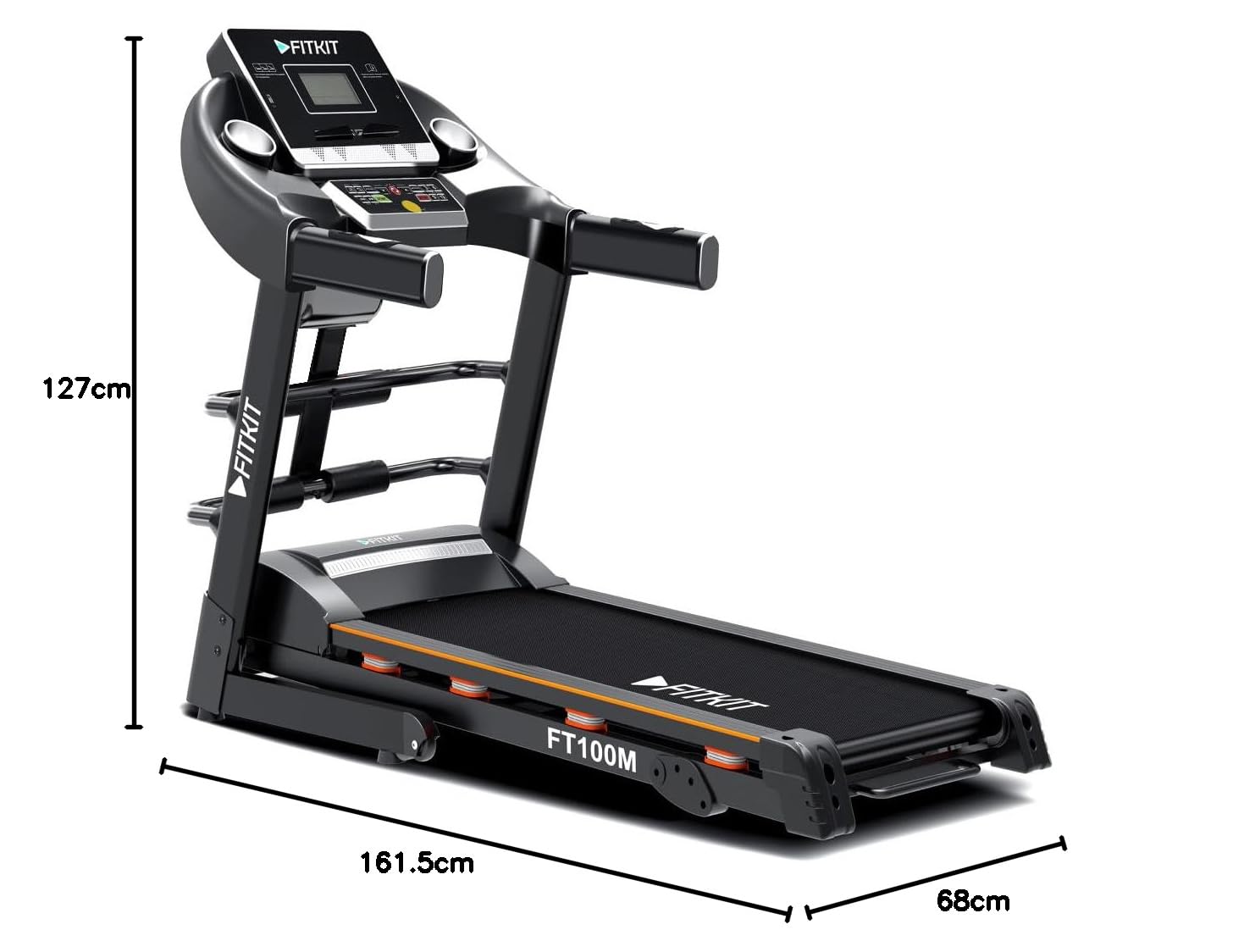
Image 9.1: Dimensional overview of the Fitkit FT100 Treadmill, showing length, width, and height measurements.
| Feature | Detail |
|---|---|
| Brand | Fitkit |
| Model Name | FT100M (Item model number: FT400MI) |
| Motor | 1.75 HP (Continuous), 3.25 HP (Peak) DC Motor |
| Speed Range | 0.8 - 14.8 km/hr |
| Maximum User Weight | 110 kg |
| Inclination | 3-level Manual |
| Running Area (Deck Width) | 1240 x 420 mm (2.2 Feet) |
| Product Dimensions (D x W x H) | 161.5D x 68W x 127H Centimeters |
| Folded Size (L x W x H) | 161.5 L × 68W × 127H centimeters |
| Item Weight | 57 Kilograms |
| Material | Alloy Steel (Frame) |
| Display Type | LCD |
| Metrics Measured | Heart Rate, Step Counter, Accelerometer |
| Special Features | Easy Lubrication, Massager, Sit-Up Bar, App Connectivity |
| Power Source | Corded Electric |
| Connectivity Technology | Power Cord (for operation), Bluetooth (for app) |
| UPC | 660902336609 |
10. Warranty and Support
10.1 Warranty Information
Your Fitkit FT100 Series Treadmill comes with the following warranty:
- Motor and Manufacturing Defect: 1 Year Warranty
- Frame: 3 Years Warranty
Please retain your purchase receipt and warranty card for any warranty claims. The warranty covers defects in materials and workmanship under normal use.
10.2 Additional Services
As a Fitkit Treadmill user, you are eligible for:
- Free Personal Dietitian (3 Months)
- Personal Training Video Session
- Doctor Consultation
Refer to the included documentation or the Fitkit website for details on how to avail these services.
10.3 Customer Support
For technical assistance, warranty claims, or any other inquiries, please contact Fitkit customer support. Contact details can typically be found on your warranty card or the official Fitkit website.
Manufacturer: Fitkit, YONGKANG MIJIA IMPORT AND EXPORT CO.LTD, 3 FLOOR NO.961 GARDEN ROAD, YONGKANG ZHEJIANG CHINA-321300, Contact Detail-15268689027
Importer/Packer: Shoora Retail, 3rd Floor Radhey Chambers, Mandi Gate Road, Pandri, Raipur-492001 (1800-572-6402)

