
Introduction
The Mitel 6920W is a powerful, feature-rich IP phone designed for business communication. Equipped with Wi-Fi connectivity, it offers flexibility in deployment and ensures reliable voice communication. This manual provides comprehensive instructions for setting up, operating, maintaining, and troubleshooting your Mitel 6920W IP Phone.
Package Contents
Before you begin, please verify that your package contains the following items:
- Mitel 6920W IP Phone Unit
- Handset
- Handset Cord
- Phone Stand
- Ethernet Cable
- Power Adapter (if not using Power over Ethernet - PoE)
- Quick Start Guide (if included)
Setup
1. Attaching the Phone Stand
The phone stand allows you to position your phone at an optimal viewing angle. Align the tabs on the stand with the slots on the back of the phone and push firmly until it clicks into place.
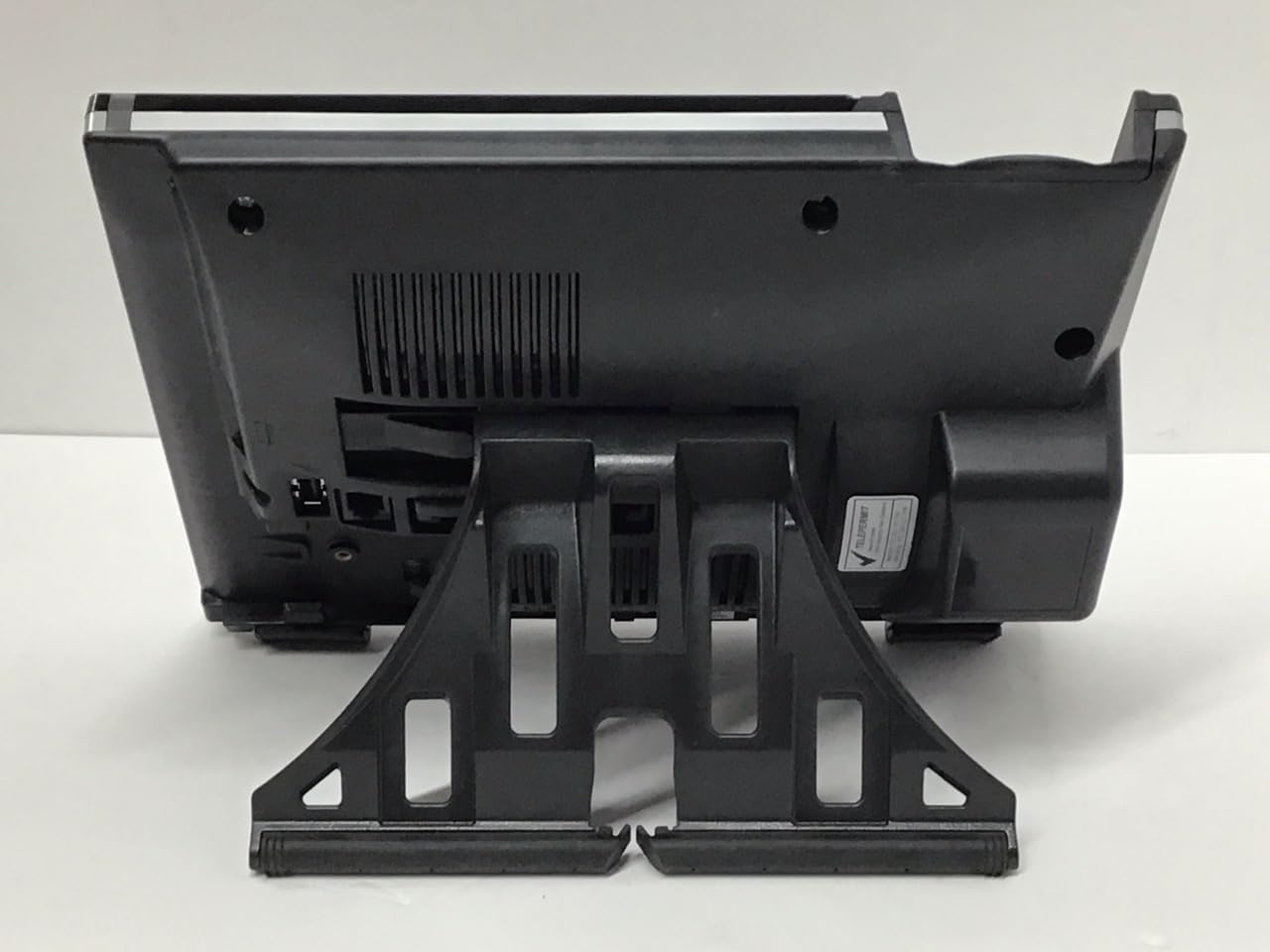
Image: Back view of the Mitel 6920W IP Phone with its stand attached, showing the connection points and the angled support.
2. Connecting the Handset and Headset
- Connect one end of the coiled handset cord to the handset and the other end to the handset port on the back of the phone (usually marked with a handset icon).
- If using a headset, connect it to the dedicated headset port (usually marked with a headset icon).
3. Connecting to the Network and Power
- Ethernet Connection: Connect one end of the Ethernet cable to the LAN port on the back of the phone and the other end to your network switch or router. If your network provides Power over Ethernet (PoE), the phone will power on automatically.
- Power Adapter (if no PoE): If PoE is not available, connect the power adapter to the power port on the back of the phone and then plug it into a wall outlet.

Image: Front view of the Mitel 6920W IP Phone, displaying its screen, physical keypad, and programmable soft keys.
4. Initial Power-On and Configuration
Once powered on, the phone will boot up and attempt to connect to your network. It may automatically download configuration settings from your VoIP system. Follow any on-screen prompts for initial setup, such as language selection or time zone.
5. Wi-Fi Connection Setup
To connect your 6920W to a Wi-Fi network:
- Press the Settings button (gear icon) on the phone.
- Navigate to Network Settings or Wi-Fi Settings.
- Enable Wi-Fi and select your desired network from the list of available networks.
- Enter the Wi-Fi password (if required) using the keypad and on-screen prompts.
- Confirm the connection. The phone should display a Wi-Fi icon indicating a successful connection.
Operating Your Mitel 6920W IP Phone
Basic Call Functions
- Making a Call: Pick up the handset or press the Speakerphone button. Dial the number and press the Dial or Send soft key.
- Answering a Call: Pick up the handset, press the Speakerphone button, or press the Answer soft key.
- Ending a Call: Hang up the handset or press the End Call soft key.
Keypad and Navigation
The phone features a standard 12-button dial pad. Use the navigation cluster (up, down, left, right arrows, and select button) to move through menus and options on the display.
Display and Soft Keys
The phone's display shows call information, menus, and status indicators. The soft keys located directly below the display change their function based on the current context (e.g., during a call, in a menu). Their current function is indicated on the display above each key.
Voicemail Access
To access your voicemail, press the Voicemail button (envelope icon) and follow the audio prompts.
Advanced Call Features
- Hold: During an active call, press the Hold soft key. Press it again to resume the call.
- Transfer: During an active call, press the Transfer soft key. Dial the number to transfer to, and once connected, press Transfer again (consultative transfer) or hang up (blind transfer).
- Conference: During an active call, press the Conference soft key. Dial the number of the third party, and once connected, press Conference again to join all parties.
- Speakerphone: Press the Speakerphone button to toggle speakerphone mode on or off.
- Mute: Press the Mute button to mute your microphone during a call. Press it again to unmute.
Maintenance
Cleaning the Phone
To keep your phone clean, gently wipe the surfaces with a soft, damp, lint-free cloth. Avoid using abrasive cleaners, solvents, or aerosol sprays, as these can damage the phone's finish and internal components.
Software Updates
Your Mitel 6920W IP Phone may receive software updates periodically to improve performance and add new features. These updates are typically managed by your system administrator. Do not attempt to manually update the firmware unless instructed by your IT department or Mitel support.
Troubleshooting
Common Issues and Solutions
| Issue | Possible Solution |
|---|---|
| No Dial Tone | Check all cable connections (Ethernet, power, handset). Ensure the phone is powered on. Contact your system administrator if the issue persists. |
| Cannot Connect to Wi-Fi | Verify Wi-Fi password. Ensure the phone is within range of the Wi-Fi access point. Restart the phone and try again. Check network settings. |
| Display Not Working | Check power connection. Restart the phone. If the display remains blank or faulty, contact support. |
| Poor Call Quality | Check network connection stability (wired or Wi-Fi signal strength). Ensure no other devices are heavily using network bandwidth. |
Factory Reset
A factory reset will erase all custom settings and return the phone to its default state. This should only be performed as a last resort and typically under the guidance of your system administrator or Mitel support. Consult your system administrator for the specific procedure for your deployment.
Specifications
| Feature | Detail |
|---|---|
| Brand | Mitel |
| Model | 6920W |
| ASIN | B07DD9BW2Z |
| Color | Black |
| Telephone Type | Corded |
| Material | Plastic |
| Power Source | Corded Electric |
| Dialer Type | Single Keypad |
| Answering System Type | Digital |
| Compatible Devices | Computer Systems, VoIP Services, Telephone Networks |
| Multiline Operation | Multi-Line Operation |
| Caller Identification | Yes |
| Package Dimensions | 10.71 x 7.91 x 3.66 inches |
| Item Weight | 2.38 pounds |
| Manufacturer | Mitel |
| Date First Available | December 20, 2022 |
Warranty and Support
The Mitel 6920W IP Phone comes with a standard manufacturer's warranty. For specific warranty terms and conditions, please refer to the documentation provided with your purchase or visit the official Mitel website.
For technical support, troubleshooting assistance, or warranty claims, please contact your system administrator or authorized Mitel reseller. You can also find additional resources and contact information on the official Mitel support website: www.mitel.com/support


