
1. Introduction
The Panasonic SC-AKX710E-K is a powerful mini audio system designed to deliver clear sound and dynamic bass. This system supports various media sources including Bluetooth, CD, FM radio, USB, and AUX-IN. It also features DJ functions and a karaoke mode for enhanced entertainment. This manual provides essential information for the safe and efficient operation of your new audio system.
2. Safety Information
Please read all safety instructions carefully before using this product. Keep this manual for future reference.
- Power Source: Connect the unit only to an AC outlet of the voltage specified on the unit.
- Ventilation: Ensure adequate ventilation. Do not block ventilation openings. Do not place the unit on a bed, sofa, rug, or similar surface that may block the ventilation openings.
- Water and Moisture: Do not expose this unit to rain, moisture, dripping, or splashing. Do not place objects filled with liquids, such as vases, on the unit.
- Heat: Do not place the unit near heat sources such as radiators, heat registers, stoves, or other apparatus (including amplifiers) that produce heat.
- Cleaning: Unplug the unit from the wall outlet before cleaning. Use a dry cloth for cleaning.
- Servicing: Do not attempt to service this product yourself. Refer all servicing to qualified service personnel.
3. Package Contents
Verify that all items are present in the package:
- Main Unit (SC-AKX710E-K)
- Speaker Units (x2)
- Remote Control
- Power Cord
- FM Indoor Antenna
- AA Battery (for remote control)
4. Setup
4.1 Speaker Connection
Connect the speaker cables from the main unit to the corresponding speaker terminals. Ensure correct polarity (red to red, black to black) for optimal sound quality.
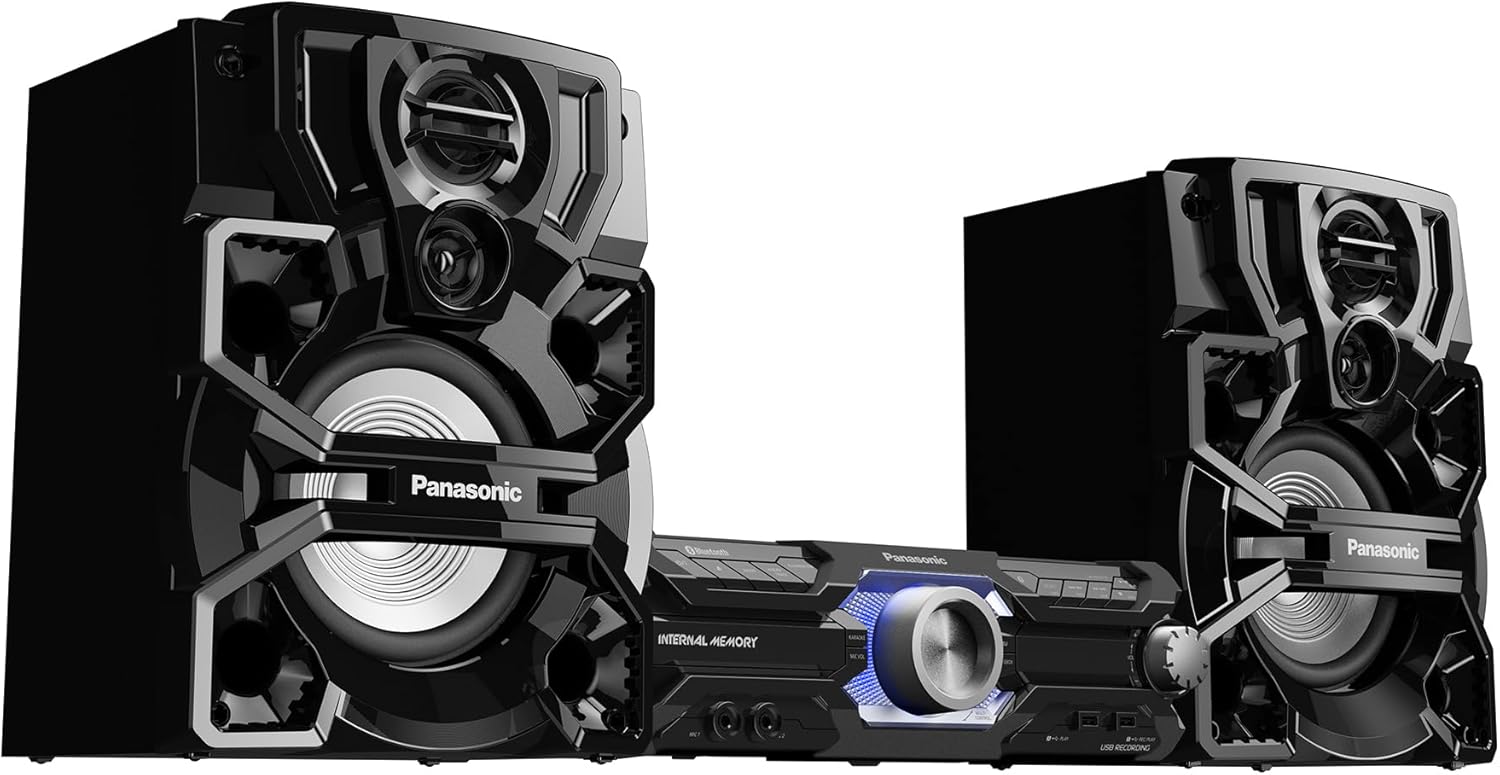
Image: The Panasonic SC-AKX710E-K main unit positioned between its two speaker units, illustrating a typical setup configuration.
4.2 Antenna Connection
Connect the supplied FM indoor antenna to the FM antenna terminal on the rear of the main unit. Extend the antenna for better reception.
4.3 Power Connection
Plug the power cord into the AC IN terminal on the main unit, then plug the other end into a wall outlet.
5. Operating Instructions
5.1 Power On/Off
Press the [Power] button on the main unit or remote control to turn the system on or off.

Image: Close-up view of the main unit's front panel, highlighting the various control buttons, knobs, and input ports for operation.
5.2 Source Selection
Press the [FUNCTION] button repeatedly to cycle through available sources: CD, FM, Bluetooth, USB1, USB2, AUX-IN, Internal Memory.
5.3 Bluetooth Pairing
- Select the Bluetooth source. The display will show "PAIRING".
- On your Bluetooth device, enable Bluetooth and search for "SC-AKX710E-K".
- Select the unit from your device's list to connect. Once connected, the display will show "BLUETOOTH CONNECTED".

Image: A visual representation of a television wirelessly streaming audio to the Panasonic SC-AKX710E-K system via Bluetooth technology.
5.4 CD Playback
- Press the [OPEN/CLOSE] button to open the CD tray.
- Place a CD with the label side up.
- Press [OPEN/CLOSE] again to close the tray.
- Select the CD source. Playback will start automatically.
5.5 FM Radio
- Select the FM source.
- Press [TUNING MODE] to select manual or auto tuning.
- Use [TUNE +/-] to find a station.
- To preset a station, press [MEMORY], then use [PRESET +/-] to select a preset number, and press [MEMORY] again to save.
5.6 USB Playback and Recording
Insert a USB device into the USB1 or USB2 port. Select the USB source. Use the playback controls to navigate and play audio files. The system also supports recording from CD, FM, or AUX-IN to a USB device.
5.7 Karaoke Function
Connect up to two microphones to the MIC1 and MIC2 jacks. Adjust microphone volume using the [MIC VOL] knob. Utilize features like Vocal Cancel or Key Control for an enhanced karaoke experience.
5.8 DJ Functions
The system includes DJ Jukebox (Crossfade/Mix), DJ Sampler, and DJ Effect functions. These can be controlled via the unit's buttons or through the MAX Juke App (for Android devices) for creative audio mixing.
5.9 Sound Adjustments
Use the [D.BASS BEAT] button to enhance bass. The equalizer allows for custom sound adjustments to suit your preferences.
6. Maintenance
6.1 Cleaning the Unit
Wipe the unit with a soft, dry cloth. For stubborn dirt, dampen the cloth with a mild detergent solution and wipe gently, then dry thoroughly. Do not use abrasive cleaners, benzene, thinner, or alcohol, as these can damage the surface.
6.2 Speaker Care
Keep the speaker cones free from dust and debris. Avoid pressing on the speaker cones, as this can cause damage.
6.3 CD Lens Cleaning
If CD playback becomes erratic, the CD lens may be dirty. Use a commercially available CD lens cleaner to clean the lens.
7. Troubleshooting
Before requesting service, check the following points. If you are in doubt about any of the check points, or if the solutions indicated do not solve the problem, consult your dealer for instructions.
- No Power:
Check: Is the power cord securely plugged into the wall outlet and the unit?
Solution: Ensure connections are firm. Try a different outlet. - No Sound:
Check: Is the volume turned up? Are the speakers connected correctly? Is the correct source selected?
Solution: Increase volume. Verify speaker cable connections and polarity. Select the appropriate input source. - Bluetooth Pairing Fails:
Check: Is the unit in Bluetooth pairing mode? Is Bluetooth enabled on your device? Is your device too far from the unit?
Solution: Ensure the unit is in pairing mode. Move your device closer. Try restarting both the unit and your Bluetooth device. - CD Does Not Play:
Check: Is the CD inserted correctly (label side up)? Is the CD scratched or dirty?
Solution: Reinsert the CD. Clean the CD with a soft cloth. Try a different CD. - USB Playback Issues:
Check: Is the USB device formatted correctly (FAT16/FAT32)? Are the audio files supported (e.g., MP3)?
Solution: Ensure USB format and file types are compatible. Try a different USB device.
8. Specifications
| Model Number | SC-AKX710E-K |
| Brand | Panasonic |
| Power Output | 2000 W RMS |
| Connectivity | Bluetooth, CD, FM Radio, USB (x2), AUX-IN |
| Special Features | Karaoke (2 mic inputs), DJ Jukebox, DJ Sampler, DJ Effect, D.Bass Beat, Full Digital Amplifier System, 4GB Internal Memory |
| Dimensions (Main Unit L x W x H) | 13.4 x 45.8 x 13.7 cm |
| Weight | 18 Kilograms (Total System) |
| Power Source | AC Cable |
| Speaker Type | Stereo |
9. Warranty and Support
Information regarding warranty coverage and customer support for your Panasonic SC-AKX710E-K Mini Hi-Fi System can typically be found in the separate warranty card included with your product. For further assistance, please refer to the official Panasonic website or contact their customer service department.