
1. Introduction
Thank you for choosing the Vangoa VGK611 61-Key Portable Electronic Keyboard. This instrument is designed to provide an engaging and educational musical experience for beginners and enthusiasts alike. Featuring lighted keys, multiple teaching modes, and a wide array of sounds, the VGK611 offers a versatile platform for musical exploration and learning.
Please read this manual thoroughly before using the product to ensure proper operation and to maximize your enjoyment of its features. Keep this manual for future reference.
2. Safety Information
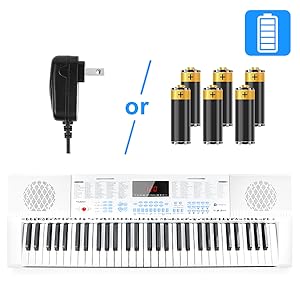
- Power Source: Use only the specified power adapter or 6 AA batteries. Ensure the voltage matches the product requirements.
- Water and Moisture: Do not expose the keyboard to water or moisture. Avoid placing liquids near the instrument.
- Ventilation: Ensure proper ventilation around the keyboard. Do not block ventilation openings.
- Cleaning: Clean the keyboard with a soft, dry cloth. Do not use abrasive cleaners or solvents.
- Handling: Handle the instrument with care. Avoid dropping or subjecting it to strong impacts.
- Volume: Prolonged exposure to high volume levels may cause hearing damage. Adjust the volume to a comfortable level.
3. Package Contents
Verify that all items are present in the package:
- Vangoa VGK611 61-Key Electronic Keyboard
- Power Adapter (9V)
- Microphone
- Music Stand
- Audio Cable
- User Manual

4. Setup
- Power Connection: Connect the 9V power adapter to the DC 9V input jack on the back of the keyboard. Plug the adapter into a standard wall outlet. Alternatively, insert 6 AA batteries into the battery compartment on the underside of the keyboard.
- Music Stand: Insert the included music stand into the designated slots above the control panel.
- Microphone (Optional): Connect the microphone to the MIC input jack on the back of the keyboard.
- Headphones (Optional): For private practice, connect headphones to the PHONES OUTPUT jack.
- External Audio (Optional): Use the AUDIO INPUT jack to connect an external audio source (e.g., MP3 player, smartphone) to play along with your favorite tracks.

5. Operating Instructions
5.1 Power On/Off
Press the red POWER button located on the left side of the control panel to turn the keyboard ON or OFF. The LED display will illuminate upon power-on.
5.2 Volume Control
Use the VOLUME +/- buttons to adjust the overall sound output. Separate controls are available for ACCOMP. VOL (accompaniment volume) and CHORD VOL (chord volume).
5.3 Selecting Timbres (Instrument Sounds)
The VGK611 offers 350 different timbres. To select a timbre:
- Press the TIMBRE button.
- Enter the 3-digit number corresponding to your desired instrument sound using the numeric keypad. A list of timbres is printed on the keyboard's surface.
5.4 Selecting Rhythms
The keyboard includes 350 rhythms. To select a rhythm:
- Press the RHYTHM button.
- Enter the 3-digit number corresponding to your desired rhythm using the numeric keypad. A list of rhythms is printed on the keyboard's surface.
- Press START/STOP to begin or end the rhythm.
- Adjust the rhythm tempo using the TEMPO +/- buttons.

5.5 Teaching Modes (Lighted Keys)
The VGK611 features 3 teaching modes with lighted keys to guide beginners:
- Press one of the TEACH 1, TEACH 2, or TEACH 3 buttons to activate a teaching mode.
- The keys will light up to indicate which notes to play, guiding you through demo songs.
- Adjust the tempo of the teaching mode using the TEMPO +/- buttons.

5.6 Recording and Playback
The keyboard allows you to record and play back your performances:
- Press the RECORD button to start recording.
- Play your desired melody.
- Press PLAY to listen to your recorded performance.
5.7 Other Functions
- Sustain: Adds a decaying effect to notes.
- Vibrato: Adds a slight pitch modulation to notes.
- Dual Keyboard: Splits the keyboard into two sections, allowing two players or different instrument sounds on each half.
- Chord: Enables various chord playing modes (e.g., single-finger chord, fingered chord).
- Transpose: Changes the pitch of the entire keyboard up or down in semitone steps.
- Metronome: Provides a steady beat for practice.

6. Features Overview
6.1 Lighted Keys & Teaching Modes
The integrated LED lighted keys are a core feature for beginners. They illuminate in sequence during teaching modes (Teach 1, Teach 2, Teach 3) to visually guide the user on which notes to play. This interactive learning method makes practicing engaging and helps develop muscle memory and note recognition.

6.2 Extensive Sound Library
Explore a vast collection of sounds with 350 timbres (instrument sounds) and 350 rhythms. From traditional piano and orchestral instruments to modern electronic sounds and various percussion options, the VGK611 provides diverse sonic possibilities. Additionally, 30 demo songs are pre-loaded for listening and learning.
6.3 Advanced Functions for Enhanced Playability
Beyond basic play, the keyboard includes features like Sustain and Vibrato for expressive playing, a Dual Keyboard function for duets or layered sounds, and a comprehensive Recording and Playback system to capture and review your musical ideas. The LED display clearly shows selected functions and settings.
6.4 Portability and Power Options
Designed for convenience, the VGK611 is lightweight and can be powered either by the included AC adapter or 6 AA batteries. This flexibility makes it suitable for use at home, during lessons, or for on-the-go musical practice.

7. Media Gallery
7.1 Product Images




7.2 Official Product Videos
Video 1: Demonstration of the Vangoa VGK611 61-Key Piano Keyboard with Lighted Keys, showcasing its features and ease of use.
Video 2: A presets demo of the Vangoa VGK611 Piano Keyboard, highlighting various instrument sounds and rhythms.
8. Maintenance
- Cleaning: Wipe the surface of the keyboard with a soft, dry, lint-free cloth. For stubborn dirt, slightly dampen the cloth with water and mild soap, then wipe dry immediately. Avoid excessive moisture.
- Storage: Store the keyboard in a cool, dry place away from direct sunlight, extreme temperatures, and humidity. If storing for an extended period, remove the batteries to prevent leakage.
- Key Care: Avoid pressing keys with excessive force or using sharp objects on them.
9. Troubleshooting
- No Power:
- Ensure the power adapter is securely connected to both the keyboard and a working power outlet.
- If using batteries, check if they are inserted correctly and are not depleted. Replace if necessary.
- No Sound:
- Check the main volume level and ensure it is not set to zero.
- If headphones are connected, sound will only output through them. Disconnect headphones to hear sound from the speakers.
- Ensure the correct timbre (instrument sound) is selected.
- Keys Not Lighting Up:
- Ensure a teaching mode (Teach 1, 2, or 3) is active.
- Verify that the 'Lighted Keys' function is enabled (if applicable, refer to the control panel).
- Microphone Not Working:
- Ensure the microphone is securely plugged into the MIC input jack.
- Check the microphone's own power switch (if it has one).
10. Specifications
| Feature | Detail |
|---|---|
| Model Name | VGK611 |
| Number of Keys | 61 Mini keys |
| Dimensions (L x W x H) | 32.7" x 10.9" x 3.1" (83.2cm x 27.8cm x 7.8cm) |
| Item Weight | 5.94 pounds (2.7 kg) |
| Power Source | Electric (9V Adapter) or 6 AA Batteries |
| Connectivity | 3.5mm Jack (Audio Input, Mic, Phones Output) |
| Timbres | 350 |
| Rhythms | 350 |
| Demo Songs | 30 |
| Teaching Modes | 3 (with Lighted Keys) |
| Material Type | Acrylonitrile Butadiene Styrene (ABS) |
11. Warranty and Support
The Vangoa VGK611 Electronic Keyboard comes with a 2-year warranty. For any product inquiries, technical support, or warranty claims, please contact Vangoa customer service. Life-long after-sales service is provided to ensure your satisfaction.
Please note that accessories are stored in the protection foam within the packaging.