1. Introduction
The Dr Ho's Circulation Promoter Ultimate Package is a therapeutic device designed to provide temporary relief from foot and leg pain, and to help increase local circulation. It integrates three distinct technologies: Transcutaneous Electrical Nerve Stimulation (TENS), Electrical Muscle Stimulation (EMS), and Dr Ho's proprietary Auto-Modulating Pulse (AMP).
This manual provides essential information for the safe and effective use of your Circulation Promoter. Please read it thoroughly before operating the device.
2. Important Safety Information
Disclaimer: DR-HO’S Circulation Promoter and any other electronic stimulators should NOT be used by patients with the following conditions:
- Pacemakers, defibrillators or extreme cardiac irregularities
- Metal implants or electronic auxiliary devices
- Abnormally high blood pressure
- A tendency toward internal bleeding
- Epilepsy or pregnant women
Please consult your doctor before using the device if any of these conditions apply to you.
3. Package Contents
Your Dr Ho's Circulation Promoter Ultimate Package includes the following items:
- Dr Ho's Circulation Promoter Main Unit
- Electrode Wire Sets
- Regular Body Pads
- Large Body Pads
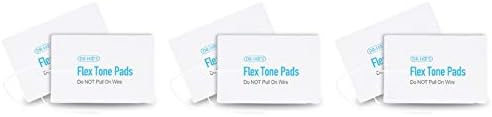
- Flex Tone Pads
- Foot Relief Pads
- Instructional DVD
- Spray Bottle
- Travel Bag
- 2 AA Batteries (required for operation)



4. Setup Instructions
- Battery Installation: Locate the battery compartment on the underside of the main unit. Insert 2 AA batteries, ensuring correct polarity. Close the compartment securely.
- Placement: Place the Circulation Promoter main unit on a stable, flat surface where you can comfortably sit and rest your feet.
- Connecting Foot Pads: If using the foot therapy function, ensure your feet are clean. You may lightly spray your feet with water for better conductivity. Place your bare feet on the designated footpad areas on the main unit.
- Connecting Body Pads (Optional): For use on other body parts, connect the electrode wire sets to the main unit. Attach the regular or large body pads to the desired body area. Ensure the pads adhere firmly to clean, dry skin.


5. Operating Instructions
The Circulation Promoter offers three distinct therapy modes: TENS, EMS, and AMP. The control unit allows you to select the desired mode and adjust intensity.
- Power On: Turn on the device using the power button on the control unit.
- Select Mode: Choose your desired therapy mode (TENS, EMS, or AMP) using the mode selection buttons.
- Adjust Intensity: Gradually increase the intensity level using the '+' button until you feel a comfortable, yet noticeable, stimulation. Avoid setting the intensity too high, which may cause discomfort.
- Session Duration: Use the device for the recommended duration as per your comfort and needs. Refer to the instructional DVD for guidance on session lengths.
- Power Off: After your session, decrease the intensity to zero and turn off the device.
Understanding the Therapy Modes:
- TENS (Transcutaneous Electrical Nerve Stimulation): This therapy gently stimulates nerves to help temporarily relieve pain.
- EMS (Electrical Muscle Stimulation): This therapy causes muscles to contract and relax, which can help with muscle recovery and circulation.
- AMP (Auto-Modulating Pulse): Dr Ho's proprietary technology delivers over 300 different stimulations that vary in length, pattern, and frequency to prevent adaptation and provide continuous relief.


6. Full-Body Use
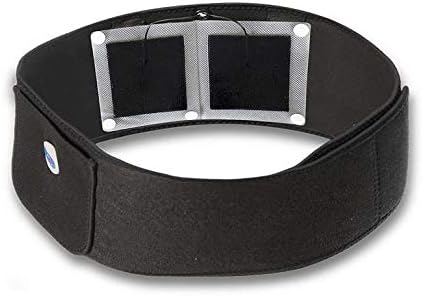
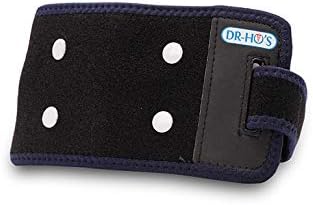
Beyond foot and leg therapy, the Dr Ho's Circulation Promoter Ultimate Package includes accessories for full-body application. The regular and large body pads can be used on various body parts for targeted temporary pain relief.
- Application Areas: These pads are suitable for use on the neck, shoulders, arms, knees, hips, and back.
- Pad Placement: Refer to the instructional materials for recommended pad placement diagrams for different body areas. Ensure pads are applied to clean, dry skin for optimal conductivity and adhesion.

7. Maintenance
- Cleaning: Wipe the main unit and control unit with a soft, damp cloth. Do not submerge the device in water or use harsh chemicals.
- Pad Care: After each use, gently clean the adhesive side of the electrode pads with a small amount of water to maintain stickiness. Store pads on their plastic backing in a sealed bag to prevent drying. Replace pads when they lose their adhesive quality.
- Storage: Store the device and all accessories in a cool, dry place, away from direct sunlight and extreme temperatures. Use the provided travel bag for organized storage.
- Battery Replacement: Replace AA batteries when the device's performance diminishes or it fails to power on.
8. Troubleshooting
- Device Not Turning On: Check if the batteries are correctly installed and have sufficient charge. Replace batteries if necessary.
- No Stimulation Felt: Ensure the electrode pads are firmly attached to clean, moist skin. Gradually increase the intensity level. If using foot pads, ensure your feet are making good contact with the conductive areas.
- Pads Not Sticking: Clean the adhesive side of the pads with a damp cloth. If pads are old, they may need to be replaced.
- Irregular Stimulation: Check all wire connections to ensure they are secure. Ensure pads are not dried out.
If you experience persistent issues, please refer to the full instructional DVD or contact customer support.
9. Specifications
| Model Number | Gen 2 |
| Power Source | Battery Powered (2 AA batteries required) |
| Material | Metal (components) |
| Item Weight | 7.55 Pounds |
| Package Dimensions | 16.75 x 16 x 5 inches |
10. Warranty and Support
Warranty Information: A 2-year warranty is provided for the control unit when purchased directly from DR-HO’S official Amazon store. This warranty excludes all accessories. The standard manufacturer’s warranty is provided by DR-HO'S.
Customer Support: For further assistance, product inquiries, or warranty claims, please contact DR-HO'S customer support directly. Refer to the contact information provided in your product packaging or on the official DR-HO'S website.


