
Introduction
Thank you for purchasing the Bestron AOV31 31 Liter Mini Oven with Rotisserie. This manual provides essential information for the safe and efficient operation, maintenance, and troubleshooting of your new appliance. Please read these instructions thoroughly before first use and keep them for future reference.

Image: The Bestron AOV31 mini oven, showcasing its compact design and control panel.
Safety Instructions
Always observe the following safety precautions to prevent electric shock, fire, or injury:
- Read all instructions before using the appliance.
- Do not touch hot surfaces. Use oven mitts or gloves when handling hot items.
- To protect against electrical hazards, do not immerse the cord, plug, or oven in water or other liquids.
- Close supervision is necessary when any appliance is used by or near children.
- Unplug from outlet when not in use and before cleaning. Allow to cool before putting on or taking off parts.
- Do not operate any appliance with a damaged cord or plug, or after the appliance malfunctions or has been damaged in any manner.
- Do not use outdoors.
- Do not let the cord hang over the edge of a table or counter, or touch hot surfaces.
- Do not place on or near a hot gas or electric burner, or in a heated oven.
- Extreme caution must be used when moving an appliance containing hot oil or other hot liquids.
- Do not use the appliance for other than intended use.
- Ensure adequate ventilation around the oven during operation.
Product Overview
The Bestron AOV31 is a versatile 31-liter mini oven designed for various cooking tasks, including baking, roasting, and rotisserie. It features adjustable temperature, multiple cooking functions, and a timer for precise control.
Components:
- Temperature Control Knob: Adjusts oven temperature up to 230°C.
- Function Selector Knob: Selects cooking modes (e.g., top heat, bottom heat, top/bottom heat, convection, rotisserie).
- Timer Knob: Sets cooking time up to 60 minutes with an automatic shut-off and signal.
- Power Indicator Light: Illuminates when the oven is operating.
- Double-Walled Glass Door: Provides insulation and allows viewing of food.
- Heat-Insulated Handle: For safe opening and closing of the door.
- Grill Rack: For grilling and supporting baking dishes.
- Enamelled Baking Tray: For baking and collecting drips.
- Rotisserie Spit: For roasting whole chickens or other meats.
- Rotisserie Handle: For safely inserting and removing the rotisserie spit.
Setup
Unpacking:
- Carefully remove the oven and all accessories from the packaging.
- Remove any protective films, stickers, or packaging materials from the oven and its accessories.
- Inspect the oven for any signs of damage. Do not use if damaged.
Placement:
- Place the oven on a stable, heat-resistant, and level surface.
- Ensure there is sufficient space (at least 10-15 cm) around the oven for proper ventilation. Do not place it directly against a wall or under cabinets.
- Keep the oven away from flammable materials, curtains, and heat sources.
- Ensure the power cord is not pinched or touching hot surfaces.
Initial Cleaning:
Before first use, wipe the interior and exterior of the oven with a damp cloth. Wash the grill rack, baking tray, and rotisserie spit in warm, soapy water, then rinse and dry thoroughly. Run the oven empty for approximately 15 minutes at maximum temperature (230°C) with the function set to top/bottom heat to burn off any manufacturing residues. A slight odor or smoke may occur during this process; ensure the area is well-ventilated.
Operating
General Baking and Roasting:
- Place the grill rack or baking tray with food into the desired insertion level. The oven has 3 insertion levels.
- Close the oven door.
- Set the Temperature Control Knob to the desired temperature (e.g., 180°C for baking).
- Set the Function Selector Knob to the desired cooking mode (e.g., top/bottom heat for general baking, convection for even heat distribution).
- Set the Timer Knob to the desired cooking time. The power indicator light will illuminate.
- When the set time elapses, the oven will automatically switch off and a signal will sound.
- Carefully remove the cooked food using oven mitts.
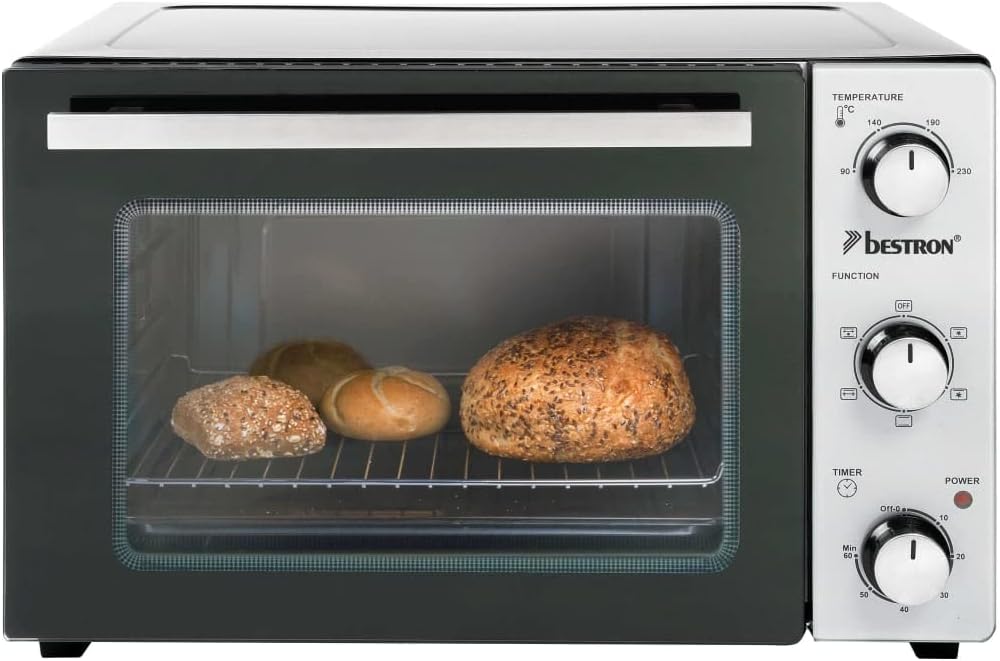
Image: A pizza baking on the grill rack inside the Bestron AOV31 mini oven.

Image: Freshly baked bread rolls inside the Bestron AOV31 mini oven.
Using the Rotisserie Function:
- Prepare the food (e.g., a whole chicken) by securing it onto the rotisserie spit using the forks provided. Ensure the food is balanced to allow for even rotation.
- Insert the rotisserie spit into the designated openings inside the oven. The pointed end goes into the motor drive on the left, and the square end rests in the support on the right.
- Close the oven door.
- Set the Temperature Control Knob to the desired temperature (e.g., 200°C for chicken).
- Set the Function Selector Knob to the rotisserie symbol (often combined with top heat or convection).
- Set the Timer Knob to the desired cooking time. The rotisserie will begin to turn, and the power indicator light will illuminate.
- Monitor the cooking process through the glass door.
- Once cooking is complete, the oven will switch off. Use the rotisserie handle to carefully remove the hot spit and food from the oven.

Image: A hand carefully inserting a chicken onto the rotisserie spit into the Bestron AOV31 mini oven.

Image: A whole chicken roasting evenly on the rotisserie inside the Bestron AOV31 mini oven.
Maintenance
Cleaning:
- Always unplug the oven from the power outlet and allow it to cool completely before cleaning.
- Wipe the exterior of the oven with a soft, damp cloth. Do not use abrasive cleaners or scouring pads.
- The interior of the oven can be cleaned with a damp cloth and mild detergent. For stubborn stains, a non-abrasive oven cleaner designed for conventional ovens may be used, following the product instructions carefully.
- Wash the grill rack, baking tray, and rotisserie spit in warm, soapy water. Rinse thoroughly and dry completely before storing or reusing.
- Do not immerse the oven body, cord, or plug in water or any other liquid.
Storage:
Ensure the oven is clean and dry before storing. Store the oven and its accessories in a cool, dry place.
Troubleshooting
If you encounter issues with your Bestron AOV31 mini oven, refer to the following common problems and solutions:
| Problem | Possible Cause | Solution |
|---|---|---|
| Oven does not turn on. | Not plugged in; power outlet malfunction; timer not set. | Ensure the oven is properly plugged into a working outlet. Set the timer to the desired cooking duration. |
| Food is not cooking evenly. | Incorrect function setting; food placement; oven preheating. | Ensure the correct function (e.g., convection) is selected. Rotate food halfway through cooking. Allow the oven to preheat fully before placing food inside. |
| Rotisserie is not turning. | Rotisserie spit not properly inserted; food too heavy/unbalanced; incorrect function setting. | Check that the spit is correctly seated in both the motor drive and support. Ensure food is balanced and within weight limits. Select the rotisserie function. |
| Excessive smoke during operation. | Food residue or grease buildup; initial burn-off. | Clean the oven interior and accessories thoroughly. If it's the first use, this is normal; ensure ventilation. |
If the problem persists after attempting these solutions, please contact Bestron customer support.
Specifications
| Feature | Detail |
|---|---|
| Brand | Bestron |
| Model Number | AOV31 |
| Capacity | 31 Liters |
| Power/Wattage | 1500 Watts |
| Voltage | 240 Volts |
| Material | Plastic, Stainless Steel, Glass |
| Product Dimensions | Approx. 51 x 40 x 35 cm (L x W x H) |
| Special Features | Rotisserie function, Temperature-controlled heating elements, Well-insulated casing, Double-glazed door, Six cooking functions |
| Control Type | Knob and Manual Control |
| Included Components | Rotisserie spit, Grill rack, Baking tray |
Warranty and Support
Bestron products are manufactured to high standards. For information regarding warranty terms and conditions, or if you require technical support, please refer to the warranty card included with your purchase or visit the official Bestron website. Please have your model number (AOV31) and purchase date available when contacting support.


