Introduction
This manual provides instructions for the Motiexic RC3047-1 replacement remote control, designed for use with specific Sanyo Soundbar models. This remote offers essential functions to control your soundbar's power, volume, input, and sound modes.
Compatibility
This remote control is compatible with the following Sanyo Soundbar models:
- Sanyo NC300
- Sanyo NC300UH
- Sanyo NC302UH
- Sanyo NC306UH
- Sanyo FWSB415E A
- Sanyo FWSB426F
- Sanyo FWSB426FA
- Sanyo FWSB405FS
Important Note: This remote control is NOT compatible with the Sanyo FWSB415E Non-A Model. Please verify your soundbar model before use.

This image displays the remote control alongside a list of compatible Sanyo soundbar models, highlighting specific models it supports and those it does not.
Setup
Inserting Batteries
The remote control requires two (2) AA batteries (not included). Follow these steps to install them:
- Locate the battery compartment cover on the back of the remote control.
- Slide the cover downwards or press the latch to open it.
- Insert two AA batteries, ensuring the positive (+) and negative (-) terminals align correctly with the markings inside the compartment.
- Replace the battery compartment cover by sliding it back into place until it clicks securely.
No additional setup or programming is required after battery installation. The remote is ready for use.

This image illustrates the process of opening the battery compartment and inserting AA batteries into the remote control.

A step-by-step diagram demonstrating how to correctly insert batteries into the remote control.
Operating Instructions
Familiarize yourself with the buttons on your remote control to operate your Sanyo Soundbar effectively.
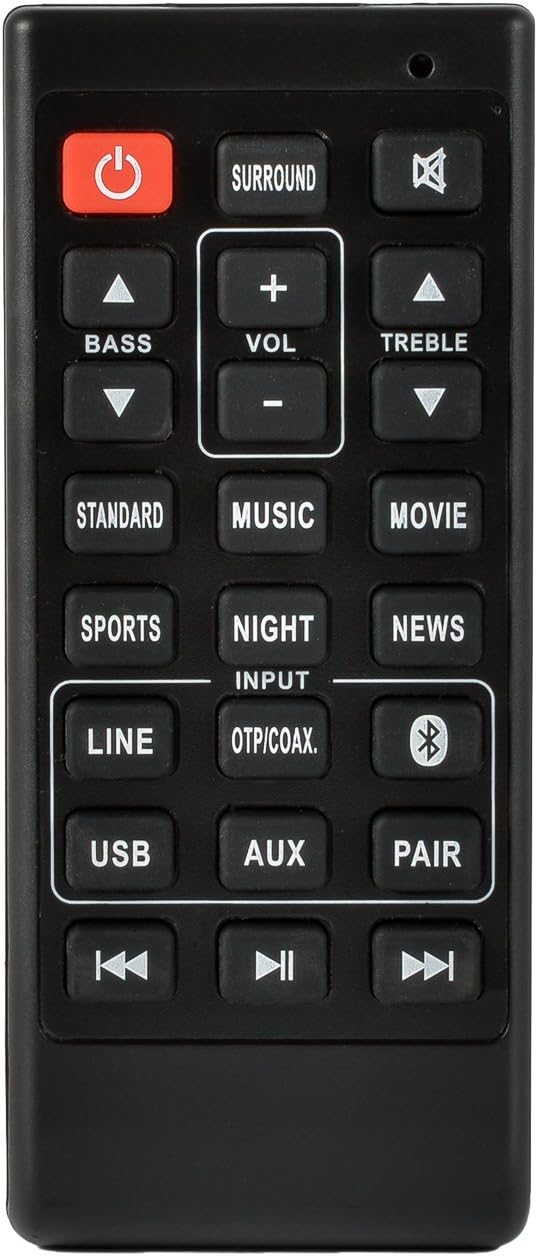
This image provides a clear view of the remote control's layout, displaying all buttons and their functions.
| Button | Function |
|---|---|
| Power (Red Button) | Turns the soundbar On or Off. |
| Mute | Mutes or unmutes the soundbar audio. |
| VOL + / - | Adjusts the main volume level. |
| BASS Up / Down | Adjusts the bass level. |
| TREBLE Up / Down | Adjusts the treble level. |
| SURROUND | Activates or deactivates surround sound mode. |
| INPUT (OTP/COAX.) | Cycles through available input sources (e.g., Optical, Coaxial). |
| LINE | Selects Line-in input. |
| USB | Selects USB input. |
| AUX | Selects Auxiliary input. |
| Bluetooth (Bluetooth Symbol) | Selects Bluetooth input. |
| PAIR | Initiates Bluetooth pairing mode. |
| STANDARD | Selects Standard sound mode. |
| SPORTS | Selects Sports sound mode. |
| MUSIC | Selects Music sound mode. |
| NIGHT | Selects Night sound mode. |
| MOVIE | Selects Movie sound mode. |
| NEWS | Selects News sound mode. |
| Previous Track (Rewind) | Skips to the previous track (for USB/Bluetooth modes). |
| Play/Pause | Plays or pauses media (for USB/Bluetooth modes). |
| Next Track (Fast Forward) | Skips to the next track (for USB/Bluetooth modes). |
Maintenance
- Cleaning: Use a soft, dry cloth to clean the remote control. Do not use liquid cleaners or abrasive materials.
- Battery Replacement: Replace batteries when the remote's response becomes sluggish or it stops functioning. Always replace both batteries at the same time with new ones of the same type.
- Storage: If the remote will not be used for an extended period, remove the batteries to prevent leakage and damage.
- Environment: Avoid exposing the remote to extreme temperatures, direct sunlight, or high humidity.
Troubleshooting
| Problem | Solution |
|---|---|
| Remote not responding. |
|
| Specific functions not working. |
|
| Bluetooth pairing issues. |
|
Specifications
- Model Number: RC3047-1
- Brand: Motiexic
- Connectivity Technology: Infrared
- Power Source: 2 x AA Batteries (not included)
- Compatible Devices: Sanyo Soundbar NC300, NC300UH, NC302UH, NC306UH, FWSB415E A, FWSB426F, FWSB426FA, FWSB405FS
- Dimensions: Approximately 4.41 x 1.85 x 1.06 inches (11.2 x 4.7 x 2.7 cm)
- Weight: Approximately 1.13 ounces (32 grams) (without batteries)
Warranty and Support
For any questions or support regarding your Motiexic replacement remote control, please refer to the seller's return policy or contact the seller directly through the platform where the purchase was made. This product is designed as a direct replacement and typically does not require additional technical support beyond basic operation and troubleshooting.


