1. Introduction
The TEWELL Mini Sound Bar (Model T-2610) is a versatile audio device designed to enhance your sound experience across various platforms. It features both wired and wireless connectivity options, delivering clear audio with enhanced bass. Its compact design makes it suitable for desktop use or portable applications.

Figure 1: Front view of the TEWELL Mini Sound Bar.
2. What's in the Box
Upon opening the package, please ensure all the following items are present:
- 1x TEWELL Mini Sound Bar
- 1x Instruction Manual
- 1x Micro-USB Charging Cable
- 1x AUX Line-in Cable
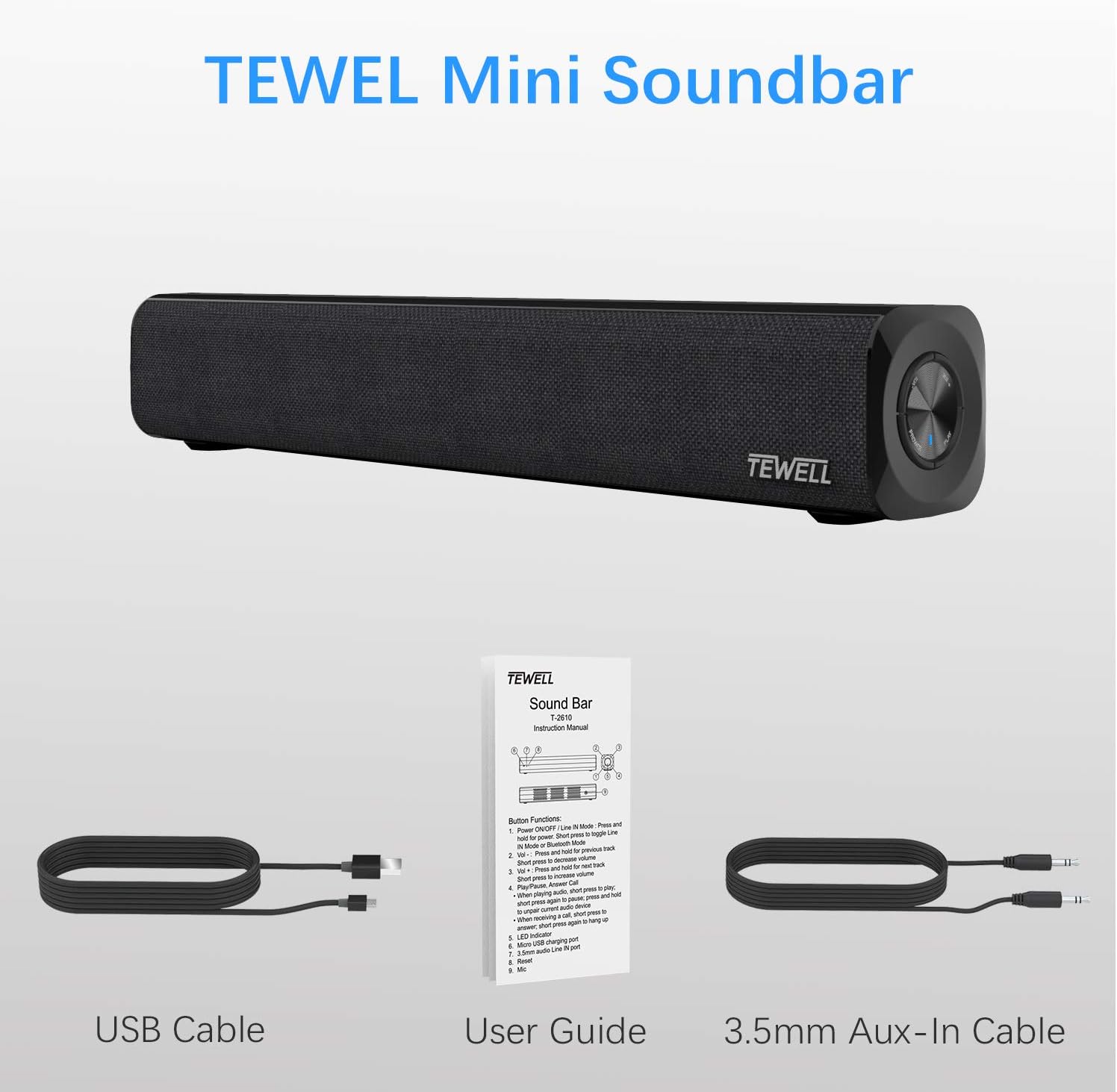
Figure 2: Contents of the TEWELL Mini Sound Bar package.
3. Product Overview
Familiarize yourself with the main components and controls of the sound bar.
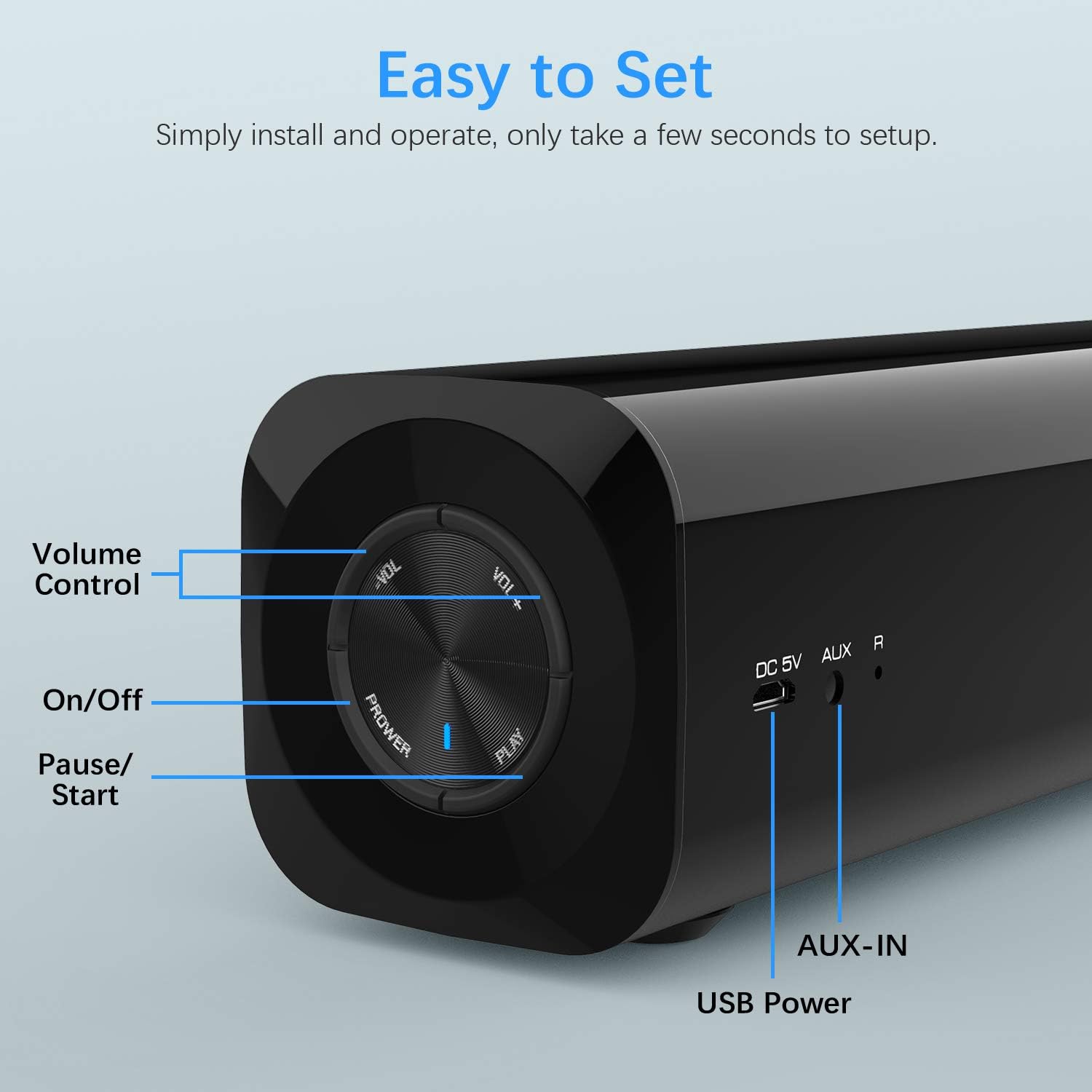
Figure 3: Control panel and rear ports.
- Volume Control: Rotate the dial to adjust volume.
- On/Off: Press and hold the power button to turn on/off.
- Pause/Start: Press the play button to pause or resume playback.
- AUX-IN Port: For wired audio connection using the 3.5mm AUX cable.
- USB Power Port: For powering the device via USB.

Figure 4: High-definition sound output.
The sound bar is equipped with two professionally-tuned speakers and one passive subwoofer, designed to deliver an extended audio curve with deep bass for an immersive sound experience.
4. Setup
The TEWELL Mini Sound Bar offers flexible setup options for various devices.
4.1. Powering the Sound Bar
Connect the Micro-USB Charging Cable to the USB Power Port on the sound bar and plug the other end into a USB power source (e.g., computer USB port, USB wall adapter). The sound bar can be powered by USB or its internal battery.
4.2. Wired Connection (AUX-IN)
For a wired connection, use the provided 3.5mm AUX Line-in Cable.
- Connect one end of the 3.5mm AUX cable to the AUX-IN port on the sound bar.
- Connect the other end of the 3.5mm AUX cable to the audio output (headphone jack) of your device (PC, laptop, smartphone, tablet, projector).
- Ensure the sound bar is powered on. It will automatically switch to AUX mode when a wired connection is detected.

Figure 5: Wired (AUX) and Wireless (Bluetooth) connection options.
4.3. Wireless Connection (Bluetooth)
To connect wirelessly via Bluetooth:
- Ensure the sound bar is powered on.
- Press and hold the Power button on the sound bar until the indicator light starts blinking, indicating it's in pairing mode.
- On your device (smartphone, tablet, laptop), enable Bluetooth and search for available devices.
- Select "TEWELL T-2610" (or similar name) from the list of devices.
- Once paired, the indicator light on the sound bar will become solid, and you will hear a confirmation tone.
The sound bar has a Bluetooth range of up to 10 meters (approximately 33 feet).
5. Operating Instructions
Once connected, you can begin using your TEWELL Mini Sound Bar.
5.1. Power On/Off
Press and hold the Power button on the control dial for approximately 3 seconds to turn the sound bar on or off.
5.2. Volume Adjustment
Rotate the VOL+ or VOL- sections of the control dial to increase or decrease the volume. You may also adjust the volume directly from your connected device.
5.3. Play/Pause
Press the PLAY button on the control dial to pause or resume audio playback.
5.4. Compatibility
The sound bar is universally compatible with devices that have a standard 3.5mm AUX jack or Bluetooth functionality. This includes Personal Computers, Laptops, Tablets, Smartphones, and Projectors. It is not suitable for direct TV connection without an appropriate adapter.

Figure 6: Universal compatibility of the sound bar.
6. Maintenance
To ensure the longevity and optimal performance of your TEWELL Mini Sound Bar, follow these maintenance guidelines:
- Cleaning: Use a soft, dry cloth to clean the exterior of the sound bar. Avoid using abrasive cleaners, waxes, or solvents.
- Storage: When not in use for extended periods, store the sound bar in a cool, dry place away from direct sunlight and extreme temperatures.
- Water Exposure: The sound bar is not waterproof. Avoid exposing it to water or excessive moisture.
- Handling: Handle the sound bar with care to prevent physical damage.
7. Troubleshooting
If you encounter issues with your sound bar, refer to the following common problems and solutions:
| Problem | Possible Cause | Solution |
|---|---|---|
| No sound | Sound bar is off; Volume is too low; Incorrect input source; Device not paired (Bluetooth); Cable not connected properly. | Ensure sound bar is on; Increase volume on sound bar and connected device; Check AUX cable connection; Re-pair Bluetooth device. |
| Distorted sound | Volume too high; Weak Bluetooth signal; Audio source issue. | Lower volume; Move device closer to sound bar; Test with a different audio source. |
| Bluetooth pairing failure | Sound bar not in pairing mode; Device Bluetooth off; Interference. | Ensure sound bar is blinking (pairing mode); Turn device Bluetooth off/on; Move away from other wireless devices. |
| Sound bar turns off unexpectedly | Low battery; Inactivity (Bluetooth mode). | Charge the sound bar; For wired connection, it should stay awake. |
8. Specifications
- Model: T-2610
- Brand: TEWELL
- Product Dimensions: 2.44"D x 14.49"W x 2.44"H
- Item Weight: 2 Pounds
- Speaker Type: Subwoofer (integrated passive subwoofer)
- Speaker Maximum Output Power: 10 Watts
- Connectivity Technology: Bluetooth, Auxiliary, USB
- Wireless Communication Technology: Bluetooth
- Bluetooth Range: 10 Meters
- Power Source: DC (USB Powered)
- Input Voltage: 5 Volts (DC)
- Charging Time: 2 Hours
- Number of Batteries: 1 Lithium Ion battery required (included)
- Material: Plastic
- Color: Black
- Control Method: Manual Button
- Special Feature: Portable
9. Official Product Video
Watch the official product video for a visual guide on the TEWELL Mini Sound Bar's features and connectivity.
Video: Mini Soundbar, PC Sound Bar with 3.5mm AUX Input and Wireless Bluetooth for PC, Tablet, Cellphone...
This video provides an overview of the sound bar's features, including its compact size, wired and wireless connectivity, and compatibility with various devices.
10. Warranty and Support
For warranty information or technical support, please refer to the contact details provided in the original product packaging or visit the official TEWELL website. You can also refer to the User Manual (PDF) for additional details.


