
Introduction
This manual provides instructions for the Garmin fenix 5S Plus, a smaller-sized multisport GPS smartwatch designed for athletes and outdoor adventurers. It features advanced functionalities including routable TOPO maps, wrist-based heart rate monitoring, music storage, and Garmin Pay contactless payment. This guide will help you set up, operate, and maintain your device to maximize its performance.
1. Initial Setup
1.1 Charging the Device
Before first use, fully charge your fenix 5S Plus. Connect the supplied charging/data cable to the charging port on the back of the watch and to a USB power source. A full charge typically takes a few hours.
1.2 Powering On and Initial Configuration
Press and hold the LIGHT button to power on the device. Follow the on-screen prompts to select your language, units of measure, and other basic settings.
1.3 Pairing with a Smartphone
To access smart features, pair your fenix 5S Plus with the Garmin Connect app on your smartphone. Download the Garmin Connect app from your phone's app store. Open the app, create an account or log in, and follow the instructions to add your device. Ensure Bluetooth is enabled on your phone.
2. Operating Your Device
2.1 Button Functions
- LIGHT: Press to turn on/off backlight. Hold to power on/off device or access controls menu.
- UP/MENU: Press to scroll through widgets and data screens. Hold to open the menu.
- DOWN: Press to scroll through widgets and data screens. Hold to open music controls.
- START/STOP: Press to start and stop activities. Press to select options in a menu.
- BACK/LAP: Press to return to the previous screen. Press to record a lap during an activity.
2.2 Activity Tracking and GPS Navigation
The fenix 5S Plus tracks various activities using its built-in GPS, GLONASS, and Galileo satellite systems. To start an activity:
- From the watch face, press START/STOP.
- Select an activity from the list (e.g., Run, Bike, Hike).
- Wait for the GPS signal to acquire (the GPS status bar will turn green).
- Press START/STOP again to begin the activity.
The watch features color TOPO maps and Trendline popularity routing to assist with navigation. You can view your current location, track your route, and follow preloaded courses directly on the watch display.

Image: The Garmin fenix 5S Plus displaying a detailed map with a highlighted route, indicating navigation capabilities for outdoor activities.
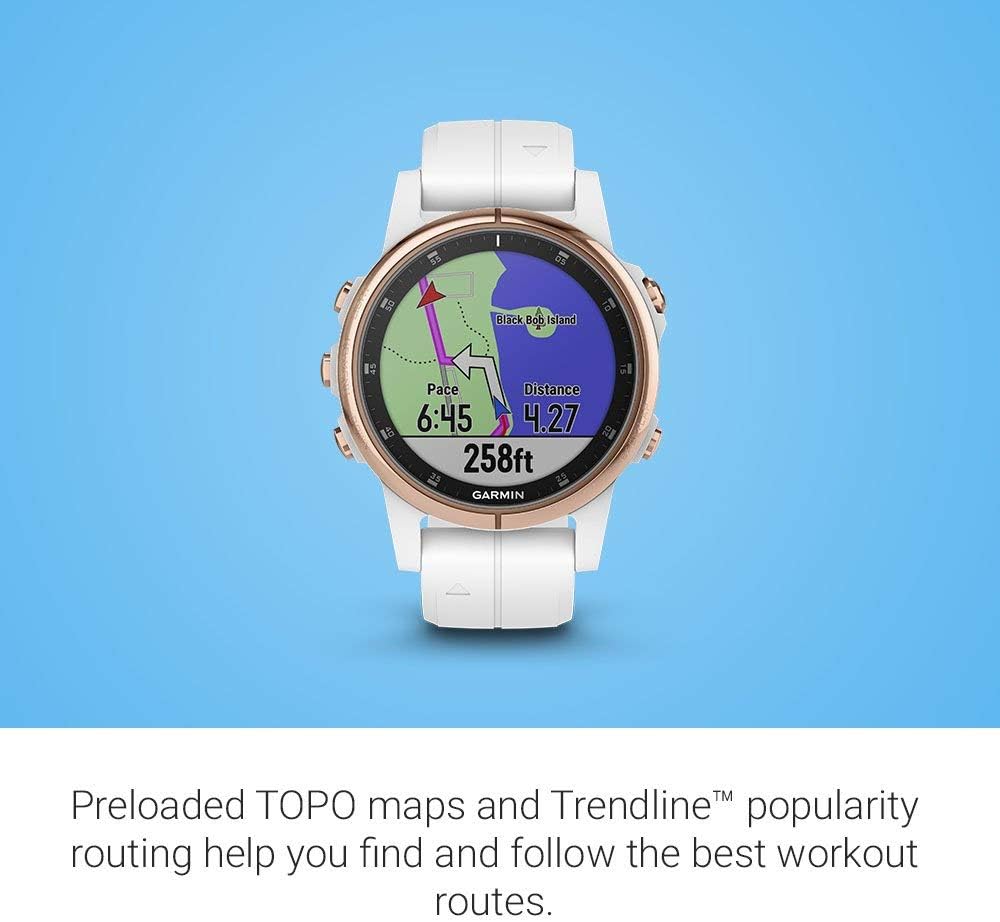
Image: The Garmin fenix 5S Plus showing real-time activity data including pace, distance, and elevation, overlaid on a map display during a workout.
2.3 Wrist-Based Heart Rate Monitoring
The fenix 5S Plus estimates heart rate at the wrist using Garmin Elevate™ optical heart rate technology. Ensure the watch is worn snugly above your wrist bone for accurate readings. Your heart rate data is continuously monitored and can be viewed on dedicated widgets or during activities.

Image: The Garmin fenix 5S Plus displaying a graph of heart rate data over the last four hours, with current heart rate shown at 68 beats per minute.
2.4 Music Storage and Playback
The device allows you to store up to 500 songs. You can transfer music from your computer using the Garmin Express application. Once music is loaded, pair Bluetooth headphones (sold separately) to your watch for phone-free listening during activities.
- Hold DOWN to access music controls.
- Select your music source and control playback.
2.5 Garmin Pay Contactless Payments
Garmin Pay allows you to make contactless payments directly from your watch. Set up your virtual wallet in the Garmin Connect app by adding your credit or debit cards from participating banks. To use Garmin Pay:
- Hold LIGHT to open the controls menu.
- Select the Wallet icon.
- Enter your passcode (if prompted).
- Select the card you wish to use.
- Hold your watch near the contactless reader.

Image: The main watch face of the Garmin fenix 5S Plus, displaying current altitude (ALT), daily steps count (STEPS), and heart rate (HR) data, along with the date.
3. Maintenance
3.1 Cleaning the Device
Regularly clean your watch and band to prevent skin irritation and maintain device functionality. Rinse the watch with fresh water after exposure to sweat, chlorine, or saltwater. Use a soft, lint-free cloth to wipe the device. Avoid harsh chemicals or abrasive cleaners.
3.2 Battery Care
The fenix 5S Plus features a rechargeable Lithium Polymer battery. To prolong battery life, avoid exposing the device to extreme temperatures. Charge the device regularly, but avoid leaving it fully discharged for extended periods. Battery performance is up to 7 days in Smartwatch mode and 4 hours in GPS mode with music.
4. Troubleshooting
4.1 Device Not Powering On
Ensure the device is fully charged. Connect it to a power source using the charging cable and allow it to charge for at least 30 minutes before attempting to power it on again.
4.2 GPS Signal Acquisition Issues
For optimal GPS performance, ensure you are in an open outdoor area with a clear view of the sky. Remain stationary for a few minutes while the device acquires satellite signals. Syncing your watch with the Garmin Connect app regularly can also help update satellite data for faster acquisition.
4.3 Heart Rate Inaccuracy
Ensure the watch is worn snugly on your wrist, just above the wrist bone. Avoid wearing it too loosely or too tightly. Clean the optical sensor on the back of the watch. Factors like skin tone, movement, and extreme temperatures can affect accuracy.
4.4 Connectivity Problems (Bluetooth)
Verify that Bluetooth is enabled on both your smartphone and the fenix 5S Plus. Ensure the watch is within range of your phone. Try restarting both your watch and smartphone. If issues persist, unpair and re-pair the device through the Garmin Connect app.
5. Specifications
| Feature | Detail |
|---|---|
| Model Number | 010-01987-06 |
| Dimensions | 1.7 x 0.6 x 1.7 inches |
| Weight | 2.4 ounces |
| Display Size | 1.2 Inches |
| Battery Type | Lithium Polymer (included) |
| Battery Life | Up to 7 days (Smartwatch mode), 4 hours (GPS mode with music) |
| Connectivity | Bluetooth |
| GPS | GPS, GLONASS, Galileo |
| Operating System | Linux |
| What's in the Box | fenix 5S Plus Sapphire, charging/data cable, documentation |
6. Warranty and Support
For detailed warranty information, please refer to the documentation included with your device or visit the official Garmin website. For additional support, frequently asked questions, and software updates, visit Garmin Support.
An official user manual in PDF format is available for download: Garmin fenix 5S Plus User Manual (PDF).