1. Introduction
Thank you for purchasing the Nobsound NS-01G Pro Bluetooth 50W x 2 HiFi Power Amplifier. This compact and versatile amplifier is designed to deliver high-quality audio from various sources, including Bluetooth-enabled devices and wired connections. Its user-friendly design ensures a seamless audio experience for both casual listeners and audiophiles.
Please read this manual thoroughly before using the product to ensure proper operation and to maximize its performance and longevity.
2. Product Features
- Versatile Connectivity: Supports both Bluetooth 5.0 for wireless audio streaming and AUX input for wired connections, offering flexibility for various audio sources.
- Powerful Output: Delivers 50W x 2 channels of high-fidelity audio, suitable for driving a wide range of passive speakers.
- Compact Design: Features a mini portable stereo design with a black aluminum case, making it easy to integrate into any setup without taking up much space.
- User-Friendly Controls: Equipped with intuitive controls for volume adjustment and input selection, along with clear input indicators and a volume display.
- High-Quality Components: Utilizes crystal copper terminals for reliable speaker connections and a robust build for enhanced durability.
3. Package Contents
Upon opening the package, please ensure all items are present and in good condition:
- Nobsound NS-01G Pro Bluetooth Power Amplifier (Black)
- USB Cable
- 3.5mm AUX Audio Cable
- AV Audio Cable
- Instruction Manual

Image: The Nobsound NS-01G Pro amplifier shown alongside its included accessories: a USB cable, a 3.5mm AUX audio cable, an AV audio cable, and the instruction manual.
4. Setup and Installation
4.1 Connecting Speakers
- Identify the speaker output terminals on the rear of the amplifier. These are typically labeled 'R' for Right and 'L' for Left, with corresponding positive (+) and negative (-) connections.
- Connect your passive speakers to these terminals using appropriate speaker cables. Ensure that the positive terminal of the amplifier connects to the positive terminal of the speaker, and the negative to the negative.
- Tighten the crystal copper terminals to secure the speaker cables.

Image: The rear panel of the Nobsound NS-01G Pro amplifier, highlighting the DC 9V-24V power input and the four speaker output terminals (two for the right channel, two for the left channel).
4.2 Power Connection
- Connect a DC 9V-24V power adapter (not included) to the 'DC 9V-24V IN' port on the rear of the amplifier.
- Plug the power adapter into a suitable wall outlet.
4.3 Input Connections
The NS-01G Pro supports multiple input methods:
- Bluetooth: For wireless audio streaming from your smartphone, tablet, or other Bluetooth-enabled devices.
- AUX Input: Use the included 3.5mm AUX audio cable to connect devices with a 3.5mm audio output.
- USB Sound Card: Connect to a computer via the Micro USB port for digital audio input.
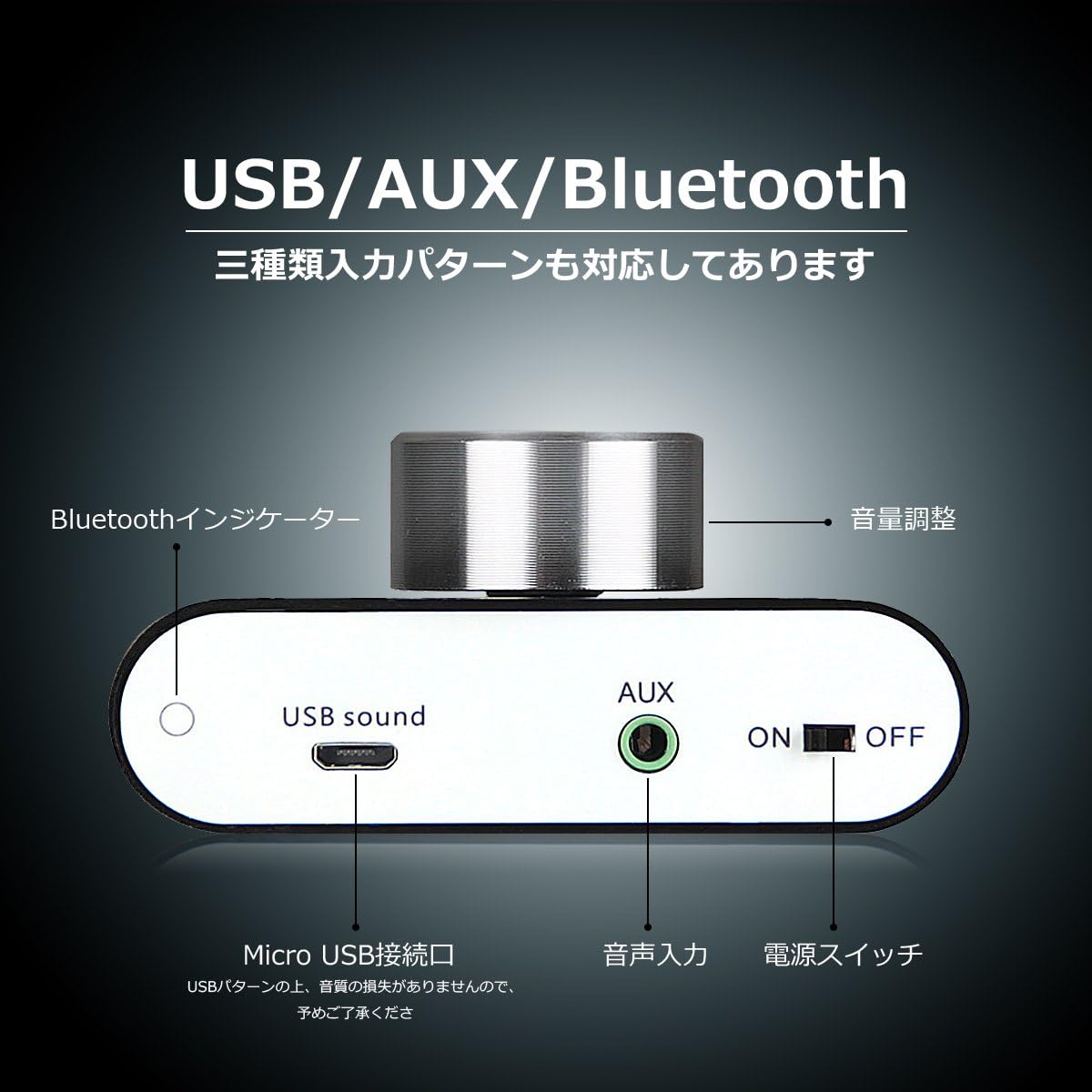
Image: The front panel of the Nobsound NS-01G Pro amplifier, displaying the Micro USB sound input, AUX audio input, power switch, Bluetooth indicator, and volume adjustment knob.

Image: A diagram illustrating the Nobsound NS-01G Pro amplifier's versatile connectivity, showing it connected to a desktop PC, tablet, Android phone, iPhone, computer, and TV, emphasizing its broad compatibility.
5. Operating Instructions
5.1 Powering On/Off
Locate the power switch on the front panel. Toggle it to the 'ON' position to power on the amplifier. The input indicator will light up. Toggle to 'OFF' to power down.
5.2 Volume Control
The large knob on the front panel controls the volume. Rotate clockwise to increase volume and counter-clockwise to decrease. The digital display will show the current volume level.
Video: This video demonstrates the physical connections of the Nobsound NS-01G Pro amplifier, including connecting speaker wires and input cables, and shows the operation of the volume knob and input selection.
5.3 Input Selection
The amplifier automatically detects the active input. For Bluetooth, ensure no AUX or USB cables are connected. For AUX or USB, connect the respective cable, and the amplifier will switch to that input.
5.4 Bluetooth Pairing
- Ensure the amplifier is powered on and no wired inputs are connected. The Bluetooth indicator light will flash, indicating it's in pairing mode.
- On your device (smartphone, tablet, etc.), enable Bluetooth and search for available devices.
- Select "BT HIFI AUDIO" from the list of devices to pair.
- Once paired, the Bluetooth indicator light will become solid, and you can begin playing audio wirelessly.
Video: This video illustrates the process of connecting the Nobsound NS-01G Pro amplifier to a subwoofer and then demonstrating Bluetooth pairing with a smartphone, showing music playback.
6. Specifications
| Brand | Nobsound |
| Model Number | NS-01G Pro |
| Color | Black |
| Output Power | 50W x 2 |
| Number of Channels | 2 |
| Connectivity Technology | Bluetooth 5.0, AUX, USB Sound Card |
| Power Input | DC 9V-24V (Power adapter not included) |
| Dimensions | 15.5 x 15 x 5.2 cm |
| Weight | 270 g |
7. Maintenance
- Keep the amplifier in a dry, well-ventilated area, away from direct sunlight, heat sources, and moisture.
- Clean the exterior with a soft, dry cloth. Do not use liquid cleaners or abrasive chemicals.
- Ensure all connections are secure and free from dust or debris.
- Avoid placing heavy objects on top of the amplifier.
8. Troubleshooting
| Problem | Possible Cause | Solution |
|---|---|---|
| No sound output |
|
|
| Bluetooth not pairing |
|
|
| Distorted sound |
|
|
9. Warranty and Support
Nobsound products are designed for reliability and performance. For warranty information, technical support, or service inquiries, please refer to the warranty card included in your package or visit the official Nobsound website. Please have your product model number (NS-01G Pro) and purchase details ready when contacting support.
For additional resources and product updates, visit the Nobsound & Douk Audio Store.


