
1. Product Overview
The King Pigeon S140L is an industrial-grade 4G Remote Controller and Alarm Unit designed for high reliability and stability. It integrates a 32-Bit High Performance Microprocessor MCU and an industrial cellular module. This unit provides 2 relay outputs, 4 digital inputs, and a USB Serial Port, enabling monitoring and control via SMS (Short Message Service).
When an input is triggered or recovers, the unit can automatically switch a relay and send an immediate SMS notification. This functionality is suitable for various industrial automation, security monitoring, and automatic measurement and control systems, particularly in harsh environments.

Figure 1: Front view of the King Pigeon S140L 4G RTU SMS Remote Controller Alarm, showing the main unit with connection ports.
2. Key Features
- 4 Digital Inputs: Compatible with both dry and wet contacts, supporting End-Of-Line (EOL) connections for enhanced security.
- 2 Relay Outputs (240VAC@3A): One relay output can be switched ON/OFF via SMS text commands. The second relay can be configured to switch on for 4 minutes when any digital input is triggered.
- 4G EC25-A Module: Supports FDD-LTE bands B2/B4/B12, compatible with AT&T and T-Mobile SIM cards in the USA.
- User Notifications: Supports up to 3 user phone numbers for receiving alarm and daily report SMS messages, and up to 5 user phone numbers for receiving alarm calls.
- Embedded Microprocessor: Features an embedded 32-bit ARM9 MCU with an in-built watchdog for reliable performance.
3. Typical Applications
The S140L is versatile and can be deployed in various scenarios:
- Security Alarm Systems
- Supervision and Monitoring Alarm Systems
- Automatic Monitoring Systems
- Vending Machine Security Protection
- Pumping Stations, Tanks, Oil or Water Level Monitoring
- Building and Real Estate Management
- Weather Stations
- River Monitoring and Flood Control
- Oil and Gas Pipeline Monitoring
- Corrosion Protection Systems
- Temperature and Water Leakage Applications
- Wellheads, Boat, Vehicle Monitoring
- Energy Saving and Street Lights Control Systems
- Valve Control Systems
- Transformer Stations
- Unmanned Machine Rooms
- Control Room Applications
- Automation Systems (M2M)
- GSM Access Control Systems, GSM Gate Openers

Figure 2: Illustrative diagram of the S140L in an application, demonstrating control of external devices like fans and sending alarm notifications to a smartphone.
4. Setup Guide
4.1 Package Contents
Verify that your package contains the following items:
- King Pigeon S140L 4G RTU SMS Remote Controller Alarm Unit
- Power Adapter
- Antenna (if not pre-attached)
- User Manual (this document)
4.2 SIM Card Installation
- Ensure the S140L unit is powered off and disconnected from any power source.
- Locate the SIM card slot on the device. This may require opening the casing.
- Insert a valid 4G SIM card (AT&T or T-Mobile compatible in the USA) into the slot. Ensure the SIM card is correctly oriented according to the diagram on the device or within the casing.
- Secure the SIM card and close the casing if it was opened.

Figure 3: Internal view of the S140L, showing the circuit board where the SIM module is typically located.
4.3 Antenna Connection
Connect the provided antenna to the ANT connector on the S140L unit. Ensure it is securely fastened to optimize signal reception.
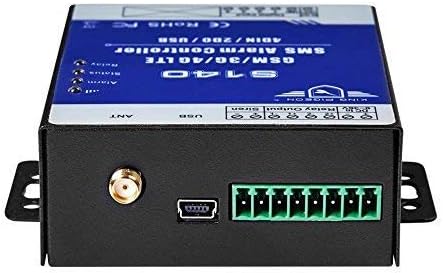
Figure 4: Side view of the S140L, highlighting the antenna connector and USB port.
4.4 Power Connection
Connect the power adapter to the DC input port on the S140L unit, then plug the adapter into a suitable power outlet. The unit will power on automatically.
4.5 Digital Input and Relay Output Wiring
Refer to the wiring diagram on the device or in the detailed technical manual for specific connections. The S140L provides 4 digital inputs and 2 relay outputs. Ensure all wiring is done correctly and safely, adhering to local electrical codes.

Figure 5: Top view of the S140L, clearly showing the terminal blocks for digital inputs and relay outputs.
5. Operating Instructions
5.1 Initial Configuration (via USB/PC Software)
For initial setup, including setting authorized phone numbers, configuring input triggers, and defining relay actions, connect the S140L to a PC via the USB port. Use the manufacturer's provided configuration software (not included in this manual) to program the device. This software allows you to:
- Add/remove authorized phone numbers for SMS alerts and calls.
- Configure digital input types (dry/wet contact, normally open/closed).
- Define actions for relay outputs based on input triggers.
- Set up daily report SMS schedules.
5.2 SMS Command Operation
Once configured, the S140L can be controlled and monitored via SMS commands from authorized phone numbers. Refer to the detailed programming manual for a complete list of SMS commands. Common commands include:
- Checking Status: Send a specific SMS command (e.g., "STATUS") to receive a report on input states, relay states, and signal strength.
- Controlling Relay 1: Send "RELAY1 ON" to activate Relay 1, and "RELAY1 OFF" to deactivate it.
- Arming/Disarming: Commands to arm or disarm the alarm system.
The unit will send SMS alerts to authorized numbers when a configured digital input is triggered or recovers, or when other alarm conditions are met.
6. Maintenance
To ensure optimal performance and longevity of your King Pigeon S140L, follow these maintenance guidelines:
- Regular Cleaning: Keep the unit clean and free from dust and debris. Use a soft, dry cloth for cleaning. Do not use liquid cleaners.
- Connection Checks: Periodically inspect all wiring connections (power, inputs, outputs, antenna) to ensure they are secure and free from corrosion.
- Environmental Conditions: Ensure the unit operates within its specified temperature and humidity ranges. Avoid exposure to extreme conditions, direct sunlight, or moisture.
- Firmware Updates: Check the manufacturer's website periodically for any available firmware updates. Follow the provided instructions carefully for any update procedures.
- SIM Card Validity: Ensure the installed SIM card remains active and has sufficient credit (if prepaid) for SMS and call functions.
7. Troubleshooting
If you encounter issues with your S140L, refer to the following common troubleshooting steps:
| Problem | Possible Cause | Solution |
|---|---|---|
| No Power/Unit Not Turning On | Power adapter not connected or faulty; power outlet issue. | Check power adapter connection. Test the power outlet with another device. Ensure the adapter is the correct voltage/current. |
| No SMS Alerts/Calls | No SIM card or improperly installed; SIM card inactive/no credit; poor 4G signal; unauthorized phone number; incorrect configuration. | Verify SIM card installation and activation. Check SIM card balance. Relocate unit for better signal. Ensure your number is authorized in the configuration. Review input trigger settings. |
| Relay Not Activating | Incorrect relay wiring; relay not configured to activate; input not triggering; faulty relay. | Check relay wiring against the diagram. Verify relay activation settings in the configuration software. Confirm digital input is correctly triggering. If all else fails, contact support. |
| Poor 4G Signal | Unit location; antenna issue. | Move the unit to a location with better cellular reception. Ensure the antenna is securely connected and undamaged. Consider using an extended antenna if available. |
| Cannot Connect via USB | Missing USB driver; faulty USB cable/port. | Install the necessary USB drivers for the device on your PC. Try a different USB cable or port. |
If the problem persists after attempting these solutions, please contact King Pigeon technical support for further assistance.
8. Specifications
| Feature | Detail |
|---|---|
| Model Number | S140L |
| Digital Inputs | 4 (compatible with dry and wet contacts, EOL support) |
| Relay Outputs | 2 (240VAC@3A) |
| Cellular Module | 4G EC25-A (FDD-LTE: B2/B4/B12) |
| Processor | Embedded 32-bit ARM9 MCU with watchdog |
| User Phone Numbers (SMS) | Up to 3 for alarm and daily reports |
| User Phone Numbers (Call) | Up to 5 for alarm calls |
| Mounting Type | Wall Mount |
| Sensor Technology | Contact Sensor |
| Item Weight | 0.77 Pounds (approx. 12.3 ounces) |
| Product Dimensions | 2.7 x 3.4 x 1.1 inches |
| Batteries | 1 Lithium Polymer battery required (included) |
| Material | Metal |
| Included Components | Power adapter |
| Power Source | DC |
| Control Method | App (via SMS commands) |
| UPC | 687345930706 |
9. Warranty and Support
For warranty information, technical support, or service inquiries, please refer to the documentation provided with your purchase or visit the official King Pigeon website. Ensure you have your product model number (S140L) and purchase details available when contacting support.