1. Product Overview
The Seagate Exos enterprise hard drives, including Exos X12 and Exos X14, are engineered to deliver high performance and reliability for demanding storage applications. Featuring enhanced caching, these drives provide fast data transfers, making them suitable for servers and bulk storage environments.
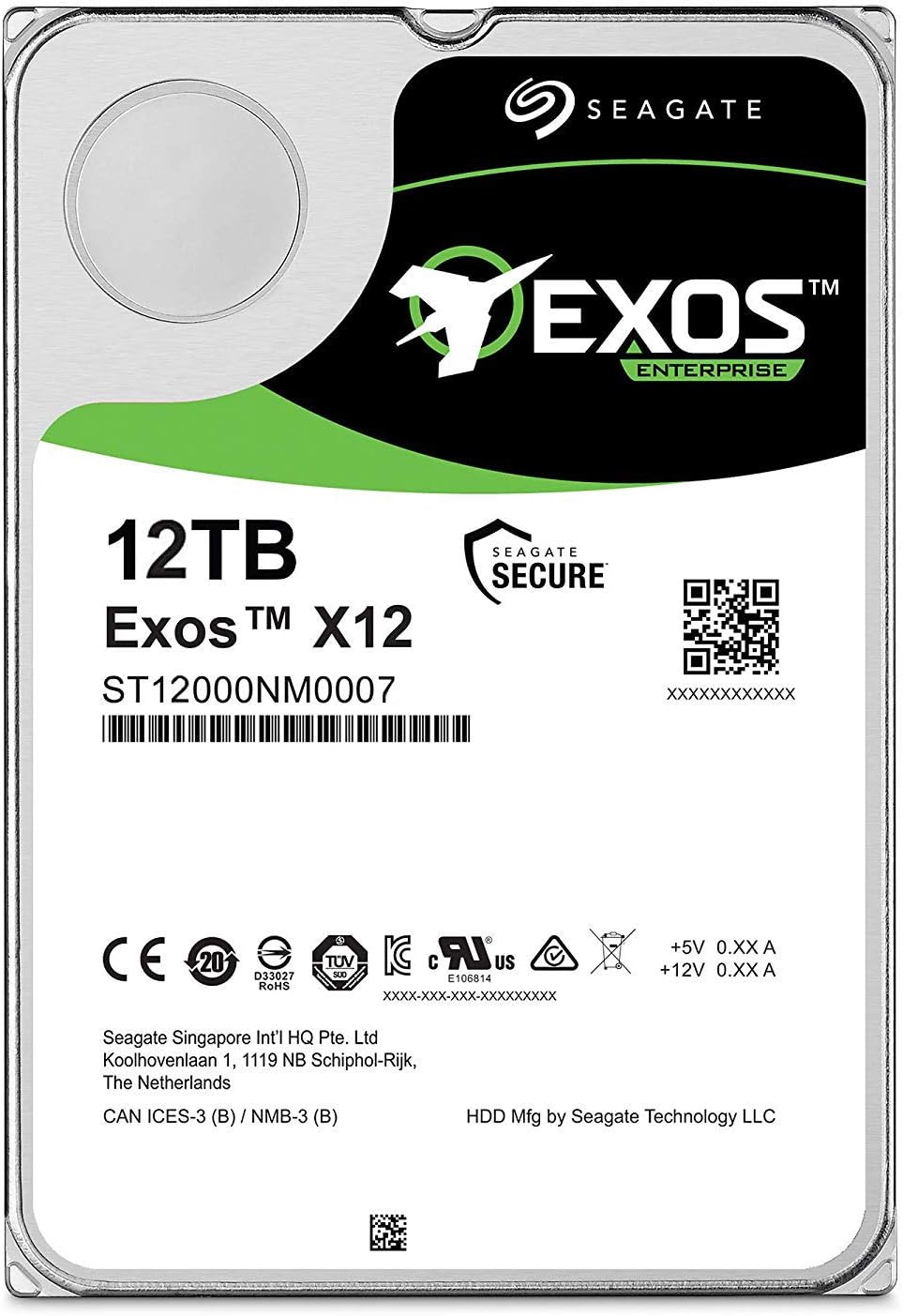
Image 1: Seagate Exos 12TB Internal Hard Drive (ST12000NM0007).
Key Features:
- Supports 12TB of data storage with an easy-to-integrate SATA HDD interface.
- Designed for 24x7 heavy application workloads with high performance.
- Offers customizable power options to optimize total cost of ownership (TCO).
- Advanced Write Caching combined with TurboBoost technology enhances performance and reduces data loss risk during unexpected power events.
- Includes a five-year limited product warranty for long-term assurance.
- Note: The actual available storage capacity may vary.
2. Installation Guide
2.1. Before You Begin
- Ensure your computer or server system is powered off and unplugged from the electrical outlet.
- Wear an anti-static wrist strap to prevent electrostatic discharge (ESD) damage to the drive and other components.
- Consult your system's user manual for specific instructions regarding internal drive installation.
2.2. Physical Installation
- Locate an available 3.5-inch drive bay within your computer or server chassis.
- Carefully slide the Seagate Exos drive into the chosen bay until it is fully seated.
- Secure the drive using the provided screws or the chassis's tool-less mounting mechanism.
2.3. Connecting the Drive
- Connect one end of a SATA data cable to the data port on the Seagate Exos drive and the other end to an available SATA port on your motherboard or Host Bus Adapter (HBA).
- Connect a SATA power cable from your power supply unit (PSU) to the power connector on the drive.
2.4. Initializing and Formatting
- After physical installation, power on your system.
- Access your operating system's disk management utility (e.g., Disk Management in Windows, Disk Utility in macOS, or command-line tools like
fdisk/partedin Linux). - Initialize the new drive. For drives larger than 2TB, it is recommended to use the GUID Partition Table (GPT) partitioning scheme.
- Create one or more partitions on the drive.
- Format the partitions with a file system compatible with your operating system (e.g., NTFS for Windows, HFS+ or APFS for macOS, Ext4 for Linux).
3. Operation
The Seagate Exos 12TB Internal Hard Drive is engineered for continuous 24x7 operation in demanding enterprise and data center environments. Its advanced features, including enhanced caching and TurboBoost, optimize data transfer speeds and overall performance. Ensure your operating system and applications are configured to utilize the drive efficiently for optimal data storage and retrieval.

Image 2: Seagate Exos drives are built for scalable, 24x7 environments.
The drive's responsive design, featuring enhanced caching, allows it to handle random workloads efficiently without performance degradation.
Image 3: Enhanced caching ensures responsive performance for various workloads.
4. Maintenance and Care
- Data Backup: Regularly back up all critical data to another storage device or cloud service to prevent data loss.
- Drive Health Monitoring: Utilize S.M.A.R.T. (Self-Monitoring, Analysis, and Reporting Technology) tools to monitor the drive's health status and anticipate potential issues.
- Cooling: Ensure adequate airflow and cooling within your system to prevent the drive from overheating, which can negatively impact performance and lifespan.
- Disk Checks: Periodically run disk error checking utilities provided by your operating system. For traditional file systems, consider defragmentation if recommended by your OS.
- Proper Shutdown: Always shut down your system properly to avoid data corruption and ensure the drive heads are safely parked.
The drive also features innovative, customizable power options to help manage energy consumption and reduce operational costs.

Image 4: Customizable power options contribute to cost efficiency.
5. Troubleshooting Common Issues
5.1. Drive Not Detected
- Check Connections: Verify that both the SATA data and power cables are securely connected to the drive and the motherboard/PSU.
- BIOS/UEFI Settings: Access your system's BIOS/UEFI settings to ensure the SATA port to which the drive is connected is enabled and that the drive is recognized.
- Cable/Port Swap: If possible, test with different SATA cables and an alternative SATA port on your motherboard.
- Power Supply: Confirm that your power supply unit (PSU) has sufficient wattage to power all connected components, including the new drive.
5.2. Slow Performance
- SATA Speed: Ensure the drive is connected to a SATA 6Gb/s port on your motherboard (if available) and that the SATA cable supports this speed.
- System Resources: Check your system's CPU and RAM usage to ensure they are not bottlenecking drive performance.
- Diagnostics: Run a disk diagnostic tool to check for potential drive issues or errors.
5.3. Unusual Noises (Clicking, Grinding)
- Immediate Backup: If you hear any unusual clicking, grinding, or scraping noises, immediately back up any critical data, as this may indicate an impending drive failure.
- Contact Support: Power down the system and contact Seagate support or your reseller for further assistance.
5.4. Data Corruption
- Stable Power: Ensure your system has a stable power supply. Consider using an Uninterruptible Power Supply (UPS) to protect against power fluctuations.
- Disk Error Checking: Regularly run disk error checking utilities provided by your operating system.
6. Technical Specifications
| Feature | Specification |
|---|---|
| Brand | Seagate |
| Model Number | ST12000NM0007 |
| Digital Storage Capacity | 12 TB |
| Hard Drive Type | Mechanical Hard Disk |
| Hard Drive Form Factor | 3.5 Inches |
| Hard Drive Interface | Serial ATA (SATA) |
| Hard Drive Rotational Speed | 7200 RPM |
| Connectivity Technology | SATA |
| Compatible Devices | Desktop |
| Installation Type | Internal Hard Drive |
| Operating System Compatibility | Windows, Mac, and Linux |
| Item Weight | 1.43 pounds |
| Product Dimensions (LxWxH) | 5.79 x 4.01 x 1.03 inches |
7. Warranty and Support
The Seagate Exos 12TB Internal Hard Drive (ST12000NM0007) is backed by a five-year limited product warranty. This warranty covers defects in materials and workmanship under normal use.
For warranty claims, technical assistance, or further support, please visit the official Seagate support website. When contacting support, please have your purchase receipt and the drive's serial number readily available.
You can find more information and resources by visiting the Seagate Store on Amazon.