
1. Product Overview
The Simfer 4242 is a versatile 42-liter mini oven designed for various cooking needs. It features multiple functions including turbo cooking, yogurt making, frozen food defrosting, and steam cleaning, making it a practical addition to any kitchen.
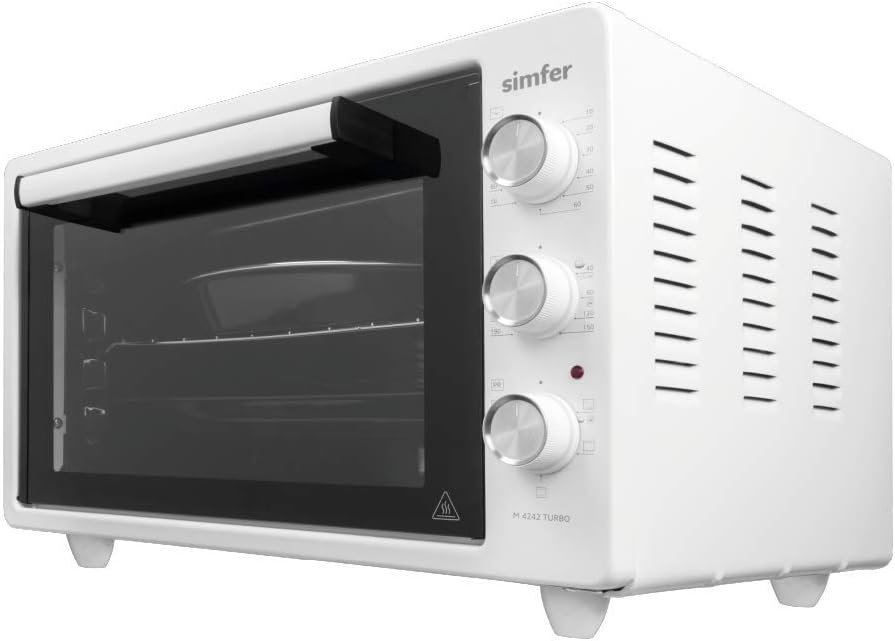
Image 1.1: The Simfer 4242 Mini Oven, showcasing its compact design and control panel on the right side.
Key Features:
- 6 Function Turbo: Provides even heat distribution for optimal cooking results.
- Yogurt Making Feature: Dedicated function for preparing homemade yogurt.
- Frozen Food Defrosting Feature: Safely thaws frozen items.
- Steam Cleaning Feature: Simplifies oven interior cleaning.
- 90-Minute Mechanical Timer: Programmable timer with automatic shut-off.
- Thermostatic Heat Control System: Maintains precise temperature for consistent cooking.
- Accessories: Includes 1 round tray, 1 standard square tray, and 1 specially designed wire rack.
- Oven Interior Lighting: For clear visibility during cooking.
2. Safety Instructions
Please read all safety instructions carefully before using the appliance to prevent personal injury or property damage. Keep this manual for future reference.
- Electrical Safety: Ensure the oven is connected to a grounded outlet with the correct voltage (1300W). Do not use extension cords. Disconnect from power before cleaning or maintenance.
- Hot Surfaces: The oven surfaces become very hot during operation. Always use oven mitts when handling hot trays or food. Keep children and pets away from the appliance.
- Ventilation: Ensure adequate space around the oven for proper ventilation. Do not block any ventilation openings.
- Flammable Materials: Do not store or use flammable materials near the oven.
- Cleaning: Allow the oven to cool completely before cleaning. Do not immerse the appliance in water.
- Supervision: Never leave the oven unattended while in operation.
- Damage: Do not operate the oven if it has a damaged cord or plug, or if it has been dropped or damaged in any way. Contact authorized service personnel for repairs.
- Intended Use: This appliance is for household use only. Do not use it for commercial purposes or outdoors.
3. Components and Controls
Familiarize yourself with the various parts and controls of your Simfer 4242 Mini Oven.

Image 3.1: Front view of the oven, showing the glass door and the internal trays and rack.
Control Panel:

Image 3.2: Close-up of the control panel, indicating the temperature, function, and timer knobs. The yogurt function is highlighted on the middle knob.
- Top Knob (Temperature Control): Used to set the desired cooking temperature.
- Middle Knob (Function Selector): Selects the cooking mode (e.g., Turbo, Yogurt, Defrost, Steam Clean).
- Bottom Knob (Timer): Sets the cooking duration up to 90 minutes. The oven will automatically turn off when the timer expires.
Accessories:

Image 3.3: A close-up of the round enamel tray, featuring a chrome rim for durability and ease of handling.
- Round Tray: Ideal for baking round items or for general cooking.
- Square Tray: Suitable for various dishes and baking.
- Wire Rack: Used for grilling, roasting, or supporting other bakeware.
4. Setup
Unpacking:
- Carefully remove the oven from its packaging.
- Remove all packing materials, including any protective films or stickers from the oven's exterior and interior.
- Check for any damage during transit. If damaged, do not operate and contact customer service.
Placement:
- Place the oven on a stable, flat, heat-resistant surface.
- Ensure there is at least 10-15 cm (4-6 inches) of clear space on all sides and above the oven for proper ventilation.
- Do not place the oven near flammable materials, curtains, or under wall cabinets.
Initial Cleaning:
- Wipe the interior and exterior of the oven with a damp cloth and mild detergent. Dry thoroughly.
- Wash all accessories (trays, wire rack) with warm soapy water, rinse, and dry.
First Use (Burn-in):
- Before cooking food, operate the oven empty for approximately 15-20 minutes at maximum temperature (e.g., 230°C) using the Turbo function.
- This process helps to burn off any manufacturing residues and eliminate initial odors. Ensure the room is well-ventilated during this time.
5. Operating Instructions

Image 5.1: The oven door is open, revealing the internal cavity with the round tray, square tray, and wire rack positioned on different levels.
General Cooking:
- Place food on the appropriate tray or rack.
- Close the oven door securely.
- Turn the Function Selector Knob to the desired cooking mode (e.g., Turbo for general baking/roasting).
- Turn the Temperature Control Knob to set the desired temperature.
- Turn the Timer Knob to set the cooking duration. The oven will begin heating.
- The oven will automatically switch off when the timer reaches zero. A bell sound will indicate completion.
- Carefully remove cooked food using oven mitts.
Specific Functions:
- 6 Function Turbo: This mode utilizes a fan to circulate hot air, ensuring faster and more even cooking. Ideal for baking cakes, cookies, and roasting meats.
- Yogurt Making:
- Prepare your yogurt mixture according to your recipe.
- Place the mixture in suitable containers inside the oven.
- Select the "Yogurt" function on the Function Selector Knob.
- Set the timer for the recommended duration (typically several hours, refer to your recipe). The oven will maintain a low, consistent temperature for fermentation.
- Frozen Food Defrosting:
- Place frozen food on a tray or rack.
- Select the "Defrost" function.
- Set the timer based on the food type and weight. This function uses gentle heat or air circulation to thaw food safely.
- Steam Cleaning: (Detailed instructions in Maintenance section)
6. Maintenance and Cleaning
Regular cleaning and maintenance will ensure the longevity and optimal performance of your oven.
- Always unplug the oven and allow it to cool completely before cleaning.
- Exterior Cleaning: Wipe the exterior surfaces with a soft, damp cloth and mild detergent. Do not use abrasive cleaners or scouring pads.
- Interior Cleaning:
- For light spills, wipe the interior with a damp cloth and mild soap.
- For stubborn stains, use the Steam Cleaning Feature:
- Pour approximately 100-150 ml of water into the bottom of the oven cavity.
- Select the "Steam Clean" function.
- Set the timer for 15-20 minutes.
- Once the cycle is complete and the oven has cooled, wipe the softened grime with a damp cloth.
- Accessories: Wash trays and racks in warm soapy water. Rinse thoroughly and dry before storing or reusing.
- Do not use metal scouring pads or sharp objects to clean the oven interior or accessories, as this can damage the surfaces.
7. Troubleshooting
If you encounter any issues with your oven, refer to the following common problems and solutions:
- Oven does not turn on:
- Check if the power cord is securely plugged into a working electrical outlet.
- Ensure the timer knob is set to a cooking duration and not "OFF".
- Check your household's circuit breaker or fuse box.
- Oven is not heating properly:
- Verify that the temperature knob is set to the desired temperature.
- Ensure the function knob is set to an active heating mode (e.g., Turbo).
- Allow sufficient preheating time.
- Food is cooking unevenly:
- Ensure the oven is placed on a level surface.
- Avoid overcrowding the oven; allow space for air circulation.
- Use the Turbo function for more even heat distribution.
- Excessive smoke or odor during first use:
- This is normal during the initial "burn-in" process. Ensure good ventilation. If it persists after initial use, contact customer support.
If the problem persists after trying these solutions, please contact Simfer customer support.
8. Specifications
| Specification | Detail |
|---|---|
| Brand | Simfer |
| Model Number | 4242 |
| Color | White |
| Product Dimensions (W x D x H) | 44 x 52 x 33 cm |
| Weight | 1.45 Kilogram |
| Capacity | 42 Liters |
| Power/Wattage | 1300 Watts |
| Material | Metal |
| Heating Method | Electric |
| Installation Type | Countertop |
9. Warranty and Support
Simfer products are manufactured with high-quality standards and come with a manufacturer's warranty. For detailed warranty information, please refer to the warranty card included with your product or visit the official Simfer website.
If you require technical assistance, have questions about your product, or need to report a defect, please contact Simfer customer support. Contact details can typically be found on the official Simfer website or on your product's packaging.
When contacting support, please have your product model number (4242) and purchase date available.


