
1. Introduction
Thank you for choosing the TC TASI-8740 Non-Contact Digital Laser Tachometer. This device is designed for accurate measurement of rotational speed (RPM) without physical contact, utilizing laser technology. It features a wide measurement range, high precision, and an LCD display for clear readings. This manual provides essential information for the safe and proper use, setup, maintenance, and troubleshooting of your tachometer.
Please read this manual thoroughly before operating the device and keep it for future reference.
2. Safety Information
- Laser Safety: This device emits a Class II laser. Do not stare directly into the laser beam or direct it at others. Avoid prolonged exposure.
- Battery Safety: Ensure correct battery polarity when installing. Do not mix old and new batteries or different types of batteries. Remove batteries if the device is not used for an extended period.
- Operating Environment: Use the device within the specified operating temperature and humidity ranges. Avoid using in environments with strong electromagnetic interference.
- Maintenance: Do not attempt to disassemble or modify the device. Refer all servicing to qualified personnel.
3. Product Overview
The TASI-8740 tachometer is a portable, handheld device designed for ease of use. It features a clear LCD display, intuitive button controls, and a non-contact laser measurement system.

Figure 3.1: Front, side, and back views of the TASI-8740 tachometer, showing its compact design and battery compartment.
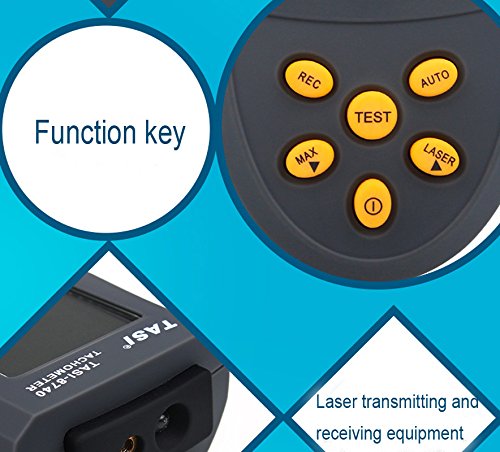
Figure 3.2: Detailed view of the tachometer's function keys (REC, MAX, TEST, AUTO, LASER) and the laser transmitting and receiving equipment.
Key Components:
- LCD Display: 5-digit display for showing RPM readings and status indicators.
- Laser Emitter/Receiver: Located at the top, used for non-contact measurement.
- Function Buttons:
- REC: Record data.
- MAX: Display maximum reading.
- TEST: Initiate measurement.
- AUTO: Automatic measurement mode.
- LASER: Adjust laser power (High/Low).
- Power Button (ⓘ): Turn the device on/off.
- Battery Compartment: Located on the back for 2 AAA batteries.
4. Setup
4.1 Battery Installation
- Locate the battery compartment cover on the back of the tachometer.
- Slide the cover downwards to open.
- Insert two (2) AAA batteries, ensuring correct polarity (+/-) as indicated inside the compartment.
- Replace the battery compartment cover, sliding it upwards until it clicks into place.
4.2 Power On/Off
- To power on the device, press the Power Button (ⓘ). The LCD display will illuminate.
- To power off the device, press and hold the Power Button (ⓘ) for approximately 2 seconds.
- The device features an automatic shutdown function after 30 seconds of inactivity to conserve battery life.
5. Operating Instructions
The TASI-8740 measures rotational speed by detecting reflections from a target surface. For accurate measurements, a reflective tape (not included) should be applied to the rotating object.
5.1 Basic Measurement
- Apply a small piece of reflective tape to the rotating object. Ensure the tape is clean and securely attached.
- Turn on the tachometer by pressing the Power Button (ⓘ).
- Point the laser emitter towards the reflective tape on the rotating object. Maintain a measurement distance between 50mm and 500mm.
- Press and hold the TEST button. The laser will activate, and the RPM reading will appear on the LCD display.
- Release the TEST button to stop measurement. The last reading will remain on the display.
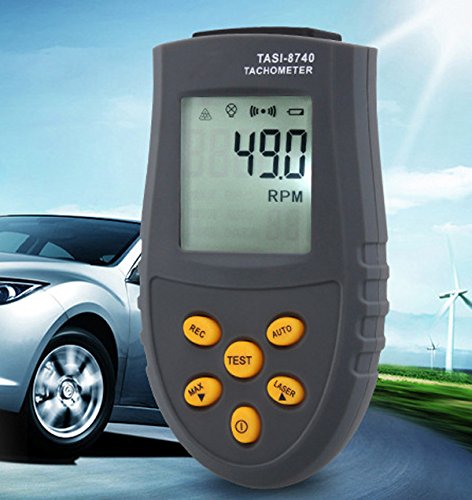
Figure 5.1: The tachometer in use, demonstrating non-contact measurement of a rotating fan blade. The laser beam targets a specific point on the object.
5.2 Data Hold and Recording
- MAX/MIN/AVG: During or after a measurement, press the MAX button to cycle through Maximum, Minimum, and Average RPM readings.
- Automatic Data Recording: The device can automatically record up to 50 sets of data. Press the REC button to activate or deactivate this function. The sampling interval can be adjusted for different measurement requirements. Refer to the on-screen indicators for recording status.
5.3 Laser Power Selection
- Press the LASER button to toggle between high and low laser power modes.
- Use high power for longer measurement distances (up to 500mm) and low power for closer distances (50mm) to protect the user's eyes and conserve battery.
6. Maintenance
- Cleaning: Use a soft, dry cloth to clean the device. Do not use abrasive cleaners or solvents. Keep the laser emitter and receiver lens clean for accurate readings.
- Battery Replacement: When the low battery indicator appears on the LCD, replace both AAA batteries promptly to ensure continued accurate operation.
- Storage: Store the tachometer in a cool, dry place away from direct sunlight and extreme temperatures. Remove batteries if storing for extended periods.
7. Troubleshooting
| Problem | Possible Cause | Solution |
|---|---|---|
| No display or device won't turn on. | Dead or incorrectly installed batteries. | Check battery polarity or replace with new AAA batteries. |
| Inaccurate or unstable readings. |
|
|
| Laser not visible. | Laser power set to low in bright conditions. | Press the LASER button to switch to high power mode. |
8. Specifications
| Feature | Specification |
|---|---|
| Display | 5-digit LCD, Max 99,999 |
| Measurement Range | 2.5 RPM - 99,999 RPM |
| Resolution | 0.1 RPM (2.5 RPM ~ 999.9 RPM) 1 RPM (1000 RPM ~ 99,999 RPM) |
| Accuracy | +/-0.05% rdg + 1 digital |
| Sampling Time | 0.5 seconds (over 120 RPM) |
| Available Measurement Distance | 50 mm - 500 mm |
| Time Base | Quartz Crystal |
| Operating Temperature | 0 ℃ to 50 ℃ (32 ℉ to 122 ℉) |
| Storage Temperature | -20 ℃ to 70 ℃ (-4 ℉ to 158 ℉) |
| Power Supply | 2 x AAA Batteries (not included) |
| Power Consumption | Laser Low Power: approx. 25mA Laser High Power: approx. 40mA |
| Dimensions (L x W x H) | 108 x 60 x 32 mm |
9. Warranty and Support
This product is covered by a standard manufacturer's warranty. For specific warranty details, please refer to the documentation provided at the time of purchase or contact your retailer. For technical support, troubleshooting assistance beyond this manual, or service inquiries, please contact the product manufacturer or your authorized dealer.