Introduction
The Mobiclinic Pro Mobi 3 Anti-Decubitus Mattress is designed to provide effective prevention and treatment for pressure sores (decubitus ulcers) in patients. This system features 17 independent air cells and a quiet compressor, offering alternating pressure therapy to enhance blood circulation, reduce pressure, and minimize friction. It is suitable for patients at medium to high risk of pressure sores, as well as for treating existing sores of Grade I, II, and III.
This manual provides essential information for the safe and efficient setup, operation, and maintenance of your Mobiclinic Pro Mobi 3 mattress system. Please read all instructions carefully before use.
1. Setup Instructions
- Unpacking: Carefully remove all components from the packaging. Verify that all parts are present: the mattress, the compressor unit, and the air hose.
- Placement of Mattress: Place the anti-decubitus mattress directly on top of the existing bed mattress. Ensure the mattress is centered and lies flat on the bed frame. The end with the air hose connectors should be positioned at the foot of the bed.

Image: The Mobiclinic Pro Mobi 3 Anti-Decubitus Mattress correctly positioned on a bed frame, ready for connection.
- Compressor Placement: Place the compressor unit on a stable, flat surface at the foot of the bed, or hang it securely on the bed frame using the integrated hooks. Ensure it is not obstructed and has adequate ventilation.
- Connecting Air Hoses: Connect the air hoses from the mattress to the air outlets on the compressor unit. Ensure a secure and airtight connection.

Image: Close-up of the air hose connection between the mattress and the compressor unit, ensuring a secure fit.
- Power Connection: Plug the compressor's power cord into a grounded electrical outlet.
- Initial Inflation: Turn on the compressor. The mattress will begin to inflate. Allow approximately 20-30 minutes for the mattress to fully inflate and stabilize before placing a patient on it.
- CPR Safety Strap: Familiarize yourself with the CPR safety strap located on the mattress. In an emergency requiring rapid deflation for cardiopulmonary resuscitation, pull this strap firmly to quickly release air from the mattress.
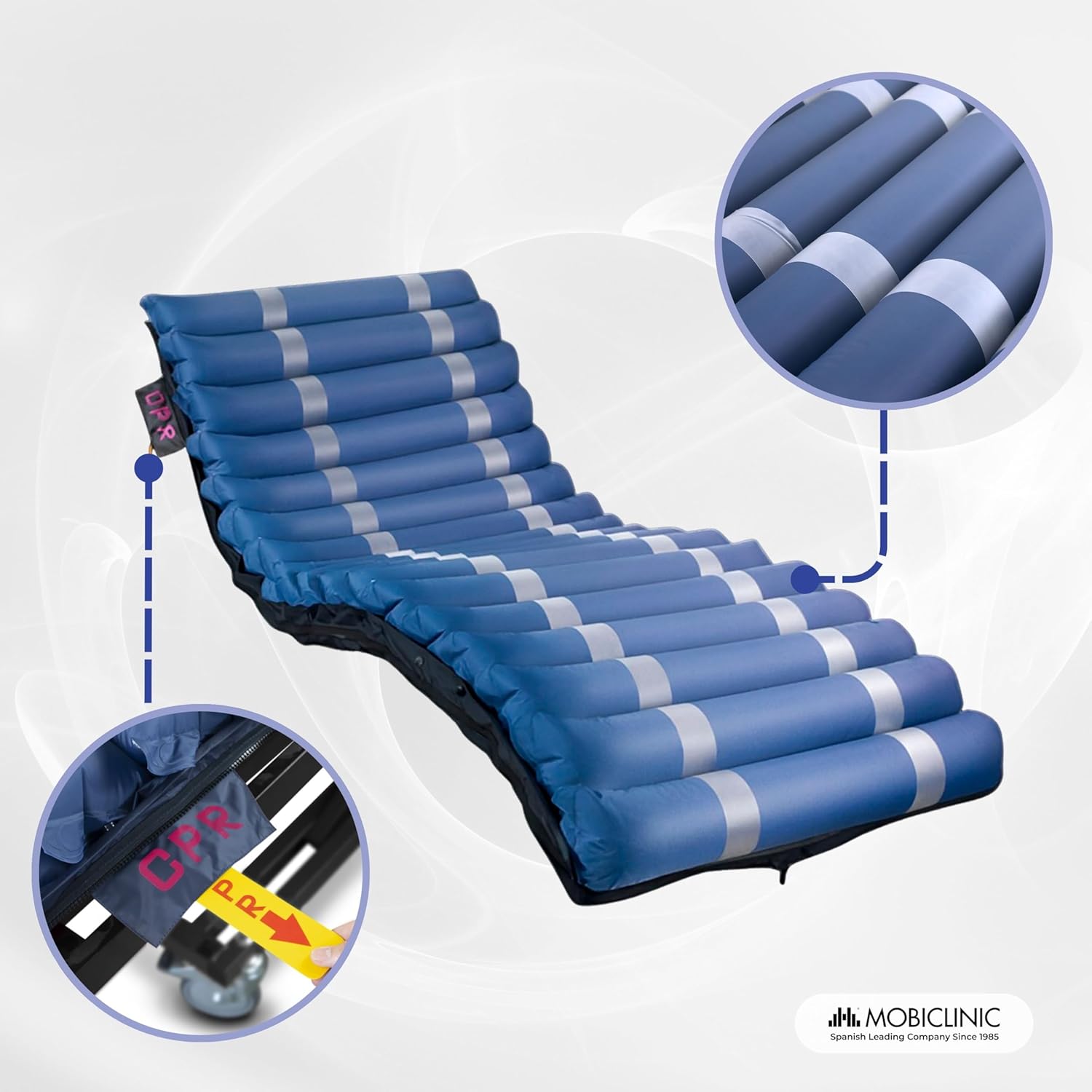
Image: Detail of the red CPR strap, designed for quick deflation in emergency situations.
2. Operating Instructions
The Mobiclinic Pro Mobi 3 compressor offers multiple operating modes to suit patient needs.

Image: The compressor control panel with indicators for power, mode selection, and alarm.
- Power On/Off: Press the power button on the compressor unit to turn it on or off. The power indicator light will illuminate when the unit is active.
- Mode Selection: Use the mode selector dial or button to choose between the following settings:
- Alternate Mode: This is the primary therapeutic mode. The compressor will cyclically inflate and deflate different air cells, providing alternating pressure relief. This mode is recommended for continuous use to prevent and treat pressure sores.
- Static Mode: In this mode, all air cells remain inflated to a constant pressure. This can be used for patient comfort during specific activities or for short periods. The upper cells can be set to remain fixed for additional comfort.
- Pressure Adjustment: Adjust the pressure setting according to the patient's weight and comfort level. Refer to the compressor's dial or digital display for guidance. Start with a moderate setting and adjust as needed to ensure the patient is adequately supported without bottoming out.
- Alarm Function: The compressor is equipped with an alarm system to alert users to potential issues, such as low pressure or power failure. If an alarm sounds, check the connections and power supply. Address the issue promptly.
3. Maintenance
Regular maintenance ensures the longevity and effective operation of your Mobiclinic Pro Mobi 3 mattress system.
- Cleaning the Mattress Cover: The mattress features a removable, water-resistant cover made of PVC fabric. This cover can be machine washed for easy cleaning. Always follow the care instructions on the label. Ensure the cover is completely dry before reattaching it to the mattress.

Image: The mattress with its protective, removable cover, highlighting its ease of cleaning.
- Cleaning the Compressor: Wipe the exterior of the compressor unit with a damp cloth. Do not immerse the compressor in water or use abrasive cleaners. Ensure the air filter (if present) is clean and free of dust.
- Individual Cell Replacement: The mattress is designed with separate air cells that can be individually replaced if damaged. To replace a cell:
- Turn off and unplug the compressor.
- Carefully open the mattress cover to access the internal cells.
- Locate the damaged cell and disconnect it from its connectors.
- Replace with a new, compatible cell, ensuring secure connections.
- Close the mattress cover and restart the compressor.

Image: A hand demonstrating the process of accessing and replacing an individual air cell within the mattress structure.
- Fuse Replacement: The compressor unit includes two fuses for electrical protection. If the unit fails to power on, check and replace the fuses if necessary. Always use fuses of the correct specification.
4. Troubleshooting
| Problem | Possible Cause | Solution |
|---|---|---|
| Compressor does not turn on. | No power, faulty power cord, blown fuse. | Check power outlet and connections. Inspect power cord for damage. Replace fuses if necessary. |
| Mattress does not inflate or inflates slowly. | Air hose disconnected, leak in mattress/hoses, compressor malfunction. | Ensure all air hose connections are secure. Check mattress and hoses for visible damage or leaks. Contact support if compressor is faulty. |
| Compressor is excessively noisy. | Normal operation noise, obstruction, internal issue. | Some noise is normal during operation. Ensure the compressor is on a stable surface and not vibrating against anything. If noise is excessive or unusual, contact support. |
| Alarm sounds. | Low pressure detected, power interruption. | Check all air connections for leaks. Verify power supply. If the issue persists, contact support. |
| Patient "bottoms out" (feels the bed frame). | Insufficient pressure setting, patient weight exceeds capacity. | Increase the pressure setting on the compressor. Ensure the patient's weight does not exceed the maximum capacity of 190 kg. |
5. Product Specifications
| Brand | Mobiclinic |
| Model Number | MB2 (QDC-5080) |
| Color | Blue |
| Mattress Dimensions (L x W x H) | 198 x 86 x 12.8 cm |
| Mattress Material | PVC Fabric |
| Mattress Weight | 2.8 kg |
| Compressor Weight | 5.2 kg |
| Maximum User Weight Capacity | 190 kg |
| Special Features | Water-resistant, Fire-retardant cover, Individual cell replacement, CPR safety strap |
| Care Instructions (Cover) | Machine wash |
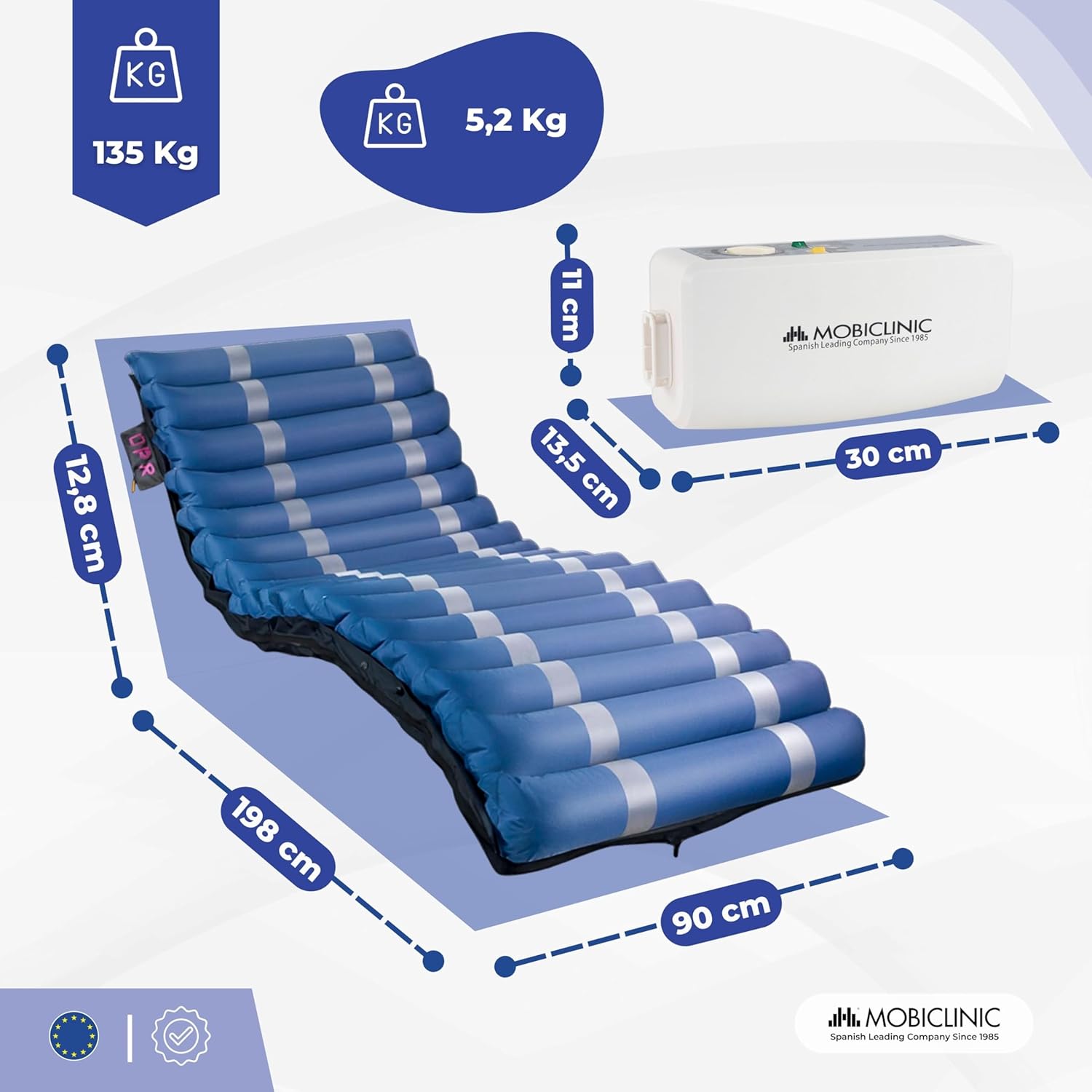
Image: Detailed diagram illustrating the dimensions of the mattress and the weight of the compressor unit.
6. Warranty Information
Mobiclinic S.L. is committed to providing high-quality and reliable products. Specific warranty terms and conditions may vary by region and purchase date. Please refer to your purchase documentation or contact Mobiclinic customer support for detailed warranty information regarding your Mobi 3 Anti-Decubitus Mattress system.
7. Customer Support
For any questions, technical assistance, or to report issues with your Mobiclinic Pro Mobi 3 Anti-Decubitus Mattress, please contact Mobiclinic customer support. Mobiclinic S.L. has been dedicated to quality and reliability since 1985.
Please visit the official Mobiclinic website or refer to your product packaging for the most up-to-date contact information.
- Online Support: Mobiclinic Brand Store on Amazon
- Manufacturer: Mobiclinic


