
1. Product Overview
The Behringer Xenyx QX1204USB Premium 12-Input 2/2-Bus Mixer is a versatile and high-performance audio solution designed for both live performances and professional-quality recordings. It features 4 studio-grade Xenyx Mic Preamps, offering premium sound quality with a 130 dB dynamic range and a bandwidth from below 10 Hz to over 200 kHz. These preamps are known for their transparency and clarity. The mixer also includes intuitive "one-knob" compressors on all mono channels for dynamics control, and "British" channel EQs for warmth and detailed musical character. An integrated KLARK TEKNIK Multi-FX Processor provides 100 world-class presets, including reverb, chorus, flange, delay, and pitch shift, with a 24-bit effects engine, LCD display, dual-parameters, Tap function, and storable user settings. For recording, a built-in USB/audio interface allows seamless connection to a computer.
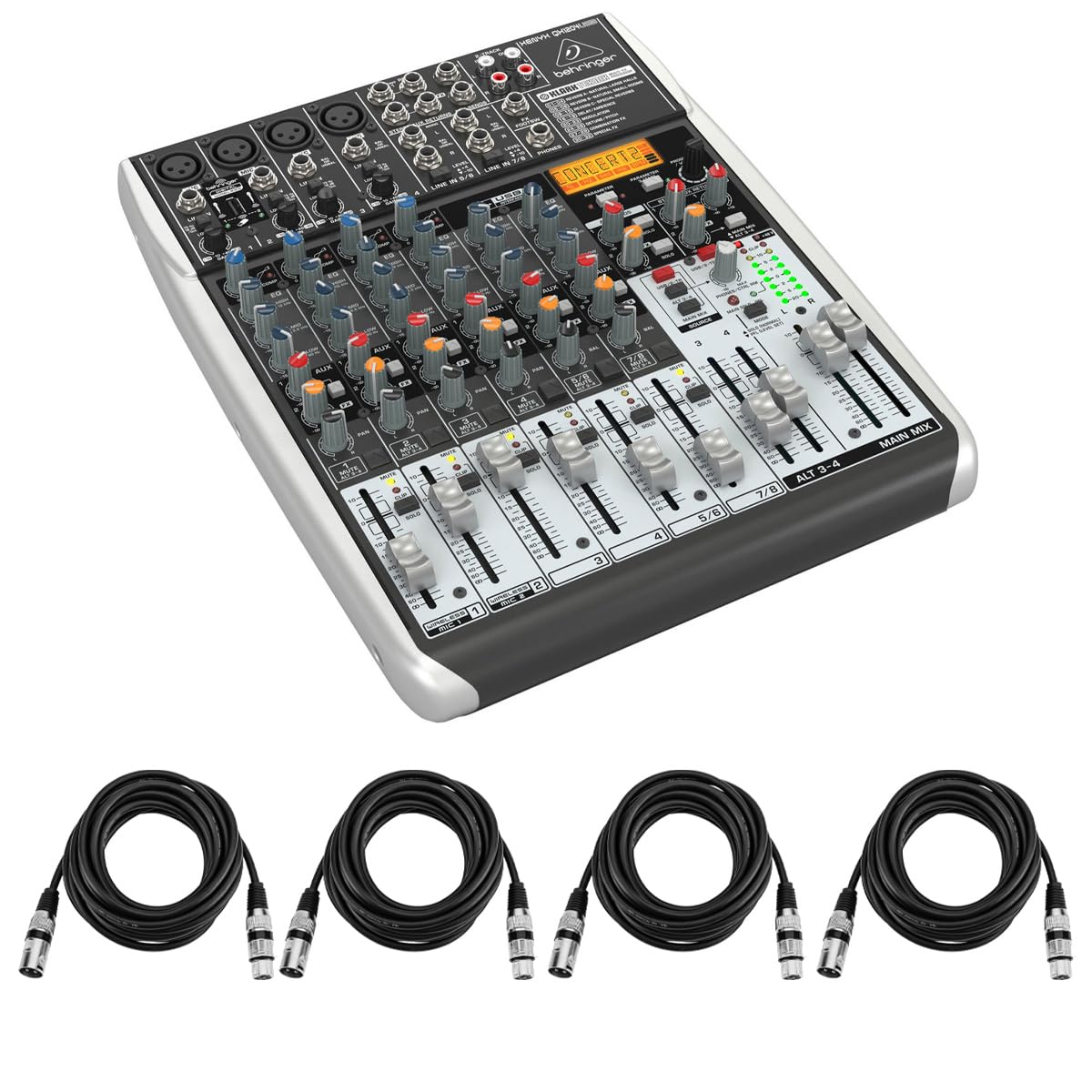
Figure 1: Angled top view of the Behringer Xenyx QX1204USB mixer, showing all controls and inputs.
2. Setup
Proper setup is crucial for optimal performance of your Xenyx QX1204USB mixer. Follow these steps to connect your devices.
2.1 Connecting Microphones and Instruments
- XLR Microphones: Connect your microphones to the XLR inputs (channels 1-4) on the top panel. For condenser microphones requiring phantom power, ensure the +48V phantom power switch (located on the rear panel) is engaged.
- Line-Level Instruments: Connect instruments such as keyboards or guitars (with appropriate preamps) to the 1/4-inch line inputs. Channels 1-4 also accept 1/4-inch inputs, while stereo channels 5/6, 7/8, 9/10, and 11/12 are dedicated for stereo line-level sources.
- Included Cables: The mixer bundle includes 4 H&A Elite Pro 15' XLR Microphone Cables for immediate microphone connectivity.

Figure 2: Close-up of the mixer's top panel, highlighting microphone and line inputs.
2.2 Connecting to a Computer (USB)
- Connect the mixer to your computer using a USB cable (not included). The built-in 2-in/2-out USB/audio interface allows for direct recording and playback of audio.
- Ensure your computer recognizes the mixer as an audio device. Refer to your computer's sound settings for configuration.

Figure 3: Rear panel of the mixer, showing the USB interface port and power input.
2.3 Connecting Output Devices
- Main Outputs: Connect your main speakers or power amplifier to the MAIN OUT (XLR) jacks on the rear panel.
- Headphones: Plug your headphones into the PHONES jack on the top panel for monitoring.
3. Operating Instructions
This section details the operation of the Behringer Xenyx QX1204USB mixer's key features.
3.1 Channel Controls
- Gain: Adjust the input sensitivity for each channel using the GAIN knob to achieve an optimal signal level without clipping.
- Compressor: The "one-knob" compressors on mono channels allow for easy dynamic control. Turn the COMP knob clockwise to increase compression, enhancing punch and clarity.
- Equalizer (EQ): Shape the tone of each channel using the 3-band "British" EQs (HIGH, MID, LOW) for mono channels and fixed 3-band EQs for stereo channels.
- FX Send: Use the FX knob to send a portion of the channel's signal to the internal KLARK TEKNIK Multi-FX Processor.
- Pan/Balance: Adjust the stereo positioning of the channel's signal.
- Level Faders: Control the overall volume of each channel in the main mix.

Figure 4: Detailed view of individual channel controls on the mixer.
3.2 KLARK TEKNIK Multi-FX Processor
- The integrated effects processor offers 100 presets. Use the PROGRAM knob to select an effect.
- Adjust effect parameters using the PARAMETER knobs and the LCD display.
- The TAP function allows for tempo-synced effects.
3.3 USB Audio Interface
- The 2-in/2-out USB interface enables recording the main mix directly to your computer and playing back audio from your computer through the mixer.
- Refer to your Digital Audio Workstation (DAW) software settings for specific recording and playback configurations.
4. Maintenance
To ensure the longevity and optimal performance of your Behringer Xenyx QX1204USB mixer, follow these maintenance guidelines:
- Cleaning: Regularly wipe the mixer's surface with a soft, dry cloth. Avoid using abrasive cleaners or solvents, which can damage the finish and controls.
- Dust Protection: Keep the mixer covered when not in use to prevent dust accumulation, which can affect faders and knobs.
- Environmental Conditions: Operate and store the mixer in a dry environment, away from extreme temperatures, direct sunlight, and high humidity. Avoid placing liquids near the unit.
- Cable Management: Ensure all cables are properly routed and secured to prevent strain on connectors and accidental disconnections.
5. Troubleshooting
If you encounter issues with your Behringer Xenyx QX1204USB mixer, consult the following common troubleshooting tips:
- No Power:
- Ensure the power cable is securely connected to both the mixer and a working power outlet.
- Verify the POWER ON switch on the rear panel is in the 'ON' position.
- No Sound:
- Check all input and output cable connections.
- Ensure channel GAIN and LEVEL faders are set to appropriate levels (not at minimum).
- Verify that the MAIN MIX faders are raised.
- If using condenser microphones, confirm +48V phantom power is engaged.
- Check the volume of connected speakers or headphones.
- Distorted Sound:
- Lower the GAIN and LEVEL settings on channels to prevent clipping (indicated by red CLIP LEDs).
- Check the input source for distortion before it reaches the mixer.
- Ensure all cables are in good condition and properly connected.
- USB Recording/Playback Issues:
- Confirm the USB cable is securely connected.
- Check your computer's sound settings to ensure the mixer is selected as the input/output device.
- Verify your DAW software is configured to use the mixer's USB audio interface.
For more detailed troubleshooting, refer to the complete user manual available on the Behringer website.
6. Specifications
| Feature | Detail |
|---|---|
| Brand | Behringer |
| Model | QX1204USB |
| Number of Channels | 12 |
| Item Weight | 13.02 pounds (5.9 kg) |
| Product Dimensions | 12.99 x 10.43 x 3.54 inches (33 x 26.5 x 9 cm) |
| Noise Level | 130 Decibels (Dynamic Range) |
| Mic Preamps | 4 Xenyx Mic Preamps |
| Compressors | "One-knob" compressors on mono channels |
| EQ | "British" channel EQs |
| Multi-FX Processor | KLARK TEKNIK with 100 presets, 24-bit engine |
| USB Interface | 2-in/2-out USB/Audio Interface |
7. Warranty and Support
The Behringer Xenyx QX1204USB mixer is covered by the manufacturer's warranty. For specific warranty terms, registration, and technical support, please visit the official Behringer website or contact their customer service. Keep your proof of purchase for warranty claims.
For additional support, you may also contact the retailer from whom you purchased the product.