
1. Introduction
The S-Link SL-KB10 is a versatile cable finder and tester designed to identify and troubleshoot various cable types, primarily network (RJ45) and telephone (RJ11) cables. This device helps users quickly determine cable continuity, open circuits, short circuits, and cross-connections, ensuring proper network and communication line functionality. Its compact design and included luxury carrying bag make it a portable and convenient tool for professionals and enthusiasts alike.
2. Package Contents
Please verify that all items are present in your package:
- S-Link SL-KB10 Main Tester Unit
- S-Link SL-KB10 Remote Unit
- Luxury Carrying Bag
- User Manual (this document)
3. Product Overview
The S-Link SL-KB10 consists of two main parts: the main tester unit and a smaller remote unit. The main unit features LED indicators for each wire, a power switch, and test ports. The remote unit has corresponding test ports and is used at the opposite end of the cable being tested.
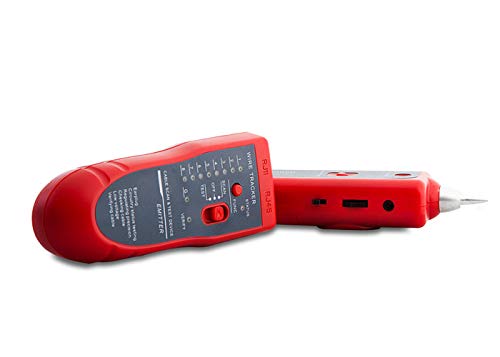
Image showing the S-Link SL-KB10 Cable Finder and Tester, consisting of a main unit and a smaller remote unit, typically used for testing network or telephone cables. The device is red and comes with a carrying case.
4. Setup
4.1. Battery Installation
The S-Link SL-KB10 requires a 9V battery (not included) for operation. To install the battery:
- Locate the battery compartment cover on the back of the main tester unit.
- Slide or unclip the cover to open it.
- Connect a 9V battery to the battery clip, observing correct polarity (+/-).
- Place the battery into the compartment and close the cover securely.
4.2. Connecting Cables
Before testing, ensure the cable is disconnected from all devices and power sources.
- Connect one end of the cable to be tested into the appropriate port (RJ45 or RJ11) on the main tester unit.
- Connect the other end of the cable into the corresponding port on the remote unit.
5. Operating Instructions
5.1. Powering On/Off
Slide the power switch located on the main tester unit to the 'ON' position to power on the device. To power off, slide the switch to the 'OFF' position.
5.2. Performing a Cable Test
Once the cable is connected to both the main and remote units and the device is powered on, the test sequence will begin automatically. The LED indicators on both units will light up sequentially, indicating the status of each wire pair.
- Normal Connection: LEDs on both units will light up in the same sequential order (1-2-3-4-5-6-7-8 for RJ45, 1-2-3-4 for RJ11).
- Open Circuit: If a wire is broken, the corresponding LED on the remote unit will not light up.
- Short Circuit: If two or more wires are shorted, multiple LEDs will light up simultaneously or out of sequence.
- Cross-Connection: If wires are crossed, the LEDs will light up in a different sequence on the remote unit compared to the main unit.
Observe the LED patterns to diagnose the cable's condition.
6. Maintenance
6.1. Cleaning
To clean the device, use a soft, dry cloth. Do not use liquid cleaners or solvents, as these may damage the device's electronics or casing.
6.2. Storage
When not in use, store the S-Link SL-KB10 in its luxury carrying bag. Keep the device in a cool, dry place, away from direct sunlight and extreme temperatures. Remove the battery if the device will not be used for an extended period to prevent leakage.
7. Troubleshooting
- Device not powering on:
Check if the 9V battery is correctly installed and has sufficient charge. Replace the battery if necessary. - Inconsistent or incorrect test results:
Ensure that the cable is securely connected to both the main and remote units. Verify that the cable itself is not visibly damaged. Test with a known good cable to confirm the tester's functionality. - Remote unit LEDs not lighting up:
This typically indicates an open circuit in the cable or a faulty connection to the remote unit. Re-check connections and inspect the cable for breaks.
8. Specifications
| Brand | S-Link |
| Model Number | SL-KB10 |
| Color | Red |
| Product Weight | 0.42 Kilogram |
| Product Dimensions (LxWxH) | 34 x 34 x 34 millimeters |
| Style | Modern |
| Manufacturer | S-Link |
9. Warranty and Support
9.1. Warranty Information
The S-Link SL-KB10 Cable Finder and Tester comes with a 24-month manufacturer's warranty from the date of purchase. This warranty covers defects in materials and workmanship under normal use. Please retain your proof of purchase for warranty claims.
9.2. Customer Support
For technical assistance, warranty service, or further inquiries, please contact your retailer or the S-Link customer support department. Contact information can typically be found on the S-Link official website or on your product packaging.