
Trevi TT 1070 E
User Manual
Trevi TT 1070 E Stereo Turntable System
Model: TT 1070 E | Brand: Trevi
Introduction
The Trevi TT 1070 E is a versatile stereo system designed to provide a comprehensive audio experience. It integrates multiple playback options including a three-speed turntable (33/45/78 RPM), a front-loading CD/MP3 player, a cassette player/recorder with auto-stop, and a digital AM/FM radio. Additionally, it supports audio playback from USB drives and SD cards, features Bluetooth connectivity for wireless streaming, and includes an Aux-In port for external devices. A key feature is its full encoding capability, allowing direct recording from vinyl, CD, cassette, Aux-In, or radio to USB/SD, and cassette recording from vinyl, CD, Aux-In, radio, or Bluetooth. This manual provides detailed instructions for the setup, operation, maintenance, and troubleshooting of your Trevi TT 1070 E system.
Safety Information
- Power Source: Ensure the unit is connected to a power supply within the specified voltage range (110-240V~50/60Hz). Use only the provided 12V 1A power adapter.
- Ventilation: Do not block any ventilation openings. Maintain adequate space around the unit for proper airflow.
- Water and Moisture: Do not expose the unit to rain, moisture, or dripping/splashing liquids. Do not place objects filled with liquids, such as vases, on the unit.
- Heat Sources: Keep the unit away from heat sources such as radiators, heat registers, stoves, or other apparatus (including amplifiers) that produce heat.
- Cleaning: Unplug the unit from the wall outlet before cleaning. Use a dry cloth for cleaning. Do not use liquid cleaners or aerosol cleaners.
- Servicing: Do not attempt to service this product yourself as opening or removing covers may expose you to dangerous voltage or other hazards. Refer all servicing to qualified service personnel.
- Placement: Place the unit on a stable, flat surface to prevent it from falling.
Product Overview
The Trevi TT 1070 E system consists of a main unit and two external speakers, offering a comprehensive audio solution. Below are images illustrating the system and its key components.

Figure 1: The complete Trevi TT 1070 E Stereo Turntable System, showing the central unit with its integrated turntable and the two separate speakers.

Figure 2: A detailed front view of the main unit, highlighting the control panel, display, and various input slots.
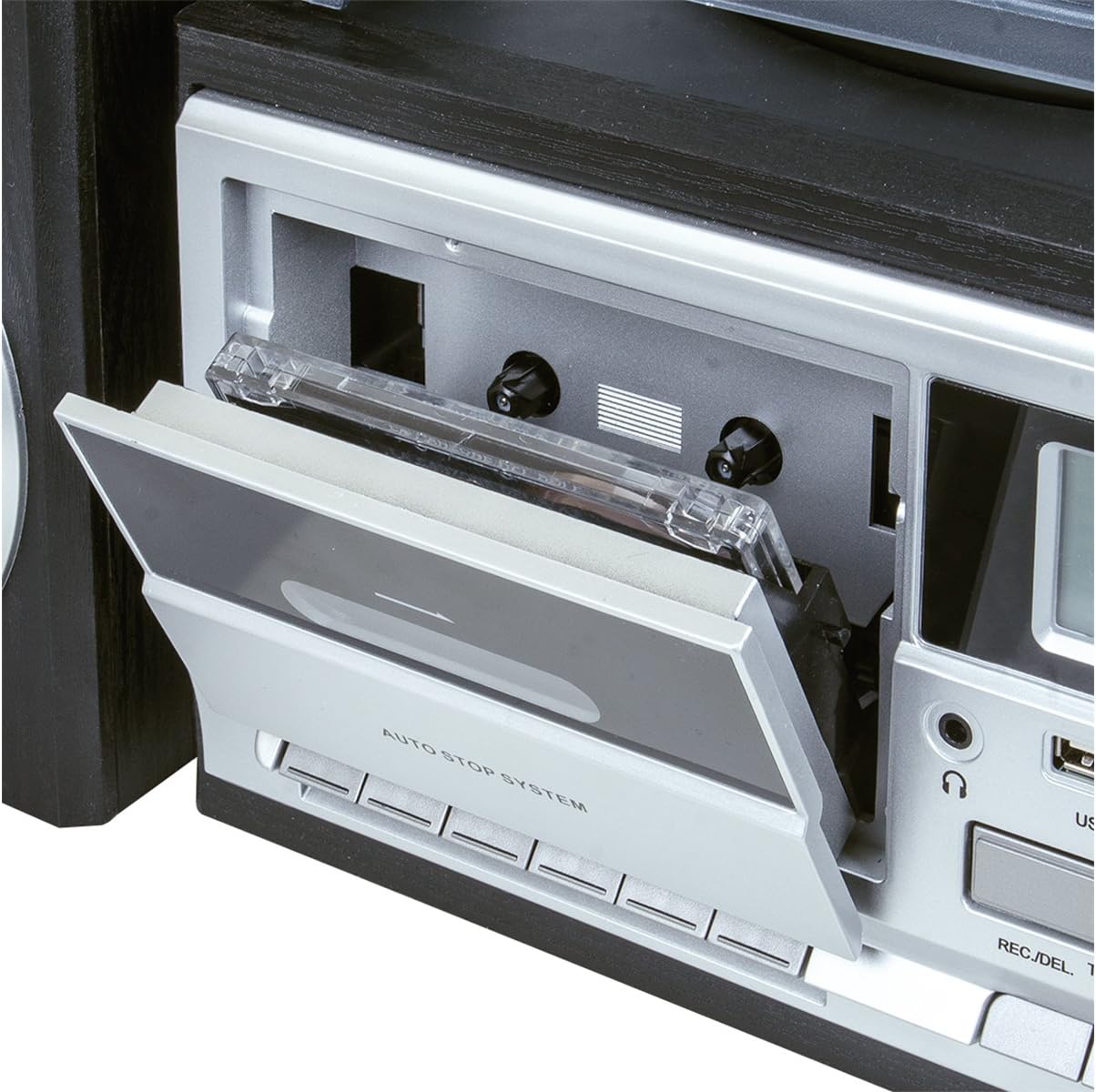
Figure 3: A close-up view of the cassette deck, showing the open tray for tape insertion and the 'AUTO STOP SYSTEM' label.

Figure 4: The motorized front-loading CD tray extended with a compact disc placed on it, ready for playback.

Figure 5: A detailed shot of the SD card slot located on the front panel, showing an SD card partially inserted.

Figure 6: A close-up of the USB port on the front panel, demonstrating a USB flash drive connected for media playback or recording.

Figure 7: The full-function remote control, providing convenient access to all system features from a distance.
Setup
- Unpacking: Carefully remove all components from the packaging. Retain the packaging materials for future transport or storage. Ensure all listed components (main unit, two speakers, remote control, power adapter, instruction manual, warranty certificate) are present.
- Speaker Connection: Connect the two external speakers to the speaker output terminals on the rear of the main unit. Ensure correct polarity (positive to positive, negative to negative) for optimal sound quality. The speakers are designed with bass reflex for enhanced audio.
- Power Connection: Insert the DC plug of the provided 12V 1A power adapter into the DC IN jack on the back of the main unit. Plug the AC end of the adapter into a standard wall outlet (110-240V~50/60Hz).
- Initial Power On: Press the STANDBY button on the unit or remote control to turn on the system. The display will illuminate.
Operating Instructions
General Controls
- Power/Standby: Press the STANDBY button to turn the unit on or off.
- Volume Control: Rotate the VOLUME/STANDBY knob or use the VOLUME +/- buttons on the remote to adjust the sound level.
- Function Selection: Press the FUNCTION button on the unit or remote to cycle through available modes: PHONO (Turntable), CD, USB, SD, TAPE (Cassette), AUX, BT (Bluetooth), TUNER (Radio).
Turntable Operation (PHONO)
- Select the PHONO function.
- Place a vinyl record on the turntable platter.
- Select the appropriate speed (33, 45, or 78 RPM) using the speed selector switch. For 45 RPM records, place the included adapter on the spindle.
- Gently lift the tonearm using the cueing lever and position the stylus over the desired track of the record. Lower the tonearm slowly onto the record.
- The turntable features an auto-stop function, which will stop the platter rotation when the record finishes.
CD/MP3 Player Operation
- Select the CD function.
- Press the OPEN/CLOSE button to open the motorized CD tray.
- Place a CD or MP3 CD onto the tray with the label side facing up.
- Press the OPEN/CLOSE button again to close the tray. The unit will read the disc and begin playback automatically or display the number of tracks.
- Use the PLAY/PAUSE, STOP, SKIP (forward/backward) buttons to control playback.
Cassette Player/Recorder Operation (TAPE)
- Select the TAPE function.
- Press the EJECT button to open the cassette deck. Insert a cassette tape with the open side facing inwards. Close the deck.
- Press the PLAY button to begin playback. Use the FAST FORWARD, REWIND, and STOP buttons for control. The auto-stop system will stop playback at the end of the tape.
- To record, ensure a blank cassette is inserted. Select the desired source (PHONO, CD, AUX, TUNER, BT) and press the RECORD button on the unit. Play the source audio to begin recording onto the cassette.
USB/SD Playback
- Insert a USB flash drive into the USB port or an SD card into the SD card slot.
- Select the USB or SD function. The unit will automatically detect and begin playing compatible audio files (e.g., MP3).
- Use the PLAY/PAUSE, STOP, SKIP (forward/backward) buttons to control playback. Use the ALBUM/PRESET buttons to navigate folders or albums.
Bluetooth Connectivity (BT)
- Select the BT function. The unit will enter pairing mode, indicated by a flashing Bluetooth icon on the display.
- On your Bluetooth-enabled device (smartphone, tablet, etc.), enable Bluetooth and search for available devices.
- Select "TREVI TT 1070 E" from the list of devices. Once paired, the Bluetooth icon will stop flashing.
- You can now stream audio wirelessly from your device to the Trevi TT 1070 E system.
AM/FM Radio Operation (TUNER)
- Select the TUNER function.
- Press the BAND button to switch between AM and FM bands.
- Press and hold the TUNER SCAN button to automatically scan and store available stations.
- Use the PRESET UP/DOWN buttons to navigate through stored stations.
Aux-In Connection
- Connect an external audio device (e.g., MP3 player, smartphone) to the AUX IN port on the front panel using a 3.5mm audio cable (not included).
- Select the AUX function.
- Play audio from your connected device. The sound will be output through the Trevi TT 1070 E speakers.
Headphone Output
Connect headphones to the headphone jack on the front panel for private listening. When headphones are connected, sound will be muted from the main speakers.
Full Encoding Function (Recording)
The Trevi TT 1070 E allows you to record audio from various sources directly to a USB drive or SD card. You can also record to cassette from certain sources.
- Recording to USB/SD:
- Insert a USB drive or SD card with sufficient free space.
- Select the desired source: PHONO, CD, TAPE, AUX, or TUNER.
- Begin playback of the source audio.
- Press the REC. button on the unit or remote. Recording will begin.
- Press the STOP button to end recording. The recorded file will be saved on the USB/SD media.
- Recording to Cassette:
- Insert a blank cassette tape into the cassette deck.
- Select the desired source: PHONO, CD, AUX, TUNER, or BT.
- Begin playback of the source audio.
- Press the RECORD button on the cassette deck. Recording will begin onto the cassette.
- Press the STOP button on the cassette deck to end recording.
Maintenance
- Cleaning the Unit: Disconnect the power before cleaning. Use a soft, dry cloth to wipe the exterior surfaces. Do not use abrasive cleaners, waxes, or solvents.
- Turntable Stylus Care: Handle the stylus (needle) with extreme care. Clean it periodically with a soft brush, brushing from back to front. Replace the stylus if sound quality deteriorates significantly.
- CD Lens Cleaning: If CD playback issues occur, use a specialized CD lens cleaner disc (not included).
- Cassette Head Cleaning: Regularly clean the cassette heads, pinch rollers, and capstans with a cotton swab lightly dampened with isopropyl alcohol to ensure optimal recording and playback quality.
- Dust Cover: Keep the turntable dust cover closed when not in use to protect the platter and tonearm from dust and debris.
Troubleshooting
If you encounter issues with your Trevi TT 1070 E system, please refer to the following table for common problems and their solutions.
| Problem | Possible Cause | Solution |
|---|---|---|
| No power | Power cord not connected; outlet not active | Ensure power cord is securely plugged into the unit and a working wall outlet. |
| No sound from speakers | Volume too low; wrong function selected; speakers not connected; headphones connected | Increase volume. Select correct function. Check speaker connections. Disconnect headphones. |
| Vinyl skipping or distorted sound | Record dirty/damaged; stylus dirty/worn; unit not level; excessive vibration | Clean record. Clean or replace stylus. Place unit on a stable, level surface away from vibrations. |
| CD player noise or skipping | CD dirty/scratched; lens dirty | Clean CD with a soft cloth. Use a CD lens cleaner. Try a different CD. |
| Cassette recording quality is poor | Cassette heads dirty; tape quality is low | Clean cassette heads. Use a new, high-quality cassette tape. |
| Low volume from Aux-In or Bluetooth | Volume on source device is low; incorrect cable/pairing | Increase volume on both the Trevi unit and the connected source device. Ensure proper cable connection or successful Bluetooth pairing. |
| Turntable auto-stop not functioning correctly | Specific record type; mechanism issue | Some records, especially older or non-standard ones, may not trigger the auto-stop. If the issue persists with multiple standard records, contact support. |
Specifications
| Feature | Detail |
|---|---|
| Brand | Trevi |
| Model | TT 1070 E |
| Dimensions (Product) | 37 x 45 x 20 cm |
| Weight (Product) | 4.8 kg |
| Power Supply | 12V 1A (with 110-240V~50/60Hz adapter) |
| Max Output Power | 25W |
| Audio Output Mode | Stereo |
| Turntable Speeds | 33 / 45 / 78 RPM |
| CD Player | Front-loading CD-MP3 player |
| Cassette Player/Recorder | Yes, with auto-stop |
| Digital Media Playback | USB / SD card reader |
| Radio Tuner | Digital PLL AM/FM with preset memories |
| Connectivity | Bluetooth, AUX-In, USB |
| Headphone Jack | Yes |
| Encoding Function | Full encoding from Vinyl / CD / Cassette / AUX-In / Radio to USB/SD. Cassette recording from Vinyl / CD / AUX-In / Radio / BT. |
| Included Components | Warranty certificate, instruction manual |
Warranty and Support
Your Trevi TT 1070 E Stereo Turntable System comes with a warranty certificate. Please refer to this document for detailed information regarding the warranty period, terms, and conditions. In case of any issues not covered by the troubleshooting section, or for service and repair inquiries, please contact Trevi customer support. Contact information can typically be found on the warranty certificate or the official Trevi website.
For further assistance, you may visit the official Trevi website or contact their customer service department. Keep your purchase receipt and warranty certificate handy when seeking support.
Related documentsTT 1070 E


Ask a question about this manual
Ask about setup, troubleshooting, compatibility, parts, safety, or missing instructions. Manuals+ will review the question and use this page’s manual context to help answer it.