
1. Introduction
This manual provides comprehensive instructions for the installation, configuration, and operation of the MENGQI-CONTROL 4-Door TCP/IP Access Control System. This system is designed for secure entry management across up to four doors, utilizing waterproof keypads, ANSI heavy-duty electric strike locks, and RFID technology. It supports remote management via software and smartphone applications, offering robust control over access permissions and event logging.

Figure 1.1: Overview of the MENGQI-CONTROL 4-Door Access Control System components.
2. Product Components
The MENGQI-CONTROL 4-Door Access Control System package includes the following main components:
- 1 x Power Supply Box: 110-240V input, 5A output, powers the entire system and houses the control board.
- 1 x 4-Door Wiegand Access Controller: The central processing unit for managing door access.
- 4 x ANSI Strike Locks: Heavy-duty electric strike locks (1000kg force), configurable for fail-secure (locked on power failure) or fail-safe modes. Designed for use with existing knob or mechanical locks.
- 4 x RFID Keypad/PIN Pad Readers: Waterproof units supporting card, PIN, or card+PIN access.
- 1 x Wired Door Bell: For visitor notification.
- 1 x RFID Enroll USB Reader: For easy registration of user cards/fobs into the software.
- 50 x RFID Keychains: For user access.
- 50 x RFID Cards: For user access.

Figure 2.1: The 4-Door Wiegand Access Controller board.

Figure 2.2: The system's power supply box.

Figure 2.3: A waterproof RFID metal keypad reader.
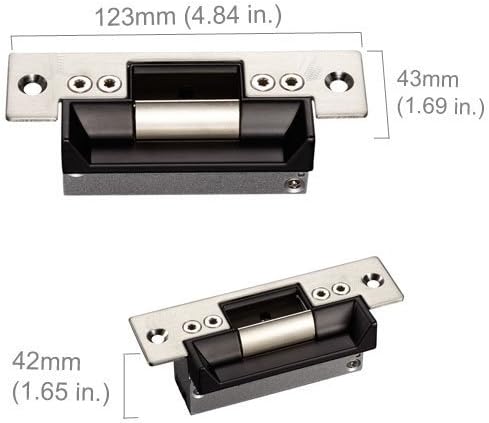
Figure 2.4: Dimensions of the ANSI electric strike lock.
3. Setup and Installation
3.1. Strike Lock Installation
The ANSI electric strike lock is designed for installation within your door frame. It is crucial to ensure the lock length (4.84 inches) is suitable for your door before proceeding. Cutting the door frame may be necessary if no existing hole is present. These locks are intended for use with knob locks or mechanical locks that have a handle, not for push bars.

Figure 3.1: Diagrams illustrating strike lock installation in hollow metal and wooden door frames.

Figure 3.2: Step-by-step visual guide for strike lock installation.

Figure 3.3: An example of a properly installed strike lock within a door frame.
3.2. Wiring Instructions
Proper wiring is essential for the system's functionality. Refer to the detailed wiring diagram provided with your product. The following video demonstrates the wiring process for the keypad reader and strike lock:
Video 3.1: Wiring instructions for the Waterproof Metal Keypad Reader and Strike Lock. This video demonstrates how to connect the reader and lock to the access control board.
3.3. Software Installation and Configuration
The system communicates via TCP/IP and requires professional management software for full functionality. The software supports Access & SQL Server databases and is compatible with Windows 7/8/10/11 (both 32 & 64-bit). After initial programming, the system operates independently without continuous network connection or a computer hookup.
Use the included RFID Enroll USB Reader to register user cards and key fobs into the software for easy programming.

Figure 3.4: The RFID USB Enroll Reader for registering user credentials.
4. Operating Instructions
The MENGQI-CONTROL Access Control System offers various methods for secure door access and comprehensive management features.
4.1. Access Methods
Users can gain entry through the waterproof keypad readers using:
- RFID Card: Swipe an authorized RFID card or key fob.
- PIN: Enter a valid Personal Identification Number on the keypad.
- Card + PIN: A combination of both RFID card swipe and PIN entry for enhanced security.
To exit, simply turn the handle or knob of the mechanical lock.

Figure 4.1: An RFID key fob used for access.

Figure 4.2: RFID cards used for access.
4.2. System Management Features
The professional management software enables:
- User Capacity: Supports up to 20,000 users and stores up to 100,000 entry records.
- Entry Record Management: Check, download, and export detailed history entry records, including who opened which door at what time.
- Authorized Access Control: Define specific access permissions, allowing certain users or groups to enter particular doors at pre-set times (e.g., during business hours).
- Time-Based Automation: Configure doors to auto-open or auto-close at specific times (e.g., main door auto-opens at 9:00 AM and closes at 5:30 PM on weekdays).
- Remote Access: Utilize a smartphone app (iOS/Android) to open locks remotely.
For a visual demonstration of the system's features and operation, refer to the following video:
Video 4.1: Overview of the MENGQI-CONTROL 4-Door Access Control System features and operation, including user management and time-based access.
5. Maintenance
To ensure the longevity and optimal performance of your MENGQI-CONTROL Access Control System, consider the following maintenance guidelines:
- Regular Cleaning: Periodically clean the keypad readers with a soft, damp cloth. Avoid abrasive cleaners or solvents.
- Software Updates: Keep the management software updated to the latest version to benefit from new features and security enhancements.
- Power Supply Check: Ensure the power supply box is in a well-ventilated area and free from obstructions. Consider adding a 12V battery backup for uninterrupted operation during power outages.
- Cable Integrity: Periodically inspect all wiring for any signs of wear, damage, or loose connections.
- Lock Mechanism: Ensure the strike locks operate smoothly. Lubricate moving parts if necessary, using a non-corrosive lubricant.
6. Troubleshooting
If you encounter issues with your access control system, consider the following basic troubleshooting steps:
- No Power: Check the power supply box and all power connections. Ensure the 110-240V input is active.
- Keypad Unresponsive: Verify the keypad's wiring connections to the control board. Ensure the keypad is receiving power.
- Lock Not Engaging/Disengaging: Check the wiring to the strike lock. Ensure the lock mechanism is free from obstructions and properly aligned with the door latch. Verify the lock's fail-secure/fail-safe mode setting.
- RFID Card/Fob Not Working: Ensure the card/fob is properly registered in the system software using the USB enroll reader. Check the proximity range of the keypad reader (5-10cm).
- Software Connectivity Issues: Verify TCP/IP network connection to the control board. Check firewall settings on the computer running the management software.
- Remote App Issues: Ensure your smartphone has an active internet connection and the app is updated. Verify the system's network configuration allows for remote access.
For more complex issues or if troubleshooting steps do not resolve the problem, please contact customer support.
7. Specifications
| Feature | Specification |
|---|---|
| Brand | MENGQI-CONTROL |
| Model Number | 4 door panel keypad-ansi strike w |
| Power Source | DC (110-240V AC input to power box) |
| Voltage | 110 volts_of_alternating_current (for power box input) |
| Connectivity Technology | TCP/IP, USB (for enroll reader) |
| Control Method | App, Keypad, RFID Card/Fob |
| Compatible Devices | Smartphone (iOS, Android) |
| User Capacity | 20,000 users |
| Record Capacity | Up to 100,000 records |
| Keypad Reader Type | Waterproof Metal Keypad, EM-ID card compatible |
| Keypad Response Speed | Less than 0.2 seconds |
| Keypad Proximity Range | 5-10 cm |
| Strike Lock Force | 1000kg (2200 lbs) |
| Strike Lock Mode | Fail-secure (default), adjustable to Fail-safe |
| Software Compatibility | Win7/Win8/Win10/Win11 (32 & 64 bit), Access & SQL Server |
8. Warranty
Please refer to the product packaging or your purchase documentation for specific warranty information. Generally, products are covered against manufacturing defects for a specified period from the date of purchase. Keep your proof of purchase for warranty claims.
9. Support
MENGQI-CONTROL is committed to providing excellent customer support. If you require assistance with installation, configuration, or troubleshooting, please utilize the following resources:
- Detailed Video Guides: Comprehensive video tutorials are available to assist with various aspects of system setup and operation.
- Wire Diagrams: A detailed wire diagram is included with your product to guide you through the connection process.
- Live Support: Contact our support team for live assistance. Refer to the contact information provided with your product or on the official MENGQI-CONTROL website.
We recommend reviewing all provided video guides and wire diagrams before attempting installation or configuration.