
1. Introduction
This manual provides essential instructions for the safe and efficient operation, maintenance, and troubleshooting of your Rovin Rechargeable Air Pump. Please read this manual thoroughly before using the product and retain it for future reference.
2. Safety Instructions
- Always keep the air pump away from water and moisture. Do not operate in wet conditions.
- Do not allow children to operate the air pump without adult supervision.
- Ensure the correct nozzle is used for the item being inflated to prevent over-inflation and damage.
- Do not block the air intake or outlet during operation.
- Avoid continuous operation for extended periods to prevent overheating. Allow the pump to cool down between uses if necessary.
- Store the pump in a cool, dry place when not in use.
- Use only the charging cable provided or recommended by the manufacturer.
3. Package Contents
Verify that all items are present in the package:
- Rovin Rechargeable Air Pump
- Charging Cable
- Assorted Nozzles (typically 3 different sizes)
- User Manual (this document)
4. Product Overview
Familiarize yourself with the components of your Rovin Rechargeable Air Pump:
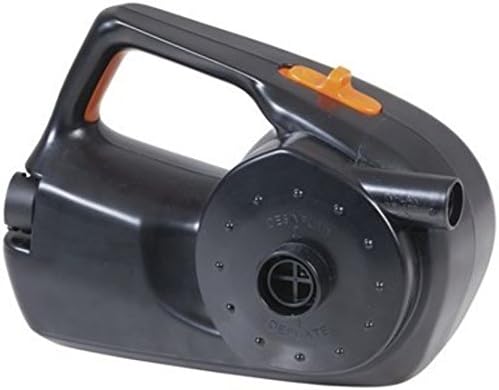
Image 1: Rovin Rechargeable Air Pump. This image displays the black-colored air pump from a top-down, slightly angled perspective. It features a prominent handle on top, an orange power switch located on the handle, and two ports on the front face: one for inflation (labeled 'INFLATE') and one for deflation (labeled 'DEFLATE'). The main body is compact and designed for portability.
- Handle: Ergonomically designed for easy carrying.
- Power Switch: Located on the handle, typically orange, to turn the pump on/off.
- Inflation Port: Where air is expelled for inflation.
- Deflation Port: Where air is drawn in for deflation.
- Charging Port: (Not visible in image, but implied for rechargeable device) For connecting the charging cable.
5. Setup
- Charge the Pump: Before first use, fully charge the air pump. Refer to the "Charging Instructions" section.
- Select Nozzle: Choose the appropriate nozzle size for the item you intend to inflate or deflate.
- Attach Nozzle: Firmly insert the selected nozzle into the desired port (inflation or deflation).
6. Charging Instructions
To charge your Rovin Rechargeable Air Pump:
- Locate the charging port on the air pump.
- Connect the charging cable to the pump's charging port.
- Plug the other end of the charging cable into a suitable power source (e.g., USB wall adapter, car charger).
- An indicator light (if present) will typically show the charging status. Refer to the product packaging for specific light indications.
- Allow the pump to charge completely before first use or when the battery is low. Charging time may vary.
7. Operating Instructions
7.1. Inflation
- Ensure the correct nozzle is attached to the inflation port.
- Insert the nozzle firmly into the valve of the item to be inflated.
- Press the power switch to turn on the pump.
- Monitor the inflation process to prevent over-inflation.
- Once the desired firmness is reached, turn off the pump and remove the nozzle.
7.2. Deflation
- Ensure the correct nozzle is attached to the deflation port.
- Insert the nozzle firmly into the valve of the item to be deflated.
- Press the power switch to turn on the pump.
- Allow the pump to draw air out until the item is sufficiently deflated.
- Once deflation is complete, turn off the pump and remove the nozzle.
8. Maintenance
- Cleaning: Wipe the exterior of the pump with a soft, dry cloth. Do not use abrasive cleaners or immerse the pump in water.
- Storage: Store the pump and its accessories in a clean, dry environment, away from direct sunlight and extreme temperatures.
- Battery Care: For optimal battery life, avoid fully discharging the battery frequently. Charge the pump periodically if it is not used for extended periods.
9. Troubleshooting
| Problem | Possible Cause | Solution |
|---|---|---|
| Pump does not turn on. | Battery is discharged. | Charge the pump fully. |
| Pump does not turn on. | Power switch is not engaged. | Ensure the power switch is firmly pressed to the 'ON' position. |
| Low air flow. | Battery is low. | Recharge the pump. |
| Low air flow. | Air intake/outlet blocked. | Check and clear any obstructions from the intake and outlet ports. |
| Pump overheats. | Continuous operation for too long. | Turn off the pump and allow it to cool down for at least 15-20 minutes before resuming use. |
10. Specifications
- Model: Rechargeable Air Pump
- Power Source: Battery Powered
- ASIN: B07D553VY6
- Date First Available: March 18 2024
11. Warranty and Support
For warranty information or technical support, please refer to the product packaging or contact Rovin customer service through their official website or the retailer from whom the product was purchased. Please have your purchase receipt and product model information ready when contacting support.