
1. Introduction
The JJC ALC-G1XM3 Auto Self-Retaining Lens Cap is specifically designed for the Canon PowerShot G1X Mark III camera. This innovative lens cap features an ultra-slim design and easily screws onto the camera lens. Its unique mechanism allows the three protective leaves to open and close automatically as the lens extends or retracts, eliminating the need to manually remove or attach the cap before and after shooting.
This product offers enhanced convenience and protection, safeguarding your valuable camera lens from dust, moisture, and scratches. Furthermore, it is engineered to prevent vignetting across the entire zoom range and can also function as a lens hood to minimize stray light interference.
Key Features:
- Specially designed for Canon PowerShot G1X Mark III camera.
- The 3 leaves of the lens cap open and close automatically.
- No need to remove the cap when shooting.
- Protects your lens from dust, moisture, and scratches.
- Ensures no vignetting is caused during use.

Figure 1.1: The JJC ALC-G1XM3 Auto Self-Retaining Lens Cap in its closed state.
2. Setup and Installation
Installing the JJC ALC-G1XM3 lens cap is a straightforward process. Ensure your camera is powered off before installation.
- Locate the filter threads on the front of your Canon PowerShot G1X Mark III lens.
- Align the JJC ALC-G1XM3 lens cap with the lens threads.
- Gently screw the lens cap onto the lens in a clockwise direction until it is securely fastened. Do not overtighten.
- Once installed, the lens cap should sit flush with the camera body and lens barrel.

Figure 2.1: Side view of the JJC ALC-G1XM3 lens cap properly installed on the Canon PowerShot G1X Mark III camera.
3. Operating Instructions
The primary advantage of the JJC ALC-G1XM3 lens cap is its automatic operation, which integrates seamlessly with your camera's lens extension mechanism.
- When you power on your Canon PowerShot G1X Mark III camera, the lens will extend. As the lens extends, the three leaves of the ALC-G1XM3 lens cap will automatically open, allowing for immediate shooting without manual intervention.
- When you power off your camera, the lens will retract. Concurrently, the three leaves of the lens cap will automatically close, providing instant protection for the lens.
- This automatic function ensures that your lens is always protected when not in use and ready for shooting the moment your camera is powered on.

Figure 3.1: The lens cap in its closed position when the camera is off or lens is retracted.
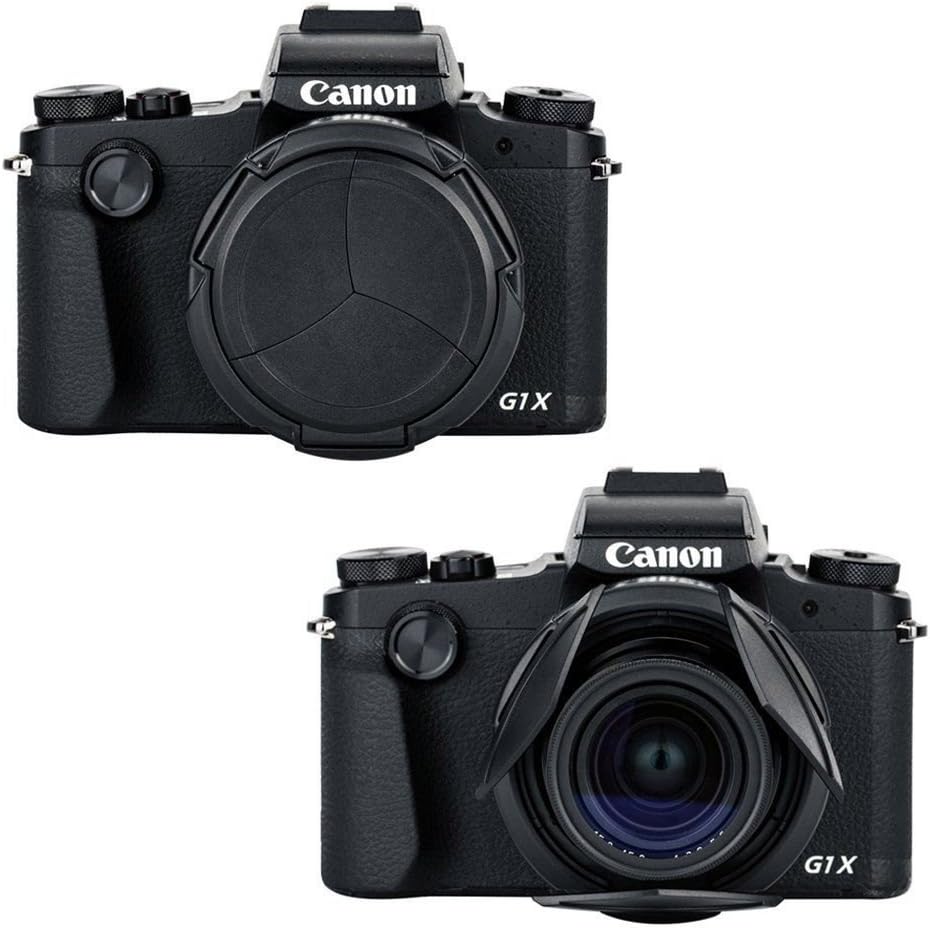
Figure 3.2: The lens cap in its open position when the camera is on and lens is extended.

Figure 3.3: Top view of the camera showing the compact profile of the lens cap.
4. Maintenance
To ensure the longevity and optimal performance of your JJC ALC-G1XM3 lens cap, follow these simple maintenance guidelines:
- Cleaning: Use a soft, clean, lint-free cloth to wipe the exterior of the lens cap. For stubborn smudges, a slightly damp cloth can be used, followed by a dry cloth. Avoid using harsh chemicals, solvents, or abrasive materials, as these can damage the finish or the automatic mechanism.
- Dust Removal: Periodically use a blower brush to remove any dust or debris that may accumulate on or around the cap's leaves. Ensure no particles interfere with the opening and closing mechanism.
- Storage: When not in use for extended periods, store the camera with the lens cap attached in a clean, dry environment, away from extreme temperatures and humidity.
- Avoid Obstruction: Do not force the leaves open or closed manually, as this can damage the internal mechanism. Allow the camera's lens extension to operate the cap naturally.
5. Troubleshooting
The JJC ALC-G1XM3 lens cap is designed for reliable operation. If you encounter any issues, consider the following:
- Cap Not Opening/Closing Smoothly:
- Check for any visible debris (dust, lint, small particles) lodged between the leaves or around the lens cap's moving parts. Use a blower brush to clear any obstructions.
- Ensure the lens cap is securely but not overtightened onto the camera lens. A loose or excessively tight cap might affect its operation.
- Verify that the camera lens itself is extending and retracting properly. The cap's operation is dependent on the lens movement.
- Vignetting Observed:
- The JJC ALC-G1XM3 is designed to prevent vignetting. If you observe dark corners in your images, ensure the lens cap is fully open when the camera is powered on and the lens is extended.
- Confirm that the lens cap is correctly installed and not misaligned.
- Check if any other accessories (e.g., filters) are causing the vignetting, especially if they are stacked or have a thick profile.
If the issue persists after performing these checks, please refer to the warranty and support information.
6. Specifications
| Attribute | Detail |
|---|---|
| Model Number | ALC-G1XM3 (Internal Model: ACLX100) |
| Brand | JJC |
| Product Dimensions | 1.5 x 1.5 x 0.5 inches |
| Item Weight | 0.704 ounces |
| Compatible Camera | Canon PowerShot G1X Mark III |
| Material | (Not specified in input, typically plastic) |
| Color | Black |
| First Available Date | October 22, 2010 |

Figure 6.1: Various views of the JJC ALC-G1XM3 lens cap, highlighting its design and dimensions.
7. Warranty and Support
For information regarding the product warranty, please refer to the documentation included with your purchase or visit the official JJC website. Warranty terms and conditions may vary by region and retailer.
For technical support, product inquiries, or assistance with troubleshooting beyond the scope of this manual, please contact JJC customer service through their official channels. Contact information can typically be found on the manufacturer's website or product packaging.
Manufacturer: JJC