
Bushnell 201661
Contents
Bushnell Golf Tour V4 Slope Laser Rangefinder User Manual
Model: 201661 | Brand: Bushnell
Introduction
The Bushnell Golf Tour V4 Slope Laser Rangefinder is designed to provide accurate distance measurements for golfers. This unit features Bushnell's patented Tour trusted slope technology, which calculates compensated distances based on the incline or decline of the hole. It also includes PinSeeker with Jolt Technology for precise flag targeting. The Tour V4 Slope is engineered in a smaller, sleeker, and more ergonomically sound form factor for enhanced usability.

Figure 1: Front-side view of the Bushnell Golf Tour V4 Slope Laser Rangefinder, showcasing its compact design and objective lens.
Key Features
- PinSeeker with Jolt Technology: Provides short vibrating bursts to confirm the laser has locked onto the flag, eliminating doubt about background targets.
- Patented Slope Technology: Offers compensated distance readings based on the incline or decline of the hole, aiding in club selection during practice rounds. This mode can be disabled for tournament play.
- Extended Range: Accurately ranges from 5 to 1,000 yards, with 400+ yards to a flag.
- High Magnification: Features 5x magnification and a fast focus system for clear target acquisition.
- Ergonomic Design: Smaller, sleeker, and more comfortable to hold, ensuring a natural fit in the hand.
- Fast and Accurate: Delivers lightning-fast readings with one-yard accuracy.
- Class 1 Laser: Equipped with a Class 1 laser with less than 0.5mW average power output.
Feature Demonstration Video

Video 1: An overview of the Bushnell Tour V4 Laser Rangefinder, detailing its PinSeeker with Jolt Technology, ergonomic design, fast focus, and other key performance features.
Setup
Battery Installation
The Tour V4 requires a disposable battery for operation. To install or replace the battery:
- Locate the battery compartment on the device.
- Open the battery compartment cover.
- Insert the new battery, ensuring correct polarity (+/-) as indicated inside the compartment.
- Close the battery compartment cover securely.
Initial Focus Adjustment
For optimal viewing clarity, adjust the focus of the eyepiece:
- Hold the rangefinder to your eye.
- Rotate the focus ring, located near the eyepiece, until the display and target appear sharp and clear. This can be done with your index finger for quick adjustments.

Figure 2: Rear view of the rangefinder, highlighting the eyepiece and focus ring for clear vision.
Operating Instructions
Taking a Measurement
- Power on the device by pressing the power/fire button, typically located on the top of the unit.
- Aim the reticle at your desired target.
- Press the power/fire button again to activate the laser and obtain a distance reading. The measurement will appear in the display almost instantly.

Figure 3: Side view of the rangefinder, showing the ergonomic grip and the prominent power/fire button.
Using PinSeeker with Jolt Technology
PinSeeker with Jolt Technology is designed to make it easier to lock onto the flagstick without inadvertently acquiring background targets. When multiple objects are in the field of view, the system prioritizes the closest object (the flag). Once the flag is acquired, the device will provide a short vibration (jolt) to confirm the lock, giving you confidence in your measurement.
Activating/Deactivating Slope Technology
The Tour V4 Slope model includes a switch or button to enable or disable the Slope Technology. When enabled, the device provides a compensated distance that accounts for uphill or downhill terrain. This feature is beneficial for practice rounds and understanding true playing distances. For official tournament play, ensure the Slope Technology is disabled to comply with golf rules.
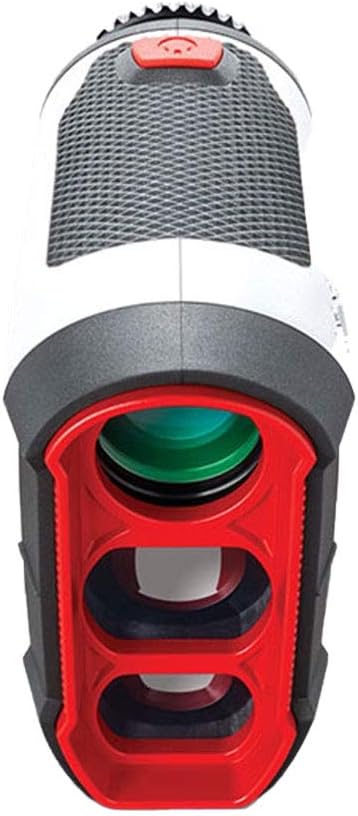
Figure 4: Front view of the rangefinder, illustrating the objective lens and laser apertures.
Maintenance
Cleaning the Lenses
To maintain optimal optical clarity, regularly clean the lenses of your rangefinder. Use a soft, clean microfiber cloth, preferably one designed for optical lenses. Gently wipe the lens surfaces to remove dust, dirt, or smudges. Avoid using abrasive materials or harsh chemicals, which can damage the lens coatings.
Storage
When not in use, store the rangefinder in its premium carry case to protect it from impacts, dust, and moisture. Store in a cool, dry place away from direct sunlight and extreme temperatures.
Troubleshooting
| Problem | Possible Cause | Solution |
|---|---|---|
| No display or power | Low or dead battery; incorrect battery installation. | Replace the battery with a fresh one, ensuring correct polarity. |
| Inaccurate readings | Lens smudged; target too far or too close; unstable hold. | Clean lenses; ensure target is within range (5-1000 yards); hold steady or use a stable surface. |
| Cannot lock onto flag (PinSeeker) | Excessive background clutter; flag not clearly visible. | Aim carefully, sweep across the flag; ensure clear line of sight. |
Specifications
| Attribute | Detail |
|---|---|
| Brand | Bushnell |
| Model Name | FBA_201661 |
| Item Weight | 12 ounces |
| Product Dimensions (LxWxH) | 2.61" x 1.33" x 1.97" |
| Color | White |
| Sport | Golf |
| Battery Type | Disposable batteries |
| Magnification Maximum | 5x |
| Measuring Range | 5 to 1,000 yards (general), 400+ yards (to flag) |
| UPC | 029757016621 |
| Included Components | Rangefinder, case, cloth, instructions |
Warranty and Support
Limited Warranty
This Bushnell Golf Tour V4 Slope Laser Rangefinder includes a 2-year limited warranty. Please refer to the warranty card included in your product packaging for full terms and conditions, including details on coverage and how to make a claim.
Customer Support
For technical assistance, troubleshooting, or warranty inquiries, please contact Bushnell customer support. Visit the official Bushnell website for the most up-to-date contact information, including phone numbers and online support resources.
Official Bushnell Website: www.bushnellgolf.com
Documents and downloads
Ask a question about this manual
Ask about setup, troubleshooting, compatibility, parts, safety, or missing instructions. Manuals+ will review the question and use this page’s manual context to help answer it.