
Introduction
This manual provides essential instructions for the setup, operation, and maintenance of your Easytry123 Universal Remote Control, model Easytry0090. This remote is designed to control various AC/Air Conditioner units from brands such as BONGU, Xinghe, Hohong, Shuaikang, Toyo, Yangzi, Hampton-Bay, Shining, Trane, Yutu, and HOGEN. Please read this manual thoroughly before use to ensure proper functionality and to maximize the lifespan of your device.
Important Note: This is a replacement remote control. While it is designed to be compatible with many models, some advanced functions of your original unit may not be fully supported. Always verify compatibility with your specific AC unit model number.
Product Overview

Figure 1: Front View of the Remote Control. This image displays the front of the universal remote control, showing the LCD screen, power button, mode selection, temperature controls, fan speed, and other function buttons like Light, F.Cool, F.Heat, Time On, Time Off, Set, Clock, and Lock.

Figure 2: Rear View with Battery Compartment. This image shows the back of the remote control with the battery cover removed, revealing the empty battery compartment designed for two AAA batteries.
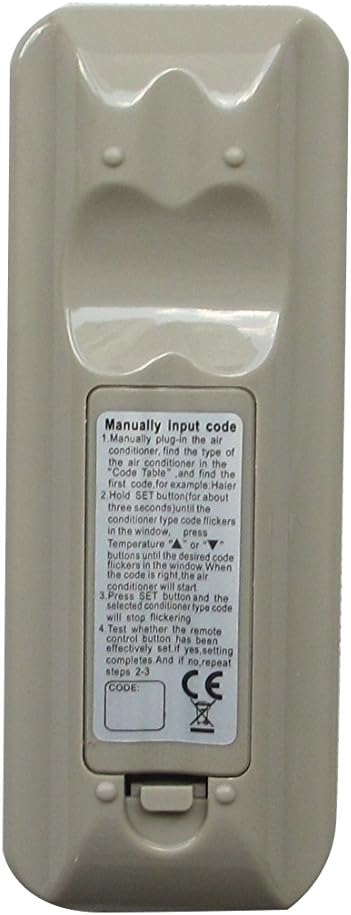
Figure 3: Rear View with Manual Code Input Instructions. This image displays the back of the remote control, featuring a label with detailed instructions for manually inputting the AC unit's code, including steps for finding the code, setting it, and confirming.
Setup
1. Battery Installation
The remote control requires two AAA batteries (not included). Follow these steps to install them:
- Locate the battery compartment on the back of the remote control (refer to Figure 2).
- Slide the battery cover downwards to open it.
- Insert two AAA batteries, ensuring the positive (+) and negative (-) terminals align correctly with the markings inside the compartment.
- Slide the battery cover back into place until it clicks securely.
2. Code Setup for Your AC Unit
This universal remote requires a specific code to operate your air conditioner. The code can be set manually. Refer to the label on the back of the remote (Figure 3) for detailed instructions. A code table is typically provided with the remote or can be found online for compatible AC brands.
Manual Code Input Steps:
- Manually plug in the air conditioner. Find the type of the air conditioner in the Code Table and find the first code. For example: Haier.
- Hold the SET button for about three seconds until the conditioner type code flickers in the window.
- Press the Temperature Up (▲) or Temperature Down (▼) buttons until the desired code flickers in the window. When the code is right, the air conditioner will start.
- Press the SET button and the selected code for the type code will stop flickering.
- Test operating the remote control. If it has been effectively set, press OK. If not, repeat steps 2-3.
Note: The code table is crucial for this step. If you do not have one, please contact the seller or search online for "Universal AC Remote Code List" for your specific remote model (K-1028E, as seen on the remote).
Operating Instructions
Once the remote is set up with the correct code, you can use it to control your AC unit. Here are the primary functions:
- ON/OFF Button: Press to turn the AC unit on or off.
- MODE Button: Cycles through operating modes such as Cool, Heat, Fan, Dry, Auto.
- TEMP Buttons (▲ / ▼): Adjusts the desired temperature up or down.
- WIND (Fan Speed) Button: Adjusts the fan speed (e.g., Low, Medium, High, Auto).
- M.SWING / A.SWING Buttons: Controls the horizontal and vertical swing of the air deflector.
- LIGHT Button: Turns the display light on the AC unit on or off (if supported).
- F.Cool / F.Heat Buttons: Activates Fast Cool or Fast Heat modes (if supported by AC unit).
- TIME ON / TIME OFF Buttons: Sets a timer for the AC unit to turn on or off automatically.
- CLOCK Button: Sets the current time on the remote's display.
- LOCK Button: Locks the remote's settings to prevent accidental changes.
- SET Button: Used for code setup and confirming settings.
- OK Button: Confirms selections or settings.
Functionality may vary depending on the specific AC unit model and its compatibility with this universal remote.
Maintenance
Proper maintenance ensures the longevity and optimal performance of your remote control.
- Cleaning: Wipe the remote control with a soft, dry cloth. Do not use liquid cleaners or abrasive materials.
- Battery Replacement: Replace batteries when the remote's response becomes sluggish or the display dims. Always replace both batteries at the same time with new ones of the same type (AAA).
- Storage: If the remote will not be used for an extended period, remove the batteries to prevent leakage and damage. Store in a cool, dry place.
- Avoid Drops: Protect the remote from physical shocks and drops, which can damage internal components.
Troubleshooting
| Problem | Possible Cause | Solution |
|---|---|---|
| Remote not responding. | Dead or incorrectly installed batteries. | Check battery polarity. Replace with new AAA batteries. |
| Remote does not control AC unit. | Incorrect code set. Remote not compatible with AC unit. | Re-enter the correct code using the manual setup process. Verify AC unit model is listed as compatible. |
| Some functions do not work. | Limited compatibility with specific AC unit features. | This is a universal remote; not all original functions may be supported. Use primary functions. |
| Remote display is dim or blank. | Low battery power. | Replace batteries. |
Specifications
- Model: Easytry0090
- Brand: Easytry123
- Connectivity Technology: Infrared
- Controller Type: Button Control
- Color: Gray
- Power Source: 2 x AAA Batteries (not included)
- Compatibility: Universal for various AC/Air Conditioner brands (BONGU, Xinghe, Hohong, Shuaikang, Toyo, Yangzi, Hampton-Bay, Shining, Trane, Yutu, HOGEN, etc.)
- Date First Available: May 16, 2018
- Manufacturer: Easytry123
- Country of Origin: China
Warranty and Support
This product is a replacement item. Information regarding specific warranty terms is not provided in the product details. For any issues or support inquiries, please contact the seller directly through the platform where the purchase was made.
Seller: Easytry123
Please note that this remote comes without a manual from the manufacturer, hence this comprehensive guide has been created to assist you.