
1. Introduction
This manual provides detailed instructions for the installation, operation, and maintenance of your CNCTOPBAOS 3-Axis GRBL Control Board with Offline Controller. Please read this manual thoroughly before use to ensure proper functionality and safety. This control board is designed for use with various CNC engraving and milling machines, including the 1310, 1610-PRO, 3018, 3018-PRO, and 3018-PRO-MAX models.
2. Setup
2.1 Package Contents
Verify that all items are present in your package:
- 1 x Upgraded GRBL 1.1f Control Board
- 1 x USB Cable
- 1 x GRBL Offline Hand Controller
- 1 x SD Card (standard capacity 1G)

2.2 Physical Connections
Connect the control board to your CNC machine components as follows:
- Power Input: Connect a 24V DC power supply to the control board.
- Stepper Motors: Connect your XYZ three-axis Nema17 or Nema23 stepper motors. Ensure the motor's maximum current is 2A or less, with 1.5A recommended.
- Spindle/Laser Module: The board supports a 24V DC Spindle with PWM speed control (0%-100%) and a 12V 3-pin PWM/TTL laser engraving module (Max. 3.0A). Connect the spindle to the 2-pin port VH3.96mm pitch.
- Limit Switches: Connect XYZ limit switches to their designated ports.
- Emergency Stop Button: Connect an emergency stop button to the dedicated port for safety.
- Probe: Connect a probe for tool setting.
- USB Connection: Use the provided USB cable to connect the control board to a computer if operating online. The improved USB interface is designed for reliable plug-in use.


2.3 Offline Controller Setup
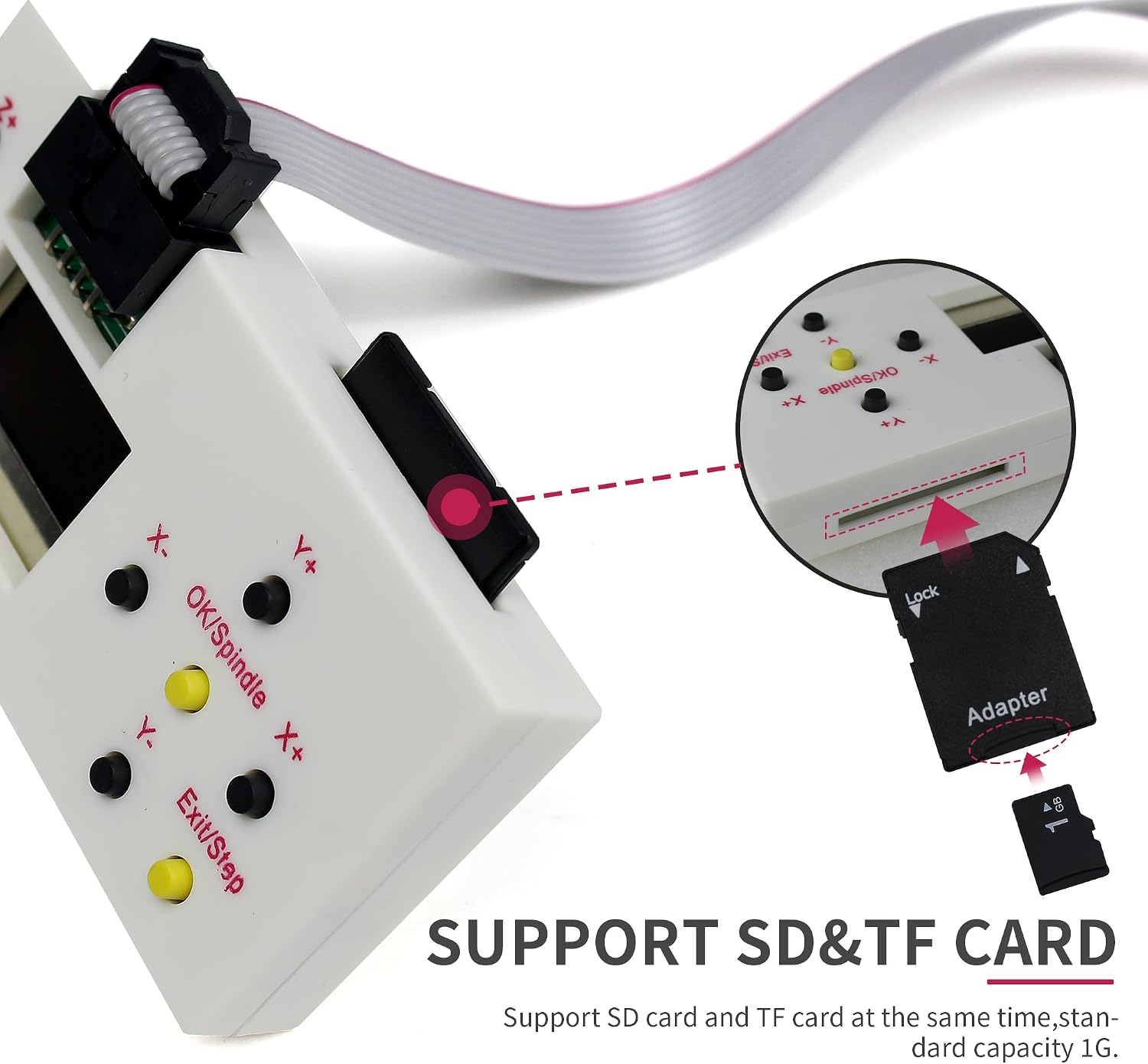
The offline controller allows you to operate the CNC machine without a computer connection. It supports both SD and TF cards for file storage.
- File Transfer: Insert an SD card (standard capacity 1G) into the offline controller. Connect the offline controller to your computer via a micro USB cable to transfer G-code files. File names should not contain spaces and must be within 12 characters. Only TXT file format is supported for command files.
- Connection: Connect the offline controller module to the GRBL control board.
- Power On: Ensure the SD card is inserted before turning on the power supply to the control board.
3. Operating Instructions
3.1 Software Compatibility
The GRBL control board is compatible with various software applications for online operation, including GRBL Control, Candle, and Universal Gcode Sender. It supports computer systems running Windows XP/7/8/10.
3.2 Offline Controller Operation
The offline controller provides a user-friendly interface for direct machine control:
- Main Page: Select 'Ctrl' for machine control or 'File' to use G-code files. Use [Y+] and [Y-] to navigate and [OK] to enter.
- Control Page: Manually adjust X, Y, Z axis positions using X±, Y±, Z± buttons. Turn the spindle ON/OFF with 'OK/Spindle'. Change step size or exit with 'Exit/Step' (long press).
- Spindle Speed Adjustment: To increase spindle power, press 'OK' and 'Z+' simultaneously. To decrease, press 'OK' and 'Z-' simultaneously.
- File Page: Select engraving files (common formats include .nc, .tex, .tap) using [Y+] and [Y-]. Press [OK] to select and [OK] again to begin engraving. Long press [Exit] to stop machining.

4. Maintenance
4.1 Heat Dissipation
The control board features an integrated fan and shell protection to ensure efficient heat dissipation and stable operation. Regularly check that the fan is free from obstructions and functioning correctly.

4.2 Cleaning
Keep the control board and offline controller clean and free from dust and debris. Use a soft, dry cloth for cleaning. Avoid using liquid cleaners or solvents that could damage the electronic components.
5. Troubleshooting
- Machine Not Responding / Incorrect Movement:
Ensure all stepper motor connections are secure and correctly wired. Check motor direction settings in your GRBL software or offline controller. Verify that limit switches are functioning properly and not falsely triggering. - Offline Controller Not Recognizing Files:
Confirm that file names do not contain spaces and are within 12 characters. Ensure files are in the supported TXT format. Re-insert the SD card and restart the offline controller. - Compatibility Issues:
This control board is specifically designed for 3-axis GRBL-controlled CNC machines such as the 1310, 1610-PRO, 3018, 3018-PRO, and 3018-PRO-MAX. Ensure your machine's firmware is GRBL 1.1f and uses a CH340 communication chip with a baud rate of 115200 for optimal compatibility. - Spindle/Laser Not Functioning:
Check power connections and ensure the correct voltage (24V DC for spindle, 12V for laser module) is supplied. Verify PWM settings in the offline controller or GRBL software.
6. Specifications
| Feature | Specification |
|---|---|
| Model | Upgraded 3 Axis GRBL 1.1F Control Board with Offline controller |
| Input Voltage | 24VDC |
| Applications | 1310, 1610-PRO, 3018, 3018-PRO, 3018-PRO-MAX CNC engraving machine or other GRBL Control CNC Router Machine |
| Stepper Motor Support | XYZ three-axis Nema17 or Nema23 (Max. Current 2A or less, recommended within 1.5A) |
| Spindle Support | 24V DC Spindle PWM speed 0%-100% |
| Laser Module Support | 12V 3-pin PWM/TTL Max. 3.0A engraving module |
| Software Compatibility | GRBL Control, Candle, Universal Gcode Sender |
| Computer System Support | Windows XP/7/8/10 |
| Terminal Pitch (Motors, Limits, Probe, E-Stop) | 2-pin 2.54mm pitch |
| Terminal Pitch (Spindle) | 2-pin port VH3.96mm pitch |
| Offline Controller Storage | SD card and TF card (standard capacity 1G) |
| Operating Temperature | 20 Degrees Celsius |
| Item Weight | 8.1 ounces (0.23 Kilograms) |
| Package Dimensions | 5.91 x 4.57 x 3.39 inches |
| Material | Acrylonitrile Butadiene Styrene (ABS) |
| Display Type (Offline Controller) | LCD or LED |
7. Warranty and Support
For specific warranty information, please refer to the product packaging or contact CNCTOPBAOS customer support directly. A PDF English user manual will be sent to you via message support upon request. For additional assistance, please visit the CNCTOPBAOS Store on Amazon.