
1. Introduction
This manual provides essential information for the safe and effective use of your Ryobi RB 18L40 18V Lithium-Ion 4.0Ah battery. This battery is designed to power compatible Ryobi ONE+ 18V cordless tools. Please read all instructions carefully before use and retain this manual for future reference.

Figure 1: The Ryobi RB 18L40 18V Lithium-Ion 4.0Ah battery. This image shows the overall design of the battery pack, featuring the Ryobi branding, Lithium+ 18V, and 4.0Ah capacity markings.
2. Safety Information
Always observe the following safety precautions to reduce the risk of fire, electric shock, personal injury, and material damage.
- Read All Instructions: Familiarize yourself with the battery and its compatible tools and chargers before use.
- Use Only Specified Chargers: Only charge the battery with Ryobi ONE+ 18V chargers designed for Lithium-Ion batteries. Using an incompatible charger may cause fire or injury.
- Avoid Short Circuits: Do not short-circuit the battery terminals. Keep the battery away from metal objects like keys, coins, paper clips, and other small metal objects that can make a connection from one terminal to another.
- Do Not Expose to Water or Moisture: Do not immerse the battery in water or allow it to get wet. This can cause electric shock or short-circuiting.
- Temperature Control: Do not store or use the battery in temperatures exceeding 50°C (122°F) or below -10°C (14°F). Avoid direct sunlight.
- Inspect for Damage: Before each use, inspect the battery for any signs of damage, cracks, or leaks. Do not use a damaged battery.
- Proper Disposal: Do not dispose of batteries in fire. They may explode. Follow local regulations for proper disposal of Lithium-Ion batteries.
- Keep Away from Children: Store batteries out of reach of children.
- Do Not Disassemble: Never attempt to open or disassemble the battery pack. There are no user-serviceable parts inside.
3. Setup and Charging
Before first use, the battery must be fully charged. Always use a compatible Ryobi ONE+ 18V Lithium-Ion charger.
3.1 Charging Procedure
- Ensure the charger is plugged into a standard power outlet.
- Align the battery with the charger's port and slide it in until it clicks securely into place.
- Observe the charger's indicator lights. Typically, a solid green light indicates a full charge, while a flashing light may indicate charging in progress or an error. Refer to your charger's manual for specific light patterns.
- Once fully charged, remove the battery from the charger.

Figure 2: The Ryobi RB 18L40 battery displaying its charge indicator lights. These lights provide a visual representation of the battery's remaining charge level, typically activated by pressing a button.
3.2 Battery Charge Indicator
The RB 18L40 battery features an on-board fuel gauge (charge indicator) to display the remaining charge. Press the button on the battery to illuminate the indicator lights. The number of lit segments indicates the charge level.
4. Operating the Battery
This battery is part of the Ryobi ONE+ system and is compatible with a wide range of 18V tools.
4.1 Installing the Battery
- Ensure the tool is switched off before installing the battery.
- Align the battery with the battery port on the tool.
- Slide the battery into the tool until it clicks firmly into place. Ensure it is fully seated and secure.

Figure 3: Top view of the Ryobi RB 18L40 battery, showing the connection interface. This view highlights the terminals and locking mechanism that connect the battery to compatible Ryobi ONE+ tools and chargers.
4.2 Removing the Battery
- Ensure the tool is switched off.
- Press and hold the battery release latches (usually located on the sides of the battery).
- Slide the battery out of the tool.
5. Maintenance
Proper maintenance ensures optimal performance and extends the lifespan of your battery.
- Cleaning: Keep the battery terminals clean and free of debris. Use a clean, dry cloth to wipe the battery. Do not use solvents or harsh chemicals.
- Storage: Store the battery in a cool, dry place, away from direct sunlight and extreme temperatures. For long-term storage, it is recommended to store the battery at approximately 50% charge.
- Avoid Deep Discharge: Do not allow the battery to completely discharge. Recharge it as soon as the power noticeably decreases.
- Regular Use: If storing for extended periods, charge the battery every 3-6 months to maintain its health.
6. Troubleshooting
If you encounter issues with your Ryobi RB 18L40 battery, refer to the following common solutions:
| Problem | Possible Cause | Solution |
|---|---|---|
| Battery not charging |
|
|
| Battery not powering tool |
|
|
| Battery overheating during use/charge |
|
|
7. Specifications
Technical details for the Ryobi RB 18L40 18V Lithium-Ion 4.0Ah Battery.
| Feature | Detail |
|---|---|
| Brand | RYOBI |
| Model Number | 4892210124104 |
| Battery Type | Lithium Ion |
| Voltage | 18V |
| Capacity | 4.0 Ah (Amp Hours) |
| Item Weight | 1.76 pounds |
| Package Dimensions | 7.2 x 6.6 x 3.2 inches |
| First Available Date | July 2, 2014 |
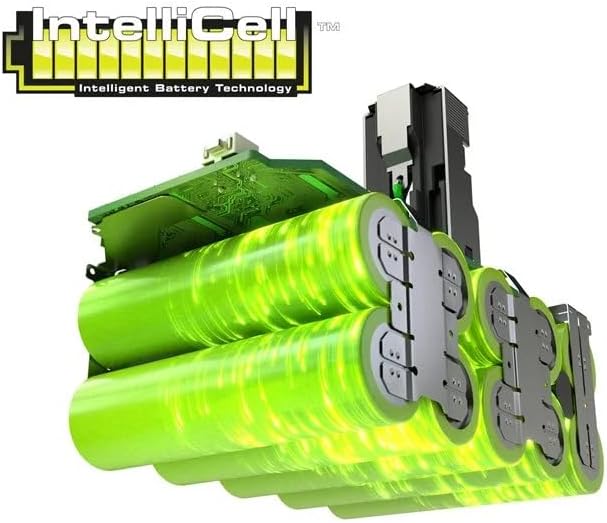
Figure 4: An illustration of Ryobi's IntelliCell Intelligent Battery Technology. This image depicts the internal components and cell arrangement, highlighting the advanced system designed for optimized performance and longevity.
8. Warranty and Support
For warranty information, product support, or service inquiries, please refer to the official Ryobi website or contact Ryobi customer service directly. Keep your purchase receipt as proof of purchase for warranty claims.


