
1. Introduction
The VEIKK S640 Digital Graphics Tablet is a versatile and portable input device designed for various digital activities. Its compact design and battery-free stylus make it suitable for drawing, painting, sketching, online teaching, and document signing across multiple operating systems.
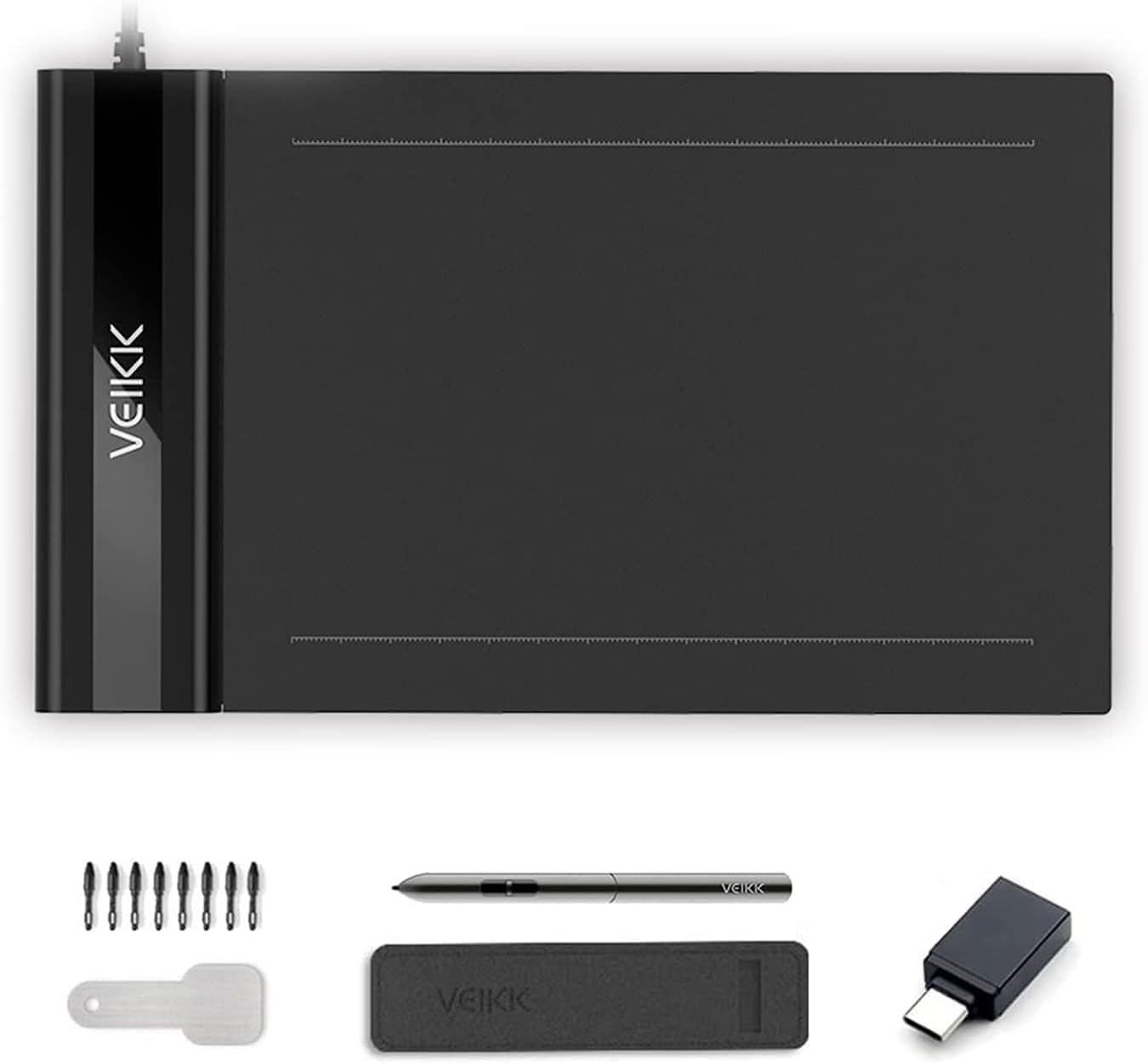
Figure 1: VEIKK S640 Digital Graphics Tablet and included accessories.
2. What's in the Box
- VEIKK S640 Graphic Tablet
- Passive Pen (P01)
- Pen Pocket
- 8 x Replacement Pen Nibs
- Pen Nib Removal Tool
- 1 x OTG Connector (for Android devices)
- Quick Guide
- Driver Reminder

Figure 2: All items included in the VEIKK S640 product package.
3. Setup
3.1. Driver Installation
- Before connecting the tablet, download the latest driver from the official VEIKK website.
- Ensure all other tablet drivers are uninstalled from your computer to prevent conflicts.
- Run the downloaded driver installer and follow the on-screen instructions.
- Restart your computer after installation is complete.
3.2. Connecting the Tablet
- Connect the VEIKK S640 tablet to your computer using the integrated USB cable.
- For Android devices (version 6.0 or above, excluding Samsung), use the provided OTG connector to connect the tablet to your phone. Ensure the OTG function is enabled in your Android device's settings.

Figure 3: Connecting the tablet to an Android device using the OTG connector.

Figure 4: Guide to enabling OTG connection in Android settings.
4. Operating Instructions
4.1. Basic Pen Usage
- The P01 Passive Pen is battery-free and offers 8192 levels of pressure sensitivity, allowing for precise and natural drawing.
- The tablet supports 60° tilt, providing a more natural drawing experience.
- The tablet can be configured for both right-handed and left-handed users through the driver settings.

Figure 5: Key features of the P01 Passive Pen.
4.2. Customizing Pen Buttons
The two customizable buttons on the passive pen can be configured via the VEIKK Pen Tablet driver software. You can assign various functions such as pen/eraser toggle, right-click, keyboard shortcuts, or navigation commands to enhance your workflow.
Video 1: Instructions on how to customize the shortcut keys of the drawing tablet.
4.3. Software Compatibility
The VEIKK S640 is compatible with a wide range of creative and office software, including but not limited to:
- Creative Software: Adobe Photoshop, Paint Tool SAI, Adobe Illustrator, Autodesk Sketchbook, Comic Studio, Maya, Krita, GIMP.
- Office Software: Microsoft Word, PowerPoint, OneNote (for creating mind-maps, diagrams, or notes).
- Online Teaching/Gaming: OSU! Game, Microsoft Office Teams.

Figure 6: Demonstrating the tablet's versatility across different applications.
Video 2: Guide on using the VEIKK Drawing Tablet with Microsoft Office Teams.
5. Maintenance
5.1. Pen Nib Replacement
The VEIKK S640 comes with 8 replacement pen nibs and a removal tool. To replace a worn nib:
- Use the nib removal tool to gently pull out the old nib from the passive pen.
- Insert a new nib firmly into the pen until it is securely in place.
6. Troubleshooting
6.1. Driver Conflicts
If you experience issues with tablet functionality, ensure that all other previously installed tablet drivers (from other brands or older VEIKK models) have been completely uninstalled from your system. Conflicting drivers are a common cause of unexpected behavior.
6.2. General Issues
For any other technical difficulties or questions, please refer to the official VEIKK support resources or contact customer service.
7. Specifications
| Feature | Detail |
|---|---|
| Product Dimensions | 8.58 x 5.12 x 0.35 inches |
| Item Weight | 6.3 ounces (approx. 177g) |
| Active Area | 6 x 4 inches |
| Pressure Sensitivity | 8192 Levels |
| Resolution | 5080 LPI (Lines Per Inch) |
| Report Rate | 290 PPS (Points Per Second) |
| Connectivity Technology | USB |
| Operating System | Windows 11/10/8/7, Mac OS 10.12 or later, Chrome OS 88 or later, Linux, Android 6.0 or later (excluding Samsung devices) |
| Special Feature | 60° Tilt Support |

Figure 7: The compact and portable design of the VEIKK S640 tablet.
8. Warranty and Support
The VEIKK S640 Digital Graphics Tablet comes with a 1-year hardware warranty. Additionally, VEIKK provides lifetime free driver updates and professional assistance for any issues you may encounter. For support, please contact VEIKK customer service.


