
1. Introduction and Overview
This document provides instructions for the proper use and maintenance of the Optrel Replacement Headgear, model 5003.263. This headgear is designed to provide a secure and comfortable fit for compatible Optrel welding helmets, enhancing user experience and safety during welding tasks. It features an adjustable ratcheting system, a three-position slider for lens distance adjustment, and a comfortable sweatband.
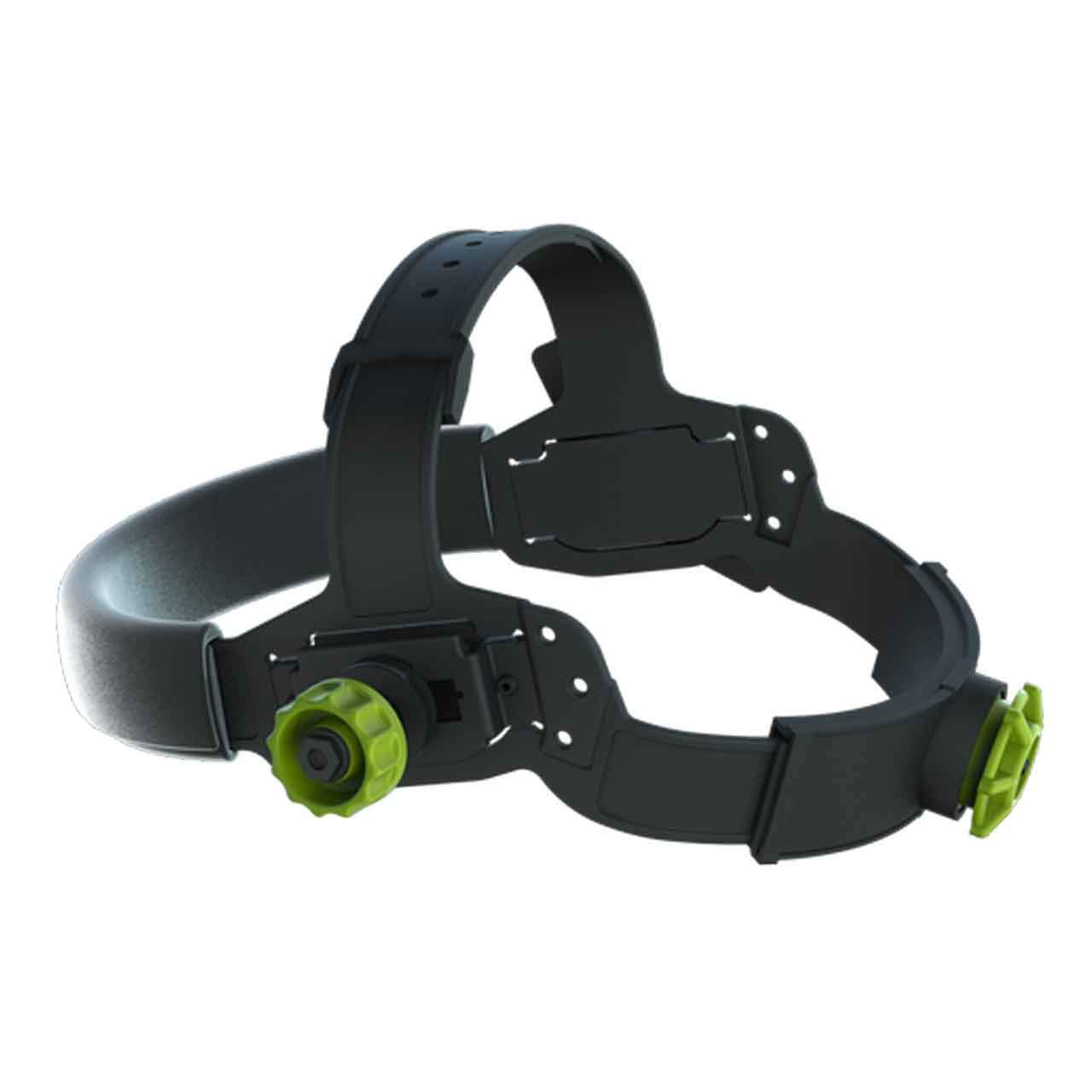
Figure 1.1: Optrel Replacement Headgear (Model 5003.263) overview.
2. Setup and Adjustment
Proper adjustment of the headgear is crucial for comfort and stability. Follow these steps to set up your Optrel Replacement Headgear:
2.1 Headband Adjustment
- Ratcheting System: Locate the knob at the back of the headgear. Rotate this knob clockwise to tighten the headband for a snug fit, and counter-clockwise to loosen it. Adjust until the headgear feels secure without being overly tight.
- Crown Strap Adjustment: The crown strap, located over the top of the head, can be adjusted for height. Utilize the multiple holes on the strap to find the optimal position that centers the headgear on your head and provides balanced support.
2.2 Attaching to Welding Helmet
The headgear is designed for integration with compatible Optrel welding helmets. Align the attachment points on the headgear with those on your welding helmet. Secure the headgear using the provided fasteners or mechanisms specific to your helmet model. Ensure all connections are firm before use.
Video 2.1: Demonstration of headgear adjustment and assembly. This video illustrates the process of adjusting the headgear components for a proper fit and shows how to secure the headgear.
3. Operating the Headgear
Once installed and adjusted, the headgear provides stability and functionality for your welding helmet.
3.1 Three-Position Slider
The headgear features a three-position slider mechanism. This allows you to customize the distance between your eyes and the welding helmet's lens. Adjusting this distance can improve comfort and optimize your field of vision. Experiment with the positions to find what works best for your specific helmet and task.
3.2 Locking Mechanism
The headgear incorporates a locking mechanism to hold the welding helmet in an upward position when not in use. This prevents the helmet from inadvertently dropping down. To lower the helmet, manually release the locking mechanism or apply gentle downward pressure as designed by your specific helmet model.
4. Maintenance
Regular maintenance ensures the longevity and hygienic use of your headgear.
4.1 Cleaning the Sweatband
The sweatband is designed to absorb perspiration and can be removed for cleaning. Detach the sweatband from the headgear and wash it with mild soap and water. Allow it to air dry completely before reattaching. Replace the sweatband if it becomes worn or damaged.
4.2 General Care
- Inspect the headgear regularly for any signs of wear, cracks, or damage to the plastic components or adjustment mechanisms.
- Ensure all knobs and sliders operate smoothly. Do not force any components.
- Store the headgear in a clean, dry environment away from direct sunlight and extreme temperatures.
5. Troubleshooting
If you encounter issues with your headgear, consider the following:
- Headgear feels loose or unstable: Ensure the ratcheting knob is tightened sufficiently. Check the crown strap for proper height adjustment.
- Helmet does not stay in the upward position: Verify that the locking mechanism is engaged correctly. Inspect the mechanism for any obstructions or damage.
- Discomfort during use: Re-adjust the headband tension, crown strap height, and the three-position slider to optimize fit and lens distance. Ensure the sweatband is clean and properly positioned.
- Headgear does not fit my welding helmet: This headgear is specifically designed for Optrel helmets. Verify compatibility with your specific Optrel helmet model. If it is an Optrel helmet and still does not fit, contact Optrel support.
6. Specifications
| Feature | Detail |
|---|---|
| Brand | Optrel |
| Model Number | 5003.263 |
| Material | Silicone |
| Closure Type | Ratchet |
| Color | Black, Green |
| Item Weight | 0.35 Pounds |
| Number of Items | 1 |
| Item Dimensions (LxWxH) | 6 x 1 x 1 inches |
7. Warranty and Support
For information regarding warranty coverage, technical support, or replacement parts for your Optrel Replacement Headgear, please refer to the official Optrel website or contact Optrel customer service directly. Keep your purchase receipt as proof of purchase for any warranty claims.