
1. Introduction
Welcome to the user manual for your BH i.Quantum II Elliptical Trainer. This guide provides essential information for the safe assembly, operation, and maintenance of your new fitness equipment. Designed for intensive use (7-20 hours per week), this elliptical offers a smooth, impact-free workout experience with a 20kg inertial system and a 45cm stride length.
The i.Quantum II features a magnetic braking system for quiet operation, a backlit LCD monitor for tracking your progress, and i.Concept technology for interactive training with compatible apps. Please read this manual thoroughly before using the elliptical trainer.
2. Safety Information
Before using the BH i.Quantum II Elliptical Trainer, please observe the following safety precautions:
- Consult a physician before starting any exercise program.
- Ensure the elliptical is placed on a stable, level surface.
- Keep children and pets away from the equipment during operation.
- Wear appropriate athletic footwear and clothing.
- Do not exceed the maximum user weight of 150 kg.
- Regularly inspect the equipment for wear and tear. Do not use if damaged.
- Always hold the handlebars for balance, especially when starting or stopping.
- Stop exercising immediately if you feel faint, dizzy, or experience pain.
3. Setup and Assembly
Your BH i.Quantum II Elliptical Trainer requires assembly. Follow the instructions provided in the separate assembly guide. Once assembled, ensure all bolts are tightened securely.
3.1 Placement
Place the elliptical on a flat, stable surface with adequate space around it for safe operation and maintenance. Ensure there is enough clearance for the moving parts.
3.2 Transport
The elliptical is equipped with transport wheels for easy relocation. To move the machine, lift the rear stabilizer bar and tilt the elliptical forward until it rests on the transport wheels. Carefully push or pull it to the desired location.


4. Operating Instructions
4.1 Console Overview
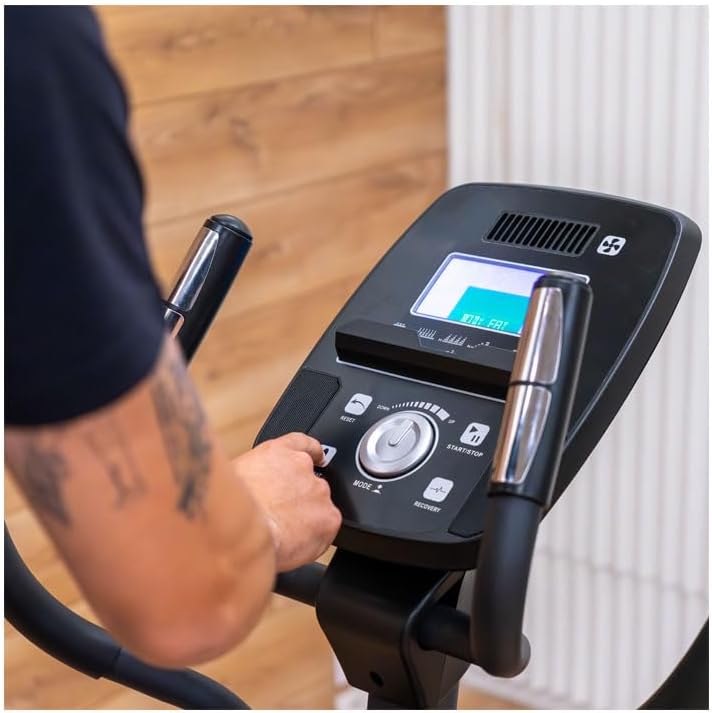
The BH i.Quantum II features an easy-to-use backlit LCD monitor that displays key workout metrics such as speed, heart rate, RPM, calories burned, distance, intensity, and training time.

4.2 Basic Operation
- Power On: The console will activate when you start pedaling or press any button.
- Start/Stop: Use the START/STOP button to begin or pause your workout.
- Mode: Press the MODE button to cycle through different display parameters.
- Resistance Adjustment: Use the central dial or UP/DOWN buttons to adjust the 24 levels of magnetic resistance.
- Reset: Press RESET to clear current workout data and start a new session.
4.3 Training Programs
The i.Quantum II offers a variety of programs to enhance your training:
- Manual Function: Set your own time, distance, calorie target, or age.
- Predefined Programs (12): Choose from a selection of pre-set workouts with varying intensity profiles.
- Watts Program: Maintain a consistent power output (watts) regardless of speed. The resistance adjusts automatically.
- Heart Rate Control Programs: Requires heart rate monitoring. The resistance will adjust to keep your heart rate within a target zone.
- Bodyfat Function: Measures body fat percentage.
- Recovery Function: Assesses your fitness level after a workout based on heart rate recovery.
4.4 Heart Rate Monitoring
Monitor your heart rate for effective and safe training:
- Handgrip Sensors: Place both hands on the sensors located on the stationary handlebars to measure your pulse by contact.
- Wireless Chest Strap (not included): The monitor is compatible with 5 kHz radiofrequency chest straps and Bluetooth Smart chest straps for continuous and accurate heart rate monitoring.
4.5 i.Concept Technology
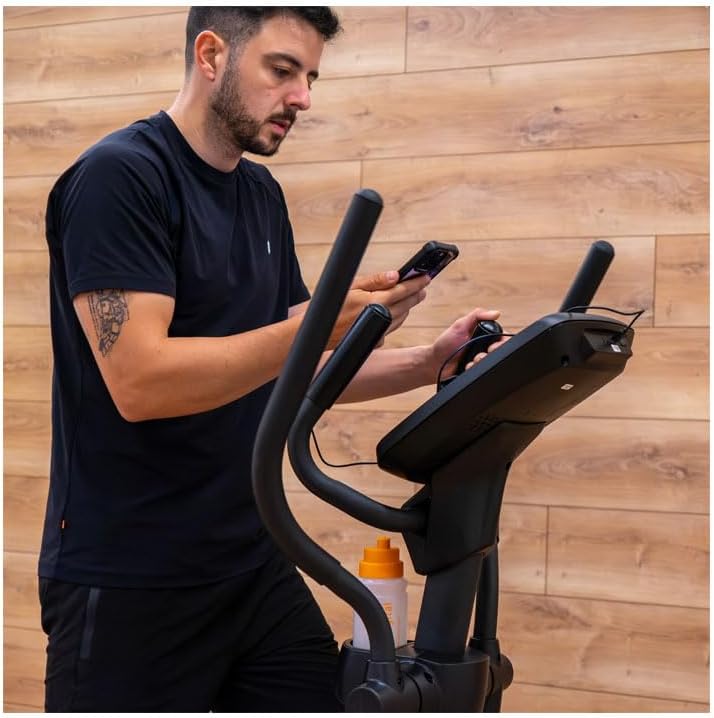
The i.Quantum II is equipped with i.Concept technology and Bluetooth Smart connectivity, allowing you to integrate your smartphone or tablet for interactive training:
- App Compatibility: Connect to fitness apps like Kinomap for personalized workouts, virtual routes, and online competitions.
- Tablet/Smartphone as Monitor: Use your device as a touch-screen monitor, accessing internet, email, videos, or social media while you train.
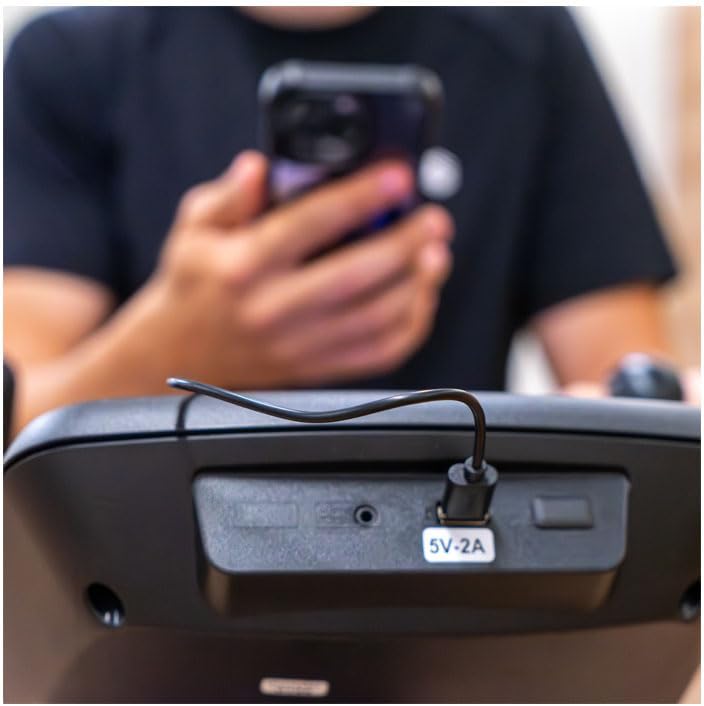
- USB Charging: A 5V-2A USB port is available on the console to charge your device during workouts.
4.6 Proper Usage
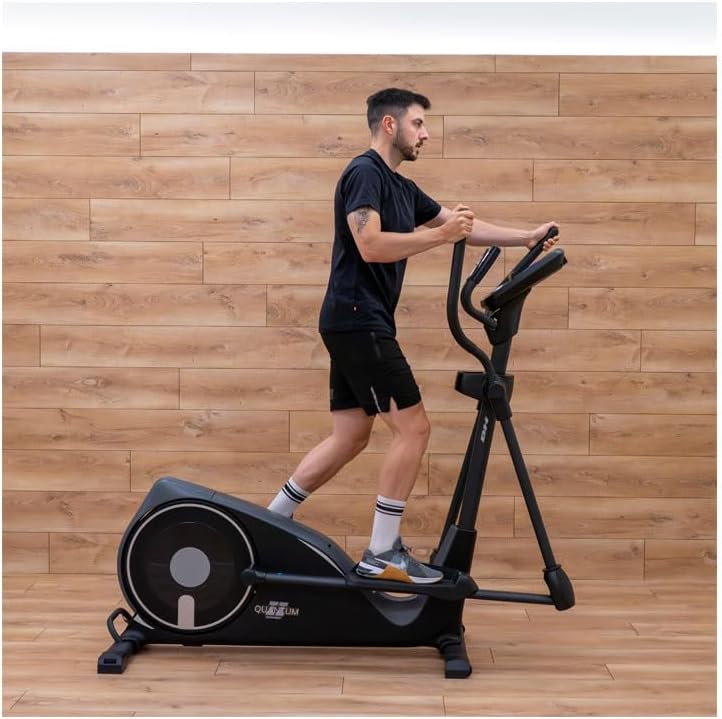
Ensure a natural and fluid movement during your workout:
- Maintain an upright posture.
- Engage both your arms and legs for a full-body workout.
- The 45cm stride length and 16cm pedal distance promote ergonomic alignment.

5. Maintenance
Regular maintenance ensures the longevity and safe operation of your elliptical trainer:
- Cleaning: Wipe down the machine with a damp cloth after each use to remove sweat and dust. Avoid abrasive cleaners.
- Inspection: Periodically check all bolts and nuts for tightness. Tighten if necessary.
- Lubrication: Refer to the assembly guide for any specific lubrication points, typically moving joints.
- Storage: Store the elliptical in a dry, cool place away from direct sunlight and extreme temperatures.
6. Troubleshooting
If you encounter any issues with your BH i.Quantum II Elliptical Trainer, refer to the following common troubleshooting tips:
- No Display on Console: Ensure the elliptical is receiving power (if applicable, though this model is self-generating for the console). Start pedaling to activate the console. Check battery compartment if applicable (for older models or specific console types).
- Unusual Noises: Check all visible bolts and connections for tightness. Lubricate moving parts as per maintenance instructions.
- Inconsistent Resistance: Ensure all cables are properly connected. If using heart rate control programs, ensure heart rate sensors are properly engaged or chest strap is correctly worn.
- Bluetooth Connectivity Issues: Ensure Bluetooth is enabled on your device and the elliptical. Try restarting both devices. Refer to your app's specific connection instructions.
For persistent issues, please contact BH customer support.
7. Specifications
| Feature | Specification |
|---|---|
| Model Name | i.Quantum II |
| Model Number | G2315FD |
| Usage Frequency | Intensive (7-20 hours/week) |
| Resistance System | Magnetic |
| Inertial System | 20 kg |
| Stride Length | 45 cm |
| Distance Between Pedals | 16 cm |
| Resistance Levels | 24 |
| Max User Weight | 150 kg |
| Product Dimensions (L x W x H) | 170 cm x 64 cm x 167 cm |
| Product Weight | 57 kg |
| Heart Rate Measurement | Contact sensors, Wireless (5 kHz & Bluetooth Smart compatible) |
| Connectivity | Bluetooth Smart (i.Concept) |
| Transport Wheels | Yes |
| Predefined Programs | 12 |
| Recovery Program | Yes |
| Smartphone/Tablet Holder | Yes |
| Integrated Speakers | Yes |
| Fan | Yes |
| Material | Alloy Steel, Rubber, Plastic |
8. Warranty and Support
The BH i.Quantum II Elliptical Trainer comes with a 3-year warranty. Please retain your proof of purchase for warranty claims.
For technical assistance, spare parts, or warranty service, please contact BH customer support through their official website or the retailer where you purchased the product. Provide your model number (G2315FD) and serial number (if applicable) when contacting support.
You can visit the BH brand store for more information: BH Fitness Store