
ONKRON M6L-WHT-FBA
Contents
ONKRON Full Motion TV Wall Mount User Manual
Model: M6L-WHT-FBA
For most 40-70 inch Flat Screen TVs, up to 100 lbs
1. Important Safety Information
Please read this manual thoroughly before installation and use. Improper installation or use may cause property damage, serious injury, or death. If you do not understand these instructions, or have doubts about the safety of the installation, please contact ONKRON customer support.
- Do not install into drywall alone. The mount must be secured to wood studs or concrete/brick walls.
- Ensure the wall structure can safely support the combined weight of the mount and the TV.
- Do not exceed the maximum weight capacity of 100 lbs (45.3 kg).
- Do not exceed the maximum VESA compatibility of 600mm x 400mm.
- Always use a qualified professional for installation if you are unsure.
- Keep children and pets away during installation.
2. Product Overview
The ONKRON M6L-WHT-FBA is a full motion TV wall mount designed to provide optimal viewing angles for your television. It features articulating dual arms for extended reach, swivel, and tilt capabilities, and is constructed from high-quality cold-rolled steel for durability and safety.

The ONKRON M6L-WHT-FBA full motion TV wall mount, showcasing its dual articulating arms and TV plate.

Key components of the ONKRON TV wall mount, including the main bracket, TV plate, and a spirit level for accurate installation.

All included accessories and hardware for the ONKRON TV wall mount, neatly laid out for identification.
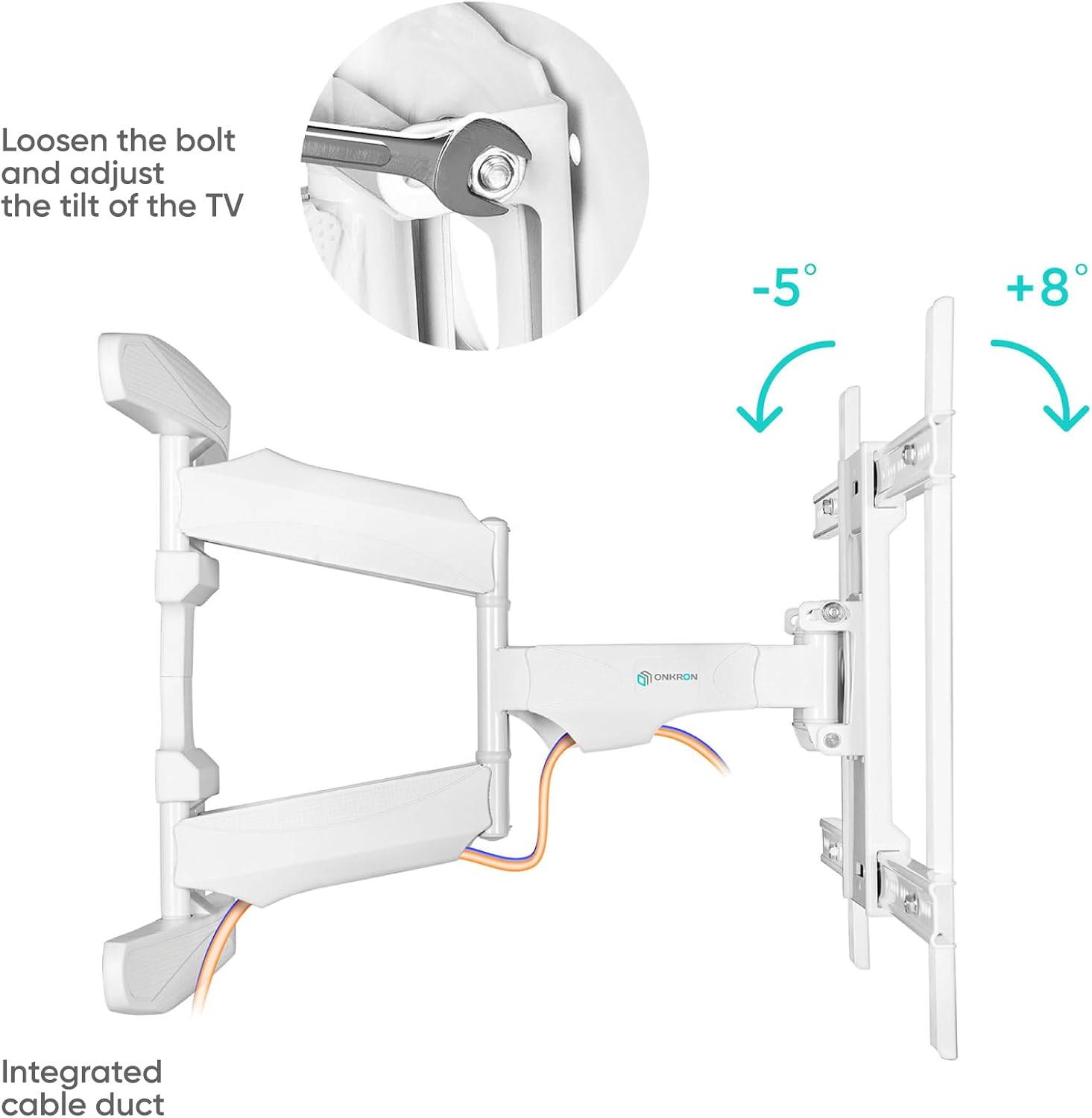
Diagram illustrating the various VESA mounting patterns supported by the ONKRON TV wall mount, ranging from 200x100 to 600x400.
3. Setup and Installation
This section provides general guidelines for installing your ONKRON TV wall mount. Always refer to the detailed instructions and hardware provided in your product packaging for precise steps.
3.1 Pre-Installation Checklist
- Verify TV weight and VESA pattern are within mount specifications.
- Identify wall type (wood stud, concrete/brick).
- Gather necessary tools (drill, stud finder, level, measuring tape, etc.).
- Ensure all parts listed in the accessories section are present.
3.2 Mounting the Wall Plate
Locate the desired mounting position on your wall. Use a stud finder to identify wood studs (for wood stud installation) or mark drilling points for concrete/brick. Ensure the wall plate is level before drilling pilot holes and securing it with the appropriate lag bolts and anchors (concrete anchors R10x50mm are included).

Visual guide for easy installation, showing steps for precise marking with a level, using a template for drilling, and securely mounting the bracket to the wall.

Illustration highlighting the enlarged wall mounting plates for maximum stability and the integrated cable management system to keep wires tidy.
3.3 Attaching TV Brackets to TV
Carefully place your TV face down on a soft, clean surface. Attach the TV brackets to the back of your TV using the appropriate screws and spacers from the hardware kit. Ensure the brackets are centered and securely fastened.
3.4 Hanging TV on Wall Plate
With assistance, carefully lift the TV and hook the attached TV brackets onto the wall plate. Secure the TV to the wall plate using the provided locking mechanisms or screws to prevent accidental dislodgement.

An ONKRON TV wall mount installed in a modern living room, demonstrating its discreet appearance when mounted.

The ONKRON TV wall mount seamlessly integrated into a contemporary room design, highlighting its aesthetic appeal.
4. Operating Instructions
Once installed, your ONKRON full motion TV mount allows for various adjustments to achieve the perfect viewing experience.
4.1 Swivel Adjustment
The mount allows for a 140° swivel range (70° left and 70° right). Gently push or pull the TV to the desired angle. Ensure cables are not pinched or strained during adjustment.

Diagram illustrating the 140-degree swivel capability of the TV wall mount, allowing for flexible viewing angles.
4.2 Tilt Adjustment
The mount offers a tilt range of -5° (backward) to +8° (forward) to reduce glare and optimize viewing. Loosen the tilt bolts on the TV plate, adjust to the desired angle, and then securely tighten the bolts.

Image demonstrating how to loosen the bolt and adjust the tilt of the TV, with indicators for -5° and +8° tilt angles, and an integrated cable duct.
4.3 Extension and Retraction
The mount can extend up to 19.7 inches (50 cm) from the wall and retract to a slim profile of 2.1 inches (5.4 cm). Gently pull or push the TV to extend or retract the arms.

Diagram showing the minimum (5.4 cm) and maximum (50 cm) distance the TV mount can extend from the wall, illustrating its slim profile and full extension.
4.4 Post-Installation Leveling
For fine-tuning, the mount allows for +/- 4° post-installation leveling. This feature helps correct any slight tilt after the TV is mounted.

Illustration demonstrating the +/- 4 degree post-installation leveling adjustment, ensuring a perfectly level TV display.
5. Maintenance
Regular maintenance ensures the longevity and safe operation of your TV wall mount.
- Cleaning: Wipe the mount with a soft, dry cloth. Do not use abrasive cleaners or solvents.
- Inspection: Periodically check all screws and bolts to ensure they are tight and secure. Re-tighten if necessary.
- Movement: Test the swivel, tilt, and extension movements occasionally to ensure smooth operation.
6. Troubleshooting
If you encounter issues with your ONKRON TV wall mount, refer to the following common problems and solutions:
- TV is not level: Use the +/- 4° post-installation leveling feature to adjust. Ensure the wall plate was installed level initially.
- Mount feels loose: Check all mounting bolts on the wall and TV attachment screws. Tighten any loose fasteners. Do not overtighten.
- Difficulty adjusting swivel/tilt: Ensure no cables are obstructing movement. Check if any adjustment bolts are overtightened. Loosen slightly if needed.
- Mount does not hold position: Verify that the TV weight is within the specified limit (100 lbs). Ensure all locking mechanisms are engaged.
If problems persist, contact ONKRON customer support for assistance.
7. Specifications
| Feature | Specification |
|---|---|
| Model Number | M6L-WHT-FBA |
| TV Size Compatibility | Most 40-70 inches (Min 32 inches, Max 90 inches compatible) |
| Weight Capacity | Up to 100 lbs (45.3 kg) |
| VESA Compatibility | 200x100, 200x200, 200x300, 200x400, 300x100, 300x200, 300x300, 300x400, 400x200, 400x300, 400x400, 500x400, 600x200, 600x300, 600x400 |
| Tilt Angle | -5° (backward) to +8° (forward) |
| Swivel Angle | Up to 140° (70° left / 70° right) |
| Wall Distance (Profile) | 2.1 inches (5.4 cm) to 19.7 inches (50 cm) |
| Post-Installation Leveling | +/- 4° |
| Material | Alloy Steel |
| Product Dimensions | 23.03 x 17.32 x 2.56 inches |
| Item Weight | 16 pounds |
8. Warranty and Customer Support
ONKRON provides reliable customer support for its products. If you have any pre-purchase questions, installation inquiries, or require assistance with your product, please contact ONKRON customer support.
ONKRON staff are available 7 days a week to help. For more information and to explore other ONKRON products, visit the official ONKRON Store:
Ask a question about this manual
Ask about setup, troubleshooting, compatibility, parts, safety, or missing instructions. Manuals+ will review the question and use this page’s manual context to help answer it.