
1. Introduction
The DEWENWILS Indoor Remote Control Outlet provides a convenient way to wirelessly control your indoor electrical appliances. This kit includes one remote control outlet and one remote control, allowing you to switch devices on and off from a distance. It is designed for ease of use, requiring no complex programming or setup.
Key Features:
- Ready to Use: Pre-programmed for immediate operation.
- Strong RF Signal: Operates through walls and doors with a range of up to 100 feet in open areas.
- Compact Design: Occupies only one wall socket, leaving others accessible.
- Expandable: Compatible with additional DEWENWILS remote outlets and remotes of the same model.
- Safety Certified: ETL and FCC listed, ensuring safe operation.
2. Safety Information
Please read and understand all safety instructions before using this product. Failure to follow these instructions may result in electric shock, fire, or serious injury.
- For indoor use only. Do not expose to rain or moisture.
- Do not exceed the maximum load rating of 10A/1200W, 1/3HP.
- Ensure the device is fully inserted into the wall outlet.
- Do not disassemble or modify the device.
- Keep out of reach of children.
- Unplug the device from the outlet before cleaning.
3. Package Contents
- 1 x DEWENWILS Remote Control Outlet
- 1 x Remote Control (with 1 AAA battery included)
4. Product Overview
Familiarize yourself with the components of your DEWENWILS Remote Control Outlet system.

Image: The DEWENWILS remote control outlet and its accompanying remote control. The outlet is a white rectangular unit with a three-prong receptacle on the front and a red indicator light. The remote is a smaller white rectangular unit with 'ON' and 'OFF' buttons and a keychain attachment.
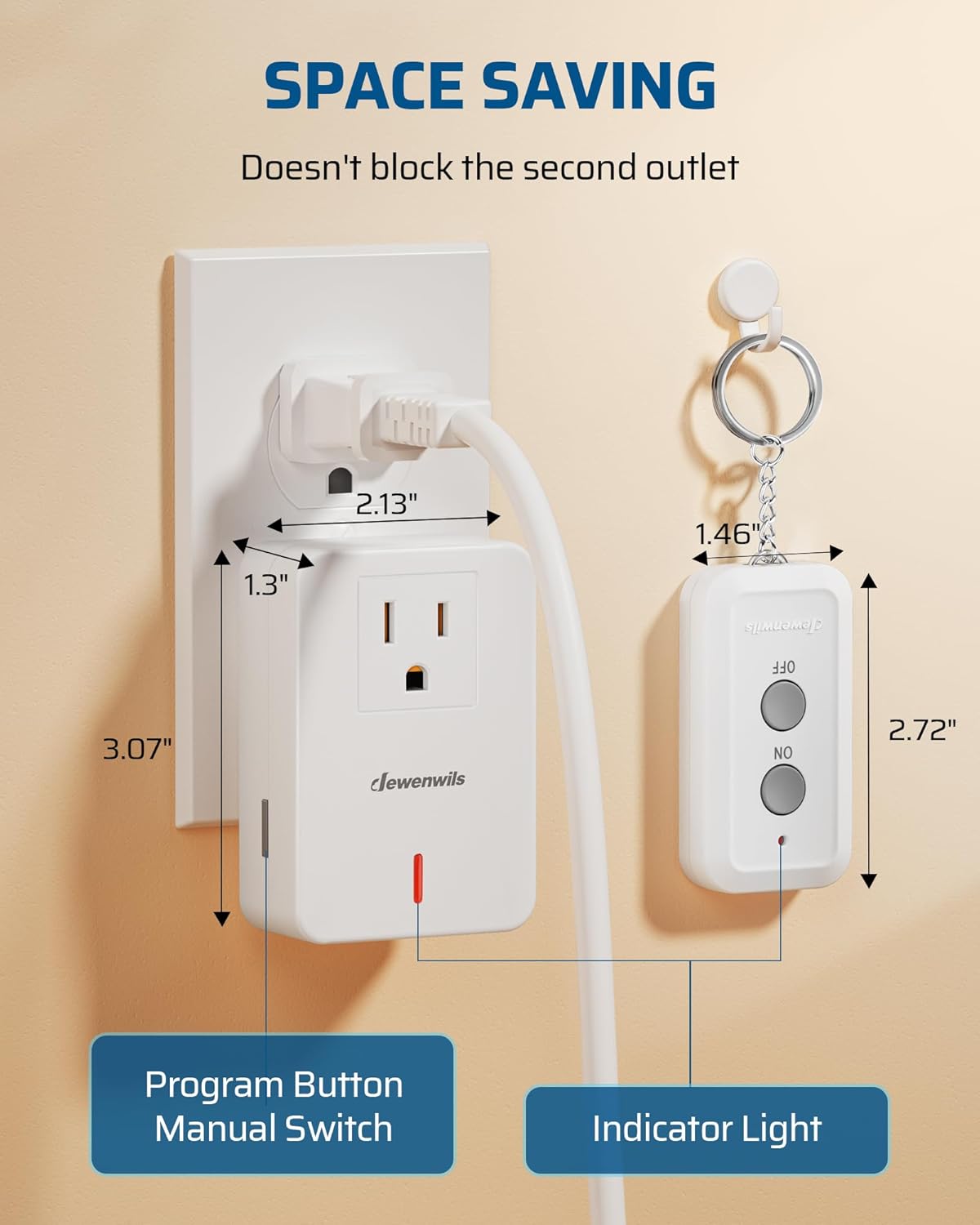
Image: A close-up view of the DEWENWILS remote control outlet plugged into a wall socket, next to the remote control. Dimensions are indicated: outlet is 3.07 inches tall, 1.3 inches wide, and 2.13 inches deep. The remote is 2.72 inches tall and 1.46 inches wide. Labels point to the 'Program Button/Manual Switch' on the side of the outlet and the 'Indicator Light' on the front.
Remote Control Outlet:
- Power Receptacle: Standard 3-prong outlet for connecting appliances.
- Indicator Light: Illuminates when the outlet is powered ON.
- Program Button/Manual Switch: Located on the side, this button can manually turn the outlet ON/OFF and is used for programming.
Remote Control:
- ON Button: Activates the connected appliance.
- OFF Button: Deactivates the connected appliance.
- Keychain: For convenient attachment and portability.
5. Setup
The DEWENWILS Remote Control Outlet is designed for quick and easy setup. No programming is required for initial use as the remote and outlet are pre-programmed.

Image: A person sitting on a couch, using the DEWENWILS remote control to operate a lamp connected to the remote outlet. The text overlay reads "PLUG AND PLAY IN SECONDS. No need to fumble in the dark, switch on and off with one button."
- Insert the AAA battery into the remote control. The battery is typically pre-installed; remove any protective tab if present.
- Plug the DEWENWILS Remote Control Outlet into a standard 3-prong wall outlet.
- Plug your desired appliance (e.g., lamp, fan) into the receptacle on the front of the remote control outlet.
- Press the ON or OFF button on the remote control to operate the connected appliance.
6. Operating Instructions
The remote control uses an RF (Radio Frequency) signal, allowing you to control appliances without direct line of sight.

Image: An aerial view diagram of a house showing the DEWENWILS remote control being used to operate an outlet from a distance, illustrating the "100FT RF REMOTE RANGE" and its ability to transmit signals through walls and doors.
- To turn the connected appliance ON, press the ON button on the remote control. The indicator light on the outlet will illuminate.
- To turn the connected appliance OFF, press the OFF button on the remote control. The indicator light on the outlet will turn off.
- The remote control has an effective range of up to 100 feet in open areas and can transmit through walls and doors.
- You can also manually switch the outlet ON/OFF by pressing the program button located on the side of the outlet.

Image: A living room scene where a DEWENWILS remote control outlet is plugged into a wall, powering a standing fan. The text overlay states "CONQUER HARD-TO REACH SWITCHES. Operating electrical appliances in hard-to-reach areas from anywhere in the house whenever you want."
7. Programming and Expanding Your System
Your DEWENWILS remote control outlet and remote are pre-programmed. If you wish to add additional DEWENWILS remote outlets or remotes (same model only) to your system, follow these steps:
- Plug the new remote control outlet into a wall socket.
- Press and hold the program button on the side of the new outlet until the indicator light begins to flash slowly (approximately 3-5 seconds).
- While the indicator light is flashing, press either the ON or OFF button on the remote control you wish to pair with the outlet.
- The indicator light on the outlet will stop flashing and remain ON (if you pressed ON) or OFF (if you pressed OFF), indicating successful pairing.
- Repeat this process for any additional outlets or remotes you wish to pair.
8. Maintenance
To ensure the longevity and proper functioning of your DEWENWILS Remote Control Outlet, follow these simple maintenance guidelines:
- Cleaning: Unplug the device from the wall outlet before cleaning. Use a dry, soft cloth to wipe the exterior. Do not use liquid cleaners or sprays.
- Storage: Store the device in a cool, dry place when not in use.
- Battery Replacement: If the remote control's range decreases or it stops responding, replace the AAA battery. Ensure correct polarity when inserting the new battery.
9. Troubleshooting
If you encounter issues with your DEWENWILS Remote Control Outlet, refer to the following common problems and solutions:
| Problem | Possible Cause | Solution |
|---|---|---|
| Outlet does not respond to remote. | 1. Remote battery is low or dead. 2. Outlet is not powered. 3. Remote and outlet are not paired. | 1. Replace the AAA battery in the remote. 2. Ensure the outlet is securely plugged into a live wall socket. 3. Re-pair the remote and outlet following the programming instructions in Section 7. |
| Appliance plugged into outlet does not turn on. | 1. Appliance is not switched on or is faulty. 2. Outlet is not receiving power. 3. Appliance exceeds outlet's maximum load. | 1. Ensure the appliance's power switch is ON and test it in a different outlet. 2. Check the wall outlet with another device. Ensure the remote outlet is firmly plugged in. 3. Verify the appliance's power consumption does not exceed 10A/1200W. |
| Reduced remote control range. | 1. Low remote battery. 2. Excessive interference. 3. Obstructions between remote and outlet. | 1. Replace the AAA battery in the remote. 2. Move the outlet or remote away from other electronic devices that may cause interference. 3. Minimize physical obstructions (e.g., thick walls, metal objects) between the remote and outlet. |
10. Specifications
| Model Number | BH9912U-18D |
| Operating Voltage | 125 Volts |
| Current Rating | 10 Amps |
| Maximum Load | 1200 Watts, 1/3 HP |
| RF Frequency | 433.92 MHz |
| Remote Range | Up to 100 feet (open area) |
| Remote Battery | 1 x AAA battery (included) |
| Product Dimensions (Outlet) | 3.5 x 2.36 x 3.07 inches |
| Certifications | ETL, FCC |
| Operation Mode | ON-OFF-ON |
11. Warranty and Support
DEWENWILS products are designed and manufactured to the highest quality standards. For warranty information or technical support, please contact DEWENWILS customer service. Details can typically be found on the product packaging or the official DEWENWILS website.
Manufacturer: DEWENWILS
Date First Available: June 27, 2018