
Lasko U35120
Lasko High Velocity Oscillating Tower Fan
Model: U35120
User Manual
Introduction
This manual provides important instructions for the safe operation and maintenance of your Lasko High Velocity Oscillating Tower Fan, Model U35120. Please read all instructions carefully before using this product and retain this manual for future reference.
The Lasko U35120 is a powerful and space-saving tower fan designed for effective air circulation in various indoor environments such as bedrooms, home gyms, garages, basements, and kitchens. It features multiple speed settings, oscillation, a timer, and remote control for convenient operation.
Important Safety Instructions
When using electrical appliances, basic precautions should always be followed to reduce the risk of fire, electric shock, and injury to persons, including the following:
- Read all instructions before using this fan.
- Use this fan only as described in this manual. Any other use not recommended by the manufacturer may cause fire, electric shock, or injury to persons.
- To reduce the risk of fire or electric shock, do not expose this fan to water or rain.
- This fan is equipped with a polarized plug (one blade is wider than the other). To reduce the risk of electric shock, this plug is intended to fit in a polarized outlet only one way. If the plug does not fit fully in the outlet, reverse the plug. If it still does not fit, contact a qualified electrician. Do not attempt to defeat this safety feature.
- Always unplug the fan when moving it, cleaning, or whenever it is not in use.
- Do not operate any fan with a damaged cord or plug, or after the fan malfunctions or has been dropped or damaged in any manner.
- Do not run cord under carpeting. Do not cover cord with throw rugs, runners, or similar coverings. Do not route cord under furniture or appliances. Arrange cord away from traffic area and where it will not be tripped over.
- Do not insert or allow fingers or foreign objects to enter any ventilation or exhaust opening as this may cause an electric shock or fire, or damage the fan.
- Do not block air openings or operate with any openings blocked.
- Always place the fan on a stable, flat, level surface during operation to prevent the fan from overturning.
- This fan is not intended for use in wet or damp locations.
- Do not use this fan near a window. Rain and moisture may create an electrical hazard.
- This fan is not suitable for use in agricultural facilities including areas where livestock, poultry or other animals are confined. Please refer to National Electric Code (NEC) Article 547-7 (2008), or applicable state or local codes or standards relating to electrical requirements for Agricultural Buildings.
- This fan is not suitable for use in hazardous locations. Please refer to National Electric Code (NEC) Article 500 or applicable state or local codes or standards relating to electrical requirements for Hazardous locations.
- The fan features the Lasko "Blue Plug" safety fuse technology, designed to cut off electric current to the fan if it detects a potentially hazardous electrical fault in the motor or power supply. If the fuse blows, unplug the fan and contact customer service.
Product Features
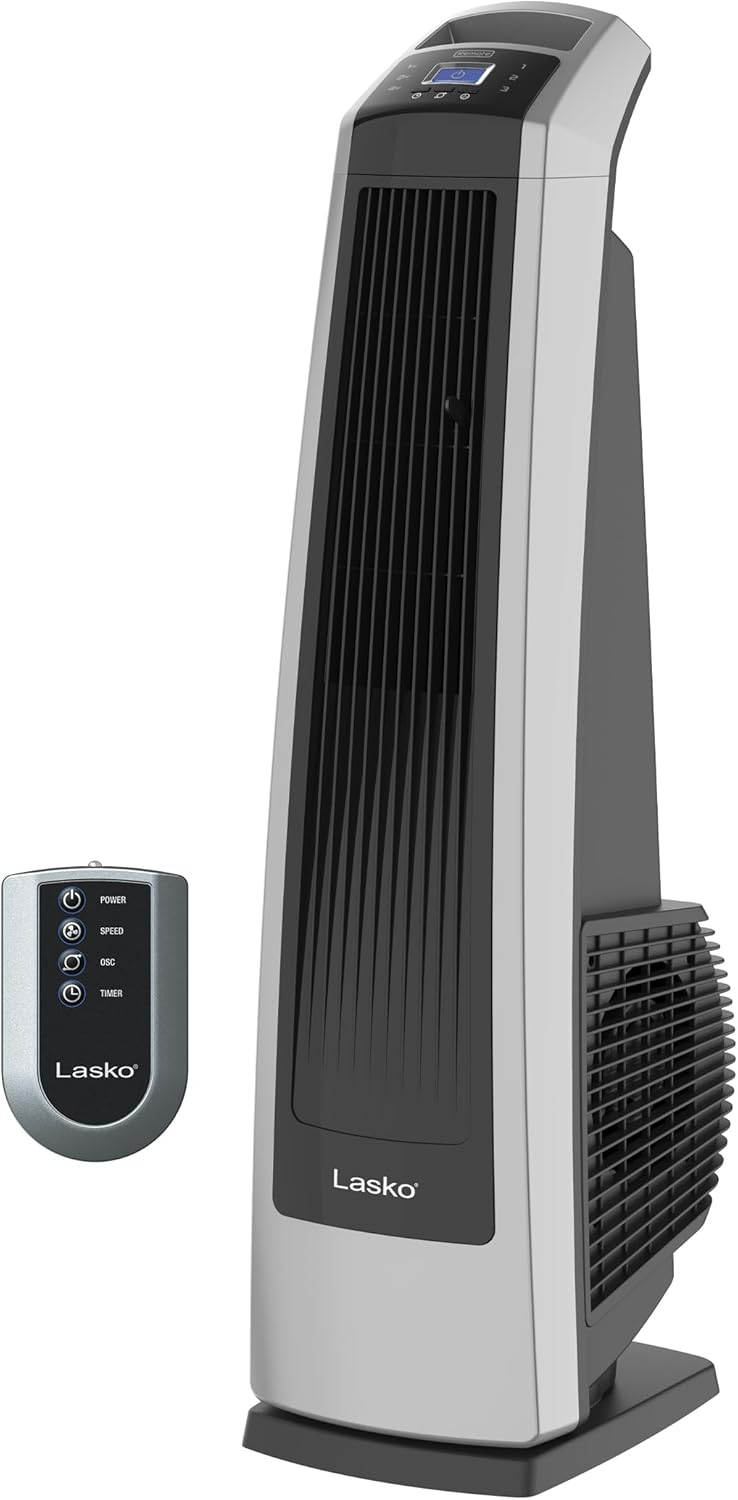
Figure 1: The Lasko U35120 High Velocity Oscillating Tower Fan shown with its accompanying remote control. The fan features a sleek black and silver design.

Figure 2: A detailed view of the fan's top control panel, highlighting the intuitive buttons for adjusting speed, activating oscillation, setting the timer, and power.

Figure 3: The Lasko "Blue Plug" safety fuse technology, an integrated feature designed to enhance user safety by cutting off electrical current in case of a fault.
- High Velocity Performance: Equipped with 3 powerful speed settings for customizable airflow.
- Electronic Controls & Remote Convenience: Easy-to-use electronic controls on the unit and a multi-function remote control with on-board storage.
- Widespread Oscillation & Directional Louvers: Provides full room coverage and precise airflow direction.
- 7-Hour Auto-Off Timer: Energy-saving feature for setting operation duration.
- Portable Design: Features an easy-grip handle for effortless transport and a stable 12-inch base.
- Enhanced Safety: Includes the Lasko "Blue Plug" trusted safety fuse technology.
Setup
The Lasko U35120 High Velocity Oscillating Tower Fan comes fully assembled and ready to use.
- Unpacking: Carefully remove the fan from its packaging. Retain packaging for off-season storage.
- Placement: Place the fan on a firm, level surface where it will not tip over. Ensure there is adequate space around the fan for proper air circulation and oscillation. Avoid placing it near curtains or other objects that could obstruct airflow or be drawn into the fan.
- Power Connection: Plug the fan directly into a 120V AC wall outlet. Do not use with extension cords or power strips. Ensure the "Blue Plug" is fully inserted into the outlet.
Operating Instructions
Control Panel
The fan can be operated using the control panel located on the top of the unit or with the included remote control.
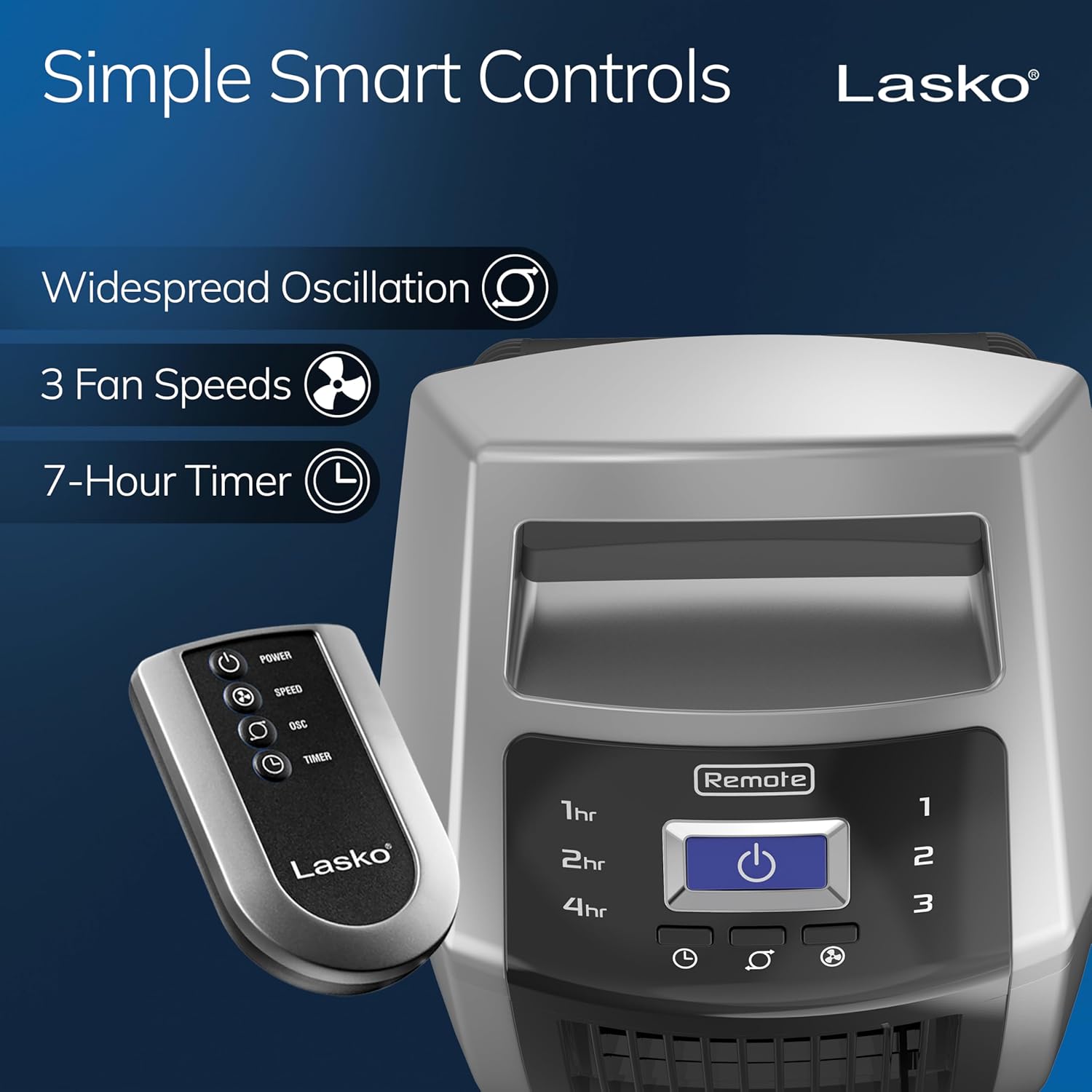
Figure 4: The fan's control panel and remote, showing buttons for Power, Speed, Oscillation, and Timer.
- Power Button (⏻): Press to turn the fan ON or OFF.
- Speed Button (⚡): Press repeatedly to cycle through the 3 speed settings: Low (1), Medium (2), High (3).
- Oscillation Button (⬤): Press to activate or deactivate the widespread oscillation feature, which sweeps the airflow across a wider area.
- Timer Button (⏱): Press repeatedly to set the auto-off timer for 1, 2, 4, or 7 hours. The corresponding indicator light will illuminate.
Remote Control
The remote control allows you to operate all fan functions from a distance. Ensure the remote is pointed towards the fan's control panel for optimal response. The remote requires 2 "AAA" batteries (not included).
- The remote control features the same buttons as the main control panel: Power, Speed, Oscillation, and Timer.
- For convenience, the fan includes on-board remote storage.
Maintenance
Regular cleaning of your fan will help maintain its performance and appearance.
- Always unplug the fan before cleaning.
- Use a soft cloth or a vacuum cleaner with a brush attachment to remove dust from the fan's grilles and exterior surfaces.
- To clean the exterior, wipe with a soft cloth dampened with a mild soap solution. Do not use abrasive cleaners or solvents as they may damage the fan's finish.
- Never immerse the fan in water or allow water to drip into the motor housing.
- For storage, it is recommended to store the fan in its original carton in a cool, dry place.
Troubleshooting
If your fan fails to operate, please check the following:
| Problem | Possible Cause | Solution |
|---|---|---|
| Fan does not turn on. |
|
|
| Weak or no airflow. |
|
|
| Fan is making unusual noise. |
|
|
If the problem persists after checking the above, please do not attempt to repair the fan yourself. Contact Lasko customer service for assistance.
Specifications
| Feature | Detail |
|---|---|
| Brand | Lasko |
| Model Name | U35120 |
| Color | Black and Silver |
| Electric Fan Design | Floor Fan |
| Power Source | AC |
| Product Dimensions | 35"D x 35"W x 11.9"H |
| Item Weight | 15.5 Pounds |
| Wattage | 96 watts |
| Air Flow Capacity | 509 Cubic Feet Per Minute |
| Voltage | 110 Volts |
| Number of Power Levels | 3 |
| Included Components | Tower Fan, Remote Control, User Manual |
| Indoor/Outdoor Usage | Indoor |
| Control Method | Push Button |
| Safety Certifications | ETL, UL |
Warranty
This Lasko product is warranted against defects in workmanship and/or materials for ONE (1) YEAR from the date of original purchase. This warranty does not apply if the damage occurred due to accident, improper handling or operation, shipping damage, abuse, misuse, unauthorized repairs made or attempted, or any other non-Lasko causes.
For service under warranty, please contact Lasko customer service. Do not return the product to the place of purchase.
Customer Support
For any questions, assistance, or replacement parts, please contact Lasko customer service.
- Website: Visit the official Lasko website for support resources and contact information.
- Phone: Refer to the product packaging or Lasko's official website for current customer service phone numbers.
- Email: Contact Lasko customer service via email for inquiries.
You can also refer to the official Instructions for Use (IFU) PDF document for additional details: Lasko U35120 User Manual (PDF).
Related documentsU35120


Ask a question about this manual
Ask about setup, troubleshooting, compatibility, parts, safety, or missing instructions. Manuals+ will review the question and use this page’s manual context to help answer it.