1. Introduction and Overview
Thank you for choosing the Volt Polska Micro UPS 1000 / 600W 2x7Ah. This Uninterruptible Power Supply (UPS) is designed to provide reliable power backup and protection for your computer and peripheral devices. Its compact and lightweight design makes it suitable for various home and office environments. The integrated Automatic Voltage Regulation (AVR) module protects connected equipment from sudden voltage fluctuations, ensuring stable power delivery. This UPS also features a cold start function, allowing it to power on directly from the battery without an AC connection.

Figure 1: Front-side view of the Volt Polska Micro UPS.
2. Safety Information
Please read and follow these safety instructions carefully before installing or operating your UPS. Failure to do so may result in electric shock, fire, or damage to the equipment.
- Indoor Use Only: This UPS is intended for indoor use in a controlled environment.
- Ventilation: Ensure adequate ventilation around the UPS. Do not block ventilation openings.
- Avoid Liquids: Do not expose the UPS to rain, water, or excessive humidity. Do not place containers with liquids on or near the UPS.
- Proper Grounding: Connect the UPS to a grounded AC power outlet. Do not remove the grounding prong.
- Battery Safety: The UPS contains a sealed lead-acid battery. Do not attempt to open or service the battery yourself. Refer to qualified service personnel for battery replacement.
- Overload Protection: Do not overload the UPS. Ensure the total power consumption of connected devices does not exceed the UPS's rated capacity.
- Temperature: Operate the UPS within the specified temperature range.
3. Product Features
- Reliable and efficient microprocessor control.
- Automatic Voltage Regulation (AVR) for stable output voltage.
- Automatic energy-saving function for ecological operation.
- Protection against overload.
- Cold start function: Allows the UPS to power on from battery without AC connection.
- Compact and lightweight design.
- Integrated efficient battery.
4. Setup
4.1 Unpacking and Initial Inspection
Carefully unpack the UPS and inspect it for any shipping damage. If any damage is found, do not install the unit and contact your dealer. Keep the packaging materials for future transport or storage.
4.2 Connecting the UPS
- Place the UPS in a well-ventilated area, away from direct sunlight, heat sources, and excessive moisture.
- Ensure the UPS is turned off.
- Connect the UPS power cord to a grounded wall outlet.
- Connect your computer, monitor, and other critical peripherals to the output sockets on the rear panel of the UPS. Ensure the total load does not exceed the UPS's capacity.
- For models with a USB port, connect the USB cable from the UPS to your computer for monitoring software (if applicable).

Figure 2: Rear view of the UPS with connection ports.

Figure 3: Detailed view of the rear connection panel.
5. Operating Instructions
5.1 Turning On/Off the UPS
- To Turn On: Press and hold the power button on the front panel for approximately 3 seconds until you hear a beep and the display illuminates.
- To Turn Off: Press and hold the power button for approximately 3 seconds until the display turns off and the UPS shuts down.
5.2 Cold Start Function
The UPS supports a cold start function, allowing it to be powered on directly from its internal battery even when not connected to an AC power source. To perform a cold start, ensure the UPS is off, then press and hold the power button as described in section 5.1. The UPS will power on and provide battery backup to connected devices.
5.3 Automatic Voltage Regulation (AVR)
The integrated AVR function automatically stabilizes the output voltage to connected devices. If the incoming AC voltage fluctuates (drops or rises), the AVR will adjust it to a safe operating range without switching to battery power, thus preserving battery life and protecting your equipment.
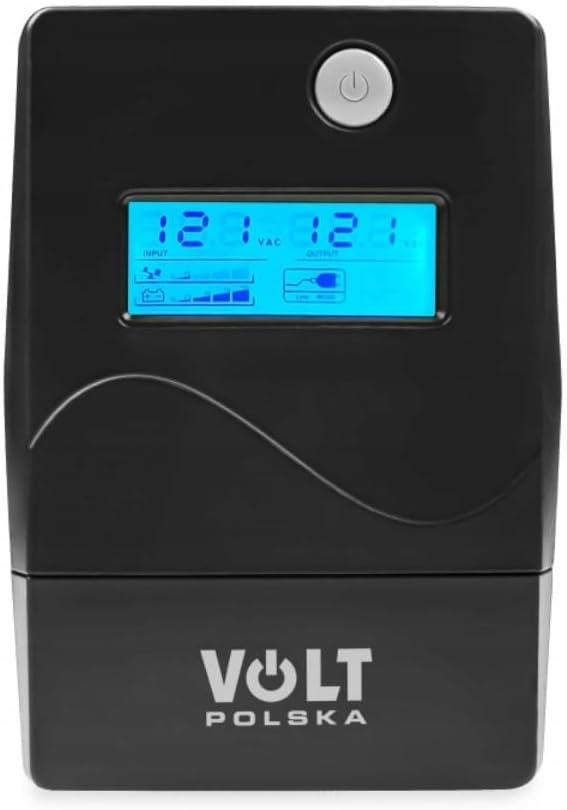
Figure 4: Front panel and display of the UPS.
6. Maintenance
- Battery Care: To maximize battery life, ensure the UPS is connected to an AC outlet and charging for at least 8 hours before initial use. Avoid deep discharges whenever possible.
- Cleaning: Use a dry, soft cloth to clean the exterior of the UPS. Do not use liquid or aerosol cleaners.
- Storage: If storing the UPS for an extended period, ensure it is fully charged, then disconnect it from the AC outlet. Recharge the UPS every three months to prevent battery degradation.
7. Troubleshooting
Refer to the table below for common issues and their solutions.
| Problem | Possible Cause | Solution |
|---|---|---|
| UPS does not turn on. | No AC power; Battery discharged; Power button not pressed long enough. | Check AC power connection; Allow UPS to charge for several hours; Press and hold power button for 3 seconds. |
| UPS beeps continuously in normal mode. | Overload condition. | Disconnect non-essential equipment to reduce load. |
| UPS switches to battery mode frequently. | Unstable AC input voltage; AVR working. | This may be normal if AC power is fluctuating. If persistent, check wall outlet or consult an electrician. |
| Short backup time. | Battery not fully charged; Battery nearing end of life; Overload. | Allow UPS to charge for 8+ hours; Consider battery replacement (contact service); Reduce connected load. |
8. Specifications
| Feature | Specification |
|---|---|
| Brand | Volt Polska |
| Model Number | 5UP1000028 |
| Maximum Power | 1000 Watt |
| Output Voltage | 230 Volts (AC) |
| Output Current | 7 A |
| Battery Composition | Lead Acid |
| Battery Ampere-hour (Ah) | 2x7 Ah (implied from product title) |
| Rechargeable Battery | Yes |
| Voltage | 230 Volts |
| Amperage | 7 A |
| Item Weight | 4.9 Kilograms |
| Form Factor | Compact, Portable |
| Color | Black |
| Connectivity | ATX, IEC 320, USB (referring to port types) |
9. Warranty and Support
For warranty information and technical support, please refer to the documentation provided with your purchase or visit the official Volt Polska website. Warranty terms may vary by region and retailer. Please retain your proof of purchase for warranty claims.


