
Introduction
This manual provides comprehensive instructions for the Braun Classic Analog Alarm Clock, model BC01B. Please read this manual carefully before using the product to ensure proper operation and longevity. Keep this manual for future reference.
Product Features
- Silent Quartz Movement: Ensures accurate timekeeping without ticking noise.
- Crescendo Beep Alarm: The alarm sound increases in frequency and volume if not turned off.
- Integrated Foot Snooze/Light Function: Activates snooze for 5 minutes and illuminates the dial for 5 seconds when pressed.
- Luminous Tipped Hands: Hour and minute hands glow in the dark for improved visibility in low light conditions.
- Easy-to-Read Dial: Clear and simple dial design for quick time reading.
Setup
1. Battery Installation
The Braun BC01B alarm clock requires one (1) AA battery (not included).
- Locate the battery compartment cover on the back of the alarm clock.
- Remove the cover by sliding or lifting it.
- Insert one AA battery, ensuring the correct polarity (+ and -) as indicated inside the compartment.
- Replace the battery compartment cover securely.

Image: Rear view of the Braun BC01B alarm clock, highlighting the battery compartment and adjustment dials for time and alarm settings.
2. Setting the Time
- Locate the time setting knob on the back of the alarm clock (usually marked with a clock icon).
- Rotate the knob clockwise or counter-clockwise until the hour and minute hands display the correct time.
3. Setting the Alarm
- Locate the alarm setting knob on the back of the alarm clock (usually marked with an alarm icon).
- Rotate the knob to move the alarm hand to your desired alarm time.
- Ensure the alarm ON/OFF switch (often a small slider or button) is in the 'ON' position to activate the alarm.

Image: A close-up view of the top of the Braun BC01B alarm clock, illustrating the integrated foot snooze/light button.
Operating Instructions
1. Activating/Deactivating the Alarm
Use the alarm ON/OFF switch located on the back or side of the clock to toggle the alarm function.
- Slide the switch to 'ON' (often indicated by a color, e.g., green) to enable the alarm.
- Slide the switch to 'OFF' to disable the alarm.
2. Snooze Function
When the alarm sounds, press the integrated foot snooze/light button located at the base of the clock.
- Pressing the button will temporarily silence the alarm for approximately 5 minutes.
- The alarm will sound again after the snooze interval.

Image: The Braun BC01B alarm clock with an overlay indicating the 'Zzz 5 min' snooze function, showing the clock face and the snooze button at the base.
3. Light Function
To illuminate the clock face in low light conditions:
- Press the integrated foot snooze/light button at the base of the clock.
- The dial will illuminate for approximately 5 seconds.

Image: The Braun BC01B alarm clock with its dial illuminated, demonstrating the light function for nighttime visibility.
Maintenance
1. Cleaning
To clean your alarm clock:
- Wipe the clock with a soft, dry cloth.
- Do not use abrasive cleaners, solvents, or chemical sprays, as these may damage the finish.
2. Battery Replacement
Replace the AA battery when the clock stops functioning or the alarm sound weakens.
- Follow the battery installation steps outlined in the "Setup" section.
- Dispose of used batteries responsibly according to local regulations.
Troubleshooting
| Problem | Possible Cause | Solution |
|---|---|---|
| Clock not working / Hands not moving | Battery is dead or incorrectly inserted. | Replace the battery with a new AA battery, ensuring correct polarity. |
| Alarm not sounding | Alarm is not activated or alarm time is incorrectly set. | Check the alarm ON/OFF switch. Verify the alarm hand is set to the desired time. |
| Light function not working | Battery is low or dead. | Replace the battery. |
| Clock losing time | Weak battery. | Replace the battery with a fresh AA battery. |
Specifications
- Model: BC01B
- Brand: Braun
- Movement: Silent Quartz
- Power Source: 1 x AA Battery (not included)
- Dimensions: 6.9 cm x 3.81 cm x 3.7 cm (2.72 in x 1.5 in x 1.46 in)
- Weight: 82.2 grams (2.9 oz)
- Material: Plastic
- Alarm Type: Crescendo Beep
- Snooze Duration: 5 minutes
- Light Duration: 5 seconds
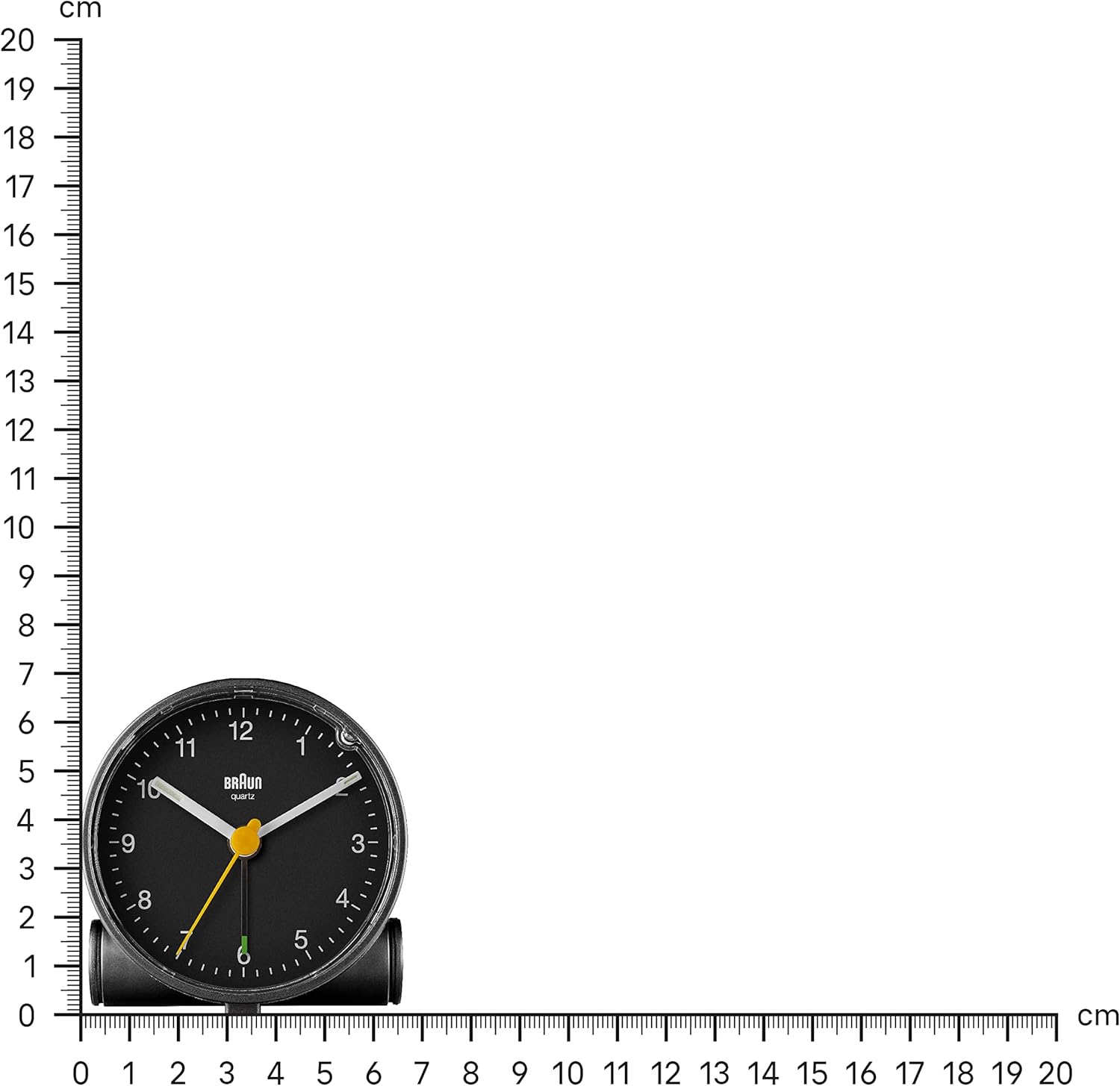
Image: The Braun BC01B alarm clock displayed alongside a ruler, illustrating its compact dimensions.
Warranty and Support
Warranty Information
This Braun BC01B alarm clock comes with a 2-year warranty from the date of purchase. This warranty covers manufacturing defects under normal use. It does not cover damage caused by misuse, accidents, unauthorized modifications, or battery leakage.
Please retain your proof of purchase for warranty claims.
Customer Support
For technical assistance, warranty claims, or further inquiries, please contact Braun customer support through their official website or the retailer where the product was purchased.