
1. Important Safety Information
Please read this manual carefully before using the appliance. Failure to follow these instructions may result in electric shock, fire, or serious injury. Keep this manual for future reference.
- Always ensure the appliance is unplugged before cleaning, maintenance, or when not in use.
- Do not immerse the appliance, power cord, or plug in water or other liquids.
- Do not operate the appliance with a damaged cord or plug, or after the appliance malfunctions or has been damaged in any manner.
- Keep the appliance out of reach of children.
- Ensure the appliance is placed on a stable, level surface to prevent tipping.
- Do not block air inlets or outlets.
- Only use clean water in the water tank. Do not add any chemicals or additives.
- This appliance is protected against splashing water (IPX4 rating). However, avoid direct water jets.
2. Product Overview
The De'Longhi EV250.BK is an evaporative air cooler designed to provide natural cooling and improved air quality. Key features include:
- Evaporative Cooling System: Utilizes water to cool the air, ideal for dry climates.
- Ionizer Function: Releases negative ions to enhance air purity and personal well-being.
- Dust Filter: Helps to clean the air by trapping dust particles.
- Large Water Tank: 4.5-liter removable water tank provides up to 6 hours of operation.
- Multiple Fan Speeds & Modes: Features 3 fan speeds and 3 operating modes (Natural, Normal, Sleep).
- Remote Control: For convenient adjustment of functions and settings.
- Portability: Equipped with handles and wheels for easy movement.

Figure 2.1: Front view of the De'Longhi EV250.BK Evaporative Air Cooler.
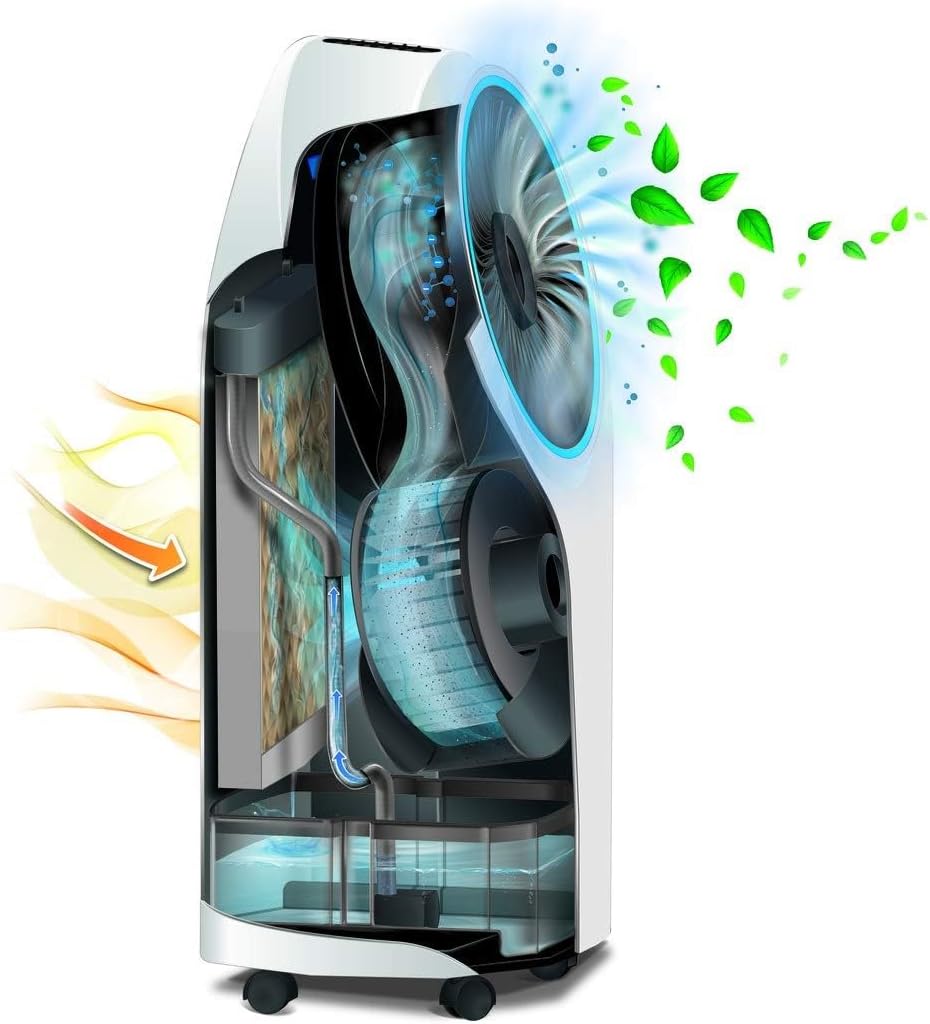
Figure 2.2: Internal diagram illustrating the evaporative cooling process and air filtration.
3. Setup
- Unpacking: Carefully remove the appliance from its packaging. Retain packaging for storage or transport.
- Positioning: Place the air cooler on a flat, stable surface. Ensure there is adequate space around the unit for proper airflow. The unit is designed for floor mounting and is portable thanks to its integrated wheels.

Figure 3.1: Example of suitable placement for the air cooler.
- Filling the Water Tank:
- Pull out the removable 4.5-liter water tank from the rear of the unit.
- Fill the tank with clean, cool water up to the maximum level indicator.
- For enhanced cooling, you may place the included ice pack (or ice cubes) into the water tank.
- Carefully slide the water tank back into the unit until it clicks into place.

Figure 3.2: Water level indicator and unit wheels for portability.
- Connecting Power: Plug the power cord into a suitable electrical outlet.
4. Operating Instructions
The De'Longhi EV250.BK can be operated using the control panel on the unit or the included remote control.

Figure 4.1: Remote control for the EV250.BK unit.
4.1 Power On/Off
- Press the Power button (symbol: circle with vertical line) on the control panel or remote control to turn the unit on or off.
4.2 Fan Speed Adjustment
- Press the Speed button (symbol: fan blades) to cycle through the 3 available fan speeds: Low, Medium, and High.
4.3 Operating Modes
- Press the Mode button to select one of the following operating modes:
- Normal: Constant airflow at the selected speed.
- Natural: Simulates natural breeze by varying fan speed.
- Sleep: Reduces fan speed and noise for quiet operation, gradually decreasing fan speed over time.
4.4 Cooling Function (Evaporative)
- Ensure the water tank is filled.
- Press the Cooling button (symbol: snowflake or water droplet) to activate the evaporative cooling function. The unit will draw water from the tank to cool the air.
- To deactivate, press the Cooling button again.
4.5 Ionizer Function
- Press the Ionizer button (symbol: often a stylized cloud or ion symbol) to activate the air purification feature.
- To deactivate, press the Ionizer button again.
4.6 Timer Function
- Press the Timer button (symbol: clock) to set the desired operating duration. The unit will automatically turn off after the set time.
- Each press typically increases the timer by one hour.
5. Maintenance
Regular maintenance ensures optimal performance and extends the lifespan of your De'Longhi EV250.BK air cooler.
5.1 Cleaning the Dust Filter
- Unplug the appliance from the power outlet.
- Locate the dust filter, typically at the rear or side air intake.
- Remove the filter according to the instructions in the full product manual (usually by sliding or unlatching).
- Clean the filter with a soft brush or vacuum cleaner to remove accumulated dust. For a more thorough cleaning, rinse it under running water. Ensure it is completely dry before reinserting.
- Reinstall the dust filter.
5.2 Cleaning the Water Tank
- Unplug the appliance.
- Remove the water tank as described in the Setup section.
- Empty any remaining water.
- Clean the inside of the tank with a mild detergent and water. Rinse thoroughly to remove all soap residue.
- Allow the tank to air dry completely before reinserting it into the unit. This helps prevent mold and mildew growth.
5.3 General Cleaning
- Wipe the exterior of the unit with a soft, damp cloth. Do not use abrasive cleaners or solvents.
- Ensure no water enters the internal electrical components.
6. Troubleshooting
| Problem | Possible Cause | Solution |
|---|---|---|
| Unit does not turn on. | No power supply. | Check if the power cord is securely plugged into the outlet. Ensure the outlet is functional. |
| No cooling effect. | Water tank is empty or cooling function is off. | Fill the water tank. Activate the cooling function. For better cooling, add ice or a frozen ice pack to the water tank. |
| Weak airflow. | Dust filter is clogged. | Clean the dust filter as described in the Maintenance section. |
| Unusual noise. | Water pump noise (normal for evaporative coolers) or unit not on a level surface. | Ensure the unit is on a stable, level surface. Some water circulation noise is normal during evaporative cooling. |
| Remote control not working. | Dead batteries or obstruction. | Replace the batteries in the remote control. Ensure there is no obstruction between the remote and the unit's sensor. |
7. Specifications
| Model Name: | EV250.BK |
| Brand: | De'Longhi |
| Material: | Plastic |
| Color: | Black |
| Mounting Type: | Floor Mount |
| Water Tank Capacity: | 4.5 Liters |
| Airflow Capacity: | 350 Microliters per minute |
| Power (Wattage): | 70 Watts |
| Noise Level: | 44 Decibels |
| Number of Speeds: | 3 |
| Control Type: | Remote Control |
| Operating Mode: | Automatic |
| Item Weight: | 7.2 Kilograms |
| Dimensions (D x W x H): | 34.2 cm (Depth) x 39.4 cm (Width) x 80 cm (Height) (Interpreted for tower form factor based on product images) |
| Special Features: | Timer, Portable |
8. Warranty and Support
Warranty Information: The De'Longhi EV250.BK evaporative air cooler comes with a 2-year availability of spare parts, indicating a commitment to product longevity and repairability. Please retain your proof of purchase for warranty claims.
Customer Support: For technical assistance, troubleshooting beyond this manual, or warranty service, please contact De'Longhi customer support through their official website or the contact information provided with your purchase documentation.
You can find more information and support resources on the official De'Longhi website: www.delonghi.com

