Introduction
This manual provides essential information for the proper installation, operation, and maintenance of the Eurodib P3D-14 Main Board. This component is designed for specific industrial and scientific applications, serving as a critical control element within compatible systems. Please read this manual thoroughly before handling or installing the board.
Safety Information
WARNING: This product is an electronic component and should only be handled and installed by qualified personnel. Improper installation or handling can result in electric shock, damage to the board, or damage to connected equipment.
- Always disconnect power to the system before installing, removing, or servicing the main board.
- Avoid touching components on the board unless necessary. Static electricity can damage sensitive components. Use appropriate ESD (Electrostatic Discharge) precautions.
- Ensure proper grounding of the system where the board is installed.
- Do not expose the board to moisture, extreme temperatures, or corrosive environments.
- Observe all warning labels on the board, such as "HIGHVOLTAGE".
Setup and Installation
Unpacking
Carefully remove the P3D-14 Main Board from its packaging. Inspect the board for any visible damage during transit. If damage is observed, do not proceed with installation and contact your supplier immediately.
Installation Procedure
Installation of the P3D-14 Main Board requires technical expertise. It is strongly recommended that installation be performed by a certified technician or qualified professional.
- Ensure the host system is completely powered off and disconnected from all power sources.
- Wear appropriate ESD protection (e.g., anti-static wrist strap).
- Carefully align the P3D-14 board with the designated mounting points within the system chassis.
- Secure the board using appropriate fasteners, ensuring it is firmly seated and does not flex.
- Connect the necessary cables to the board's connectors. Refer to the system's wiring diagram for correct connections. Pay close attention to labeled points such as LIN (Line Input), GND (Ground), and connectors like CON3. Note the HIGHVOLTAGE warning area.
- Double-check all connections for secure fit and correct polarity.
- Once installed, close the system chassis and re-connect power.
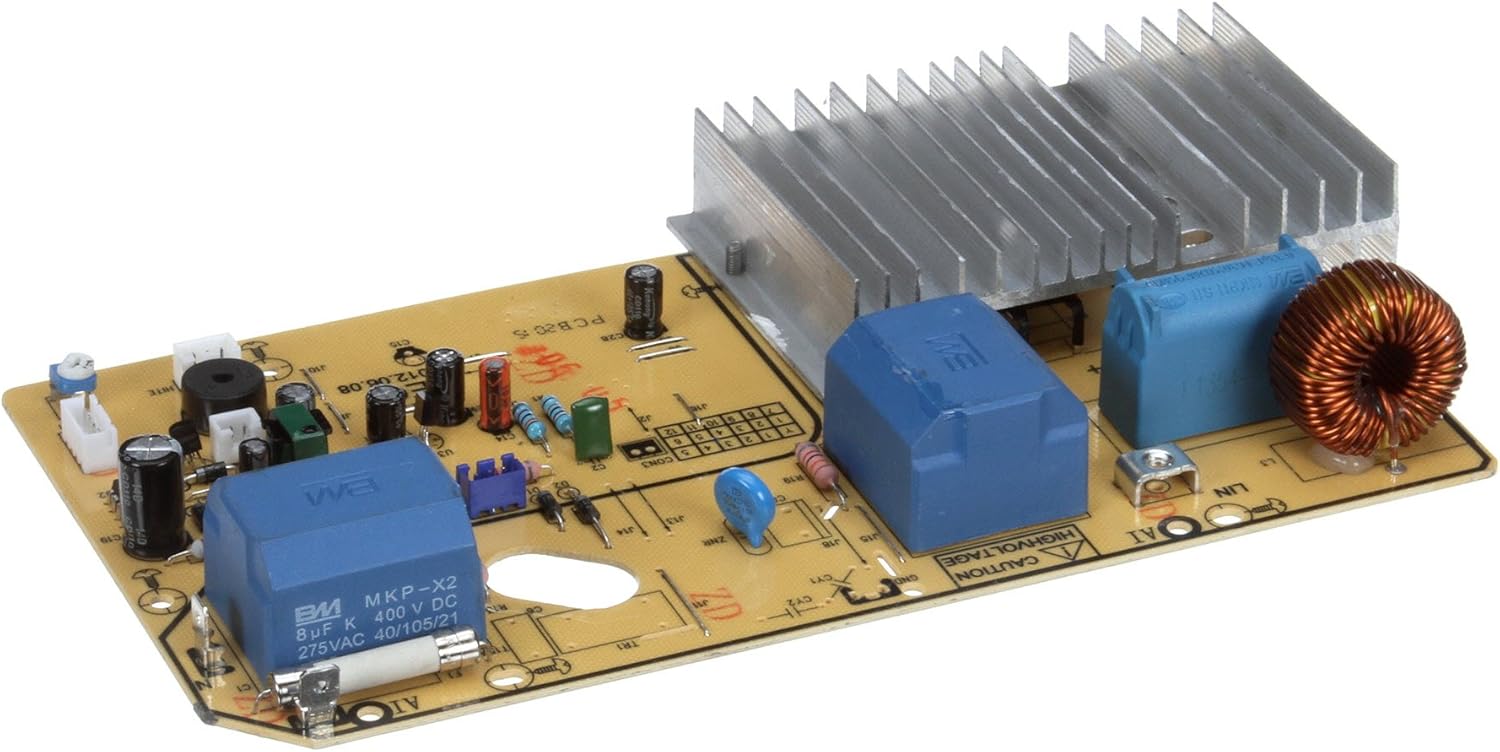
Figure 1: Top view of the Eurodib P3D-14 Main Board. This image displays the layout of the circuit board, including the heat sink, various capacitors, resistors, and connection points. Key labels such as "LIN", "GND", "HIGHVOLTAGE", and "CON3" are visible, indicating critical connection and warning areas. The board also features a large copper coil and blue rectangular components, likely capacitors or relays, along with a fuse.
Operating Principles
The P3D-14 Main Board functions as the central control unit for the system it is integrated into. It processes input signals, manages power distribution, and controls various outputs to ensure the proper operation of the connected appliance or machinery. As a core component, its operation is typically managed by the overarching system's software or control panel, rather than direct user interaction with the board itself.
Upon system power-up, the board initiates its internal diagnostics and prepares for operation. Its specific functions are determined by the firmware loaded onto it and the design of the system it serves.
Maintenance
Proper maintenance ensures the longevity and reliable performance of the P3D-14 Main Board.
- Cleaning: Periodically, and only when the system is powered off and disconnected, gently clean the board to remove dust and debris using compressed air or a soft, dry brush. Do not use liquids or abrasive cleaners.
- Inspection: Regularly inspect the board for any signs of overheating (discoloration), loose connections, or damaged components. Address any issues promptly.
- Environment: Ensure the operating environment remains within specified temperature and humidity ranges to prevent component degradation.
Troubleshooting
Troubleshooting issues with a main board often requires specialized diagnostic tools and knowledge. The following are general guidelines:
| Problem | Possible Cause | Solution |
|---|---|---|
| System not powering on. | No power to the board; faulty power supply; board failure. | Verify power connections. Check power supply unit. If issues persist, professional diagnosis is required. |
| Intermittent operation. | Loose connections; overheating; component degradation. | Check all cable connections. Ensure adequate ventilation. Consult a technician. |
| Incorrect system function. | Software/firmware issue; board component failure. | Refer to the system's main manual. If the board is suspected, professional repair or replacement may be needed. |
For complex issues or if you are unsure about any troubleshooting step, always consult a qualified technician or the manufacturer's support.
Specifications
- Model: P3D-14
- Brand: Eurodib
- Item Weight: 1 pounds
- ASIN: B07CZ1S4SQ
- Date First Available: January 6, 2019
- Typical Operating Voltage (DC): Up to 400 V DC (based on capacitor rating)
- Typical Operating Voltage (AC): Up to 275 V AC (based on capacitor rating)
Warranty and Support
For information regarding warranty coverage, please refer to the original purchase documentation or contact your Eurodib product supplier. Warranty terms typically cover manufacturing defects under normal use conditions.
For technical support, replacement parts, or service inquiries, please contact the authorized Eurodib service center or the vendor from whom you purchased the P3D-14 Main Board. Provide your product model number (P3D-14) and ASIN (B07CZ1S4SQ) when seeking assistance.


