
Product Overview
The NEBO Armor3 Flashlight is a robust and versatile lighting tool designed for durability and performance in various conditions. It features multiple light modes, a non-slip rubber coating, and a magnetic base for hands-free operation. Engineered to be impact-resistant and waterproof, the Armor3 is built to withstand demanding environments.
- 4 Light Modes: Flashlight, Work Light, Red COB Worklight, Red COB Flash.
- Durable Design: Non-slip rubber coating, floats, fully dimmable, steel clip, magnetic base.
- Operation: Front position ON/OFF button; hold to dim.
- Resilience: IPX7 Waterproof and impact resistant (rated for 66 feet drop).
- Power: Powered by 3x AAA batteries (included).

Figure 1: Front view of the NEBO Armor3 Flashlight, highlighting its primary light source and the side COB work light.
Initial Setup
Battery Installation
- Locate the battery compartment cover, typically at the base of the flashlight.
- Unscrew the two screws securing the battery cover.
- Insert 3x AAA batteries, ensuring correct polarity (+/-) as indicated inside the compartment.
- Replace the battery cover and securely tighten the screws to maintain the waterproof seal.

Figure 2: Side view of the Armor3 flashlight, illustrating the general area for battery access.
Operating Your Armor3 Flashlight
Power Button and Mode Selection
The Armor3 features a single front-positioned ON/OFF button for all functions.
- Press once: Activates Flashlight mode (top spot light).
- Press twice: Activates Work Light mode (side COB light).
- Press three times: Activates Red COB Worklight mode.
- Press four times: Activates Red COB Flash mode.
- To turn off: Press the button again after cycling through all modes, or hold the button down for 2 seconds in any mode.
Dimmable Feature
While in Flashlight or Work Light mode, hold down the ON/OFF button to activate the dimming function. Release the button at your desired brightness level. The light will remember the last brightness setting for the next time it is turned on in that mode.
Integrated Features
- Steel Clip: Use the integrated steel clip for convenient attachment to pockets, belts, or gear.
- Magnetic Base: The powerful magnetic base allows for hands-free lighting by attaching the flashlight to metallic surfaces.

Figure 3: Detailed diagram illustrating the various features and components of the Armor3 flashlight.
Official Product Video: Durability Test

Video 1: An official NEBO video demonstrating the durability of the Armor3 flashlight through various tests, including waterproof, drop, crush, and impact tests. This video highlights the product's robust construction and resilience.
Care and Maintenance
- Cleaning: Wipe the flashlight with a soft, damp cloth. Do not use abrasive cleaners or solvents.
- Battery Care: Remove batteries if the flashlight will not be used for an extended period to prevent leakage and corrosion. Store in a cool, dry place.
- Waterproof Seal: Ensure the battery compartment cover is securely fastened before exposing the flashlight to water to maintain its IPX7 waterproof rating.

Figure 4: The Armor3 flashlight submerged in water, showcasing its waterproof design and ability to float.
Troubleshooting
| Problem | Possible Cause | Solution |
|---|---|---|
| Light does not turn on. | Dead or incorrectly installed batteries. | Check battery polarity. Replace with fresh AAA batteries. |
| Light is dim or flickers. | Low battery power. Loose battery connection. | Replace batteries. Ensure battery compartment is securely closed. |
| Water inside battery compartment. | Battery cover not properly sealed. | Immediately remove batteries and dry the compartment. Ensure cover is tightened correctly for future use. |
Technical Specifications
| Feature | Detail |
|---|---|
| Brand | NEBO |
| Model Number | Nebo 6526 |
| Light Source Type | LED |
| Brightness (Spot Light) | 160 Lumens |
| Brightness (Work Light) | 360 Lumens |
| Power Source | Battery Powered (3x AAA, included) |
| Water Resistance Level | IPX7 Waterproof (floats) |
| Impact Resistance | Rated for 20 meters (66 feet) |
| Material | Plastic, Rubber |
| Item Weight | 7.4 ounces (209 Grams) |
| Product Dimensions | 8 x 4 x 6 inches |
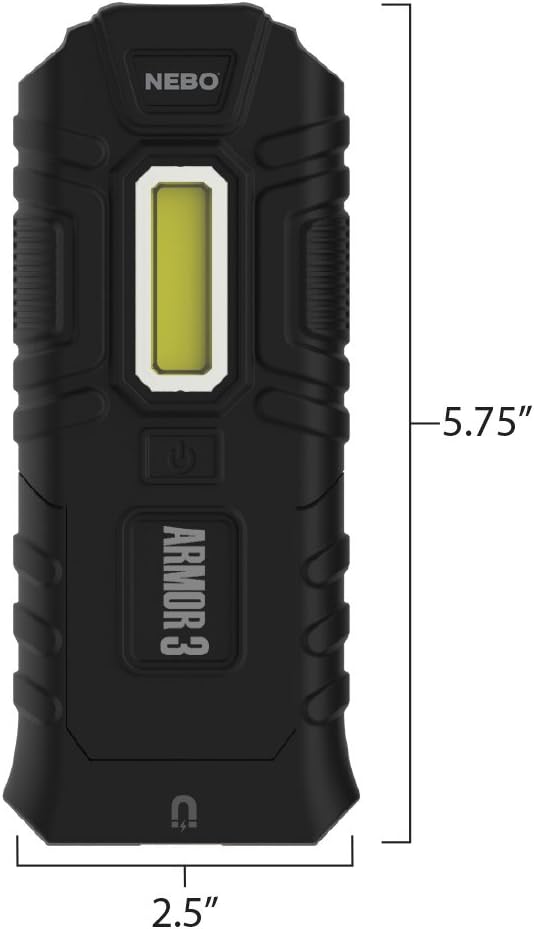
Figure 5: Dimensions of the Armor3 flashlight.
Warranty and Support
The NEBO Armor3 Flashlight comes with a Limited Lifetime Warranty, ensuring peace of mind regarding its durability and performance. For warranty claims, technical support, or any product-related inquiries, please refer to the official NEBO website or contact their customer service directly.
Official NEBO Website: www.nebo.acgbrands.com