Introduction
This manual provides essential information for the proper installation, operation, and maintenance of the Red Lion CUB4V020 CUB4 RED Volt Meter. Please read this manual thoroughly before using the device to ensure safe and efficient operation.
The CUB4V020 is a compact, versatile digital panel meter designed for accurate voltage measurement in various industrial and scientific applications. Its bright red LED display provides clear readings.
Product Overview
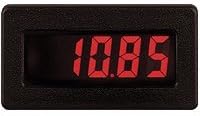
Figure 1: Red Lion CUB4V020 CUB4 RED Volt Meter. This image shows the Red Lion CUB4V020 CUB4 RED Volt Meter, a compact digital panel meter. The display is red LED, currently showing a reading of '10.85', indicating its function as a voltage measurement device.
The CUB4V020 features a high-contrast red LED display for easy readability, even in challenging lighting conditions. It is designed for panel mounting and offers reliable performance for monitoring DC voltage levels.
Setup and Installation
Proper installation is crucial for the accurate and safe operation of the CUB4V020 Volt Meter. Follow these general guidelines:
- Safety First: Ensure all power sources are disconnected before beginning installation to prevent electrical shock.
- Mounting: Select a suitable panel cutout for the meter. Secure the meter firmly using the provided mounting hardware.
- Wiring: Connect the voltage input wires to the designated terminals on the back of the meter. Observe correct polarity. Refer to the wiring diagram (typically found on the device or in a separate wiring guide) for specific terminal assignments.
- Power Supply: Connect the meter's power supply according to the specifications. Ensure the voltage and current ratings match the meter's requirements.
- Verification: Double-check all connections before restoring power.
Note: Specific wiring diagrams and detailed mounting instructions may vary. Always consult the product's physical documentation or the manufacturer's website for precise model-specific instructions.
Operating Instructions
Once installed and powered, the CUB4V020 Volt Meter operates automatically to display the measured voltage.
- Power On: Apply power to the meter. The red LED display should illuminate and show a voltage reading.
- Reading Display: The meter continuously displays the measured voltage. The display resolution and range are fixed according to the model specifications.
- Environmental Conditions: Operate the meter within its specified environmental limits (temperature, humidity) to ensure accurate readings and longevity.
No user calibration or adjustment is typically required for standard voltage measurement with this model.
Maintenance
The CUB4V020 Volt Meter is designed for minimal maintenance. Regular care ensures optimal performance and extends the product's lifespan.
- Cleaning: Use a soft, dry cloth to clean the display and housing. Do not use abrasive cleaners, solvents, or harsh chemicals, as these can damage the plastic and display.
- Inspection: Periodically inspect the wiring connections for any signs of wear, corrosion, or looseness. Ensure the meter is securely mounted.
- Environment: Keep the meter free from excessive dust, moisture, and extreme temperatures.
No internal user-serviceable parts are present. Do not attempt to open the meter housing.
Troubleshooting
If you encounter issues with your CUB4V020 Volt Meter, refer to the following common troubleshooting steps:
| Problem | Possible Cause | Solution |
|---|---|---|
| Display is blank | No power supply; Incorrect wiring; Faulty meter | Check power connections and source; Verify wiring against diagram; Contact support if power and wiring are correct. |
| Incorrect reading | Incorrect wiring; Input voltage out of range; Sensor issue | Verify input voltage wiring and polarity; Ensure measured voltage is within meter's specified range; Contact support. |
| Display flickers or is unstable | Unstable power supply; Electrical interference; Loose connections | Check power supply stability; Ensure proper grounding and shielding; Tighten all wiring connections. |
If the problem persists after attempting these solutions, please contact Red Lion Controls technical support.
Specifications
- Model: CUB4V020
- Brand: Red Lion Controls
- Display Type: Red LED
- Function: Volt Meter
- Item Weight: 0.01 Ounces (approximate)
- ASIN: B07CYZLMJ9
- Date First Available: May 9, 2018
- Further detailed specifications (e.g., voltage range, accuracy, power requirements, dimensions) can be found on the official Red Lion Controls product datasheet.
Warranty Information
Red Lion Controls products are typically covered by a limited warranty against defects in materials and workmanship. The specific terms and duration of the warranty may vary by product and region.
For detailed warranty information, please refer to the warranty statement included with your product packaging or visit the official Red Lion Controls website. Keep your proof of purchase for warranty claims.
Support and Contact
If you require technical assistance, have questions about your CUB4V020 Volt Meter, or need to report an issue, please contact Red Lion Controls customer support.
- Website: Visit the official Red Lion Controls website for product documentation, FAQs, and support resources.
- Technical Support: Contact information (phone, email) for technical support can typically be found on the manufacturer's website.
When contacting support, please have your product model number (CUB4V020) and any relevant purchase information ready.


