Introduction
Thank you for purchasing the J-AXIS ACY14-BK 10 BAR Water Resistant Digital Watch. This manual provides comprehensive instructions for setting up, operating, and maintaining your watch. Please read this manual carefully to ensure proper use and to fully utilize all its features.
Setup
1. Unboxing and Initial Inspection
Upon opening the package, please ensure all components are present and in good condition:
- J-AXIS ACY14-BK Digital Watch
- Instruction Manual (this document)
- Warranty Card (included within the instruction manual)
- Product Box
2. Battery Information
The watch comes with one Lithium Ion battery pre-installed. No user installation is required for initial use. The battery type is specified as Lithium Ion.
3. Button Functions Overview
Your watch features four buttons, typically located on the sides of the watch case. Their general functions are:
- MODE: Cycles through different modes (Time, Alarm, Stopwatch, Timer, Second Time Zone).
- RESET: Used to reset values or move selection during setting.
- ST/STP (Start/Stop): Used to start/stop functions like stopwatch or timer, or to adjust values during setting.
- LIGHT: Activates the EL backlight for illumination.
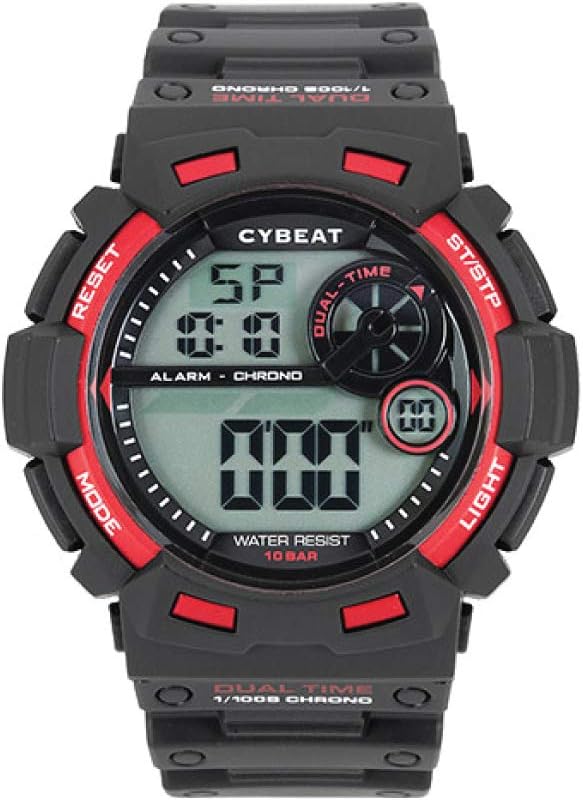
Image: Front view of the J-AXIS ACY14-BK digital watch, showing the display and button labels. The watch has a black case with red accents and a clear digital display.
4. Time and Date Setting
- In Timekeeping Mode, press the MODE button repeatedly until the seconds start flashing.
- Press RESET to cycle through the setting items: seconds → hour → minute → year → month → day.
- Use the ST/STP button to adjust the flashing value.
- Once all settings are correct, press MODE to exit the setting mode.
5. Alarm Setting
The watch supports up to 5 alarms.
- From Timekeeping Mode, press MODE until you reach the Alarm Mode (indicated by 'AL' or similar on the display).
- Press RESET to select the alarm number (AL1, AL2, etc.) or to toggle the alarm ON/OFF.
- When an alarm time is flashing, use ST/STP to adjust the hour and minute.
- Press MODE to confirm and exit.
6. Timer Function
- From Timekeeping Mode, press MODE until you reach the Timer Mode (indicated by 'TR' or similar).
- Press RESET to set the desired countdown time (hours, minutes, seconds). Use ST/STP to adjust values.
- Press ST/STP to start or pause the timer.
- Press RESET while the timer is paused to reset it to the initial set time.
7. Stopwatch Function
- From Timekeeping Mode, press MODE until you reach the Stopwatch Mode (indicated by 'ST' or 'CHRONO').
- Press ST/STP to start the stopwatch.
- Press ST/STP again to pause it.
- Press RESET while paused to reset the stopwatch to zero.
- The watch also supports split time measurement. Consult the display for specific indicators.
8. EL Backlight
Press the LIGHT button to illuminate the display for a few seconds, making it visible in low-light conditions.
9. Hourly Chime
The watch features an hourly chime function. To activate or deactivate it, navigate to the Timekeeping Mode and look for an indicator (e.g., a bell icon). Use the ST/STP or RESET button to toggle it on or off.
10. Second Time Zone Display
Your watch can display a second time zone. Navigate to the Dual Time or Second Time Zone mode using the MODE button. Follow the on-screen instructions or use the ST/STP and RESET buttons to set the desired second time zone.
Operating Instructions
This section details the daily operation of your J-AXIS ACY14-BK watch.
1. Mode Switching
Press the MODE button to cycle through the various functions of the watch. The typical sequence is:
Timekeeping → Alarm → Stopwatch → Timer → Second Time Zone → Timekeeping
2. Water Resistance (10 BAR)
Your watch is rated for 10 BAR (10 atmospheres) water resistance. This means it is suitable for swimming, showering, and snorkeling. However, it is not recommended for scuba diving or high-impact water sports. Do not operate buttons while the watch is submerged in water.

Image: A diagram highlighting the features of the J-AXIS ACY14-BK digital watch, including 10 BAR water resistance, EL backlight, stopwatch, 5 alarms, hourly chime, timer, calendar, and second time display.
Maintenance
1. Cleaning Your Watch
To clean your watch, wipe it with a soft, dry cloth. For stubborn dirt, a slightly damp cloth can be used, followed by a dry cloth. Avoid using chemical cleaners, solvents, or abrasive materials, as these can damage the watch case and strap.
2. Battery Replacement
The watch uses a Lithium Ion battery. When the display becomes dim or functions become erratic, it may be time for a battery replacement. It is recommended to have the battery replaced by a qualified watch technician to ensure the water resistance seal is properly maintained.
3. Storage
When not in use for extended periods, store your watch in a cool, dry place away from direct sunlight, extreme temperatures, and strong magnetic fields. This helps preserve battery life and the integrity of the watch materials.
Troubleshooting
If you encounter any issues with your watch, please refer to the table below for common problems and their solutions.
| Problem | Possible Cause | Solution |
|---|---|---|
| Display is blank or dim. | Low battery. | Replace the battery. |
| Buttons do not respond. | Watch is in a locked mode or malfunction. | Try pressing all buttons simultaneously for a few seconds to reset (if applicable). If issue persists, consult support. |
| Time is incorrect. | Time not set correctly or battery low. | Re-set the time as per instructions. If it keeps losing time, replace battery. |
| Water inside the watch. | Water resistance seal compromised or buttons operated underwater. | Immediately take the watch to a qualified technician for inspection and repair. Do not attempt to dry it yourself. |
Specifications
Below are the technical specifications for the J-AXIS ACY14-BK Digital Watch:
| Feature | Detail |
|---|---|
| Model Number | ACY14-BK |
| Brand | J-AXIS |
| Water Resistance | 10 BAR (10 ATM) |
| Movement | Battery-powered Quartz |
| Case Material | ABS Resin, Acrylic Resin |
| Band Material | Polyurethane |
| Case Dimensions | Approx. 50mm diameter x 15mm thickness |
| Band Length | Approx. 260mm |
| Weight | 55 g |
| Battery Type | 1 Lithium Ion Battery (included) |
| Functions | 10 BAR Water Resistance, EL Full Backlight, Calendar (Date/Day), Second Time Display, Stopwatch, 5 Alarms, Hourly Chime, Timer, Calendar Alarm (alarm sounds on specified date) |
| Country of Origin | China |

Image: The J-AXIS ACY14-BK digital watch shown in its retail packaging, highlighting key features like 10 BAR water resistance and various functions.
Warranty and Support
1. Manufacturer's Warranty
This product comes with a 1-year manufacturer's warranty from the date of purchase. The warranty covers defects in materials and workmanship under normal use. Please retain your proof of purchase and the warranty card (included in this manual) for any warranty claims.
The warranty does not cover:
- Damage caused by improper use or negligence.
- Damage caused by unauthorized repair or modification.
- Normal wear and tear of the case, band, or battery.
- Water damage if the watch was used beyond its specified water resistance limits or if buttons were operated underwater.
2. Customer Support
For further assistance, technical support, or warranty inquiries, please contact your retailer or visit the official J-AXIS brand store: