
1. Introduction
This manual provides instructions for the safe and effective operation of your A2Z Ozone Aqua-8 Water Ozone Generator. The Aqua-8 is designed for various applications including water purification, cleaning fruits and vegetables, and maintaining fish tanks. Please read this manual thoroughly before operating the device.

Image 1.1: The A2Z Ozone Aqua-8 Water Ozone Generator unit with its power cord.
2. Safety Information
WARNING: Improper use of ozone generators can be hazardous. Adhere to all safety guidelines.
- Exposure: In case of exposure to ozone, immediately move to fresh air. Inhaled ozone can cause lung damage.
- Flammable Materials: Keep the Aqua-8 away from natural gas, oil, gasoline, or other flammable chemicals. Ozone can create an extreme fire hazard in the presence of such materials.
- Medical Use: The Aqua-8 Ozone Generator is not intended for medical purposes. Do not use for medical treatments.
- Cold Plunge Freezers: The Aqua-8 does not possess a sufficiently strong pump for use with cold plunge freezer baths. Do not purchase or use for this application.
- Ventilation: Ensure adequate ventilation when operating the unit, especially in enclosed spaces.
- Water Contact: Do not immerse the main unit in water. Only the diffuser stones and tubing should be placed in water.
3. Product Overview
The A2Z Ozone Aqua-8 is a high-capacity ozone generator designed for water treatment. It offers versatile operation with multiple program options.
Key Features:
- Ozone Output: Up to 800 mg/hour with oxygen input; up to 160 mg/hour with air input.
- Timer Functions: 18 programmable options for one-time, 1-hour, or 4-hour repeat cycles.
- Control: Button-controlled interface with LED diagnostics.
- Portability: Lightweight and designed for free-standing or wall-mountable use.
- Optional Oxygen Input: Allows connection to an external oxygen source for higher ozone concentration.

Image 3.1: Diagram highlighting key features such as LED diagnostics, portability, optional oxygen input, and ozone output.
Components:
The Aqua-8 package typically includes:
- Aqua-8 Ozone Generator Unit
- Power Cord
- Silicone Tubing
- Diffuser Stones (typically two)
- User Manual

Image 3.2: The Aqua-8 unit shown with its included accessories: power cord, silicone tubing, and diffuser stones.
4. Setup Instructions
Follow these steps to set up your Aqua-8 Ozone Generator.
4.1 Placement
The Aqua-8 can be used free-standing on a flat surface or mounted on a wall. Ensure the unit is placed in a well-ventilated area, away from direct heat or moisture.
4.2 Connecting Tubing and Diffuser Stones
- Connect one end of the silicone tubing to the 'Ozone Out' port on the Aqua-8 unit.
- Attach a diffuser stone to the other end of the silicone tubing.
- Place the diffuser stone into the water or liquid you wish to treat. Ensure the stone is fully submerged.

Image 4.1: Close-up of the silicone tubing and diffuser stones.
4.3 Optional Oxygen Input
For higher ozone concentrations (up to 800 mg/h), an external oxygen generator can be connected to the 'Oxygen In' port. Ensure the external oxygen source is compatible and provides the correct pressure (e.g., 2.0 PSI) and flow rate (L/min) as required by the Aqua-8. An oxygen tubing swivel adapter may be necessary if connecting non-standard tubing.
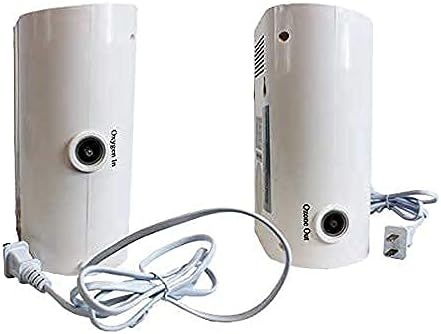
Image 4.2: Rear view of the Aqua-8 unit showing the 'Oxygen In' and 'Ozone Out' ports.
5. Operating Instructions
The Aqua-8 features a user-friendly control panel with an LED display and buttons for program selection.

Image 5.1: Diagram of the Aqua-8 control panel and external features.
5.1 Control Panel Functions
- LED Display: Shows the selected program setting.
- Program Buttons (+/-): Used to increase or decrease the program setting.
- Power Button: Turns the unit on or off.
- Pause Button: Temporarily stops the current operation.
- LED Indicators: An easy LED indicates working status, while a red LED indicates a non-working status.
5.2 Selecting a Program
The Aqua-8 offers 18 program options. Use the '+' and '-' buttons to cycle through the available settings. Each setting corresponds to a specific duration for a one-time cycle, or a repeat cycle (1-hour or 4-hour intervals). Refer to the detailed program chart in your included manual for specific timings.
5.3 General Operation Steps
- Fill a container with the clean water or liquid to be treated.
- Place the diffuser stone, attached to the tubing from the Aqua-8, into the liquid.
- Connect the Aqua-8 to a power outlet.
- Use the program buttons to select the desired timer setting.
- Press the Power button to start the ozone generation. The unit will run for the selected duration.
- Once the cycle is complete, the unit will turn off automatically. Remove the diffuser stone and proceed with rinsing, cleaning, or sanitizing as needed.
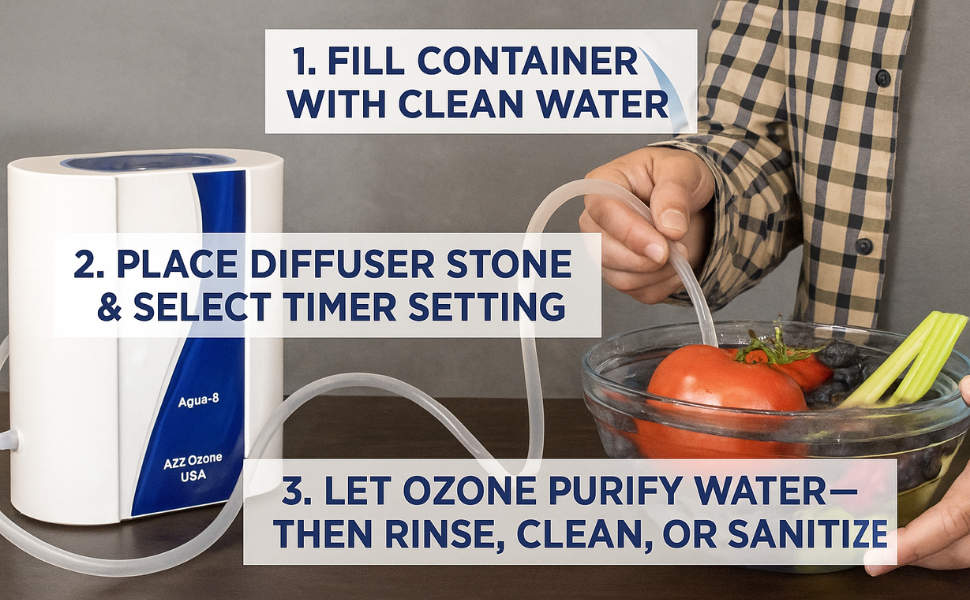
Image 5.2: Visual guide for using the Aqua-8: Fill container, Place diffuser stone & select timer, Let ozone purify.
5.4 Specific Applications
The Aqua-8 can be used for various purposes:
- Cleaning Fruits and Vegetables: Ozonated water can help reduce pathogens and pesticides, increasing shelf life and retaining flavor. Submerge produce in water with the diffuser stone and run a cycle.
- Water Purification: Use to treat drinking water.
- Fish Tanks: Ozonating fish tank water can help maintain crystal clear, clean water and reduce maintenance.
- General Sanitization: Can be used to disinfect kitchen utensils, baby bottles, toys, and dental equipment.

Image 5.3: Examples of Aqua-8 applications including rinsing fruits and vegetables, maintaining aquatic organisms, and cleaning various items.
6. Maintenance
Regular maintenance ensures optimal performance and longevity of your Aqua-8 unit.
- Cleaning the Unit: Wipe the exterior of the unit with a soft, dry cloth. Do not use abrasive cleaners or allow water to enter the unit.
- Diffuser Stones: Periodically clean the diffuser stones to prevent mineral buildup, which can reduce efficiency. Rinse them with clean water and allow them to air dry. Replace stones if they become clogged or damaged.
- Tubing: Inspect the silicone tubing for cracks or damage. Replace if necessary to ensure proper ozone delivery.
- Air Filter: The unit has an internal air filter. Refer to the full operating manual for instructions on inspecting and cleaning or replacing the air filter, if applicable.
7. Troubleshooting
If you encounter issues with your Aqua-8, refer to the following common troubleshooting tips:
- Unit Not Turning On: Ensure the power cord is securely plugged into both the unit and a working electrical outlet. Check the power button.
- No Ozone Output: Verify that the tubing is correctly connected and not kinked. Ensure the diffuser stone is not clogged. If using optional oxygen, confirm the oxygen source is active and properly connected.
- Weak Ozone Output: This could be due to a clogged diffuser stone, a kinked tube, or an issue with the air/oxygen input. If using an external oxygen generator, ensure it is providing adequate flow and pressure. Refer to the ozone concentration chart for expected output with oxygen input.

Image 7.1: Chart showing Aqua-8 ozone concentration with varying oxygen input (L/min).
For persistent issues, contact A2Z Ozone customer support.
8. Specifications
| Specification | Detail |
|---|---|
| Model Number | Aqua-8 (8bd16499-d23f-4afd-abad-175eb91b6894) |
| Brand | A2Z Ozone |
| Ozone Output (with Oxygen) | Up to 800 mg/hour |
| Ozone Output (with Air) | Up to 160 mg/hour |
| Wattage | 16 watts |
| Product Dimensions | 9.7"D x 5.3"W x 8.76"H (2.7 Pounds) |
| Controller Type | Button Control |
| Color | White, Blue |
| Manufacturer | A2Z Ozone |
9. Warranty and Support
For warranty information, service, or technical support, please contact A2Z Ozone directly. Details can typically be found on the manufacturer's official website or through the contact information provided with your purchase documentation.
Manufacturer: A2Z Ozone, Inc.
For additional resources, visit the A2Z Ozone Store on Amazon.


