1. Introduction
This manual provides instructions for the VINABTY AKB73615337 replacement remote control, designed to operate various LG Plasma TV models. This remote is a direct replacement and typically requires no programming, functioning immediately upon battery installation.

Image 1: VINABTY AKB73615337 Remote Control with compatible LG Plasma TV models.
Compatible LG Plasma TV Models:
- 42PA4900
- 50PA4500, 50PA450C, 50PA4510, 50PA4900, 50PA5500, 50PA550C
- 50PA6500, 50PA6500UA, 50PA6500-UA, 50PA6550
- 60PA5500, 60PA550C
- 60PA6500, 60PA6500UA, 60PA6500-UA, 60PA6550, 60PA6550UA, 60PA6550-UA, 60PA6550UF, 60PA6550-UF
- And other LG Plasma TV models that originally used the AKB73615337 remote.
2. Setup
Battery Installation
The remote control requires two (2) AAA batteries (not included) for operation. Follow these steps to install the batteries:
- Locate the battery compartment cover on the back of the remote control.
- Press down on the tab and slide the cover downwards to open the compartment.
- Insert two AAA batteries, ensuring the positive (+) and negative (-) terminals match the diagrams inside the compartment.
- Slide the battery compartment cover back into place until it clicks securely.
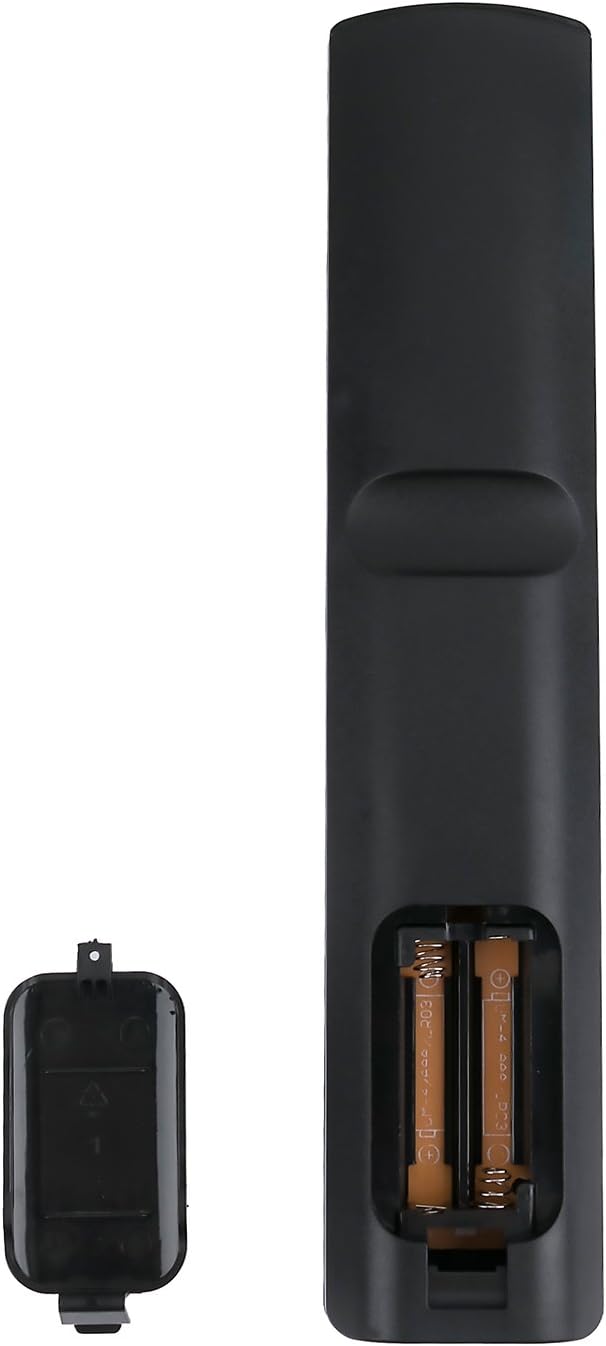
Image 2: Battery compartment with AAA batteries inserted.
Note: No programming is required for this replacement remote. It is ready to use once batteries are installed.
3. Operating Instructions
Point the remote control directly at your LG Plasma TV. Ensure there are no obstructions between the remote and the TV's infrared receiver.

Image 3: Front view of the remote control with button layout.
Key Button Functions:
| Button | Function |
|---|---|
| Power (Red) | Turns the TV on or off. |
| TV | Switches to TV mode. |
| RATIO | Adjusts the screen aspect ratio. |
| INPUT | Selects input sources (HDMI, AV, Component, etc.). |
| ENERGY SAVING | Activates or deactivates energy-saving modes. |
| Number Buttons (0-9) | Direct channel selection. |
| LIST | Displays the channel list. |
| FLASHBK | Returns to the previously viewed channel. |
| VOL (+/-) | Adjusts the volume level. |
| CH (Up/Down) | Changes channels. |
| MUTE | Mutes or unmutes the TV sound. |
| INFO | Displays program information. |
| SETTINGS | Accesses the TV's main settings menu. |
| AV MODE | Selects audio/video modes. |
| Q.MENU | Accesses the Quick Menu for common settings. |
| Navigation (Up/Down/Left/Right) | Navigates through menus and options. |
| OK | Confirms selections in menus. |
| EXIT | Exits the current menu or function. |
| Color Buttons (Red, Green, Yellow, Blue) | Functions vary depending on the TV menu or application. |
| Media Control Buttons (Play, Pause, Stop, Rewind, Fast Forward) | Controls media playback (e.g., USB content). |
4. Maintenance
Cleaning the Remote
To clean the remote control, use a soft, dry cloth. For stubborn dirt, lightly dampen the cloth with water or a mild, non-abrasive cleaner. Avoid using harsh chemicals or solvents, as these can damage the remote's surface or internal components.
Battery Care
- Replace batteries when the remote's response becomes sluggish or stops working.
- Do not mix old and new batteries, or different types of batteries (e.g., alkaline and rechargeable).
- Remove batteries if the remote will not be used for an extended period to prevent leakage and damage.
- Dispose of used batteries according to local regulations.
5. Troubleshooting
| Problem | Solution |
|---|---|
| Remote is not working. |
|
| Remote works intermittently. |
|
| Certain buttons do not respond. |
|
6. Specifications
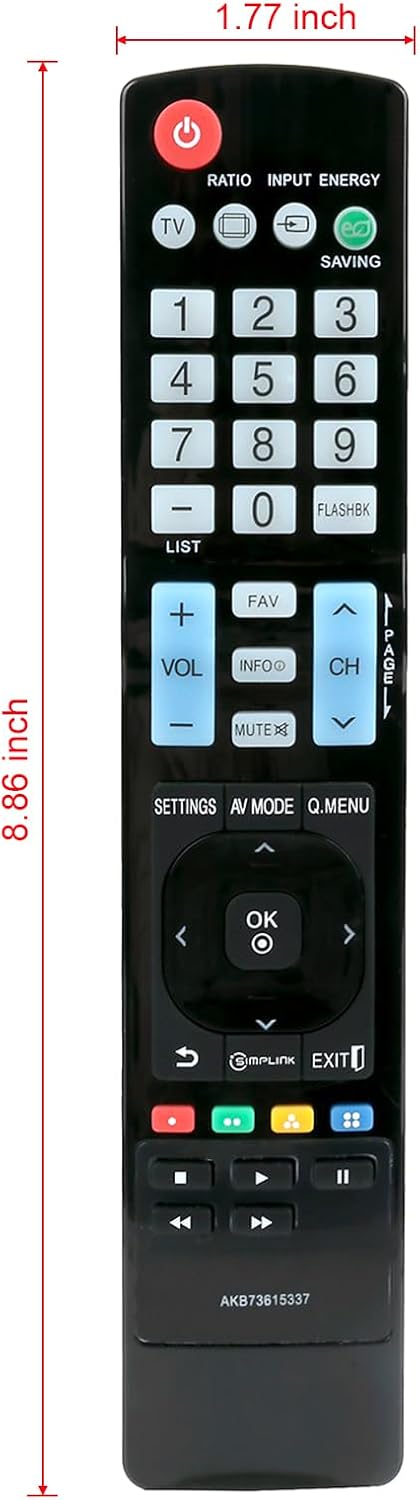
Image 4: Remote control dimensions.
- Model Number: AKB73615337
- Brand: VINABTY
- Compatible Devices: LG Plasma Televisions
- Power Source: 2 x AAA Batteries (not included)
- Color: Black
- Product Dimensions: Approximately 7 x 2 x 0.5 inches (17.78 x 5.08 x 1.27 cm)
- Item Weight: Approximately 3 ounces (85 grams)
- Special Feature: Ergonomic design
7. Warranty and Support
For any questions, concerns, or support regarding your VINABTY AKB73615337 replacement remote control, please refer to the retailer or manufacturer's customer service channels. Keep your purchase receipt for warranty claims, if applicable.
This product is designed to provide a reliable replacement for your original LG Plasma TV remote. Should you encounter any issues not covered in this manual, please contact customer support for further assistance.
