
Introduction
This manual provides instructions for the VINABTY AKB72915231 replacement remote control. This remote is designed to function as a direct replacement for various LG Hospitality and Healthcare Portal TV models. No programming is required; simply insert batteries for immediate use.
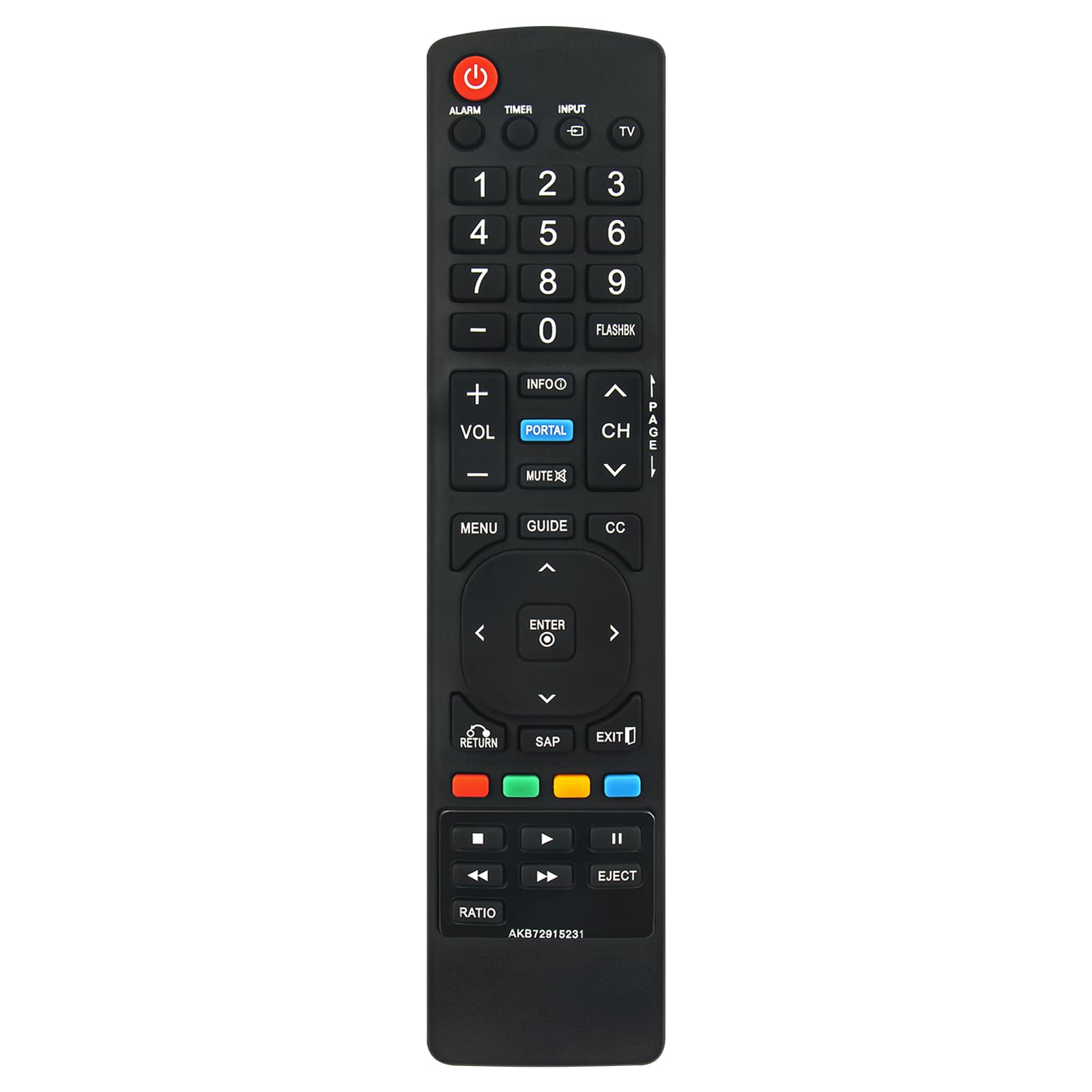
Figure 1: Overview of the VINABTY AKB72915231 Replacement Remote Control.
Setup
1. Battery Installation
The remote control requires two (2) AAA batteries (not included). Follow these steps to install the batteries:
- Locate the battery compartment on the back of the remote control.
- Press down on the latch and slide the battery cover downwards to open it.
- Insert two AAA batteries, ensuring the positive (+) and negative (-) terminals align correctly with the markings inside the compartment.
- Slide the battery cover back into place until it clicks securely.

Figure 2: Back view of the remote control, highlighting the battery compartment.

Figure 3: Correct insertion of AAA batteries into the remote control.
2. Initial Use
This remote control is pre-programmed and does not require any setup or pairing. Once batteries are installed, it is ready for immediate use with compatible LG Hospitality and Healthcare Portal TV models.
Operating Instructions
The VINABTY AKB72915231 remote control provides full functionality for compatible LG TVs. Below is a general guide to its buttons and their functions.

Figure 4: Front view of the remote control, detailing button layout.
- Power (RED button): Turns the TV on or off.
- Input: Selects the input source (e.g., HDMI, AV).
- Number Buttons (0-9): Directly selects TV channels.
- VOL (+/-): Adjusts the volume level.
- CH (Page Up/Down): Changes TV channels sequentially.
- Mute: Mutes or unmutes the TV audio.
- MENU: Accesses the TV's main menu.
- GUIDE: Displays the electronic program guide (if available).
- INFO: Displays information about the current program or input.
- PORTAL (BLUE button): Accesses the LG Hospitality Portal features.
- Navigation Pad (Up/Down/Left/Right): Navigates through menus and options.
- ENTER (Center button): Confirms selections in menus.
- RETURN: Returns to the previous screen or menu.
- EXIT: Exits the current menu or function.
- Color Buttons (Red, Green, Yellow, Blue): Perform specific functions depending on the TV menu or application.
- Playback Controls (Play, Pause, Stop, Rewind, Fast Forward, Eject): Controls media playback on compatible devices or TV functions.
Maintenance
Cleaning the Remote Control
To clean the remote control, use a soft, dry cloth. For stubborn dirt, lightly dampen the cloth with water or a mild, non-abrasive cleaner. Avoid using harsh chemicals or abrasive materials, as these can damage the remote's surface or internal components.
Battery Replacement
Replace batteries when the remote control's response becomes inconsistent or stops working. Always replace both batteries at the same time with new AAA alkaline batteries. Do not mix old and new batteries, or different types of batteries, as this can lead to leakage or malfunction.
Troubleshooting
| Problem | Possible Cause | Solution |
|---|---|---|
| Remote control does not work. | Batteries are dead or incorrectly installed. | Replace batteries with new AAA batteries, ensuring correct polarity (+/-). |
| Remote control works intermittently. | Low battery power. Obstruction between remote and TV. | Replace batteries. Ensure a clear line of sight between the remote and the TV's IR receiver. |
| Specific buttons do not respond. | Button malfunction or dirt under the button. | Clean the remote control. If the issue persists, the remote may require replacement. |
| Remote does not control TV functions. | Remote is not compatible with the TV model. | Verify your TV model is listed in the compatible models section of this manual or product description. |
Specifications
| Feature | Detail |
|---|---|
| Model Name | AKB72915231 |
| Brand | VINABTY |
| Connectivity Technology | Infrared (IR) |
| Power Source | 2 x AAA Batteries (not included) |
| Maximum Range | Approximately 33 feet (10 meters) |
| Dimensions (L x W x H) | 5" x 1.9" x 0.5" (12.7 cm x 4.8 cm x 1.3 cm) |
| Compatible LG TV Models |
|

Warranty Information
Please refer to the retailer or manufacturer's website for specific warranty terms and conditions. Typically, replacement remote controls come with a limited warranty covering manufacturing defects.
Customer Support
For further assistance or inquiries regarding your VINABTY AKB72915231 replacement remote control, please contact the seller or manufacturer through the platform where the purchase was made. Provide your order details and the model number (AKB72915231) for efficient support.