
TOPENS RK990T
TOPENS RK990T Automatic Sliding Gate Opener Instruction Manual
Model: RK990T | Brand: TOPENS
1. Product Overview
The TOPENS RK990T is a robust automatic sliding gate opener designed for heavy-duty applications. It features a powerful 1/2 HP 370W AC motor capable of moving slide gates weighing up to 2200 pounds and up to 40 feet in length. This system is engineered for quiet operation and enhanced security, making it suitable for various residential, commercial, courtyard, farm, and ranch gates made of steel, wood, vinyl, or chain-link.

Image 1.1: The TOPENS RK990T gate opener unit, two remote controls, and sections of nylon gear rack.
2. Safety Information
Always prioritize safety during installation and operation. Read all instructions carefully before beginning. Ensure the gate area is clear of obstructions and people before operating the gate. The system includes a safety stop-and-reverse module that activates if an obstruction is detected during gate movement. Keep remote controls out of reach of children. In case of power outage, use the manual release key to operate the gate.
3. Components Included
The TOPENS RK990T package includes the following main components:
- RK990T Gate Opener Unit
- 2 x M12 Remote Controls (with 65' operation range)
- 12 pcs Nylon Gear Racks (total 13 feet)
- Manual Release Key
- Magnet Assembly (for limit adjustment)
- Full Set of Required Installation Hardware

Image 3.1: Detailed view of the RK990T gate opener's internal components and included accessories.
4. Setup and Installation
The RK990T is designed for straightforward DIY installation using common tools. No welding is required. The installation process involves mounting the gate opener unit, installing the nylon gear racks along the gate, and connecting the power supply. The electromagnetism limit switch allows for simple adjustment of the gate's open and close positions. The system can be configured for gates opening towards either the left or the right.

Image 4.1: Dimensional drawing of the RK990T unit and a schematic of a typical gate setup with optional accessories.
For detailed step-by-step instructions, please refer to the official user manual PDF available on the TOPENS website or via the provided document link: User Manual (PDF).
5. Operating Instructions
Operating the RK990T gate opener is simple and convenient:
- Standard Operation: Pressing the remote button will automatically open or close the gate.
- Midway Mode: This feature allows for partial gate opening, ideal for pedestrian access or when only a small opening is needed for vehicles.
- Auto-Close Function: For enhanced security, the gate can be set to automatically close after a predetermined period.
- Manual Release: In the event of a power outage or if the remote is lost, the included manual release key can be used to disengage the motor and operate the gate manually.

Image 5.1: Illustrates the ease of opening the gate with a remote control.

Image 5.2: Explains various operational modes and gate opening directions.
6. Maintenance
The TOPENS RK990T is designed for minimal maintenance. The nylon gear racks are durable and require little upkeep. Periodically inspect the gate and opener for any debris, loose connections, or signs of wear. Keep the gear rack clean to ensure smooth operation. Lubricate moving parts as recommended in the full user manual.
7. Troubleshooting
If you encounter issues with your RK990T gate opener, consider the following common solutions:
- Gate Not Moving: Check the power supply. Ensure the manual release is fully engaged (or disengaged if you want automatic operation). Verify remote control batteries.
- Gate Stops Unexpectedly: The safety stop-and-reverse module may have detected an obstruction. Clear the path of the gate and try again. Inspect the gate path for any physical impediments.
- Remote Control Issues: Ensure you are within the 65-foot operating range. Check battery levels in the remote.
- Power Outage: Use the manual release key to unlock the gate and operate it manually until power is restored.
For more detailed troubleshooting steps, refer to the comprehensive user manual or contact TOPENS customer support.
8. Specifications
Key technical specifications for the TOPENS RK990T Automatic Sliding Gate Opener:
| Specification | Value |
|---|---|
| Manufacturer | TOPENS |
| Part Number | RK990T |
| Item Weight | 43.2 pounds |
| Product Dimensions | 10.67 x 5.98 x 13.03 inches |
| Power Source | AC |
| Voltage | 110 Volts |
| Wattage | 370 watts |
| Horsepower | 0.5 hp |
| Maximum Weight Capacity | 2200 Pounds |
| Maximum Gate Length | 40 feet |
| Sound Level | 50 dB |
| Temperature Range | Minus 4 to 122 Degrees Fahrenheit |
| Batteries Required | Yes (6 CR2 batteries for remotes, included) |
| Included Components | 1 x Full Set of Required Installation Hardware |
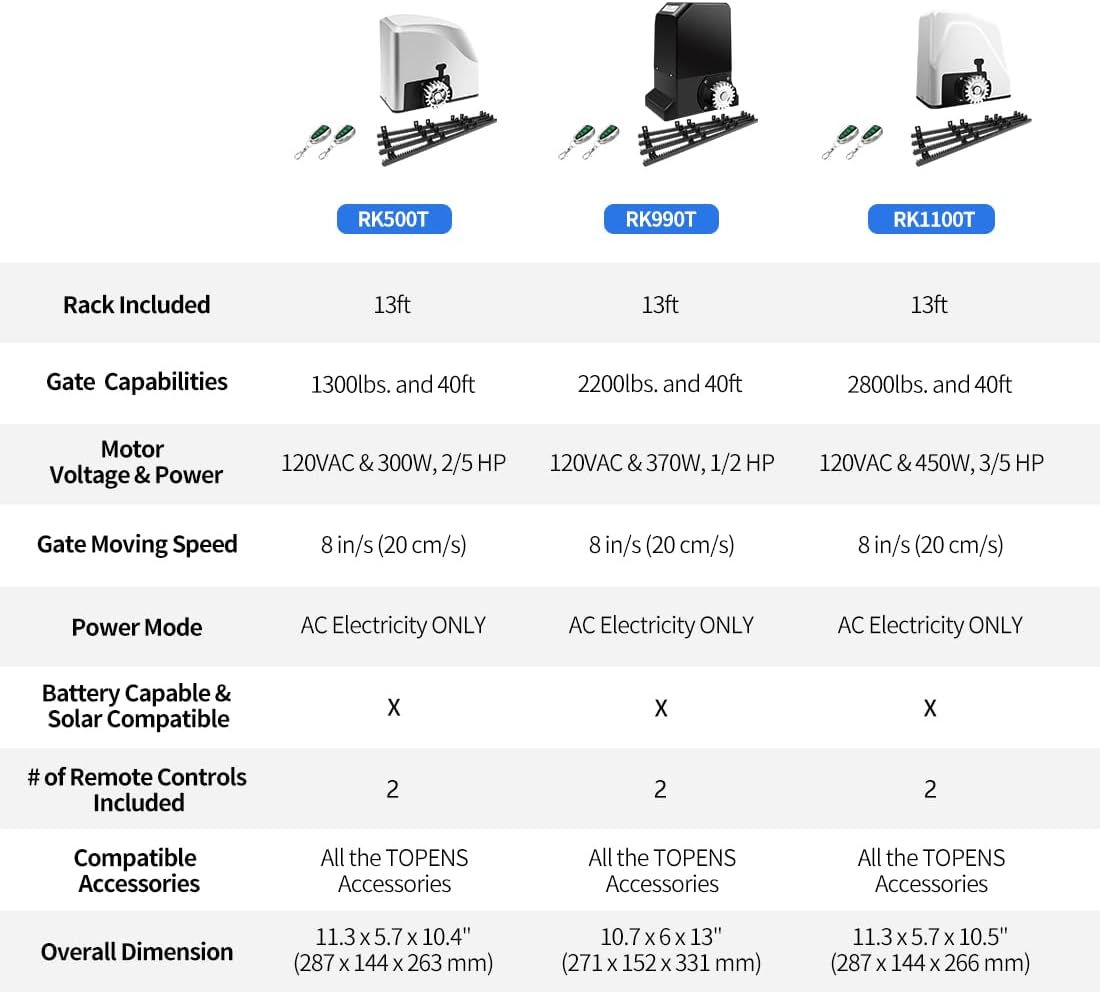
Image 8.1: Comparison of RK990T specifications with other TOPENS sliding gate opener models.
9. Compatible Accessories
The RK990T system can be enhanced with various TOPENS accessories to expand its functionality and convenience. These include additional remote controls, keypads, photo eye sensors, warning lights, and more. For a full list of compatible accessories and their availability, please visit the official TOPENS online store.

Image 9.1: A selection of compatible accessories available for TOPENS gate openers.
10. Warranty and Customer Support
All TOPENS products, including the RK990T, come with a 12-month warranty against defects. Additionally, TOPENS offers a 30-day exchange and return policy. For any questions, technical assistance, or personalized service, TOPENS provides excellent customer support. You can find user manuals, installation videos, and contact information on the official TOPENS website.

Image 10.1: TOPENS is committed to providing professional customer support.
Visit the TOPENS Store for more information: TOPENS Official Store
Related documentsRK990T


Ask a question about this manual
Ask about setup, troubleshooting, compatibility, parts, safety, or missing instructions. Manuals+ will review the question and use this page’s manual context to help answer it.