1. Introduction
The CHUNGHOP RM-L7 is a compact, universal infrared (IR) learning remote control designed to consolidate the functions of your existing IR remotes into a single device. It features 7 programmable keys, allowing you to learn commands from various home entertainment appliances such as TVs, VCRs, cable boxes, DVDs, VCDs, CDs, SAT receivers, and projectors. This manual provides detailed instructions for setup, programming, operation, and troubleshooting to ensure optimal use of your RM-L7 remote control.

Image 1.1: Front view of the CHUNGHOP RM-L7 Universal IR Mini Learning Remote Control.
2. Product Overview
2.1 Key Features
- Universal Compatibility: Capable of learning IR signals from most infrared remote controls.
- 7 Learning Keys: Provides 7 customizable buttons for essential functions.
- Digital Circulation Learning Technology: Ensures fast and accurate learning of commands.
- Permanent Memory: Retains learned codes even after battery replacement.
- Compact Design: Mini size for comfortable handling and portability.
2.2 Package Contents
Ensure all items are present:
- CHUNGHOP RM-L7 Universal IR Mini Learning Remote Control
- User Manual (this document)

Image 2.1: The CHUNGHOP RM-L7 remote control shown in its retail packaging.
3. Setup
3.1 Battery Installation
The RM-L7 remote control requires two AAA-LR03 1.5V batteries (not included).
- Locate the battery compartment cover on the back of the remote control.
- Slide the cover downwards to open the compartment.
- Insert two AAA batteries, ensuring the positive (+) and negative (-) terminals match the indicators inside the compartment.
- Slide the battery compartment cover back into place until it clicks securely.

Image 3.1: Open battery compartment showing placement for two AAA batteries.
4. Learning Function (Programming)
The RM-L7 remote control learns functions directly from your original IR remote controls. Ensure your original remote is functional and has fresh batteries. The RM-L7 can only learn from IR remotes.
4.1 Learning Procedure
- Enter Learning Mode: Press and hold the SET button on the RM-L7 for approximately 3 seconds. The indicator light on the RM-L7 will illuminate brightly, indicating it is in learning mode.

Image 4.1: Illustration of pressing the SET button to enter learning mode.
- Position Remotes: Place the RM-L7 and your original remote control face-to-face, with their IR emitters aligned and approximately 1-3 cm (0.4-1.2 inches) apart.

Image 4.2: Illustration showing the correct alignment of the two remotes for learning.
- Transmit Original Signal: Press the button on your original remote control that you wish to learn. The indicator light on the RM-L7 will begin to flicker, confirming it has received the signal.

Image 4.3: Illustration of pressing a button on the original remote.
- Assign to RM-L7 Button: While the RM-L7's indicator light is flickering, press the corresponding button on the RM-L7 where you want to store this function. The indicator light will flicker at a different rate, then go solid again, indicating successful learning.

Image 4.4: Illustration of pressing a button on the RM-L7 to assign the learned function.
- Repeat or Exit:
- To learn more functions, repeat steps 3 and 4 for each desired button.
- To exit learning mode, press the SET button again. The indicator light will turn off.
Important Notes:
- If the learning process fails, the indicator light may flash rapidly or turn off without going solid. In this case, reposition the remotes and repeat the steps.
- Some special original remote controls may require multiple attempts or may not be fully compatible.
- The RM-L7 is designed for 1-device control, meaning all 7 keys will control functions for a single device (e.g., your TV).
5. Operating Instructions
After successfully programming the RM-L7, you can use it to control your device. Simply point the RM-L7 towards your appliance and press the learned buttons as you would with your original remote.
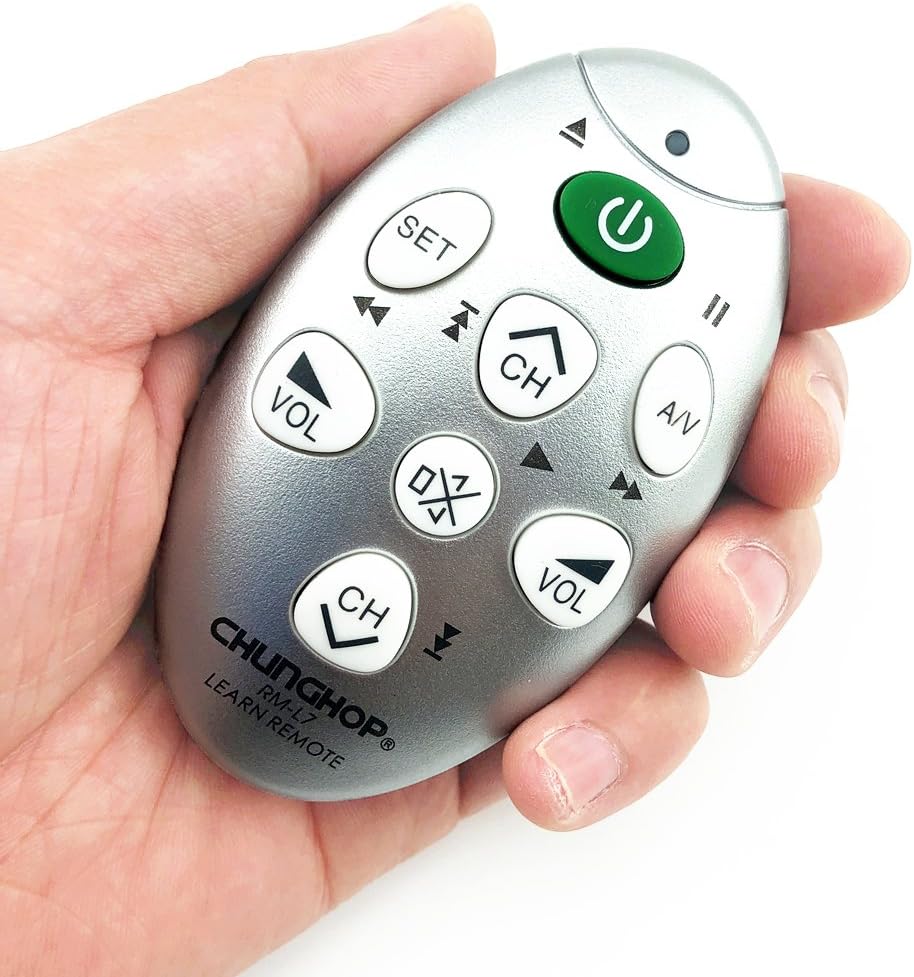
Image 5.1: The CHUNGHOP RM-L7 remote control being held, demonstrating its compact size.
6. Troubleshooting
- Remote not responding after programming:
- Ensure the RM-L7's IR emitter is pointed directly at the device.
- Verify that the batteries in the RM-L7 are correctly installed and have sufficient power.
- Repeat the learning process for the unresponsive buttons, ensuring proper alignment and signal transmission from the original remote.
- Learning process fails (indicator light does not go solid):
- Check the batteries in both the RM-L7 and the original remote. Weak batteries can cause learning failures.
- Ensure the remotes are positioned correctly, face-to-face and 1-3 cm apart.
- Try learning in a dimly lit room to avoid interference from strong ambient light.
- Some original remotes may have a weaker IR signal; try holding the button on the original remote for a slightly longer duration during step 3.
- Learned button sends only a single pulse (e.g., volume changes one step instead of continuously):
- This can occur with certain original remote signals. Try repeating the learning process for that specific button. Sometimes, multiple attempts can result in a better capture of the continuous signal.
- Ensure you hold the button on the original remote for the full duration you would typically press it for continuous action during the learning phase.
- RM-L7 does not learn from my original remote:
- Confirm that your original remote is an IR (infrared) remote. The RM-L7 cannot learn from RF (radio frequency) or Bluetooth remotes.
- Ensure the original remote is fully functional.
7. Specifications
| Feature | Specification |
|---|---|
| Model Number | RM-L7 |
| Product Dimensions | 3.15 x 1.97 x 1.57 inches (8 x 5 x 4 cm) |
| Item Weight | 2.39 ounces (67.7 grams) |
| Power Source | 2 x AAA-LR03 1.5V Batteries (not included) |
| Max Number of Supported Devices | 1 |
| Special Feature | Universal Learning Function |
| Compatible Devices | TV, VCR, CBL, DVD, VCD, CD, SAT, Projector (IR-based) |
8. Warranty and Support
CHUNGHOP products are manufactured with quality and reliability in mind. For any questions, technical assistance, or support regarding your RM-L7 Universal IR Mini Learning Remote Control, please contact CHUNGHOP customer service through the retailer where the product was purchased or visit the official CHUNGHOP website for contact information.
Please retain your purchase receipt as proof of purchase for any warranty claims.


