
Introduction
Welcome to the Luminox Leatherback Sea Turtle Watch user manual. This document provides essential information for the proper setup, operation, maintenance, and care of your new timepiece. The Luminox Leatherback Sea Turtle series is designed for durability and functionality, featuring 100-meter water resistance and self-powered illumination for visibility in all conditions.

Image: Front view of the Luminox Leatherback Sea Turtle Watch.
Product Features
- Movement: Swiss-made quartz (Ronda 515) for accurate timekeeping.
- Case: Durable CARBONOX™ case, 39 mm diameter, 12 mm thickness.
- Glass: Hardened mineral crystal (550-650 Vickers) for scratch resistance.
- Water Resistance: 100 meters (330 feet / 10 ATM), suitable for swimming and snorkeling.
- Bezel: Unidirectional rotating bezel for dive timing.
- Illumination: Luminox Light Technology (LLT) on dial ring and hands (orange & green) for constant glow up to 25 years. Green Super-LumiNova on bezel dot for additional light-powered illumination.
- Strap: Black silicone band, 19 mm width, 210 mm length.
- Crown: Protected crown with security gaskets.

Image: Detailed product specifications including case size, glass type, bezel, movement, case material, and water resistance.

Image: Additional product specifications detailing illumination technology, caseback, weight, strap material, and crown protection.
Setup
Setting Time and Date
- Unscrew the Crown: Gently unscrew the crown counter-clockwise until it is free from the case.
- Pull to Position 2 (Date Setting): Pull the crown out to the first click position. Turn the crown clockwise or counter-clockwise to adjust the date.
- Pull to Position 3 (Time Setting): Pull the crown out to the second click position. Turn the crown to set the hour and minute hands. Ensure the time is set correctly for AM/PM if your watch has a date function that changes at midnight.
- Push and Screw Down the Crown: Once the time and date are set, push the crown back into the case and screw it down clockwise firmly to ensure water resistance.
Strap Adjustment
The silicone strap can be adjusted using the buckle. For optimal fit, ensure the watch is snug but comfortable on your wrist. If you need to verify the watch size, a printable size guide is available. Please follow the instructions precisely for accurate printing and measurement.

Image: Close-up of the watch dial, highlighting the self-powered illumination technology.
Operating Instructions
Using the Unidirectional Rotating Bezel
The bezel rotates in one direction (counter-clockwise) to prevent accidental changes that would indicate a shorter elapsed time. To use it for timing, align the zero marker on the bezel with the minute hand at the start of an event. The minute hand will then point to the elapsed time on the bezel scale.
Water Resistance
Your Luminox watch is water resistant to 100 meters (10 ATM). This rating means it is suitable for recreational swimming, snorkeling, and showering. It is not designed for scuba diving or high-impact water sports. Always ensure the crown is fully screwed down before any water exposure.
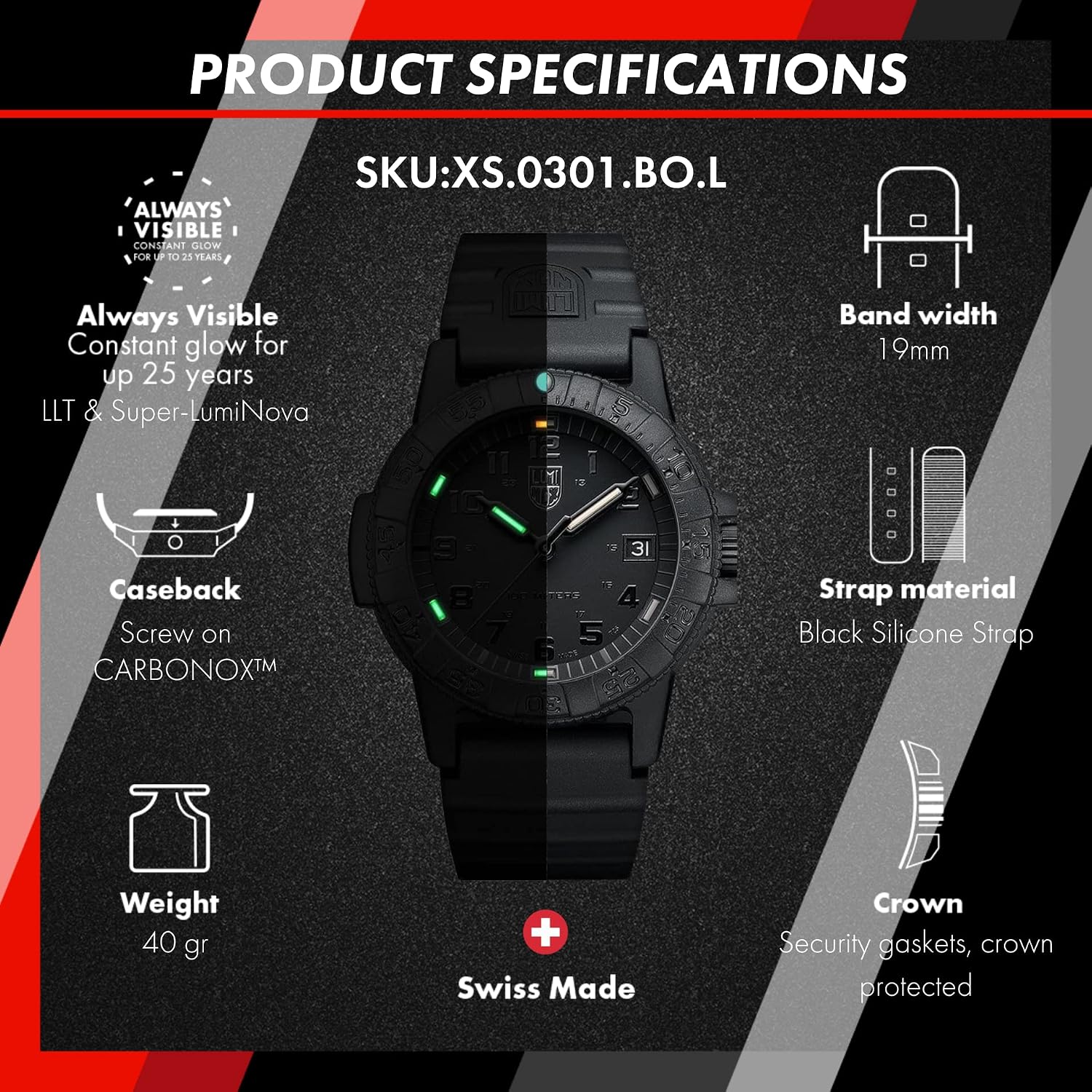
Image: The Luminox watch partially submerged in water, demonstrating its water resistance.
Maintenance
Cleaning Your Watch
Clean your watch regularly with a soft, damp cloth. For silicone straps, mild soap and water can be used. Rinse thoroughly and dry with a soft cloth. Avoid harsh chemicals or abrasive materials.
Battery Replacement
The watch is powered by one LR44 battery. Battery life typically lasts several years. When the watch stops, it indicates the battery needs replacement. It is recommended to have the battery replaced by an authorized Luminox service center to ensure proper sealing and maintain water resistance.
Water Resistance Checks
To maintain the water resistance of your watch, it is advisable to have it checked annually by an authorized service center, especially if it is frequently exposed to water or if the battery has been replaced.
Troubleshooting
Watch Not Running
- Check if the crown is fully pushed in and screwed down.
- The battery may need replacement. Refer to the "Battery Replacement" section.
Date Not Changing
- Ensure the time is set correctly for AM/PM. The date typically changes around midnight.
- Manually advance the date using the crown in Position 2.
For any persistent issues, please contact an authorized Luminox service center.
Specifications
| Feature | Detail |
|---|---|
| Model Number | XS.0301.BO.L |
| Case Diameter | 39 mm |
| Case Thickness | 12 mm |
| Band Width | 19 mm |
| Band Length | 21 cm |
| Item Weight | 40 g |
| Case Material | CARBONOX™ |
| Band Material | Silicone |
| Crystal Type | Hardened Mineral |
| Movement Type | Quartz (Ronda 515) |
| Water Resistance Depth | 100 meters / 330 feet / 10 ATM |
| Power Source | Battery Powered (1 LR44 included) |
| Display Type | Analog |
| Additional Features | Luminox Light Technology (LLT), Super-LumiNova, Date Function, Unidirectional Rotating Bezel |
Warranty and Support
Your Luminox watch comes with an International Warranty. For detailed warranty terms and conditions, please refer to the warranty card included with your watch or visit the official Luminox website.
For warranty service or technical support, it is recommended to contact an authorized Luminox dealer or service center. You can find more information and locate service centers on the official Luminox website: www.luminox.com/warranty.

Image: The Luminox watch box with the International Warranty Card.