
Product Overview
This manual provides instructions for the installation, operation, and maintenance of your LEONLITE LED Security Light. This outdoor motion sensor flood light features adjustable dual heads, dusk-to-dawn functionality, and is UL Listed for wet locations, providing 5000K daylight illumination. It offers 1400 lumens of brightness and a long service life of 50,000 hours.
Safety Information
Please read and understand all instructions before installing or operating this product. Failure to follow these instructions may result in electric shock, fire, or other hazards that could cause injury or property damage.
- WARNING: Risk of electric shock. Disconnect power at the fuse or circuit breaker before installation or servicing.
- This product must be installed in accordance with the applicable installation code by a person familiar with the construction and operation of the product and the hazards involved.
- Use only UL-listed wire connectors.
- Do not install this fixture on surfaces that are not structurally sound.
- Ensure all connections are secure and properly insulated.
Package Contents
Upon opening the package, verify that all components are present and undamaged. The package typically includes the LED security light fixture, mounting hardware, and this instruction manual.
Product Features and Components
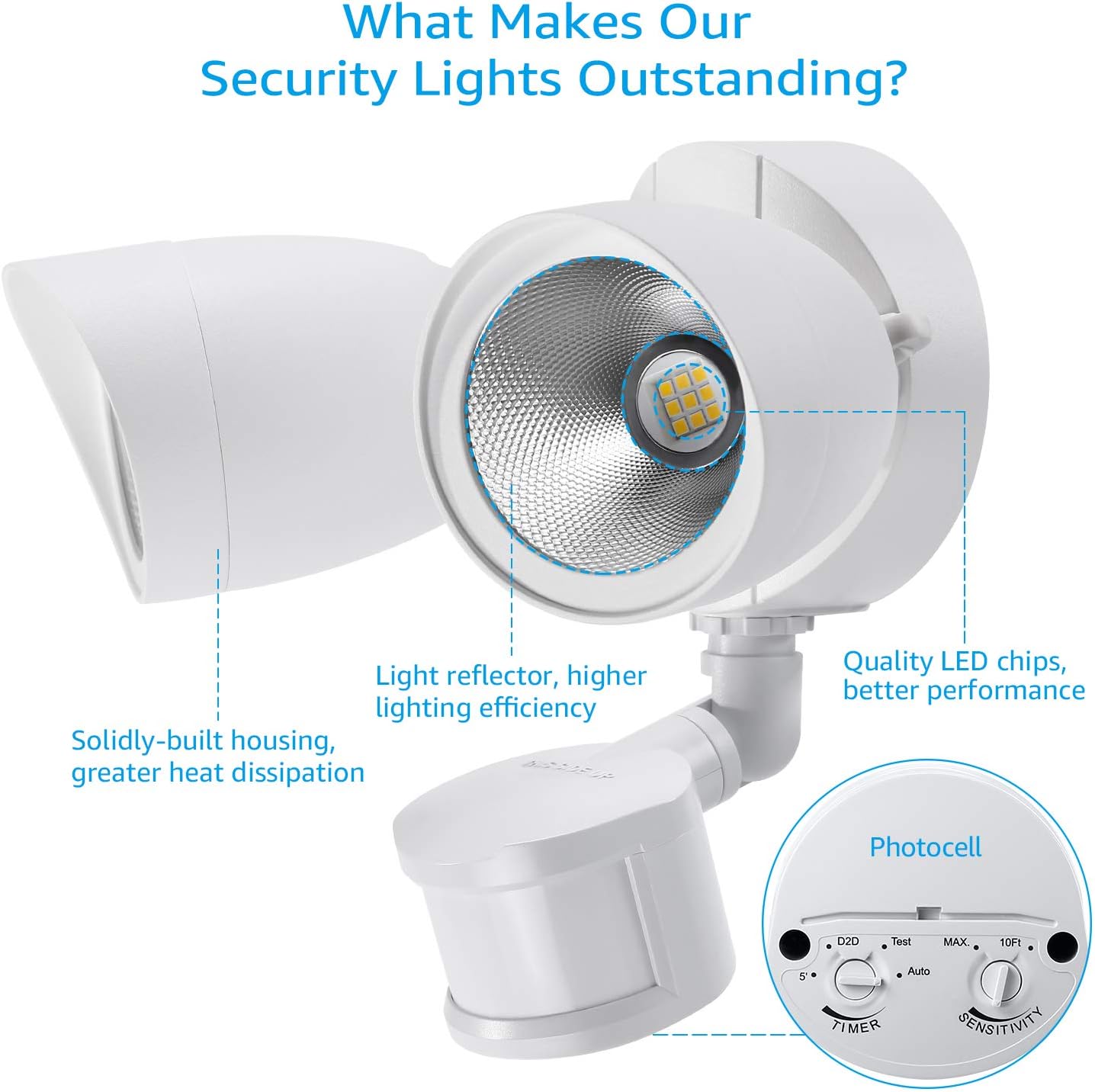
The LEONLITE LED Security Light is designed for optimal outdoor illumination and security. Key features include adjustable light heads and a motion sensor with multiple operating modes.

Installation
Before beginning installation, ensure the power supply to the installation area is turned off at the circuit breaker. This fixture is designed for wall mounting in outdoor wet locations.
- Prepare Wiring: Carefully pull the electrical wires from the junction box.
- Mount Bracket: Secure the mounting bracket to the junction box using the provided screws.
- Connect Wires: Connect the fixture's wires to your household wiring. Typically, white to white (neutral), black to black (live), and green/bare copper to green/bare copper (ground). Use UL-listed wire connectors and ensure connections are tight.
- Attach Fixture: Carefully align the fixture with the mounting bracket and secure it with the provided screws. Ensure a watertight seal if applicable.
- Adjust Light Heads and Sensor: Position the light heads and motion sensor to cover the desired area.
Operating Instructions
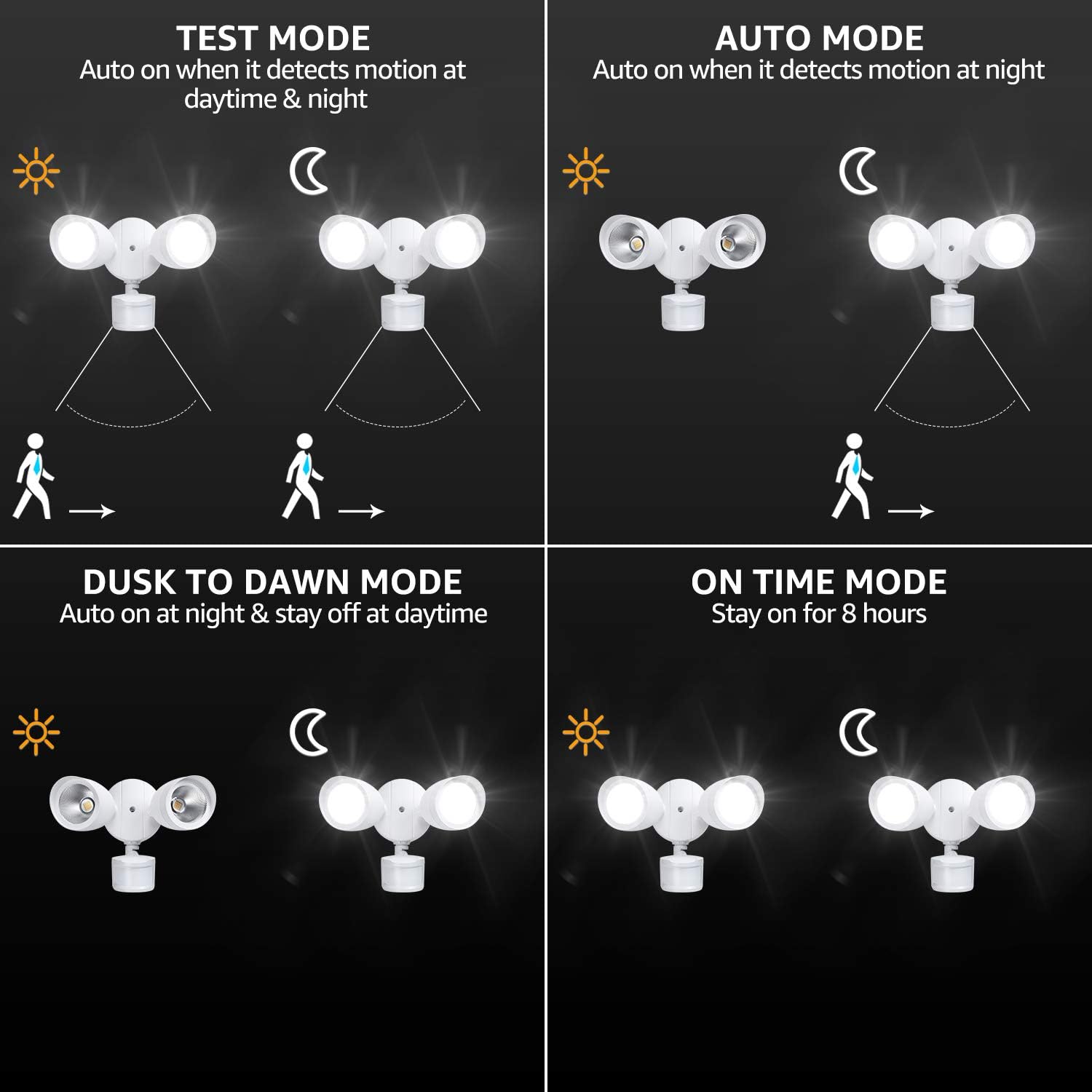
The security light offers four distinct operating modes, controlled by the dials on the motion sensor. Refer to Figure 1 for the location of these controls.

Mode Selection
- Test Mode: Set the 'TIMER' dial to 'Test'. The light will turn on when motion is detected, regardless of ambient light, and turn off approximately 5 seconds after motion ceases. This mode is useful for testing the sensor's coverage area.
- Auto Mode: Set the 'TIMER' dial to a desired duration (10 seconds to 5 minutes) and the 'SENSITIVITY' dial to 'Auto'. The light will activate when motion is detected during nighttime hours and turn off after the set duration if no further motion is detected.
- Dusk-to-Dawn Mode: Set the 'TIMER' dial to 'D2D'. The light will automatically turn on at dusk and remain on until dawn, regardless of motion.
- Manual Override (On-Time) Mode: To activate this mode, first ensure the light is in 'Auto' mode. Turn the power switch OFF and then ON within 3 seconds. The light will stay on for approximately 8 hours or until dawn, then revert to 'Auto' mode. To exit this mode manually, turn the power switch OFF and then ON again within 3 seconds.

Adjustments
The light heads and motion sensor are adjustable to customize the illumination and detection area.
- Light Head Adjustment: Loosen the adjustment screws on the side of each light head. Pivot the light heads horizontally and vertically to direct light where needed. Tighten the screws firmly once adjusted.
- Motion Sensor Adjustment: The motion sensor can be rotated horizontally and tilted vertically to optimize its detection range and angle. Ensure the sensor is not obstructed by objects or foliage.

Maintenance
Regular maintenance ensures optimal performance and longevity of your security light.
- Cleaning: Periodically clean the fixture with a soft, damp cloth. Do not use abrasive cleaners or solvents.
- Inspection: Annually inspect the wiring and mounting for any signs of wear, damage, or loosening. Address any issues promptly.
- Sensor Area: Keep the motion sensor lens clear of dirt, dust, and obstructions to ensure accurate detection.
Troubleshooting
If your security light is not functioning as expected, refer to the following common issues and solutions:
| Problem | Possible Cause | Solution |
|---|---|---|
| Light does not turn on at night. | Power off; incorrect mode; sensor obstructed; ambient light too high. | Check power supply; ensure correct mode (Auto/D2D); clear sensor; relocate or adjust sensor sensitivity. |
| Light stays on continuously. | Manual override active; constant motion in sensor range; wiring issue. | Deactivate manual override; adjust sensor range/sensitivity; check wiring connections. |
| Light flickers or cycles on/off rapidly. | Loose wiring; power fluctuations; faulty sensor. | Check and secure all wiring; consult an electrician for power issues; contact customer support if sensor is faulty. |
| Motion sensor not detecting. | Sensor obstructed; sensitivity too low; incorrect angle. | Clear obstructions; increase sensitivity; adjust sensor angle. |
Specifications
| Feature | Detail |
|---|---|
| Brand | LEONLITE |
| Model Number | ZH3SCT-20WRSS50-WHT |
| Color | White (5000K) |
| Material | Metal (Aluminum) |
| Light Source | LED |
| Brightness | 1400 Lumens |
| Wattage | 20 Watts |
| Voltage | 120 Volts |
| Light Color | Daylight/Cool White |
| Detection Distance | Max 60ft |
| Sensing Angle | 180° |
| Water Resistance Level | Waterproof (IP65) |
| Lifespan | 50,000 hours |
| Dimensions (L x W x H) | 10.5" x 6.1" x 9.6" |
| Item Weight | 2.6 Pounds |
| Certifications | UL Listed, Energy Star |
Warranty and Support
This LEONLITE LED Security Light comes with a 3-year warranty, ensuring reliability and peace of mind. For any questions, technical assistance, or warranty claims, please contact our professional lifetime customer service. Our team is dedicated to providing support and ensuring your satisfaction with the product.
Please retain your proof of purchase for warranty purposes.