
Introduction
The Nitecore NU30 is a high-performance, lightweight rechargeable headlamp designed for various outdoor activities. It features a powerful primary white LED, high CRI auxiliary white LEDs for close-range illumination, and a red auxiliary LED for preserving night vision. With its integrated USB-C charging and durable construction, the NU30 provides reliable lighting for your adventures.

Image: Front view of the Nitecore NU30 headlamp with its adjustable headband.
Package Contents
Please check the package for the following items:
- Nitecore NU30 Headlamp
- USB-C to USB-C Charging Cable
- Headband
- Nitecore Sticker
Product Overview
The Nitecore NU30 features a dual-button interface for intuitive control over its various light sources and brightness levels. The headlamp unit is attached to an adjustable, elastic headband for comfortable wear.

Image: Diagram illustrating the location of the Power Button and Mode Button on the Nitecore NU30 headlamp.
Controls:
- Power Button: Controls power on/off and brightness levels for the primary white light.
- Mode Button: Switches between different light sources (primary white, auxiliary white, auxiliary red) and special modes.
Charging the Headlamp
The NU30 headlamp is equipped with a built-in 1500mAh Li-ion battery and a USB-C charging port for convenient recharging. A power indicator will show the charging status.
- Locate the USB-C charging port on the side of the headlamp.
- Connect the included USB-C to USB-C charging cable to the headlamp and a USB power source (e.g., wall adapter, power bank, computer).
- The power indicator will illuminate during charging.
- Charging is complete when the indicator light changes or turns off (refer to the power indicator section for details). A full charge typically takes approximately 2 hours.

Image: The Nitecore NU30 headlamp being charged via its USB-C port.
Operating Instructions
The NU30 offers multiple light sources and modes for various lighting needs.

Image: Diagram illustrating the three distinct light sources available on the Nitecore NU30 headlamp.
Power On/Off:
- To Turn On: Press and hold the Power Button for 1 second. The headlamp will turn on in the previously used primary white light mode.
- To Turn Off: When the headlamp is on, long press either the Power Button or the Mode Button until the light turns off.
Switching Light Sources:
When the headlamp is on, short press the Mode Button to cycle through the light sources in the following order:
Primary White Light → Auxiliary White Light → Auxiliary Red Light → Primary White Light...
Adjusting Brightness (Primary White Light):
When the Primary White Light is active, short press the Power Button to cycle through brightness levels:
Low → Mid → High → Low...
Auxiliary White Light Modes:
When the Auxiliary White Light is active, short press the Power Button to cycle through:
Ultralow → Flood → Ultralow...

Image: Visual comparison demonstrating the wide and even illumination of the TrueVision+ flood beam.
Auxiliary Red Light Modes:
When the Auxiliary Red Light is active, short press the Power Button to cycle through:
Low → High → Slow Flashing → Low...
Special Modes (SOS / Beacon):
When the headlamp is off, press and hold the Mode Button for 1 second to directly access SOS mode. While in SOS mode, short press the Power Button to switch to Beacon mode. Short press the Power Button again to return to SOS. Long press either button to turn off.
Power Indicator:
The power indicator light provides information on the remaining battery power. Refer to the product's specific indicator patterns for detailed battery status (e.g., flashes for remaining power, solid for charging, off for fully charged).
Maintenance
Proper maintenance ensures the longevity and optimal performance of your Nitecore NU30 headlamp.
- Cleaning: Wipe the headlamp with a soft, damp cloth. Avoid using abrasive cleaners or solvents.
- Storage: Store the headlamp in a cool, dry place when not in use. Recharge the battery every 3 months to maintain battery health if stored for extended periods.
- Water Resistance: The NU30 is rated IP66, meaning it is protected against powerful water jets. Do not submerge the headlamp in water. Ensure the USB-C port cover is securely closed to maintain water resistance.
Troubleshooting
If you encounter issues with your NU30 headlamp, try the following solutions:
- Headlamp not turning on: Ensure the battery is charged. Connect the headlamp to a power source using the USB-C cable and check if the charging indicator activates.
- Light output is dim: The battery may be low. Recharge the headlamp fully.
- Charging not working: Check the USB-C cable for damage and ensure the power source is functional. Try a different cable or power adapter.
- Buttons unresponsive: Ensure the headlamp is not in a locked mode (if applicable, refer to specific product features for lock-out functions). If issues persist, contact customer support.
Specifications
Detailed technical specifications for the Nitecore NU30 headlamp:
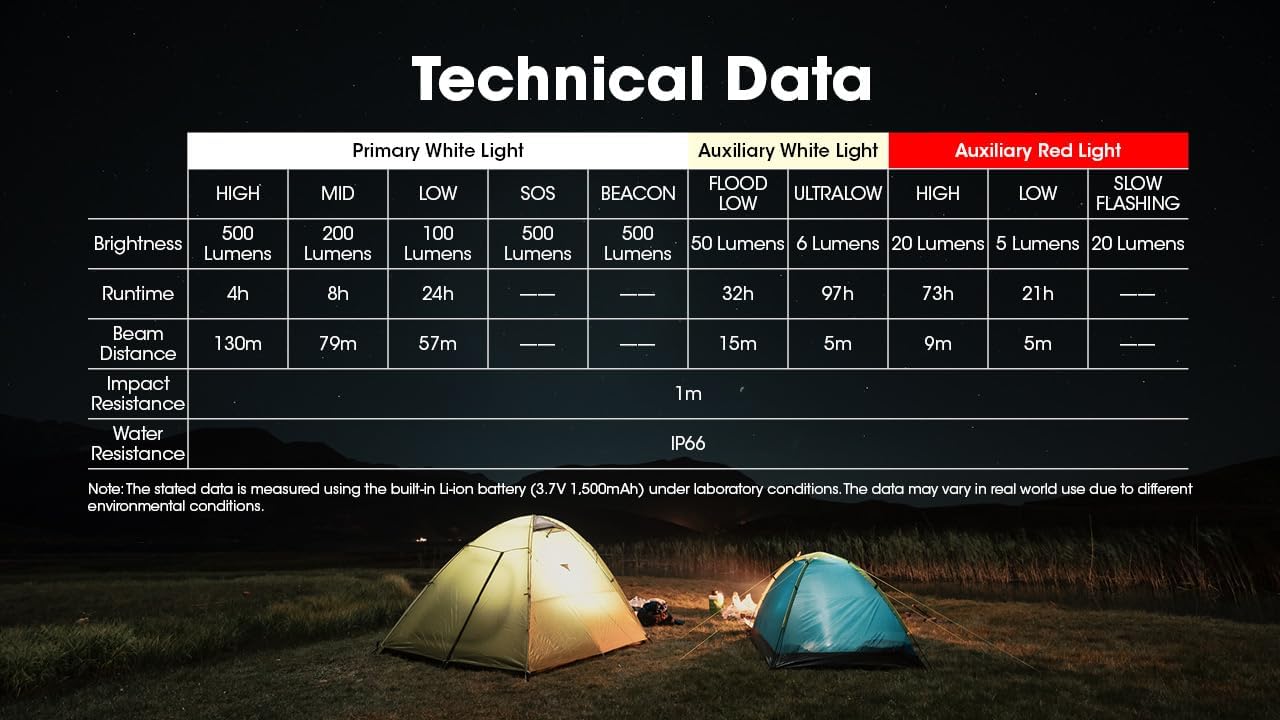
Image: Comprehensive table detailing the technical specifications of the Nitecore NU30 headlamp.
| Feature | Detail |
|---|---|
| Max Brightness | 500 Lumens |
| Max Beam Distance | 130 meters (142 yards) |
| Battery Type | Built-in 1500mAh Li-ion Battery |
| Charging Port | USB-C |
| Max Runtime | Up to 97 hours (Ultralow Auxiliary White) |
| Impact Resistance | 1 meter |
| Water Resistance | IP66 |
| Weight | 90g (3.17 oz) |
| Material | Durable PC Material |
Safety Information
Please read and follow these safety guidelines to prevent injury or damage to the headlamp:
- Do not shine the light directly into eyes, as this may cause temporary vision impairment.
- Do not disassemble or modify the headlamp, as this may void the warranty and cause damage.
- Keep out of reach of children.
- Avoid exposing the headlamp to extreme temperatures or direct sunlight for prolonged periods.
Warranty and Support
Nitecore products are backed by a warranty. For detailed warranty terms and conditions, please refer to the official Nitecore website or the warranty card included with your product. If you require technical support or have questions about your NU30 headlamp, please contact Nitecore customer service or your authorized dealer.
For more information, visit the official Nitecore website: www.nitecore.com


