
Garmin MS-RA770
Contents
Garmin Fusion Apollo MS-RA770 Marine Stereo User Manual
Model: MS-RA770
1. Introduction
The Garmin Fusion Apollo MS-RA770 is a state-of-the-art marine stereo system designed to deliver exceptional audio quality and advanced connectivity on the water. It features a brilliant touchscreen display, built-in Wi-Fi, and Apple AirPlay 2 capabilities, offering a seamless and intuitive user experience. Engineered with True-Marine accreditation, this system is built to withstand the harsh marine environment, ensuring reliable performance for years to come.
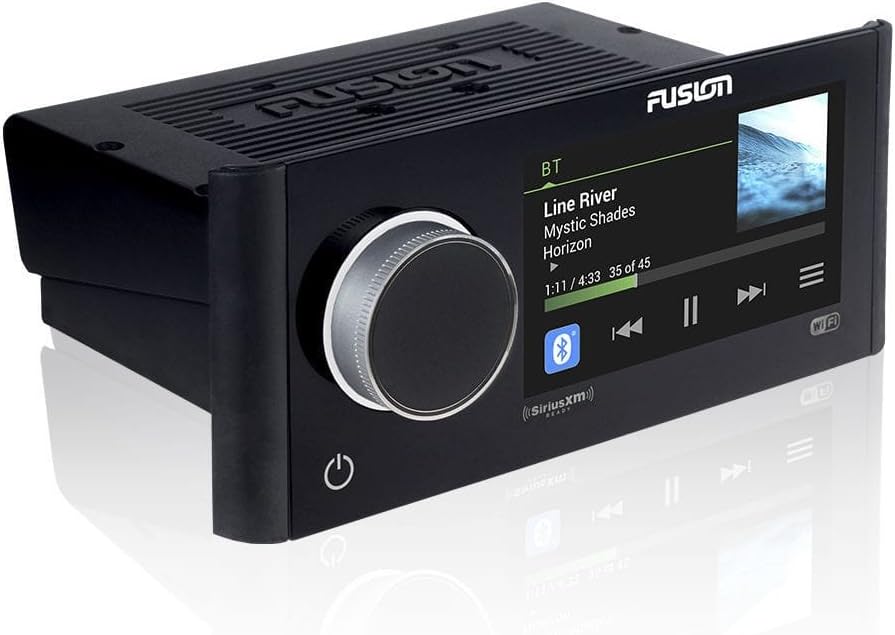
Figure 1: Angled view of the Garmin Fusion Apollo MS-RA770 Marine Stereo, showcasing its touchscreen display and rotary knob.
2. Key Features
- Brilliant 4.3" Touchscreen LCD: Navigate menus and control settings with intuitive touch swipe commands.
- Built-in Wi-Fi and Apple AirPlay 2: Enjoy seamless, high-quality audio streaming from compatible devices.
- Digital Signal Processing (DSP) Technology: Experience superior sound quality with custom audio profiles optimized for various listening environments.
- Fusion PartyBus-Network: Group multiple networked stereos to play the same audio source in sync across different zones on your vessel.
- Multi-Zone Technology: Control up to 4 independent audio zones for a customized listening experience.
- True-Marine Accreditation: Rated IPX6 and IPX7 water-resistant, ensuring durability in the marine environment.
- Fusion-Link Integration: Control your audio system from compatible multifunction displays, smart devices, or Garmin watches.
3. What's in the Box
Upon opening the package, verify that all the following components are included:
- Apollo™ RA770 marine stereo unit
- Mounting gasket
- Four 8-gauge, self-tapping screws
- Two screw covers
- Power and speaker wiring harness
- Auxiliary-in, line-out, and subwoofer-out wiring harnesses
- 6 ft (2 meter) NMEA 2000® drop cable
- Dust cover
- Documentation (this manual)
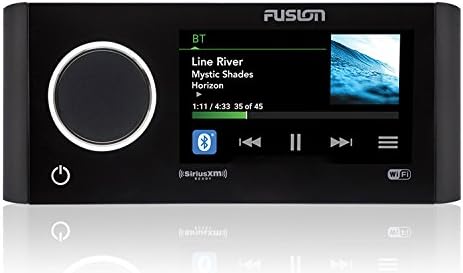
Figure 2: Front view of the MS-RA770, showing the touchscreen and control knob.
4. Setup and Installation
Proper installation is crucial for optimal performance and longevity of your marine stereo. It is recommended to have this unit installed by a qualified marine electronics technician.
4.1 Mounting Considerations
- Choose a location that is protected from direct sunlight and excessive moisture, although the unit is water-resistant.
- Ensure adequate ventilation around the unit to prevent overheating.
- Verify that there is sufficient space behind the mounting surface for wiring and connections.

Figure 3: Product dimensions of the MS-RA770, showing measurements for installation planning.
4.2 Wiring Connections
Connect the provided wiring harnesses to the corresponding ports on the back of the stereo and to your vessel's power, speaker, and auxiliary systems. Refer to the detailed wiring diagram in the included documentation for specific connections.
- Power Harness: Connect to a fused 12V DC power source.
- Speaker Harness: Connect to your marine speakers, ensuring correct polarity for each channel.
- Auxiliary-in, Line-out, Subwoofer-out: Use these harnesses for external audio sources, amplifiers, and subwoofers.
- NMEA 2000® Drop Cable: Connect for integration with compatible marine electronics and multifunction displays.
Video 1: Product Overview Video. This video provides a general overview of the Garmin Fusion Apollo MS-RA770 Marine Stereo, highlighting its key features and components, including the various wiring harnesses for installation.
5. Operating Instructions
5.1 Powering On/Off
Press and hold the power button located on the front panel to turn the unit on or off.
5.2 Touchscreen Navigation
The 4.3-inch touchscreen allows for intuitive control. Swipe left or right to navigate through menus, tap icons to select options, and use the rotary knob for precise volume adjustments and menu scrolling.
Video 2: Preview of volume control on the MS-RA770. This short video demonstrates how to adjust volume levels using the rotary knob and the on-screen interface, showing individual zone controls.
5.3 Audio Sources
The MS-RA770 supports various audio sources:
- Wi-Fi/AirPlay 2: Connect to a Wi-Fi network and stream audio wirelessly from Apple devices.
- Bluetooth: Pair your smartphone or other Bluetooth-enabled device for wireless audio streaming.
- USB: Connect a USB drive for media playback or to charge compatible devices.
- Auxiliary Input: Connect external audio devices using the RCA auxiliary input.
- SiriusXM: Requires an optional SiriusXM Connect Vehicle Tuner and subscription.
- AM/FM Radio: Tune into local radio stations.
5.4 Multi-Zone Control and PartyBus™-Network
Manage audio in up to four independent zones. Adjust volume, source, and tone for each zone individually. With Fusion PartyBus™-Network, you can group multiple Apollo series stereos connected on the same network to play synchronized audio across different areas of your boat.
5.5 Digital Signal Processing (DSP)
The built-in DSP optimizes audio output for your specific speakers and listening environment. Access DSP settings through the menu to create custom audio profiles for superior sound quality.
6. Maintenance
- Cleaning: Use a soft, damp cloth to clean the display and exterior. Avoid abrasive cleaners or solvents.
- Software Updates: Periodically check for and install over-the-air software updates via Wi-Fi to ensure optimal performance and access to new features.
- Connections: Regularly inspect all wiring connections for corrosion or damage, especially in the marine environment.
7. Troubleshooting
| Problem | Possible Cause | Solution |
|---|---|---|
| No power | Loose power connection, blown fuse, low battery voltage. | Check power connections, replace fuse, ensure adequate battery charge. |
| No audio output | Incorrect source selected, volume too low, speaker wiring issue, amplifier off. | Verify selected source, increase volume, check speaker connections, ensure amplifier is powered on. |
| Wi-Fi/Bluetooth connectivity issues | Out of range, interference, incorrect pairing. | Move device closer, reduce interference, re-pair device, restart stereo. |
| Touchscreen unresponsive | Temporary software glitch, excessive moisture/debris on screen. | Clean screen, restart unit. If issue persists, contact support. |
8. Specifications
| Feature | Detail |
|---|---|
| Model Number | 010-01905-00 |
| Product Dimensions | 4.7 x 7.56 x 3.23 inches |
| Item Weight | 1.94 pounds |
| Display Technology | LCD Touchscreen (4.3") |
| Connectivity Technologies | Bluetooth, Auxiliary, Wi-Fi, USB, SiriusXM, Digital Optical Input, iPhone/iPod, MTP, DAB+, Apple AirPlay 2, UPnP, AM/FM, NMEA 2000 |
| Water Resistance Rating | IPX6 and IPX7 |
| Audio Output Mode | Stereo (Multi-Zone Capable) |
9. Warranty and Support
The Garmin Fusion Apollo MS-RA770 Marine Stereo is backed by a 3-year limited consumer warranty. This warranty covers defects in materials and workmanship under normal use. For detailed warranty terms and conditions, please refer to the official documentation included with your product or visit the Garmin website.
For technical support, troubleshooting assistance, or warranty claims, please contact Garmin customer service. You can find contact information on the Garmin website or in your product's documentation.
Documents and downloads
Ask a question about this manual
Ask about setup, troubleshooting, compatibility, parts, safety, or missing instructions. Manuals+ will review the question and use this page’s manual context to help answer it.