
Camp Chef PG24XT
Contents
Camp Chef XT 24 Pellet Grill Instruction Manual
Brand: Camp Chef | Model: PG24XT
1. Introduction
The Camp Chef XT 24 Pellet Grill is a versatile outdoor cooking tool designed for both smoking and grilling, offering precise temperature control and an innovative ash cleanout system. This manual provides essential information for the safe and effective use of your pellet grill.

Figure 1: The Camp Chef XT 24 Pellet Grill, showcasing its compact design and integrated hopper.
Key Features:
- Pellet Grill and Smoker: Designed for both smoking and grilling, providing a wide range of cooking options.
- High-Quality PID Technology: Ensures precise temperature control for even cooking.
- Smoke Control: Adjustable smoke settings (1 to 10) for customized flavor intensity.
- Ash-Cleanout System: Simplifies cleanup after cooking sessions.
2. Setup
Before first use, ensure all packaging materials are removed and the grill is assembled according to the included assembly guide. Place the grill on a stable, non-combustible surface away from flammable materials.
Loading Pellets:
The pellet hopper is located on the side of the grill. Open the hopper lid and fill with premium hardwood pellets. The hopper is designed to hold a standard 20-pound bag of pellets, providing extended cooking times without frequent refills.

Figure 2: Close-up view of the pellet hopper, showing the wood pellets ready for use.
3. Operating Instructions
The Camp Chef XT 24 features a digital control panel for easy operation. Plug in the grill and use the control knob to set your desired temperature and smoke level.
Temperature and Smoke Control:
Utilize the PID technology to maintain consistent temperatures, preventing over or under-cooking. Adjust the 'Smoke Number' between 1 and 10 to customize the intensity of smoke flavor in your food. Higher numbers typically result in more smoke.
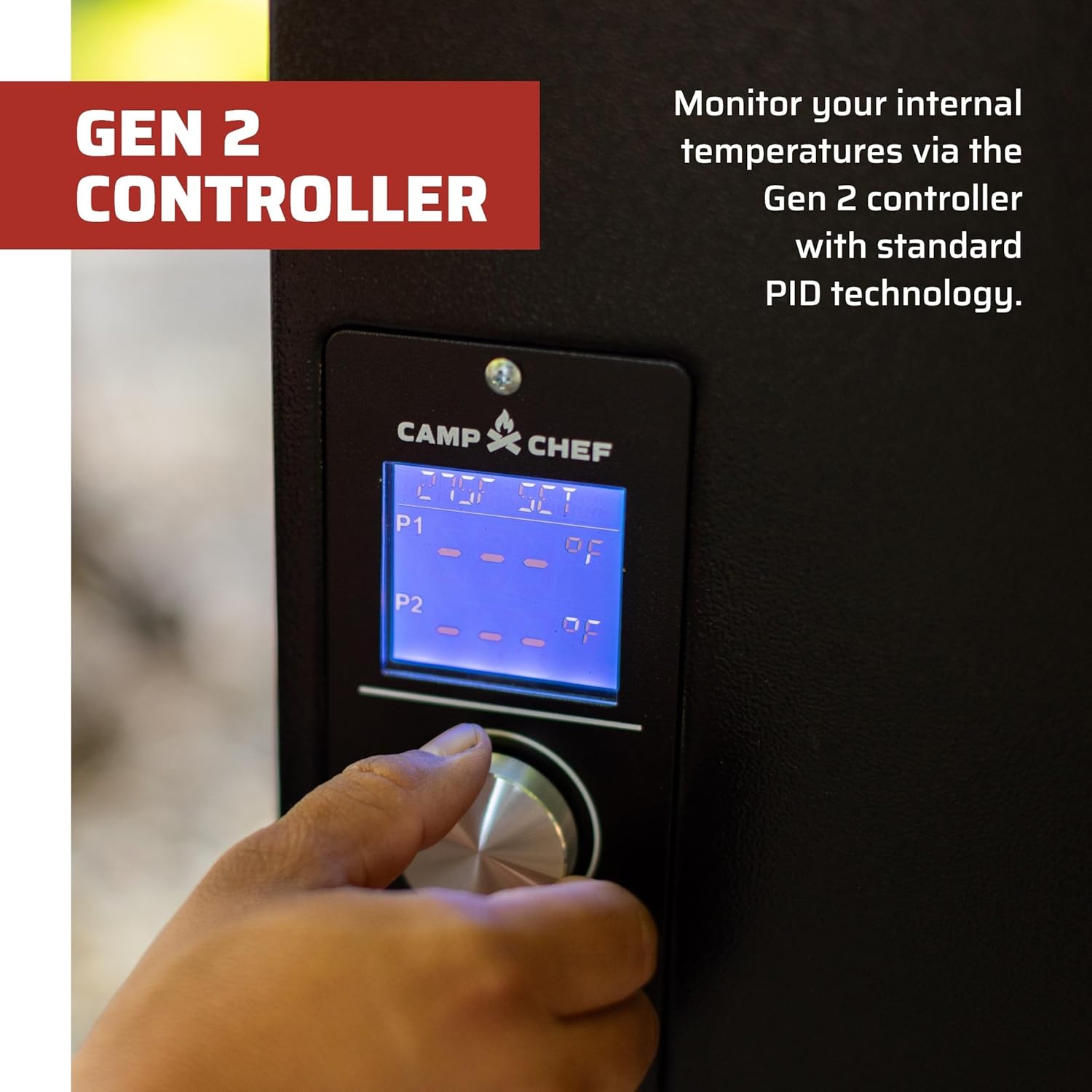
Figure 3: The digital control panel, allowing precise temperature and smoke adjustments.

Figure 4: Adjusting the smoke number for desired flavor intensity.
Cooking Space:
The grill offers ample cooking surface. For additional capacity, extra grill grates can be added to create multiple tiers, maximizing your cooking space for larger meals.

Figure 5: Ribs smoking on the grill grates, demonstrating the cooking capacity.

Figure 6: Basting food during the cooking process on the grill.

Figure 7: The grill with an optional Sidekick attachment, expanding its cooking versatility.
4. Maintenance
Regular maintenance ensures optimal performance and longevity of your Camp Chef XT 24 Pellet Grill.
Ash Cleanout System:
The innovative Ash-Cleanout System simplifies the removal of ash. Simply pull the handle to release ash into the removable cup, making cleanup quick and easy. It is recommended to empty the ash cup after each use to prevent buildup and ensure proper airflow.

Figure 8: The convenient ash cleanout system for easy disposal of spent pellets.
5. Troubleshooting
This section addresses common issues you might encounter with your pellet grill.
Common Issues:
- Temperature Swings: While PID technology minimizes fluctuations, significant temperature swings (e.g., 15-20 degrees) can occur, especially in cold or windy conditions. Ensure the grill lid is properly sealed and consider using a thermal blanket in extreme weather.
- Auger Feeds Pellets but No Burn: This can indicate an issue with the igniter or a clogged burn pot. Ensure the burn pot is clear of ash and debris. If the igniter is not heating, contact customer support.
- Flame Out: If the flame extinguishes, the burn pot may overfill with pellets. Always clean the burn pot before restarting after a flame out.
For more detailed troubleshooting steps or persistent issues, please refer to the official Camp Chef support resources or contact their customer service.
6. Specifications
| Feature | Detail |
|---|---|
| Brand | Camp Chef |
| Model Name | Smoke Pro Pellet Grill and Smoker BBQ with Digital Controls and Stainless Temp Probe |
| Model Number | PG24XT |
| Power Source | Corded Electric |
| Color | Black |
| Outer Material | Stainless |
| Item Weight | 110 Pounds |
| Product Dimensions | 24.5"D x 47.5"W x 50"H |
| Inner Material | stainless_steel |
| Fuel Type | Wood |
| UPC | 033246214955 |
7. Warranty and Support
For warranty information, product registration, or technical assistance, please visit the official Camp Chef website or contact their customer support directly. Keep your purchase receipt for warranty claims.
Click to access Camp Chef customer support resources.
Documents and downloads
Ask a question about this manual
Ask about setup, troubleshooting, compatibility, parts, safety, or missing instructions. Manuals+ will review the question and use this page’s manual context to help answer it.