
ZIME MH-200
Contents
ZIME MH-Series Mini Smart Weigh Portable Pocket Scale User Manual
Model: MH-200
1. Introduction
Thank you for choosing the ZIME MH-Series Mini Smart Weigh Portable Pocket Scale. This precision instrument is designed for accurate weighing of various items, including precious metals, jewelry, gems, medication, and herbs. Its compact and portable design, combined with durable stainless steel and ABS plastic construction, makes it an ideal tool for both professional and personal use. This manual provides detailed instructions for setup, operation, maintenance, and troubleshooting to ensure optimal performance and longevity of your scale.
2. Safety Information
- Do not overload the scale beyond its maximum capacity (500g for 0.1g model / 200g for 0.01g model) to prevent damage.
- Avoid exposing the scale to extreme temperatures, humidity, or direct sunlight. The optimal operating temperature is 10-30°C (50-86°F).
- Keep the scale away from strong electromagnetic fields, which can affect accuracy.
- Handle the scale with care. Avoid dropping or subjecting it to strong impacts.
- Do not immerse the scale in water or use abrasive cleaners.
- Remove batteries if the scale will not be used for an extended period to prevent leakage.
- Keep out of reach of children.
3. Package Contents
Please check the package carefully to ensure all items are present and in good condition:
- 1 x ZIME MH-Series Digital Pocket Scale
- 1 x User Manual (this document)

Image: The ZIME MH-Series pocket scale and its packaging, showing what is included in the box.
4. Product Features
- High Precision: Available in 500g x 0.1g or 200g x 0.01g capacities for accurate measurements.
- Durable Construction: Made of high-quality stainless steel and ABS plastic for easy cleaning and longevity.
- Compact and Portable: Designed for portability, allowing you to weigh items anywhere.
- Multiple Measurement Units: Reads in grams (g), ounces (oz), troy ounces (tl), carats (ct), and grains (gn).
- Auto Calibration: Ensures consistent accuracy without manual adjustment.
- Tare Function: Allows you to subtract the weight of a container for net weight measurement.
- Auto-Off Function: Automatically turns off after 30 seconds of inactivity to conserve battery life.
- Backlit LCD Display: Clear, easy-to-read digital display with backlight for visibility in various lighting conditions.
5. Setup
5.1 Battery Installation
The scale requires two (2) AAA batteries (not included). Follow these steps to install them:
- Locate the battery compartment on the underside of the scale.
- Gently slide open the battery compartment cover.
- Insert two AAA batteries, ensuring the correct polarity (+ and -) as indicated inside the compartment.
- Close the battery compartment cover securely.

Image: View of the battery compartment, indicating where to insert two AAA batteries.
5.2 Initial Placement
Place the scale on a hard, flat, and stable surface to ensure accurate readings. Avoid placing it on soft or uneven surfaces, or near vibrating equipment.
6. Operating Instructions

Image: Detailed view of the scale's control panel and digital display.
6.1 Power On/Off
- To turn the scale ON, press the ON/OFF button. The display will show "88888" and then "0.0" or "0.00".
- To turn the scale OFF, press and hold the ON/OFF button for a few seconds until the display turns off. The scale will also automatically turn off after 30 seconds of inactivity.

Image: The scale powered on and displaying '0.0', ready for weighing.
6.2 Unit Conversion
To change the weighing unit, press the UNITS button repeatedly. The scale will cycle through the available units: grams (g), ounces (oz), troy ounces (tl), carats (ct), and grains (gn).
6.3 Tare Function
The Tare function allows you to subtract the weight of a container, so you only measure the net weight of the contents.
- Place the empty container on the weighing platform.
- Wait for the display to stabilize and show the container's weight.
- Press the TARE button. The display will reset to "0.0" or "0.00".
- Now, place the items to be weighed into the container. The display will show only the weight of the items.
6.4 Piece Counting Function (PCS)
The PCS function allows you to count items of uniform weight.
- Turn on the scale and ensure it displays "0.0".
- Press and hold the PCS button until a sample size (e.g., "25", "50", "75", "100") appears on the display.
- Press the UNITS button to select your desired sample size (e.g., 25, 50, 75, 100 pieces).
- Place the exact number of items corresponding to the selected sample size onto the platform.
- Press the PCS button again to confirm the sample. The display will now show the number of pieces.
- You can now add more items, and the scale will count them based on the sample weight.
- To exit counting mode, press the UNITS button.
6.5 Backlight Function
Press the LIGHT button to turn the display backlight on or off, improving readability in different lighting conditions.
6.6 Weighing Example

Image: The scale accurately weighing a 200g object.
To weigh an item, simply place it gently on the center of the weighing platform after the scale has been turned on and displays "0.0". The stable weight will be shown on the display.
7. Maintenance
7.1 Cleaning
- Wipe the scale with a soft, damp cloth. Do not use harsh chemicals or abrasive cleaners.
- Ensure no liquids enter the interior of the scale.
- The stainless steel platform can be cleaned with a mild stainless steel cleaner if necessary.
7.2 Storage
- Store the scale in a clean, dry place at room temperature.
- Avoid storing it in areas with high humidity or extreme temperature fluctuations.
- Keep the protective cover on the scale when not in use to protect the weighing platform and display.
8. Troubleshooting
| Problem | Possible Cause | Solution |
|---|---|---|
| "LO" or Low Battery Indicator | Batteries are low or depleted. | Replace with new AAA batteries. |
| "OUE2" or "EEEE" (Overload) | Weight on the platform exceeds the scale's maximum capacity. | Remove the excess weight immediately. Do not overload the scale. |
| Unstable or Inaccurate Readings |
|
|
| Scale does not turn on |
|
|
9. Specifications
| Feature | Detail |
|---|---|
| Model | MH-200 |
| Capacity | 500g x 0.1g / 200g x 0.01g |
| Units | g, oz, tl, ct, gn |
| Dimensions (Scale) | 120 mm (L) x 62 mm (W) x 20 mm (H) |
| Platform Dimensions | 56 mm x 55 mm |
| Material | Stainless Steel (platform), ABS Plastic (body) |
| Power Supply | 2 x AAA batteries (not included) |
| Auto Off | 30 seconds (default) |
| Operating Temperature | 10-30°C / 50-86°F |
| Calibration | Auto calibration |
| Tare Range | Full capacity |
| Item Weight | 100 g |
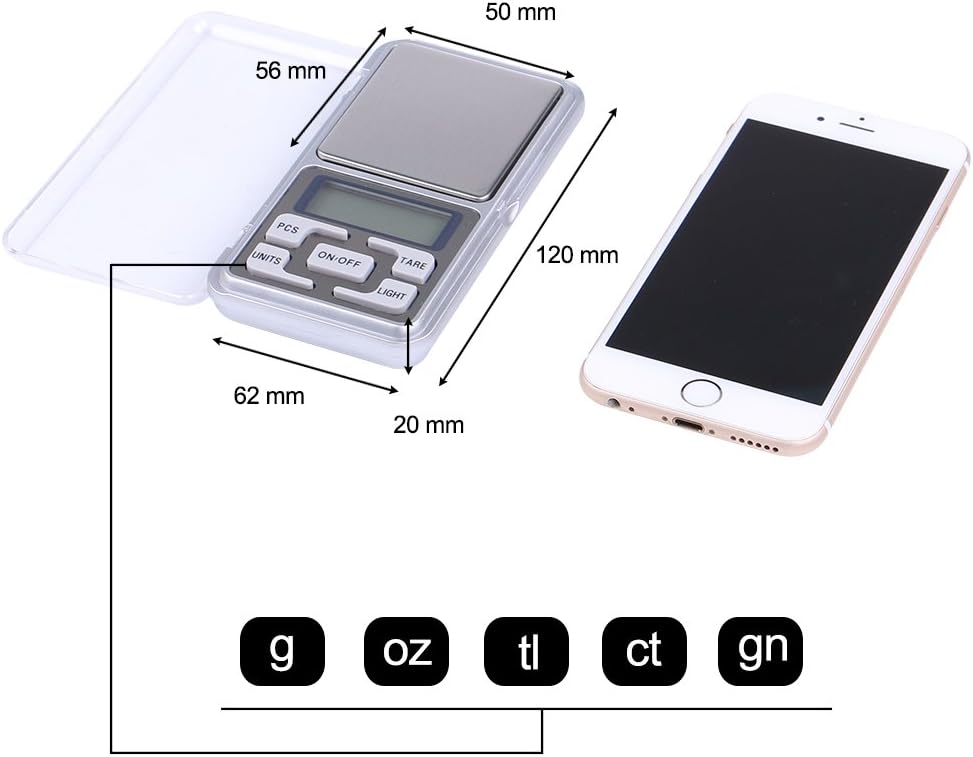
Image: Visual representation of the scale's dimensions and supported measurement units.
10. Warranty and Support
ZIME products are manufactured to high-quality standards. While specific warranty details are not provided in this manual, please retain your proof of purchase for any warranty claims. For technical support, troubleshooting assistance, or inquiries about your ZIME MH-Series Pocket Scale, please refer to the retailer or contact ZIME customer service through their official channels, if available.
Always refer to the official ZIME website or product listing for the most up-to-date warranty information and support contacts.
Documents and downloads
Ask a question about this manual
Ask about setup, troubleshooting, compatibility, parts, safety, or missing instructions. Manuals+ will review the question and use this page’s manual context to help answer it.