
KEiiD KD-V01
KEiiD CD Player with Speakers Bluetooth Home Stereo System
Model: KD-V01
Product Overview
The KEiiD CD Player is an all-in-one home entertainment system designed to provide versatile audio playback options and high-quality sound. It integrates a CD player, Bluetooth stereo system, FM radio, USB input, SD card slot, and auxiliary input, all housed in a handcrafted wooden cabinet with a retro aesthetic.
This system delivers rich and clear sound through its powerful stereo speakers, featuring 4-inch bass speakers and 1.3-inch dome silk tweeters. Its user-friendly interface and compact design make it a seamless addition to any living space.

The KEiiD CD Player, showcasing its main unit with a CD inserted and the included remote control.
Setup Guide
- Unboxing: Carefully remove all components from the packaging. Verify that all items are present: the main unit, power cord, audio cord, remote control, user manual, and test CD.
- Placement: Place the unit on a stable, flat surface. Ensure adequate ventilation around the device.
- Connect Power: Connect the power cord to the AC IN port on the rear of the unit and then plug it into a wall outlet.
- FM Antenna: Extend the FM antenna located at the back of the unit for optimal radio reception.
- Initial Power On: Turn on the device by pressing the volume (power) knob on the front panel or by pressing the power key on the remote control.

Contents of the box, including the power cord, audio cord, remote, user manual, and a test CD.
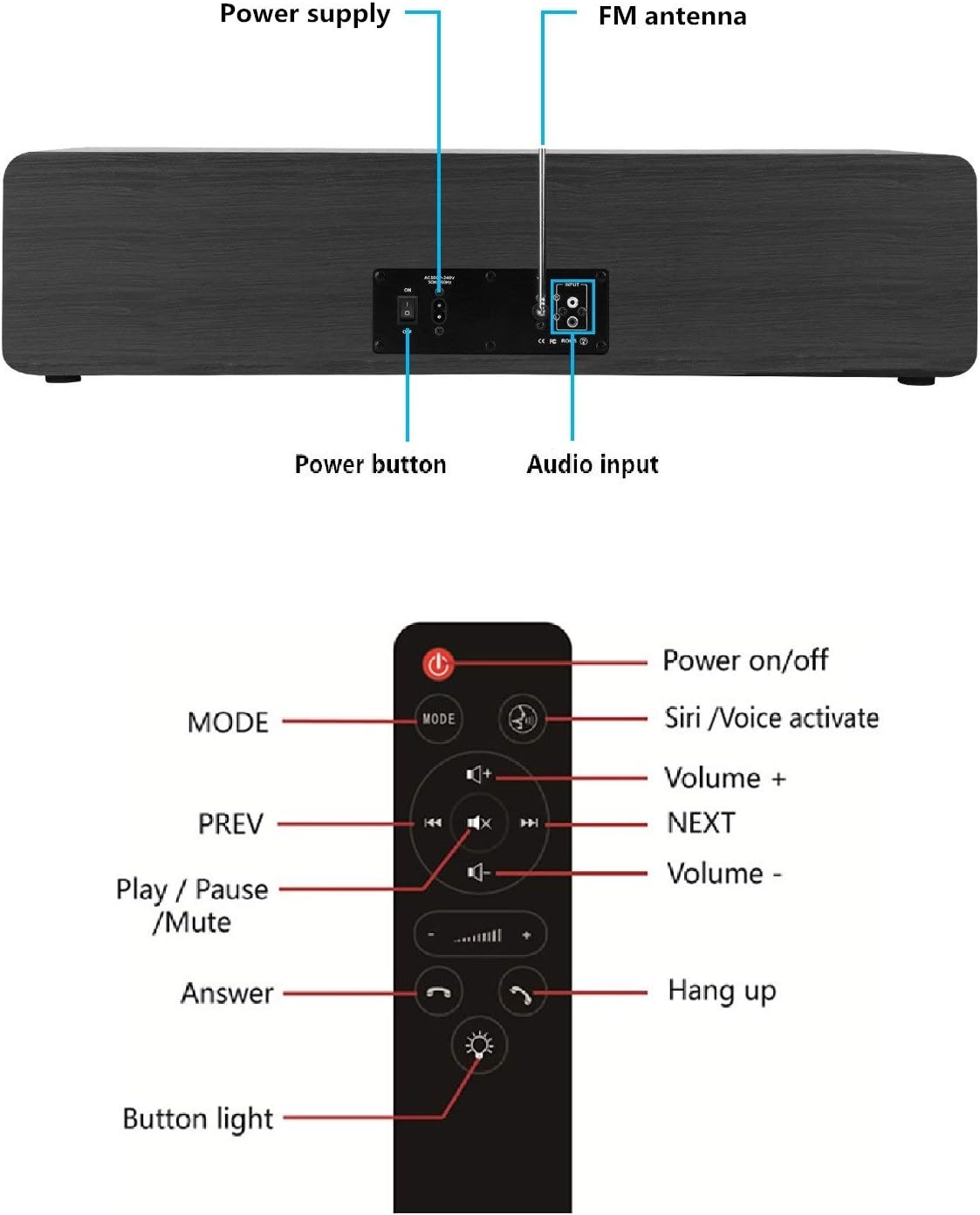
Rear panel connections: Power button, power supply input, FM antenna, and audio input ports.
Operating Instructions
The KEiiD CD Player offers multiple playback modes. Use the front panel controls or the remote control for navigation.
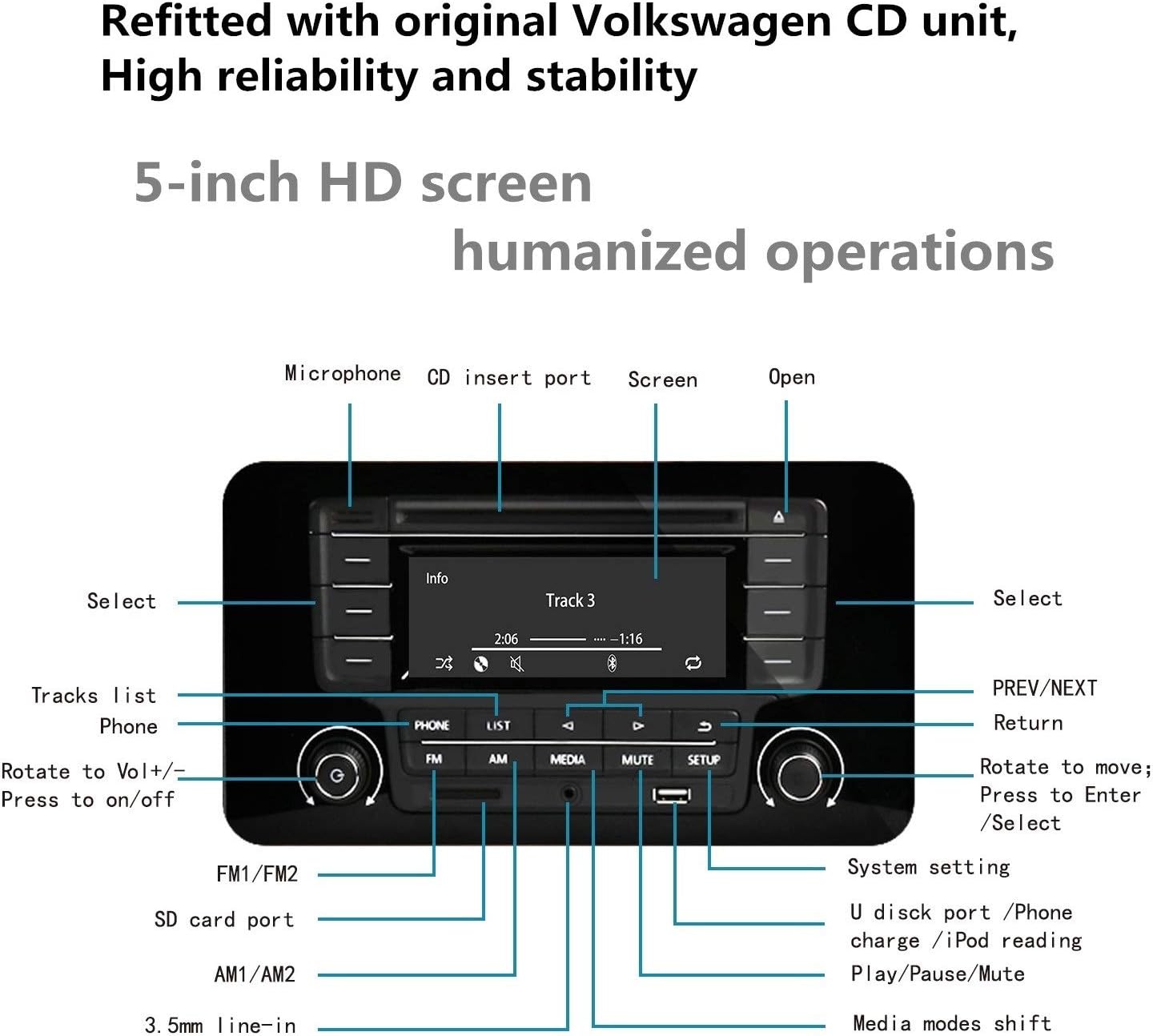
Detailed view of the 5-inch HD screen and control layout on the front panel.
Mode Selection
Press the 'MODE' button on the remote or the corresponding button on the front panel to switch between CD, Bluetooth, FM Radio, USB, SD, and AUX modes.
CD Playback
- Insert a CD into the slot-in CD drive on the front panel. The system will automatically switch to CD mode and begin playback.
- Use the 'PREV/NEXT' buttons to skip tracks.
- Press 'Play/Pause' to pause or resume playback.
- The system may automatically replay a CD. Adjust settings if continuous playback is not desired.

The system supports various audio CDs for slot-in reading.
Bluetooth Connectivity
- Switch the system to Bluetooth mode. The display will indicate it is ready for pairing.
- On your mobile device, enable Bluetooth and search for 'KEiiD' or similar. Select it to pair.
- Once connected, you can stream audio wirelessly from your device.
- The built-in microphone allows for hands-free calls when connected to a smartphone.

Wireless streaming from a phone via Bluetooth, with hands-free call capability.
FM Radio
- Switch to FM Radio mode.
- Use the 'Seek' function to automatically search for available stations.
- Save your favorite stations to preset memory for quick access.
- Note: This device supports FM radio (87.5-108 MHz). AM radio functionality is not available.

Full-band FM radio is supported.
USB and SD Card Playback
- Insert a USB flash drive into the USB port or an SD card into the SD card slot on the front panel.
- The system will automatically detect the media and begin playing supported audio files (e.g., WAV, MP3).
- You can navigate through folders and files using the controls.

Supports USB and SD card playback, including USB charging supply.
AUX Input
- Connect an external audio source (e.g., smartphone, tablet, TV) to the 3.5mm AUX IN jack on the front or the RCA jacks on the rear using an appropriate audio cable.
- Switch the system to AUX mode. Audio from the connected device will now play through the KEiiD system.

The system can be connected to a TV via its audio cord and shifted into AUX mode to function as a HiFi 2.0 TV soundbar.
Remote Control
The included remote control provides convenient access to all primary functions from a distance.

Remote control layout with buttons for power, Siri/Voice activate, volume, track navigation, play/pause/mute, answer/hang up calls, and button light.
- Power On/Off: Press the power button to turn the unit on or off.
- MODE: Cycles through input sources (CD, Bluetooth, FM, USB, SD, AUX).
- Volume +/-: Adjusts the master volume level.
- PREV/NEXT: Skips tracks or tunes radio stations.
- Play/Pause/Mute: Controls playback and mutes audio.
- Answer/Hang up: Manages phone calls when connected via Bluetooth.
- Siri/Voice Activate: Activates voice assistant on connected devices.
Maintenance
- Cleaning: Use a soft, dry cloth to clean the exterior of the unit. Do not use liquid cleaners or abrasive chemicals.
- CD Lens Care: Avoid touching the CD lens. If cleaning is necessary, use a specialized CD lens cleaner disc.
- Ventilation: Ensure that the ventilation openings are not blocked to prevent overheating.
- Storage: When not in use for extended periods, unplug the unit and store it in a cool, dry place.
Troubleshooting
| Problem | Possible Cause | Solution |
|---|---|---|
| No power | Power cord not connected; Unit not turned on. | Ensure power cord is securely plugged in. Press the power knob or remote power button. |
| No sound | Volume too low; Incorrect input mode; Cables not connected properly. | Increase volume. Select correct input mode. Check all audio cable connections. |
| CD not playing | CD inserted incorrectly; CD is dirty or scratched; Unit in wrong mode. | Re-insert CD correctly. Clean or replace CD. Ensure unit is in CD mode. |
| Bluetooth pairing failure | Device too far; Bluetooth not enabled on source; Unit not in pairing mode. | Move device closer. Enable Bluetooth on source device. Ensure unit is in Bluetooth pairing mode. |
| Poor FM reception | Antenna not extended; Weak signal. | Fully extend the FM antenna. Try repositioning the unit or antenna. |
| Remote control not working | Batteries drained; Obstruction between remote and unit. | Replace remote batteries. Remove any obstructions. Ensure remote is pointed at the unit's sensor. |
Specifications
| Feature | Detail |
|---|---|
| Model Number | KD-V01 |
| Product Dimensions (L x W x H) | 26 x 8.6 x 6.3 inches (66 x 21.8 x 16 cm) |
| Item Weight | 19.21 pounds (8.71 kg) |
| Connectivity Technology | Bluetooth, Auxiliary, USB |
| Speaker Type | Stereo (2x 4-inch bass speaker + 2x 1.3-inch dome silk tweeter) |
| FM Radio Frequency | 87.5-108 MHz |
| Power Source | AC Power |
| Remote Control Battery | 1 Lithium Metal battery (required) |
| Color | Black finish |
Physical dimensions and weight of the KEiiD CD Player.
Additional Information
Product Video
Official product video showcasing the KEiiD CD player's features and design.
Ask a question about this manual
Ask about setup, troubleshooting, compatibility, parts, safety, or missing instructions. Manuals+ will review the question and use this page’s manual context to help answer it.